
Dolibarr est l'ERP open-source optimal pour les micro-entreprises (moins de 20 utilisateurs) nécessitant une facturation légère et un CRM sans mise en œuvre complexe.
For businesses ready to move beyond Dolibarr's limitations, working with an experienced Odoo implementation partner for growing businesses ensures the transition is smooth and the platform is configured to scale.
Chez Cudio, nous aidons souvent les entreprises à évaluer cette décision précise. Dans ce guide, nous décomposons les principales différences entre Dolibarr et Odoo, afin que vous puissiez diagnostiquer quelle plateforme ERP s'aligne le mieux avec vos opérations actuelles et la direction que prend votre entreprise.
Ce guide technique évalue les capacités opérationnelles des deux plateformes pour vous aider à déterminer le bon chemin de migration :
- Quelles sont les différences architecturales entre Dolibarr et Odoo ?
- Comment leurs modules de CRM, de comptabilité et d'inventaire se comparent-ils ?
- Quel est le véritable Coût Total de Possession (CTP) incluant l'implémentation ?
- Quels risques de sécurité et de conformité s'appliquent aux environnements auto-hébergés par rapport aux environnements cloud ?
Obtenez mon évaluation ERP gratuite aujourd'hui
Principaux enseignements
- Dolibarr contre Odoo se résume à l'échelle et à la complexité. Dolibarr fonctionne mieux pour de très petites équipes de 20 utilisateurs ou moins qui ont besoin d'un logiciel ERP léger pour la facturation de base, la gestion de la relation client et la gestion de projets simples. En revanche, Odoo est conçu comme un système complet de planification des ressources d'entreprise (ERP) pour les entreprises de taille moyenne qui ont besoin d'une gestion intégrée des stocks, des ventes et des opérations.
- Dans le paysage de Dolibarr contre Odoo, l'adoption du marché diffère également. En 2025-2026, Odoo soutient plus de 13 millions d'utilisateurs dans le monde, génère environ 650 millions d'euros de revenus et alimente plus de 100 000 magasins en ligne grâce à des outils tels que l'intégration de la passerelle de paiement Odoo et des applications de commerce électronique. Dolibarr reste entièrement open source sous GPL v3, offrant une option de logiciel de gestion d'entreprise léger avec une communauté active et des modules de marché.
- La véritable décision entre Dolibarr et Odoo concerne le stade de croissance. Une petite société de conseil utilisant des solutions de gestion d'entreprise de base a des besoins très différents de ceux d'un grossiste gérant l'inventaire, la chaîne d'approvisionnement et plusieurs équipes au sein d'un système ERP centralisé.
- De nombreuses entreprises évaluant Dolibarr par rapport à Odoo découvrent que le changement se produit lorsque les opérations s'étendent. Si les tableurs se multiplient, que les équipes dupliquent des données à travers les systèmes, ou que le système ERP existant ne peut pas prendre en charge une gestion des ventes structurée, une gestion de projet intégrée, ou une automatisation telle que la facturation récurrente ou la gestion des locations, l'entreprise a généralement dépassé Dolibarr et devrait évaluer Odoo Enterprise comme une plateforme plus évolutive.
Réponse rapide : Devriez-vous choisir Dolibarr ou Odoo ?
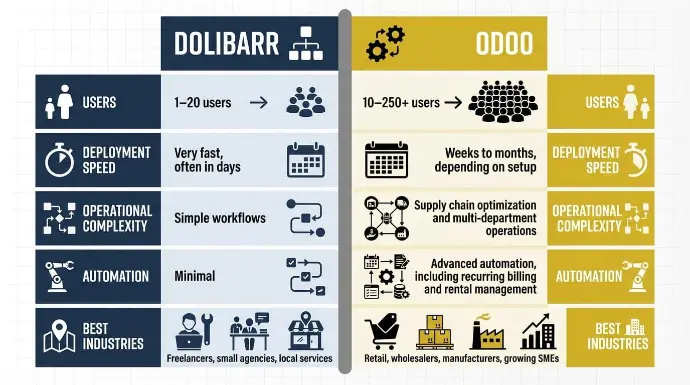
Si vous voulez la réponse rapide concernant la décision entre Dolibarr et Odoo, cela dépend principalement de la taille de l'entreprise et de la complexité opérationnelle.
Dolibarr est conçu pour de très petites équipes qui ont besoin d'un système simple pour la facturation, la comptabilité de base et un module CRM léger. Il fonctionne bien pour les travailleurs autonomes ou les petites équipes gérant des dépenses de gestion de trésorerie, des contacts simples et des opérations de base sans avoir besoin d'un grand système ERP centralisé.
Odoo, d'autre part, est conçu pour les entreprises de taille moyenne qui ont besoin d'une plateforme plus connectée. Il regroupe la gestion des ventes, Odoo, la comptabilité, la gestion de la paie, l'inventaire et les opérations en un seul système ERP centralisé qui évolue à mesure que l'entreprise grandit et commence à gérer des flux de travail plus complexes, tels que la gestion de la chaîne d'approvisionnement.wholesale distribution ERP expenses
Voici la comparaison en un coup d'œil :
Dimension | Dolibarr | Odoo |
Plage de revenus | Travailleurs autonomes à petites équipes | Petites et moyennes entreprises |
Utilisateurs | 1–20 utilisateurs | 10–250+ utilisateurs |
Vitesse de déploiement | Très rapidement, souvent en quelques jours | Semaines à mois, selon la configuration |
Complexité opérationnelle | Flux de travail simples | Soutient l'optimisation de la chaîne d'approvisionnement et les opérations inter-départements |
Fonctionnalités principales | Facturation, module CRM de base, inventaire simple | GRC, comptabilité, gestion de la paie, gestion de la chaîne d'approvisionnement, automatisation |
Automatisation | Minimal | Automatisation avancée, y compris la facturation récurrente et la gestion des locations |
Meilleures Industries | Travailleurs autonomes, petites agences, services locaux | Vente au détail, grossistes, fabricants, PME en croissance |
Force clé | Coût très bas et simplicité | Plateforme intégrée avec une gestion des ventes solide, Odoo et des outils d'opérations |
Dolibarr vs Odoo : Différences fondamentales entre les plateformes
Lorsque les entreprises comparent Dolibarr à Odoo, la plus grande différence ne réside pas seulement dans les fonctionnalités. C'est la philosophie derrière la façon dont chaque plateforme est conçue pour soutenir une entreprise.
Dolibarr se concentre sur la simplicité et l'accessibilité. Il offre aux petites organisations un ERP léger qui gère les tâches essentielles avec une complexité minimale. Odoo adopte l'approche opposée. Il est conçu comme une plateforme flexible qui permet aux entreprises d'ajouter des modules et d'automatiser des processus à mesure que leurs opérations se développent.
Comprendre cette différence aide à expliquer pourquoi les deux systèmes servent souvent des étapes très différentes du développement des affaires.
Dolibarr : ERP Open-Source Simple pour Petites Entreprises
Dolibarr est construit autour d'un modèle entièrement open-source sous la licence GPL, ce qui signifie que les entreprises peuvent télécharger, modifier et exécuter le logiciel sans payer de frais de licence.
La plateforme utilise une architecture légère, ce qui la rend facile à installer et à exécuter même sur des environnements d'hébergement modestes. De nombreuses entreprises peuvent la déployer rapidement sans avoir besoin d'une équipe informatique dédiée.
Dolibarr offre un ensemble de modules simples couvrant les essentiels : CRM, facturation, gestion des produits, projets et comptabilité de base. Les entreprises n'activent que les modules dont elles ont besoin, ce qui rend le système facile à naviguer.
En raison de cette structure, Dolibarr reste peu coûteux et facile à déployer. Pour les travailleurs autonomes, les petites entreprises de services ou les associations avec des opérations simples, il fournit souvent tout ce dont on a besoin sans introduire de complexité inutile.
Odoo : ERP modulaire conçu pour les entreprises en croissance
Odoo adopte une approche très différente. Au lieu de se concentrer sur le minimalisme, il est conçu comme un écosystème modulaire d'applications commerciales qui peut s'étendre à mesure qu'une entreprise se développe.
La plateforme se décline en deux éditions principales :
- Odoo Communauté : Une version open-source gratuite avec des fonctionnalités ERP de base
- Odoo Enterprise : Une version commerciale avec des modules avancés, du support et des outils d'automatisation supplémentaires
Odoo comprend une large gamme d'applications intégrées couvrant la gestion de la relation client (CRM), la comptabilité, l'inventaire, la fabrication, le commerce électronique, les ressources humaines, la gestion de projet et le marketing. Ces applications partagent une seule base de données, permettant à l'information de circuler entre les départements.
Cette structure permet aux entreprises de commencer avec quelques modules et d'en ajouter progressivement d'autres à mesure que les opérations deviennent plus complexes. En conséquence, Odoo est souvent choisi par les entreprises qui ont besoin d'évolutivité, d'automatisation et d'une intégration opérationnelle plus approfondie à mesure qu'elles se développent.
Dolibarr vs Odoo Caractéristiques : Comparaison des capacités opérationnelles
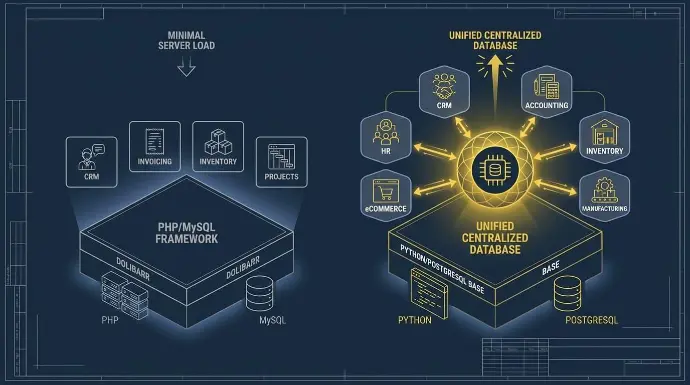
La différence fondamentale entre Dolibarr et Odoo réside dans leur architecture de base de données et leur philosophie de déploiement.
Dolibarr utilise un cadre PHP/MySQL simplifié et peu gourmand en ressources, conçu pour exécuter des fonctions de base (CRM, facturation) dès le départ avec une charge serveur minimale. En revanche, Odoo utilise une pile Python/PostgreSQL construite autour d'une architecture modulaire, où les applications fonctionnent de manière indépendante mais partagent une base de données centralisée et unifiée.
Cela permet à Odoo de synchroniser nativement des données complexes—comme lier un achat sur un site web frontal directement à un routage de fabrication en arrière-plan—ce que Dolibarr ne peut pas accomplir sans développement d'API personnalisé.
Gestion de la relation client et des ventes
Dolibarr comprend un module CRM de base conçu pour de petites équipes gérant des pipelines de vente simples. Les utilisateurs peuvent suivre les pistes, les contacts, les opportunités et les suivis à travers le CRM, qui est conçu pour maintenir les relations avec les clients sur la bonne voie sans complexité.
Il fonctionne bien pour les entreprises qui gèrent les affaires manuellement ou qui ont un petit nombre de prospects actifs.
Cependant, le système manque d'outils de vente plus avancés.
Il n'y a pas de pipeline Kanban visuel natif, l'automatisation du marketing est limitée et il y a moins d'intégrations pour les outils de prospection commerciale.
CRM d'Odoo est significativement plus structuré. Chaque opportunité est présentée sous forme de carte avec toutes les informations essentielles, et chaque étape donne un aperçu des revenus attendus.
La vue Kanban organise les opportunités par étape, et vous pouvez planifier des appels, des réunions, des envois de courriels ou des devis pendant qu'Odoo planifie automatiquement la prochaine activité en fonction de votre script de vente.
Il comprend :
- Pipelines de vente Kanban visuels
- Attribution et évaluation automatisées des prospects
- Campagnes intégrées par courriel et SMS
- Journalisation des appels et suivi des activités
- Applications mobiles pour les équipes de vente
Documentation sur le scoring prédictif des prospects d'Odoodécrit comment le système utilise un modèle d'apprentissage automatique basé sur des données CRM historiques pour calculer automatiquement la probabilité de gain de chaque opportunité.
Parce qu'Odoo se connecte directement avec l'inventaire, la comptabilité et le commerce électronique, il peut gérer l'ensemble du cycle de vente, de la génération de prospects à la facturation. Pour les entreprises ayant des équipes de vente structurées ou des campagnes de marketing, Odoo offre des capacités beaucoup plus solides.
Comptabilité et gestion financière
Dolibarr couvre les flux financiers de base la plupart des petites entreprises ont besoin. Cela inclut :
- Facturation des clients
- Factures de fournisseurs
- Suivi de la TPS
- Entrées de journal de base
- Rapprochement bancaire
Pour une petite entreprise opérant dans un pays avec une comptabilité simple, ces outils sont généralement suffisants.
Les capacités comptables d'Odoo aller beaucoup plus loin, surtout dans l'édition Entreprise. Plusieurs entreprises peuvent être gérées au sein de la même base de données, chacune avec son propre plan comptable, tandis que les comptes peuvent être partagés pour les rapports de consolidation. Les utilisateurs peuvent consulter des enregistrements et des rapports de plusieurs entreprises simultanément.
De la même source, Odoo enregistre chaque transaction à la fois dans la devise par défaut de l'entreprise et dans la devise de la transaction, avec des gains et des pertes de change générés automatiquement après la réconciliation des éléments de journal.
La plateforme comprend :
- Grand livre complet
- Comptes fournisseurs et comptes clients
- Réconciliation automatisée des factures
- Comptabilité multi-entreprises et multi-devises
- Rapport financier consolidé
- Intégration avec les abonnements, la paie et les dépenses
Parce que les données financières sont nativement liées aux ventes et à l'inventaire, Odoo élimine les écritures de journal manuelles. D'après nos données d'implémentation Cudio 2025 auprès de 40 clients de taille intermédiaire, la transition des systèmes décentralisés vers le moteur de comptabilité multi-entreprises d'Odoo Enterprise réduit les délais de clôture financière de fin de mois de 45 % en moyenne.
Inventaire et opérations
Dolibarr comprend des outils de gestion d'inventaire de base adapté aux environnements de stock simples. Les entreprises peuvent gérer :
- Catalogues de produits
- Niveaux de stock
- Emplacements des entrepôts
- Commandes d'achat
- Mouvements de stock simples
Cette configuration fonctionne bien pour les petites opérations avec un entrepôt ou une complexité d'inventaire limitée.
Le module d'inventaire d'Odoo est conçu pour des environnements opérationnels plus avancés. Les produits peuvent être suivis par lots et numéros de série avec une traçabilité complète de bout en bout à chaque étape de la chaîne d'approvisionnement, visible directement depuis le tableau de bord des stocks.
Numérisation de codes-barres est pris en charge nativement : les transferts peuvent être créés et traités en temps réel à l'aide d'un scanner de codes-barres compatible avec Odoo ou de l'application mobile Odoo, avec la numérisation des lots et des numéros de série gérée automatiquement lors des opérations de réception et de livraison.
Il comprend :
- Routage multi-entrepôts : Configurez des règles complexes de poussée/tirage pour automatiser les transferts de stock entre plusieurs emplacements physiques et bacs virtuels.
- Règles d'approvisionnement automatisées : Établir des seuils de stock minimum qui génèrent automatiquement des bons de commande (BC) auprès des fournisseurs ou des ordres de fabrication internes (OF) sans intervention manuelle.
- Intégration de codes-barres natifs : Utilisez l'application mobile d'Odoo pour traiter les reçus, la préparation de commandes et les opérations d'emballage via la numérisation en temps réel des codes-barres et des codes QR.
- Traçabilité de bout en bout : Suivez les cycles de vie des produits jusqu'à l'unité individuelle en utilisant l'enregistrement obligatoire des numéros de lot et de série pour un contrôle de qualité strict.
Odoo s'intègre également aux modules de fabrication et de chaîne d'approvisionnement, permettant aux entreprises de gérer la planification de la production, les nomenclatures et la logistique d'entrepôt au sein du même système. Pour les entreprises de distribution ou les fabricants, ces capacités font une grande différence.
Gestion des ressources humaines et des employés
Dolibarr offre un ensemble d'outils RH limité axé sur l'administration de base des employés. Les entreprises peuvent suivre :
- Dossiers des employés
- Demandes de congé
- Demandes de remboursement
- Feuilles de temps de base
Pour des très petites équipes, cela peut être suffisant.
Odoo Enterprise offre un système de ressources humaines beaucoup plus large. La gestion des employés Odoo simplifie des processus clés tels que l'intégration, le suivi des performances, la paie, la gestion des congés et la présence, permettant d'économiser du temps et des ressources tout en améliorant la précision.
De la même source, le profil de chaque employé peut être enrichi de compétences personnalisées et mesurables qui sont mises à jour au fil du temps pour suivre le développement. Les plans d'intégration et de désengagement déclenchent une séquence d'activités prédéfinie à travers les applications pour assurer une transition en douceur.
Les modules clés comprennent :
- Recrutement et suivi des candidats
- Flux de travail d'intégration des employés
- Évaluations de performance
- Paie (disponible dans les régions prises en charge)
- Suivi de la présence et du temps
- Gestion des compétences et du développement des employés
Parce que les modules RH se connectent à la comptabilité et aux projets, les dépenses de paie et les coûts de main-d'œuvre s'intègrent directement dans les rapports financiers. Ce niveau d'intégration devient important à mesure que les entreprises augmentent leur effectif.
Commerce électronique et portails clients
Dolibarr n'inclut pas de plateforme de commerce électronique native. Les entreprises le connectent généralement à des systèmes externes tels que WooCommerce, PrestaShop ou Magento à l'aide de connecteurs. Cette approche fonctionne, mais elle nécessite des intégrations supplémentaires pour synchroniser les produits, les commandes et l'inventaire.
Odoo comprend des applications de site web et de commerce électronique intégrées. Les entreprises peuvent créer une boutique en ligne avec des pages de produits attrayantes et gérer tout, du marketing aux opérations, sur une seule plateforme unifiée, avec un stock pour chaque variante de produit mis à jour en temps réel. Les entreprises peuvent :
- Créez des sites Web à l'aide d'un éditeur par glisser-déposer
- Gérer les catalogues de produits
- Traiter les commandes en ligne
- Intégrer des passerelles de paiement
- Fournir des portails clients pour le suivi des commandes
Gestion des commandes de commerce électronique d'Odoo se connecte directement aux opérations de back-office. La facturation peut être automatisée de sorte qu'une fois qu'un paiement en ligne est confirmé, la facture est générée et un courriel automatique est envoyé au client lorsque le statut de transfert dans Odoo est marqué comme terminé. Parce que ces fonctionnalités se connectent directement à l'inventaire, à la comptabilité et au CRM, Odoo soutient le commerce omnicanal plus facilement. Pour les entreprises vendant en ligne sur plusieurs canaux, cette intégration réduit considérablement la complexité opérationnelle.
Automatisation, Analyse et Rapport
Dolibarr repose principalement sur des flux de travail manuels et des déclencheurs simples. Des fonctionnalités de rapport existent, mais de nombreux tableaux de bord avancés nécessitent des modules tiers ou un développement personnalisé.
Odoo met l'accent sur l'automatisation de plusieurs processus d'affaires. Odoo's automation rules peut être configuré pour s'exécuter sur des déclencheurs à travers l'ensemble de la plateforme.
Lorsqu'un déclencheur se produit, comme une mise à jour du statut de paiement sur une facture client publiée, la règle d'automatisation vérifie les conditions définies et exécute automatiquement l'action configurée, que ce soit la mise à jour d'un enregistrement, l'envoi d'un courriel ou la création d'une activité de suivi.
Réapprovisionnement des stocks fonctionne de la même manière : lorsque qu'un produit tombe en dessous d'une quantité spécifiée, Odoo génère automatiquement un bon de commande ou un ordre de fabrication en utilisant l'itinéraire configuré, maintenant les niveaux de stock prévus dans les seuils définis.
Les exemples incluent :
- Création de factures automatisée à partir des commandes de vente
- Réapprovisionnement des stocks basé sur les prévisions de demande
- Campagnes de marketing automatisées déclenchées par l'activité CRM
- Génération de tâches à partir des interactions avec les clients
Odoo propose également des tableaux de bord intégrés qui combinent des données provenant de différents départements. Les dirigeants peuvent surveiller les ventes, les finances et les opérations à partir d'une seule interface. Pour les organisations qui souhaitent une visibilité en temps réel sur les opérations, ce niveau d'analyse et d'automatisation peut améliorer considérablement la prise de décision.
Tarification et Coût Total de Possession
Le prix des ERP est l'un des aspects les plus mal compris de la décision d'achat. Les frais de licence ne sont généralement que le point de départ.
Une fois que vous tenez compte de l'hébergement, de la mise en œuvre, de la formation, de la personnalisation et de la maintenance continue, le chiffre réel semble tout à fait différent.
C'est vrai pour Dolibarr et Odoo, mais de manières très différentes.
Modèle de tarification de Dolibarr
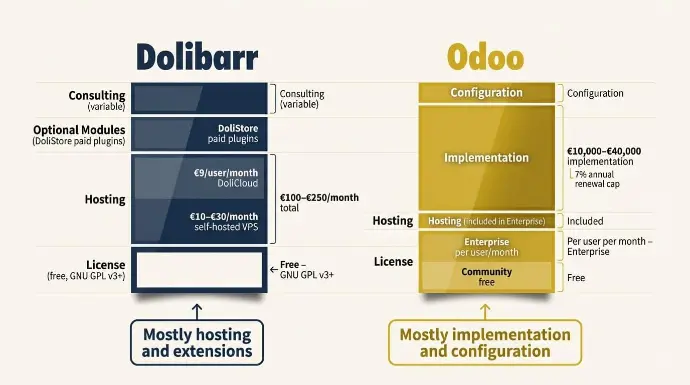
Dolibarr est gratuit. Pas gratuit avec des limites, pas un essai gratuit. Le logiciel est distribué sous le GNU GPL v3+ license, ce qui signifie qu'il peut être utilisé sans limites sur les machines, les utilisateurs, le temps ou les fonctionnalités ; le code source est ouvert et peut être distribué et modifié librement.
Alors, où va l'argent? À quelques endroits :
Hébergement.
Vous avez besoin d'un endroit pour l'exécuter. L'auto-hébergement sur un VPS de base coûte environ 10 € à 30 € par mois. Si vous souhaitez un hébergement géré sans la charge technique, DoliCloud est l'option la plus couramment utilisée, à partir de 9 € par utilisateur par mois et incluant l'installation standard de Dolibarr, des modules externes et un accès complet à la base de données et aux fichiers. Les plans gérés par des tiers varient généralement de 14 € à 30 € par utilisateur par mois, selon le stockage et le support.
Modules optionnels.
Le logiciel de base couvre beaucoup de choses, mais vous voudrez peut-être l'étendre. Le Marché DoliStore c'est là que vous trouvez ces extensions. Dolibarr fournit des modules d'affaires et techniques par défaut dans sa distribution standard, mais de nombreuses améliorations et personnalisations peuvent être réalisées en ajoutant des modules externes tiers, gratuits et payants. Certains plugins sont gratuits, d'autres nécessitent un paiement, et les membres de la fondation Dolibarr bénéficient d'une réduction de 20 % sur les modules payants.
Consultation et mise en œuvre.
Si vous le configurez vous-même avec des modules de base, vos coûts restent très bas. Si vous avez besoin d'aide, Dolibarr dispose d'un réseau mondial de partenaires qui offrent des services de configuration, de personnalisation et de formation, facturés à leurs propres tarifs. Il n'y a pas de tarification standard ici. Cela dépend entièrement de l'envergure et de la personne avec qui vous travaillez.
Le total honnête pour une petite entreprise utilisant Dolibarr sur un hébergement géré avec quelques modules complémentaires payants se situe généralement entre 100 € et 250 € par mois. Si vous vous auto-hébergez et effectuez la plupart de la configuration vous-même, cela peut être considérablement moins. C'est un chiffre difficile à battre.
Modèle de tarification Odoo
Odoo est un peu plus complexe, et il vaut la peine de comprendre la structure avant de s'approcher d'un devis.
La version communautaire est gratuite. Vous pouvez le télécharger, l'héberger vous-même et l'exécuter avec un nombre illimité d'utilisateurs sans frais de licence. Le hic, c'est qu'il n'y a pas de support officiel, les mises à jour nécessitent des ressources techniques, et certaines des fonctionnalités les plus puissantes, y compris Odoo Studio, la comptabilité complète et la paie, ne sont disponibles que dans l'Enterprise.
Enterprise est l'endroit où vous payez. Le plan Standard vous offre une base de données hébergée sur Odoo en ligne et un accès à toutes les applications Odoo. Le les prix sont les mêmes que vous installiez trois applications ou soixante-dix : un prix unique par utilisateur par mois.
Tous les plans incluent l'hébergement, des sauvegardes quotidiennes incrémentielles sur deux continents, l'intégration des courriels, la sécurité, une surveillance 24/7, un support par courriel illimité du lundi au vendredi, l'accès à la plateforme d'apprentissage en ligne et des mises à jour de version sans frais supplémentaires.
Le plan personnalisé est destiné aux entreprises qui ont besoin de gérer plusieurs sociétés sur une seule base de données ou qui souhaitent personnaliser via Odoo Studio, le développement personnalisé ou l'intégration API. Quelques éléments à savoir avant de signer :
- Les frais d'abonnement d'entreprise sont basés sur le nombre d'utilisateurs et le plan d'abonnement choisi. Si le nombre d'utilisateurs dépasse ce qui a été convenu au moment de la signature du contrat, des frais supplémentaires s'appliquent au prix courant pour le reste de la période.
- Les augmentations de prix de renouvellement sont plafonnées à 7 % par an, basé sur les frais du terme précédent.
Mise en œuvre.
C'est ici que se situe le véritable coût d'Odoo pour la plupart des entreprises. Pour les petites entreprises comptant moins de 50 employés Odoo offre des Success Packs, des forfaits de consultant structurés couvrant la configuration, l'importation de données et la formation.
Avant la mise en œuvre, un consultant analyse le fonctionnement de votre entreprise et suggère la meilleure façon d'utiliser Odoo, en s'occupant de toute la configuration et en formant les utilisateurs clés lors de séances planifiées par téléphone ou en ligne. Pour les entreprises de taille intermédiaire comptant plus de 50 employés, Odoo vous dirige vers un partenaire certifié qui gère l'ensemble du projet.
Les coûts de mise en œuvre varient considérablement selon l'envergure, mais une fourchette réaliste pour une entreprise en croissance déployant de 5 à 10 modules avec migration de données et formation est d'environ 10 000 € à 40 000 €. Les projets plus simples avec les services de consultants internes d'Odoo peuvent coûter moins cher. Les projets complexes multi-entreprises ou fortement personnalisés sont facturés à des tarifs plus élevés.
Chez Cudio, nous expliquons la différence aux clients de cette manière : le coût de Dolibarr est principalement ce que vous payez pour l'héberger et l'étendre. Le coût d'Odoo est principalement ce que vous payez pour l'implémenter et le configurer correctement. Les deux peuvent être raisonnables, mais seulement si vous entrez en sachant quels coûts s'appliquent réellement à votre situation.
Obtenez mon évaluation ERP gratuite aujourd'hui
Mise en œuvre, sécurité et risques ERP
Choisir la plateforme est la partie facile. Ce qui prend réellement les entreprises au dépourvu, c'est le temps qu'il faut pour se mettre en ligne, ce qui se passe lorsqu'une vulnérabilité de sécurité est découverte, et où se situent les véritables risques du projet. Voici ce que vous devez savoir sur les deux plateformes.
Chronologies typiques de mise en œuvre d'un ERP
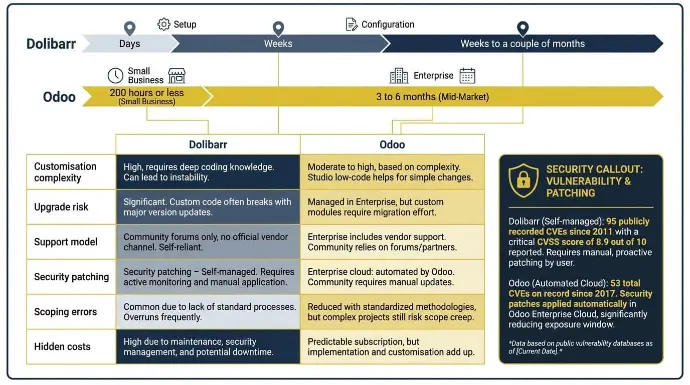
Dolibarr est rapide à déployer. Les images Docker et les installateurs en un clic facilitent le démarrage. Marché Dolibarr , et une petite entreprise avec des exigences claires peut être opérationnelle en quelques jours. Une configuration plus complète avec migration de données et quelques modules payants de DoliStore prend généralement quelques semaines à quelques mois Il n'y a pas de processus de partenaire obligatoire. La rapidité avec laquelle vous avancez dépend de vous.
Odoo prend plus de temps, et c'est attendu, compte tenu de ce qu'il fait.Pour les entreprises comptant moins de 50 employés,Odoo offre des mises en œuvre structurées de Success Pack, et 80 % de ces projets sont opérationnels en 200 heures ou moins. Pour les entreprises de taille intermédiaire travaillant avec un partenaire certifié, attendez-vous à un délai de 3 à 6 mois. Les déploiements complexes multi-entités ou les personnalisations lourdes prennent plus de temps.
Si la rapidité à obtenir de la valeur est la plus importante et que vos opérations sont simples, Dolibarr est le chemin le plus rapide. Si vous avez besoin d'une plateforme plus performante et que vous pouvez investir dans sa mise en place adéquate, le calendrier d'Odoo reflète cette profondeur.
Considérations en matière de sécurité et de conformité
Les deux plateformes sont open source, donc la sécurité est une responsabilité partagée entre le fournisseur, la communauté et vous. La différence réside dans la façon dont chacune d'elles gère cela.
Dolibarr a accumulé 95 CVE enregistrés publiquement depuis 2011. Rien qu'en 2025, 4 vulnérabilités ont été publiées avec une moyenne Score CVSS de 8,9 sur 10.
Les problèmes récents ont inclus des failles d'exécution de code à distance, des vulnérabilités XSS et des faiblesses de contrôle d'accès. Rien de tout cela ne rend Dolibarr particulièrement risqué; la plupart des plateformes open-source présentent un profil similaire. Mais la maintenance de la sécurité est entièrement autogérée. Il n'y a pas de fournisseur qui pousse des correctifs vers votre instance. Certains modules peuvent exposer une surface d'attaque supplémentaire, donc il est essentiel de garder l'installation à jour.
Odoo a 53 CVE au total enregistrés depuis 2017. Des exemples récents incluent deux vulnérabilités de contrôle d'accès de haute gravité divulguées en février 2025, affectant à la fois les éditions Communauté et Entreprise, évalué CVSS 8.1 et 7.5. La principale différence réside dans la façon dont Odoo répond. Dans le cadre du processus de divulgation responsable d'Odoo Une fois qu'une vulnérabilité est confirmée, les clients d'entreprise reçoivent un avis de sécurité privé 2 à 3 semaines avant la divulgation publique, leur donnant le temps d'appliquer le correctif.
Mieux encore, pour les bases de données hébergées sur la plateforme Cloud d'Odoo, les correctifs de sécurité sont appliqués automatiquement sans aucune action requise de la part du client.
Le point pratique : si vous êtes sur le cloud Odoo Enterprise, la sécurité est en grande partie gérée pour vous. Sur l'édition Community ou Dolibarr auto-hébergé, vous êtes responsable. Prenez cela en compte dans votre décision si vous traitez des données sensibles de clients ou financières.
Risques courants de mise en œuvre d'un ERP
Les deux plateformes ont de véritables modes de défaillance. Ce sont juste des modes différents.
Risque | Dolibarr | Odoo |
Complexité de la personnalisation | Faible pour une utilisation standard, augmente rapidement avec des changements au niveau de PHP | Modéré à élevé avec empilement de modules lourds ou code personnalisé |
Risque de mise à niveau | Les installations standard se mettent à jour proprement, mais les modifications personnalisées du noyau ou les modules externes incompatibles peuvent causer des problèmes. | Géré via le service de mise à niveau officiel sur Enterprise; significatif sur Community avec une personnalisation importante |
Modèle de soutien | Forums communautaires seulement, pas de canal officiel de fournisseur | Entreprise : support officiel du lundi au vendredi, 24/5 ; Communauté : basé sur un forum |
Correction de sécurité | Autogéré | Cloud d'entreprise : automatisé par Odoo ; auto-hébergé : manuel |
Erreurs de portée | Risque faible compte tenu de la portée limitée | Modéré à élevé dans des projets complexes de marché intermédiaire |
Coûts cachés | Frais de développeur PHP si une personnalisation est nécessaire | Licences d'entreprise par utilisateur plus frais de partenaire d'implémentation |
Un thème se dégage des deux plateformes et de chaque projet ERP que nous avons observé : les plus grands risques ne se trouvent pas dans le logiciel. Ce sont des exigences floues, une mauvaise sélection de partenaires et un travail de migration de données sous-estimé. Ceux-ci causent plus d'échecs que tout ce que la plateforme elle-même peut faire.
Lorsque les entreprises dépassent Dolibarr
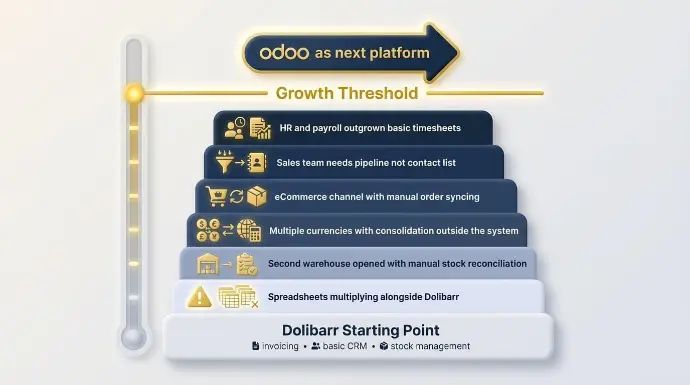
Dolibarr fonctionne jusqu'à ce qu'il ne fonctionne plus. Le point de transition est généralement progressif, et la plupart des entreprises manquent les signaux jusqu'à ce qu'elles soient déjà profondément dans le territoire des solutions de contournement.
Le signe le plus clair est la multiplication des tableurs. Lorsque votre équipe commence à maintenir des données dans Excel en parallèle avec Dolibarr parce que la plateforme ne peut pas relier les points entre les départements, ce n'est pas un problème de configuration de Dolibarr. C'est un plafond de plateforme.
Autres signaux à surveiller :
- Vous avez ouvert un deuxième entrepôt, et la réconciliation des stocks est maintenant une tâche manuelle quotidienne.
- Vous effectuez des transactions dans plusieurs devises, et la consolidation financière se fait en dehors du système
- Vous avez lancé un canal de commerce électronique, et quelqu'un synchronise manuellement les commandes avec l'inventaire
- Votre équipe de vente a besoin d'un pipeline, pas seulement d'une liste de contacts
- Les ressources humaines et la paie ont dépassé les feuilles de temps et le suivi des congés de base
Le seuil de complexité opérationnelle n'est pas une question de taille d'entreprise. Il s'agit de la profondeur des processus. Une entreprise de produits de 15 personnes peut dépasser Dolibarr plus rapidement qu'une entreprise de services de 40 personnes, selon ce qu'elle fait.
Voici un scénario que nous voyons régulièrement chez Cudio. Une entreprise de produits en croissance commence dans Dolibarr, gérant la facturation, le CRM de base et la gestion des stocks. Au bout de deux ans, elle a ajouté un deuxième entrepôt, lancé une boutique Shopify et commencé à assembler des kits dans un processus de fabrication léger.
Obtenez mon évaluation ERP gratuite aujourd'hui
Dolibarr peut techniquement toucher à chacune de ces choses, mais il ne peut pas les connecter. L'équipe réconcilie les stocks avec Shopify manuellement, produit des sélections de fabrication par feuille de calcul et exporte des fichiers comptables séparés. C'est à ce moment-là qu'Odoo devient la bonne conversation, non pas parce que Dolibarr a échoué, mais parce que l'entreprise a dépassé ses capacités.
Liste de vérification des décisions : Quel ERP convient à votre entreprise ?
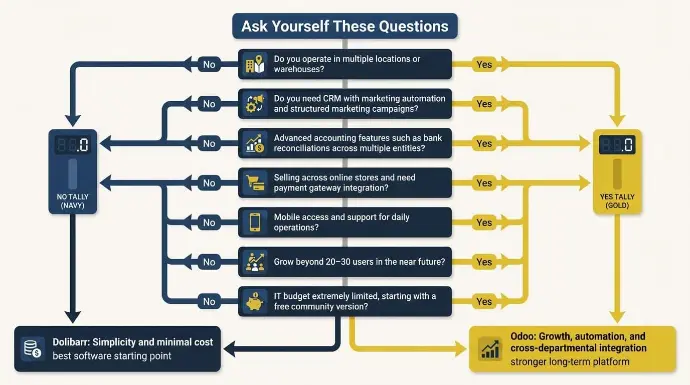
Si vous évaluez encore Dolibarr par rapport à Odoo, répondre à quelques questions pratiques peut aider à identifier la solution ERP idéale pour votre organisation.
Demandez-vous :
- Opérez-vous dans plusieurs emplacements ou entrepôts ?
- Avez-vous besoin d'un CRM avec automatisation du marketing et campagnes marketing structurées ?
- Votre entreprise a-t-elle besoin de fonctionnalités comptables avancées telles que des rapprochements bancaires entre plusieurs entités ?
- Vendez-vous sur des magasins en ligne et avez-vous besoin d'intégration de passerelle de paiement et de connexions de plateforme avec des plateformes de commerce électronique ?
- Votre équipe aura-t-elle besoin d'un accès mobile et de soutien pour les opérations quotidiennes ?
- Vous attendez-vous à ce que votre organisation croisse au-delà de 20 à 30 utilisateurs dans un avenir proche ?
- Votre budget informatique est-il extrêmement limité et axé sur les petites entreprises, en commençant par une version communautaire gratuite ?
Si la plupart des réponses pointent vers la simplicité et un coût minimal, Dolibarr pourrait être le meilleur point de départ en matière de logiciel.
Si de nombreuses réponses pointent vers la croissance, l'automatisation et l'intégration inter-départementale, les comparaisons entre Odoo et Dolibarr montrent généralement qu'Odoo devient la plateforme la plus solide à long terme.
Les entreprises qui évaluent Dolibarr par rapport à Odoo testent souvent les plateformes par le biais d'un essai gratuit ou d'une mise en œuvre pilote pour déterminer quel système soutient le mieux leurs opérations en évolution.
Conclusion : Choisir le bon ERP pour votre stade de croissance
La décision entre Dolibarr et Odoo dépend finalement de l'état actuel de votre entreprise et de sa direction future.
Dolibarr est un excellent choix pour les travailleurs autonomes, les petites entreprises de services et les micro-entreprises qui ont besoin d'un système simple pour la facturation, la gestion de la relation client (CRM) et les opérations de base sans un grand budget ni une configuration complexe.
Odoo, d'autre part, est conçu pour les entreprises en croissance qui ont besoin d'une plateforme ERP plus intégrée. À mesure que les opérations s'étendent aux ventes, à l'inventaire, à la comptabilité, au commerce électronique et à plusieurs emplacements, l'écosystème modulaire d'Odoo et ses capacités d'automatisation deviennent beaucoup plus précieux.
Chez Cudio, nous aidons les entreprises à évaluer les plateformes ERP, à concevoir des stratégies de mise en œuvre et à garantir que le système que vous choisissez soutient réellement vos opérations et vos plans de croissance. Que vous soyez en train de décider entre Dolibarr et Odoo ou de planifier une migration, avoir la bonne stratégie rend la transition beaucoup plus fluide.
Obtenez mon évaluation ERP gratuite aujourd'hui
FAQ
Voici des réponses rapides aux questions courantes que les entreprises posent lors de la comparaison entre Dolibarr ERP et Odoo.
Puis-je faire fonctionner Dolibarr et Odoo côte à côte pendant une migration ?
Oui, vous pouvez faire fonctionner à la fois Dolibarr et Odoo côte à côte pendant une migration. De nombreuses entreprises utilisent Dolibarr ERP pour la comptabilité et les comptes fournisseurs, tout en migrant progressivement leur CRM ou leurs opportunités de vente vers Odoo. Cette approche aide les équipes à tester les flux de travail et à transférer des données en toute sécurité entre d'autres systèmes. Une fois la transition stable, Dolibarr ERP est généralement conservé comme une archive en lecture seule.
Est-ce que Odoo Community est suffisant, ou ai-je vraiment besoin de Odoo Enterprise ?
La version gratuite d'Odoo Community peut convenir aux entreprises à la recherche d'outils de CRM, d'inventaire et de gestion de projets de base. Cependant, elle offre moins de fonctionnalités que l'Enterprise, notamment en comptabilité, en automatisation et en intégrations tierces. Odoo Enterprise ajoute des fonctionnalités riches, un accès à distance amélioré et des outils tels que la création de sites Web et des intégrations avec des plateformes de commerce électronique. De nombreuses entreprises commencent avec la version gratuite et passent à la version payante à mesure que leurs besoins augmentent.
Quelle est la difficulté de personnaliser Dolibarr par rapport à Odoo ?
Dolibarr ERP peut être personnalisé par le biais de modules, mais son écosystème est plus petit. Odoo est beaucoup plus personnalisable grâce à son architecture modulaire, ses API et ses intégrations avec d'autres applications tierces. Cette flexibilité aide les entreprises à gérer des flux de travail complexes et à connecter plusieurs systèmes. Pour des configurations simples, les deux outils fonctionnent, mais Odoo prend généralement en charge une gamme plus large de personnalisations.
Quel système fonctionne mieux pour 50 à 100 utilisateurs simultanés ?
Pour les environnements comptant de 50 à 100 utilisateurs, Odoo excelle car il est conçu pour s'adapter à des équipes plus importantes. Dolibarr ERP peut prendre en charge plusieurs utilisateurs, mais les performances peuvent dépendre davantage de la configuration du serveur et de l'infrastructure. Les entreprises qui ont besoin d'automatisation avancée, de rapports et de suivi des opportunités de vente constatent souvent qu'Odoo fonctionne de manière plus cohérente. Cela le rend plus courant pour les organisations en croissance et même certaines grandes entreprises.
Quel est le plan à long terme pour Dolibarr et Odoo ?
La feuille de route pour Dolibarr et Odoo reflète des objectifs différents. Dolibarr ERP évolue grâce à une communauté active axée sur la stabilité et une interface conviviale pour les petites organisations, telles que les travailleurs autonomes et les cabinets de comptables. Odoo continue d'élargir ses applications, son automatisation et ses intégrations avec les plateformes de commerce électronique et les outils d'affaires. Les entreprises à la recherche d'une innovation plus rapide et de fonctionnalités plus approfondies, comparées entre les systèmes, se tournent souvent vers Odoo.