
Si vous avez investi dans Odoo en espérant de la clarté et que vous avez rencontré des délais manqués, des flux de travail brisés et une équipe qui a cessé de faire confiance au système, vous n'êtes pas seul. Nous avons vu cela 35 fois.
Cudio a été créé par nécessité. Nos fondateurs ont développé leur propre entreprise omnicanale sur Odoo, ont rencontré tous les obstacles d'implémentation que nos clients nous décrivent maintenant, et ont reconnu que la plupart des partenaires Odoo n'avaient jamais réellement géré le type d'entreprise qu'ils étaient censés réparer. Ce parcours, combiné à plus de 30 ans d'expérience en TI, finance et leadership, est ce que nous apportons à chaque engagement de sauvetage.
Les implémentations d'Odoo échouées se rapportent presque toujours à trois choses : comment le projet a été défini, qui l'a dirigé et si l'entreprise était prête à changer son mode de fonctionnement. Ce sont des problèmes réparables. Cet article couvre ce que nous avons trouvé, comment nous avons diagnostiqué ce qui s'est cassé et à quoi ressemble une véritable récupération de l'intérieur.
Commencez votre évaluation gratuite de sauvetage Odoo
Principaux enseignements
- La plupart des échecs proviennent d'une mauvaise stratégie de déploiement, d'une gestion du changement inadéquate et de personnalisations non planifiées, et non du logiciel.
- Six signes d'avertissement distinguent un revers temporaire d'une défaillance structurelle
- Rester sur un système défectueux entraîne des coûts chaque mois : les erreurs de réconciliation, les correctifs d'urgence et l'érosion de l'intégrité des données s'accumulent avec le temps
- Le sauvetage et la réimplémentation sont tous deux des voies valides; le bon choix nécessite une analyse des causes profondes, pas de l'instinct
- Les délais de récupération sont déterminés par la santé de la base de données PostgreSQL, la qualité des données et la profondeur de la personnalisation
- Définir des critères de succès mesurables avant le début de la récupération est l'étape la plus négligée.
Ce que nous avons trouvé lors de 35 sauvetages
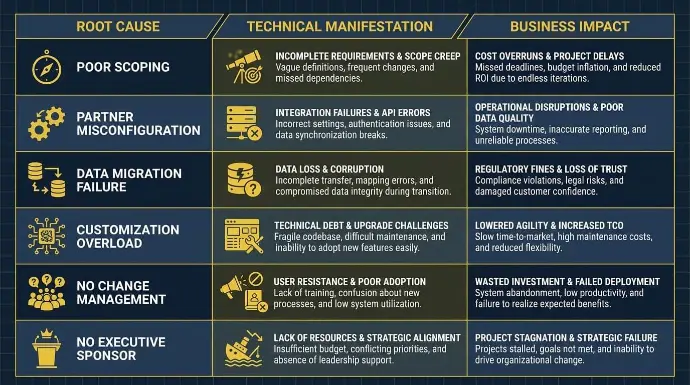
Nous avons complété 35 interventions de sauvetage Odoo dans des entreprises de fabrication, de distribution, de vente au détail, de santé et de logistique à travers l'Amérique du Nord. Chaque intervention était différente dans ses spécificités. La plupart partageaient les mêmes causes profondes.
Les causes sont attribuées à un ou plusieurs des domaines suivants.
Élargissement du périmètre et mauvaise planification
La plupart des projets Odoo échouent lors de la phase de planification, et l'échec de l'implémentation de l'ERP Odoo commence souvent par une mauvaise planification et des exigences floues bien avant qu'un seul module ne soit configuré. Les équipes se lancent dans le processus d'implémentation sans avoir pleinement cartographié les exigences commerciales, et une collecte d'exigences faible entraîne un désalignement avec les flux de travail réels. Des modules incorrects sont activés, des fonctionnalités sont manquées, et la configuration s'écarte de la façon dont l'entreprise fonctionne réellement.
Un projet Odoo bien structuré nécessite des phases clairement définies :
- Tests en bac à sable
- Revue des jalons
- Points de contrôle de validation des données
- Simulations de mise en service
Avec une planification adéquate, les principales parties prenantes peuvent aligner la portée et les résultats attendus avant le début des travaux. Un plan de projet ERP structuré est ce qui transforme une mise en œuvre ERP en un projet réussi.
Lorsque ceux-ci sont compressés ou omis, des données non vérifiées sont mises en ligne et des erreurs de configuration apparaissent sous la pression réelle des transactions.
Exécution et adéquation des partenaires
Un partenaire de mise en œuvre sous-qualifié peut mal configurer des modules essentiels de manière à ce qu'ils ne soient pas immédiatement visibles, et le mauvais partenaire de mise en œuvre Odoo laisse souvent ces problèmes enfouis jusqu'à ce qu'ils perturbent les opérations. Les échecs courants incluent :
- Les permissions de rôle sont mal définies
- Connecteurs tiers configurés sans test de compatibilité de version
- Les paramètres de la base de données sont laissés par défaut et ne peuvent pas gérer les volumes de transactions réels
Le bon partenaire de mise en œuvre apporte à la fois une discipline de processus et une expertise technique.
Les flux de travail semblent fonctionnels lors des tests, puis se cassent sous de réels volumes de commandes. Au moment où le problème se manifeste, le partenaire d'origine est souvent injoignable.
Le choix du partenaire est important au-delà des certifications techniques. Un partenaire qui ne comprend pas d'abord vos besoins commerciaux et ne cartographie pas vos processus existants risque de mal configurer l'évaluation des stocks, le routage des commandes et la comptabilité interentreprises de manière à ce que les problèmes n'apparaissent que des semaines après la mise en service.
Notre équipe comprend des consultants qui ont géré des entreprises sur Odoo avant de rejoindre Cudio. En tant que partenaire d'implémentation Odoo expérimenté et partenaire Odoo chevronné, Cudio apporte cette perspective de première main à la livraison. Le chef de projet Connor Rinck a mis en œuvre Odoo dans son ancienne entreprise, où cela a doublé les ventes en ligne et réduit les frais administratifs de 25 %. Cette expérience de première main constitue un point de départ différent de celui d'un cabinet de conseil qui n'a jamais été que du côté du conseil.
Étude de cas : Almac Imports
Almac est venu à nous en utilisant 10 plateformes logicielles distinctes dans le cadre d'une opération de distribution mondiale multilingue et multidevise. Nous avons remplacé les 10 par un déploiement unique d'Odoo, en configurant des modules multidevise et multilingues natifs et en construisant une logique de distribution et de réapprovisionnement automatisée sur les flux de travail standard d'inventaire et d'achat d'Odoo.
Résultats :
- Augmentation de 40 % des ventes sans effectif supplémentaire en service à la clientèle
- Réduction estimée de 60 % des coûts annuels des logiciels
- Aucun professionnel en TI sur place requis
Découvrez nos histoires de succès de clients Odoo
Personnalisations sans stratégie technique
Un des modèles les plus nuisibles que nous observons est celui des fournisseurs qui poussent de nombreuses entreprises vers le développement personnalisé avant qu'elles n'aient pleinement utilisé les capacités natives d'Odoo. Chaque modification effectuée en dehors du cadre ORM standard d'Odoo crée une dette technique.
Les équipes confondent souvent la configuration avec la personnalisation, considérant les fonctionnalités de base comme insuffisantes et promettant un développement minimal, pour ne créer que des problèmes à long terme par la suite.
À quoi cela ressemble en pratique :
- Modules brisés après des mises à jour mineures de version et mises à niveau futures plus difficiles dans des environnements fortement personnalisés
- Éléments de menu manquants et dépendances de module échouées
- Des plantages récurrents lors du traitement des tâches en arrière-plan, où même des bogues critiques peuvent persister
- Cycles de correctifs qui nécessitent des tests de régression complets de chaque module personnalisé
Notre développeur Daniel Almaguer, qui possède plus de 14 ans d'expérience dans le développement Odoo utilisant Python, PostgreSQL et les API RESTful, dirige notre approche de ces nettoyages. Le processus est toujours le même : auditer ce qui existe, supprimer ce qui est redondant, et faire en sorte que l'équipe de développement élimine d'abord les personnalisations inutiles pour réduire le risque de mise à niveau, puis reconstruire dans le cadre standard de l'ORM et de l'API des modules d'Odoo avant toute expansion.
Migration de données incomplète ou corrompue
Une mauvaise migration des données s'accumule discrètement. Des enregistrements corrompus, des correspondances de champs mal alignées entre les systèmes hérités et le schéma PostgreSQL d'Odoo, ainsi que des données historiques incomplètes érodent progressivement l'exactitude des rapports et la confiance des utilisateurs.
Les défaillances techniques spécifiques que nous rencontrons le plus souvent : les problèmes de migration deviennent rapidement un risque pour l'exactitude des données, et une migration réussie commence par un audit complet des systèmes existants pour identifier les données critiques, éliminer les enregistrements hérités redondants et préparer des ensembles de données propres.
- Le manque d'indexation sur le backend PostgreSQL cause des ralentissements du tableau de bord
- Réplique mal configurée entraînant des échecs de synchronisation entre la base de données en direct et les environnements de reporting
- Données héritées non nettoyées migrées sans validation, produisant des évaluations d'inventaire incorrectes, des chaînes de suivi de lots rompues et des erreurs de rapprochement dans le module de comptabilité dès le premier jour
- Des correspondances de champs non concordantes lors du transfert de données des systèmes existants vers le nouveau système, surtout sans règles de correspondance claires, créent des erreurs de migration de données qui entraînent des rapports inexacts et des perturbations opérationnelles.
Résumé des causes profondes
Cause profonde | Manifestation Technique | Impact commercial |
Mauvaise définition de portée | Modules incorrects activés, configuration basée sur des hypothèses | Retard de mise en service, reconstructions coûteuses en cours de projet |
Mauvaise configuration du partenaire | Permissions de rôle incorrectes, connecteurs défectueux et paramètres de base de données par défaut | Des flux de travail fragiles, des conflits de permissions et une faible adoption |
Échec de la migration des données | Mappages de champs non correspondants, indexation PostgreSQL manquante et enregistrements non validés | Rapports peu fiables, suivi de lot défaillant, erreurs de rapprochement |
Surcharge de personnalisation | Python personnalisé en dehors du cadre ORM, conflits de dépendance de module | Modules brisés après les mises à jour, accumulation de la dette technique |
Aucune gestion du changement | Aucun plan de formation, pas d'utilisateurs super internes, pas de documentation, mauvaise gestion du changement, mauvaise communication, et pas de communication transparente ou de plan de communication clair pour les objectifs et les résultats attendus | Les solutions de contournement manuelles persistent, les systèmes parallèles continuent, la résistance des utilisateurs augmente en raison d'une formation et d'un soutien insuffisants, et l'adoption stagnante peut mener à l'échec du projet |
Aucun commanditaire exécutif | Les décisions stagnent, personne ne s'occupe de l'UAT, des lacunes en matière de responsabilité | Écart de projet, jalons manqués et mise en service incomplète |
6 Signes d'Alerte que le Projet a Déjà Échoué
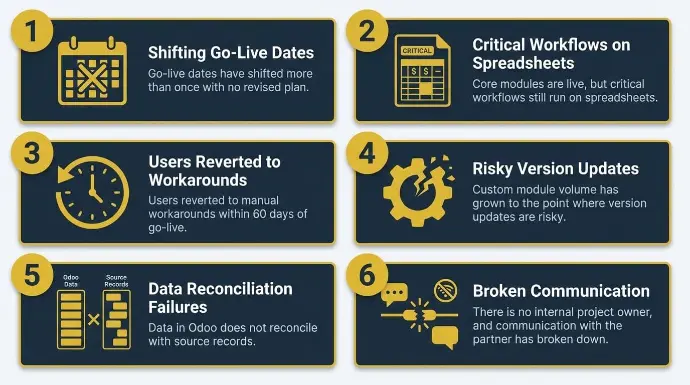
Chaque période difficile ne signifie pas nécessairement des problèmes structurels, mais ces 6 signaux expliquent souvent pourquoi les implémentations d'odoo échouent. Lorsque plusieurs s'appliquent en même temps, le projet a besoin d'un diagnostic, pas de plus de patience.
- Les dates de mise en service ont été déplacées plus d'une fois sans plan révisé : Des reports répétés sans un calendrier de reprise clair signifient que les problèmes sous-jacents n'ont pas été résolus.
- Les modules principaux sont en ligne, mais les flux de travail critiques fonctionnent toujours sur des tableurs : Lorsque l'inventaire, la facturation ou le flux de commandes n'ont jamais été entièrement migrés vers Odoo, le système est devenu opérationnel en nom seulement.
- Les utilisateurs sont revenus à des solutions manuelles dans les 60 jours suivant le lancement : une adoption qui s'effondre aussi rapidement signifie que la configuration d'Odoo ne reflétait pas le fonctionnement réel de l'entreprise.
- Le volume des modules personnalisés a atteint un point où les mises à jour de version sont risquées : Lorsque chaque cycle de correctif Odoo nécessite un test de régression complet de chaque module personnalisé, les coûts de maintenance ont déjà dépassé le coût de reconstruction sur des fonctionnalités standard.
- Les données dans Odoo ne concordent pas avec les enregistrements sources : Si les chiffres comptables ne correspondent pas aux relevés bancaires, si l'inventaire ne correspond pas au stock physique, ou si la traçabilité des lots présente des lacunes, le système ne peut pas soutenir les décisions pour lesquelles il a été conçu.
- Il n'y a pas de propriétaire de projet interne, et la communication avec le partenaire s'est détériorée : Sans un responsable interne nommé pour gérer les tests d'acceptation utilisateur (UAT) et la gestion du changement, les problèmes s'accumulent sans être résolus, et l'ensemble du projet perd son alignement.
Étude de cas : Prizm Document Solutions
Prizm a reconnu plusieurs de ces signaux avant de prendre contact. Leurs modules de service d'assistance, de comptabilité et de ventes étaient complètement déconnectés. Les techniciens réconciliaient les stocks manuellement à la fin de chaque journée. La facturation des compteurs d'imprimante était faite à la main.
Ce que nous avons mis en œuvre :
- Odoo dans le service d'assistance, le service sur le terrain, les projets, l'inventaire, les ventes, la CRM et la comptabilité
- Boutons intelligents personnalisés pour les flux de travail des techniciens de terrain
- Commandes d'achat automatisées utilisant MTO et règles de réapprovisionnement
- Automatisation de la facturation par abonnement pour les contrats basés sur des compteurs
Résultats : Élimination complète des saisies en double, obtention de données d'inventaire de service sur le terrain en temps réel, et centralisation de toute la facturation, du support et du CRM dans un environnement Odoo unique.
Parlez à notre équipe de secours aujourd'hui
Ce que rester sur un système défaillant vous coûte réellement
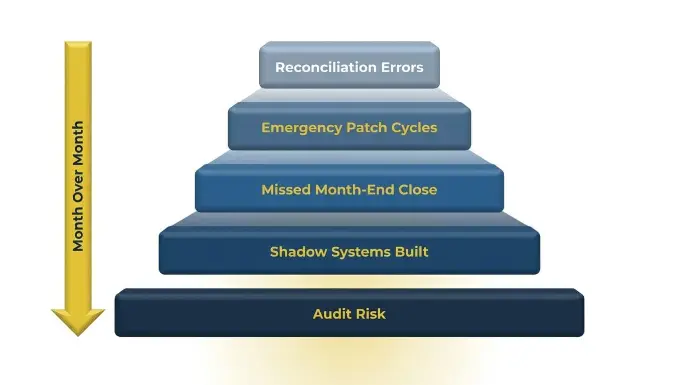
Différer l'action semble être le choix prudent. En pratique, c'est une décision avec un coût croissant attaché à chaque mois de retard.
Les Coûts Mensuels Cachés
- Les solutions de contournement par tableur introduisent des erreurs de rapprochement qui aggravent les problèmes de qualité des données PostgreSQL mois après mois
- Le code personnalisé construit en dehors du cadre des modules d'Odoo se casse lors des mises à jour mineures, transformant les cycles de correctifs en sessions d'urgence, et le coût à long terme augmente dans la phase post-implémentation lorsque le support est réactif plutôt que planifié.
- Les équipes financières manquent les fenêtres de clôture de fin de mois parce que les écritures comptables ne concordent pas avec les transactions bancaires réelles.
- Les équipes de vente et d'opérations construisent des systèmes parallèles dans des tableurs, et le système ERP cesse de les aider à rationaliser les opérations, ce qui accélère l'abandon d'Odoo.
- Le risque d'audit augmente lorsque les enregistrements de lots d'inventaire, les transactions interentreprises ou les journaux financiers ne peuvent pas être rapprochés des documents sources.
Étude de cas : Lexington Medical
Lexington Medical opérait dans 30 pays et cinq filiales, gérant des nomenclatures multilevel, des numéros de lot, le suivi des dates d'expiration, des flux de travail de sous-traitance et des transactions interentreprises sur un système non configuré pour gérer tout cela.
Comme Rowan de Lexington Medical l'a dit "Odoo nous a permis d'élargir rapidement et efficacement nos opérations à l'échelle mondiale tout en tenant compte de structures de nomenclature (BOM) et d'affaires complexes d'une manière qui serait très difficile avec d'autres systèmes ERP."
La consultante en comptabilité fonctionnelle Daniela Melo, qui possède plus de 10 ans d'expérience en ERP et en finance et a géré plus de 30 projets Odoo, a dirigé la reconstruction avec des rapports financiers personnalisés avancés et un traitement automatisé des transactions interentreprises.
Résultats : Le nombre de jours jusqu'à la clôture financière a été réduit de plus de 50 %, le taux d'erreur a été considérablement réduit, dans le cadre d'une opération dans 30 pays.
Étude de cas : R&W Rope
R&W Rope envoyait des factures, des bordereaux d'expédition et des numéros de suivi manuellement. Shopify ne pouvait pas supporter la complexité de son catalogue de produits. QuickBooks et Fishbowl n'avaient aucune capacité de reporting significative. Chaque semaine, 40 à 60 heures de travail administratif étaient effectuées manuellement.
Ce que nous avons construit : Nous avons reconstruit leur site de commerce électronique sur les modules de site web et de commerce électronique natifs d'Odoo, et avons mis en œuvre l'inventaire, la fabrication, les achats, les ventes et la comptabilité dans un environnement unique.
Résultats :
- Plus de 33 000 $ en économies annuelles sur les coûts de logiciels
- 40 à 60 heures de travail administratif hebdomadaire sont entièrement automatisées
- Visibilité des données en temps réel à travers tous les canaux de vente et catégories de produits
Secourir ou Réimplémenter ? Comment Prenons-Nous Cette Décision
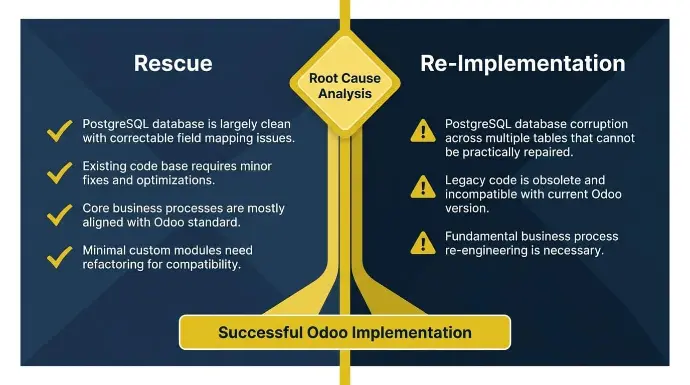
La plupart des opérateurs confrontés à un déploiement Odoo défaillant supposent qu'ils doivent tout recommencer. Cet instinct est compréhensible, mais il est souvent erroné. La bonne réponse dépend d'une analyse des causes profondes de l'environnement réel.
Quand un sauvetage a du sens
Le sauvetage est la bonne décision lorsque la fondation est structurellement solide, mais que des zones spécifiques ont échoué. Recherchez ces indicateurs :
- Le système est en ligne et au moins partiellement adopté
- Les problèmes sont contenus dans un ou deux modules
- La base de données PostgreSQL est en grande partie propre, avec des problèmes de mappage de champs corrigibles.
- Le périmètre du projet original était raisonnable pour la taille de l'entreprise
Le secours fonctionne également lorsque le système ERP odoo original est toujours structurellement utilisable malgré des pannes localisées.
Si les utilisateurs contournent le système plutôt que de l'abandonner complètement, cela suggère que la configuration était directionnellement correcte mais incomplète. Une remediation ciblée est souvent le moyen le plus rapide d'atteindre une mise en œuvre réussie lorsque les fondations sont intactes.
Étude de cas : Aeromist
Aeromist est venu à nous avec des systèmes déconnectés, des nomenclatures (BOM), et des ordres de changement suivis dans des tableurs, sans visibilité sur le coût des produits ou la prévision de production. L'investissement sous-jacent dans Odoo était solide.
Ce que nous avons mis en œuvre :
- Odoo ERP dans la gestion des stocks, des ventes, du CRM, de la fabrication, des projets et des services sur le terrain
- Intégration WooCommerce
- Avatax pour la conformité fiscale automatisée multi-juridictionnelle
- ShipStation pour l'automatisation de l'expédition
Résultats : Suivi des stocks en temps réel dans plusieurs entrepôts, achats automatisés et prévisions de la demande, fabrication et expédition rationalisées, CRM unifié et pipeline de ventes. Livré par le biais d'un travail de sauvetage ciblé, et non d'une reconstruction complète.
Quand recommencer est la meilleure option
La réimplémentation est la bonne décision lorsque les problèmes sont fondamentaux, surtout lorsque la mise en œuvre d'Odoo a commencé à partir d'une configuration défectueuse qui devrait être redémarrée plutôt que corrigée. Les indicateurs que nous recherchons :
- L'équipe de vente a assuré à l'entreprise que les modules standards s'adapteraient, mais les processus d'affaires essentiels n'ont jamais été correctement cartographiés avant le début de la configuration.
- Corruption de la base de données PostgreSQL à travers plusieurs tables qui ne peuvent pas être réparées pratiquement
- La couche de personnalisation construite en dehors de l'ORM et de l'API des modules d'Odoo est si étendue que le système ne peut pas être mis à jour sans compromettre la fonctionnalité de base.
Redémarrer est souvent le seul chemin vers une mise en œuvre réussie d'Odoo lorsque la conception de base est incorrecte.
Si le partenaire original a mal défini le projet dès le départ, un effort de sauvetage risque de reconstruire sur une base défectueuse. Commencer à zéro avec une analyse des écarts appropriée et une migration de données propre est souvent plus rapide à long terme.
La seule façon fiable de faire cette détermination est par une analyse des causes profondes réalisée par une partie indépendante de la mise en œuvre originale.
Comment nous structurons chaque engagement de sauvetage
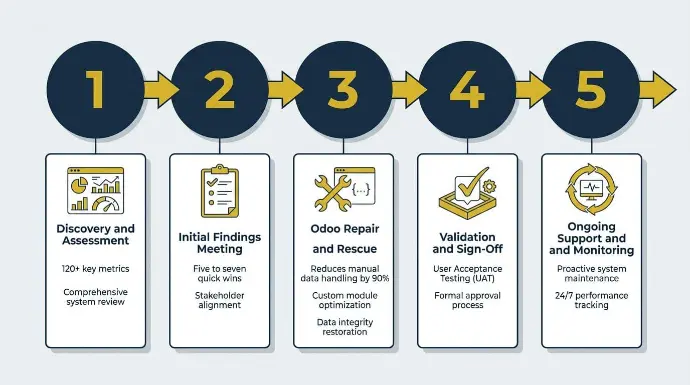
Notre processus de sauvetage suit une séquence structurée en cinq étapes, perfectionnée au cours des 35 interventions.
Étape 1 : Découverte et Évaluation
En tant que première étape de l'évaluation de l'implémentation de l'ERP Odoo pour un déploiement échoué, nous connectons la base de données Odoo existante à notre tableau de bord de comptabilité et de santé propriétaire, qui surveille les journaux système, les interactions API, l'intégrité des transactions et la santé des journaux à travers plus de 120 indicateurs clés.
Cela nous donne une image objective de l'endroit où l'implémentation a échoué avant que nous ne changions quoi que ce soit, couvrant :
- Problèmes d'intégrité des données
- Dépendances de module mal configurées
- Configurations de connecteurs tiers défectueuses
- Problèmes de performance de PostgreSQL
- Écarts d'alignement des flux de travail
La révision vérifie également si le design actuel correspond aux outils existants et aux réalités opérationnelles.
Étape 2 : Réunion des constatations initiales
Au cours de la première semaine, nous tenons une réunion de résultats pour évaluer les progrès par rapport aux risques, aux priorités et aux objectifs de rétablissement, et nous présentons :
- Une répartition claire de chaque problème identifié
- Une évaluation des risques classée par urgence et impact sur les affaires
- Cinq à sept gains rapides que nous pouvons aborder immédiatement
- Un calendrier de récupération proposé
- Risques futurs signalés de manière proactive (mauvaise hygiène des données, inefficacités côté serveur, mauvaises configurations des travailleurs en arrière-plan)
Les réunions de révision régulières améliorent également la responsabilité grâce à une communication plus transparente.
Identifier d'abord les gains rapides est délibéré. C'est ainsi que nous commençons à reconstruire la confiance de l'équipe dans le système avant que les travaux de remédiation plus importants ne commencent.
Étape 3 : Réparation et Sauvetage d'Odoo
Nous abordons les causes profondes par des réparations au niveau du code, des reconfigurations système et la gestion des correctifs pour stabiliser un système ERP sous-performant par le biais de réparations et de reconfigurations.
Le nettoyage du code personnalisé est dirigé par :
- Daniel Almaguer : plus de 14 ans, Odoo ORM, Python, PostgreSQL, API RESTful, Odoo.sh.
- Hiram Hernandez : Plus de 12 ans dans la personnalisation d'Odoo, le développement de modules, le développement d'API et les migrations de données ETL.
Notre approche consiste toujours à simplifier d'abord et à reconstruire ensuite dans le cadre de l'API des modules standard d'Odoo. L'objectif est une intégration transparente avec les plateformes connectées tout en minimisant les perturbations.
La réparation d'intégration est gérée à travers notre réseau de partenaires :
- Rithum: Commerce électronique multi-marché sur plus de 420 canaux.
- Avalara: Conformité fiscale automatisée multi-juridictionnelle.
- Crossfire: Échange de données EDI et de chaîne d'approvisionnement entièrement géré.
La re-migration des données, lorsqu'elle est nécessaire, utilise notre moteur ETL construit sur Python et PostgreSQL, alimenté par l'apprentissage automatique, et hébergé sur Google Cloud. Cela réduit le temps moyen de migration de six semaines et diminue la manipulation manuelle des données de 90 %.
Étude de cas : Tech Rafraîchie
Refreshed Tech est venu à nous en tant qu'entreprise ITAD avec un mouvement d'inventaire inefficace, aucune visibilité en temps réel sur les unités non traitées, des coûts de main-d'œuvre élevés dus à la réconciliation manuelle et une intégration Rithum défaillante.
Ce que nous avons mis en œuvre :
- Odoo à travers les modules d'inventaire, de comptabilité, de fabrication, de ventes, de CRM et de projets
- Connecteur Rithum pour le flux de données automatisé du marché
- Logique de traitement d'inventaire personnalisée pour la visibilité en temps réel de l'inventaire non traité
Résultats :
- Facturation et rapprochement automatisés pour des accords complexes de partage des revenus
- Rapports précis sur les marges et les revenus au niveau des appareils pour l'intelligence tarifaire
- Infrastructure de marché prête à s'étendre à plus de 15 canaux dans l'année
Étape 4 : Validation et Approbation
Rien n'est marqué comme complet tant que cela n'a pas été :
- Validé dans un environnement de bac à sable
- Évalué pour la performance sous des volumes de transactions réalistes
- Approuvé par le biais des tests d'acceptation utilisateur avec l'équipe du client
La validation devrait également inclure des tests d'intégration avant l'approbation.
Cette étape confirme que toutes les réparations tiennent sous des conditions d'exploitation réelles et qu'aucune nouvelle erreur de module ou conflit de configuration n'a été introduit lors de la remédiation.
Étape 5 : Soutien et surveillance continus
Notre tableau de bord de comptabilité et de santé continue de surveiller les journaux système, la santé des interactions API, l'intégrité des transactions et l'exactitude des journaux après la mise en service dans le cadre du soutien post-implémentation. Si le système montre des signes précoces de problèmes, nous intervenons de manière proactive avant que cela n'ait un impact opérationnel.
Dans cette phase post-implémentation, le soutien continu devrait inclure la formation des utilisateurs, une formation complète et des sessions de remise à niveau. La documentation basée sur les rôles et les sessions de formation pratiques réduisent le risque d'une formation inadéquate après la mise en service.
Étude de cas : Simons Chaussures
Simons Shoes, une marque de chaussures patrimoniale à Brookline, Massachusetts, est venue à nous incapable de publier efficacement des produits sur plusieurs marchés, gérant manuellement les flux d'inventaire des fournisseurs et opérant sans visibilité en temps réel à travers les canaux en ligne et physiques.
Ce que nous avons mis en œuvre :
- Odoo à travers l'inventaire, le point de vente, les achats et les ventes
- Plateforme Rithum via notre connecteur propriétaire Rithum-Odoo pour plus de 420 canaux de marché
Résultats :
- Publication de produits plus rapide
- Amélioration de la précision des inventaires sur Amazon et Walmart
- Capacité de lancer sur de nouveaux marchés en une à deux semaines
- Augmentation des revenus du commerce électronique
Ces résultats nécessitaient un engagement soutenu après le lancement, et non un transfert et un départ.
À quoi ressemble un calendrier de récupération réaliste
Les délais de récupération varient plus que la plupart des partenaires ne vous le diront au départ.
Portée | Chronologie typique |
Correction spécifique au module (par exemple, évaluation des stocks mal configurée, configuration de journal défectueuse, connecteur API échoué) | 4 à 8 semaines |
Réimplémentation complète | 3 à 6 mois |
Adoption et stabilisation post-lancement | 4 à 6 semaines supplémentaires |
Aucune des deux plages n'est une garantie. Ce qui détermine réellement le calendrier n'est pas le nombre de modules affectés. Trois facteurs déterminent constamment le rythme :
- État de la base de données PostgreSQL lors de la récupération
- Profondeur et qualité du code personnalisé existant
- À quel point l'organisation est-elle prête à s'engager dans des flux de travail modifiés
La récupération n'est pas complète lorsque le système est en ligne; elle est complète lorsque l'équipe travaille à travers cela, et non pas autour.
Définir le succès avant le début de la réhabilitation
Avant de commencer tout travail de récupération, nous définissons à quoi ressemble le travail terminé en termes mesurables.
Métrique | Comment nous le définissons |
Temps de clôture de fin de mois | Cible de réduction spécifique par rapport à la ligne de base, suivie en fonction des dates d'achèvement des journaux du module de comptabilité |
Taux d'erreur de traitement des commandes | Seuil convenu pour les erreurs de prélèvement, d'emballage et d'expédition suivies par le module d'inventaire d'Odoo |
Taux d'utilisation active des utilisateurs | Pourcentage d'adoption mesuré par l'activité de connexion Odoo et les taux d'achèvement des flux de travail d'ici la quatrième semaine |
Précision de la réconciliation des inventaires | Taux de correspondance entre les évaluations de stock Odoo et les enregistrements de comptage physique |
Temps de génération du rapport | Heures automatisées économisées par rapport à l'effort manuel actuel, mesuré dans les modules de comptabilité et de reporting |
Nous exigeons qu'un commanditaire exécutif interne soit nommé avant le début des travaux. Sans cela, les tests d'acceptation utilisateur (UAT) sont dépriorisés, l'adoption ralentit et les décisions stagnent, peu importe la qualité de la remédiation technique.
Comment choisir un partenaire de rétablissement
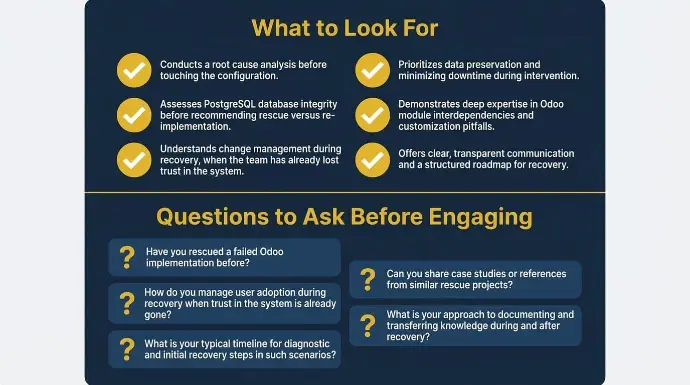
Tout partenaire certifié Odoo n'est pas équipé pour hériter d'une mise en œuvre défaillante. Le travail d'implémentation standard commence dans des conditions contrôlées : un périmètre défini, des données propres et une équipe motivée. Le travail de récupération commence dans des conditions opposées.
Ce qu'il faut rechercher
Un spécialiste de la récupération est le bon partenaire d'implémentation Odoo pour un déploiement défaillant :
- Effectue une analyse des causes profondes avant de toucher à la configuration
- Évalue l'intégrité de la base de données PostgreSQL avant de recommander la récupération ou la réimplémentation
- Peut documenter ce qui a été réellement construit par rapport à ce qui était initialement prévu
- A des résultats mesurables et vérifiés provenant de sauvetages précédents, pas seulement des références
- Fonctionne en tant que partenaire d'implémentation Odoo expérimenté, pas seulement comme installateur de logiciels
- Comprend la gestion du changement pendant la récupération, lorsque l'équipe a déjà perdu confiance dans le système
Tout partenaire qui propose une solution de sauvetage sans d'abord diagnostiquer le système fait des suppositions sur une solution, et choisir le bon partenaire de mise en œuvre est un facteur majeur dans une mise en œuvre réussie d'Odoo ERP.
Questions à poser avant de s'engager
Avant de vous engager avec un partenaire de récupération, utilisez ces questions pour évaluer s'ils ont déjà effectué ce travail :
- Avez-vous déjà sauvé une mise en œuvre Odoo ratée ? Quelle en était la cause principale ?
- Comment évaluez-vous l'intégrité de la base de données PostgreSQL avant de vous engager sur une voie ?
- À quoi ressemble votre processus lorsque le partenaire d'origine ne répond pas et qu'il n'y a pas de documentation ?
- Pouvez-vous montrer des résultats vérifiés et mesurables des sauvetages précédents ?
- Comment gérez-vous l'adoption des utilisateurs pendant la récupération lorsque la confiance dans le système est déjà perdue ?
Pourquoi l'expérience des opérateurs est importante
Les partenaires qui n'ont jamais été que du côté du conseil comprennent le logiciel.
Les partenaires qui ont également géré des opérations à travers cela comprennent ce qui se casse sous une pression transactionnelle réelle, pourquoi l'adoption par les utilisateurs s'effondre lorsque les flux de travail ne reflètent pas le fonctionnement d'une entreprise, et pourquoi l'expérience des opérateurs est importante dans les travaux de sauvetage et de ré-implémentation, où la complexité de l'ERP est souvent sous-estimée.
Cudio est né de cette expérience précise. Nos fondateurs ont développé leur propre entreprise omnicanale sur Odoo, consolidant ce qui était 14 systèmes en un seul, avant de créer une pratique de consultation autour de cela. Notre mission est de devenir le partenaire Odoo de premier plan pour les entreprises complexes, multinationales et omnicanales.
Découvrez comment nous structurons nos interventions de sauvetage
Derniers mots
Une mise en œuvre d'Odoo échouée n'est pas un verdict sur la plateforme ou sur votre organisation.
Dans presque tous les cas, le problème remonte à l'exécution : comment le projet a été défini, qui l'a dirigé, si la migration des données a été validée et si l'entreprise était vraiment prête à s'engager dans des flux de travail modifiés.
Ce sont des problèmes réparables. Nous les avons réparés 35 fois.
Nous maintenons un taux de fidélisation de 100 % des clients parce que nous ne remettons pas un système et ne partons pas. Nous restons pendant la stabilisation, surveillons à travers notre tableau de bord Comptabilité et Santé, et restons engagés jusqu'à ce que l'entreprise fonctionne avec Odoo, et non autour de celui-ci.
Notre vision est de fournir une expérience commerciale et technologique à la fine pointe qui établit la norme de l'industrie pour nos clients.
Si votre mise en œuvre a stagné ou déraillé, la première étape consiste à comprendre exactement ce qui s'est cassé.
Faites l'évaluation de sauvetage Odoo gratuite
Questions Fréquemment Posées
Essayez-vous de déterminer si votre mise en œuvre d'Odoo peut encore être sauvée ? Voici des réponses rapides aux questions les plus courantes que les entreprises posent lors des projets de récupération et de sauvetage d'ERP.
Comment puis-je savoir si mon partenaire Odoo a causé l'échec ?
Vous pouvez généralement identifier les échecs liés aux partenaires en examinant les décisions techniques et opérationnelles prises lors de la mise en œuvre. Des problèmes tels que des flux de travail comptables défaillants, une mauvaise configuration des autorisations, des modules personnalisés instables et des incohérences d'inventaire indiquent souvent des problèmes d'exécution. De nombreux projets échoués impliquent également du code personnalisé qui ignore l'architecture standard d'Odoo et crée des problèmes de maintenance à long terme. Un audit technique indépendant est généralement le moyen le plus rapide d'identifier la véritable cause profonde.
Puis-je me rétablir sans remplacer mon partenaire actuel ?
Oui, certains projets Odoo peuvent se redresser sans changer de partenaires d'implémentation. Cela dépend généralement de la capacité du partenaire à identifier et à résoudre objectivement les problèmes qu'il a créés. Dans de nombreux projets échoués, le plus grand défi est un manque de diagnostic clair plutôt que le logiciel lui-même. Une évaluation technique honnête est le point de départ le plus important avant de décider de rester ou de faire la transition.
Combien de temps prend la migration des données d'une instance Odoo défectueuse ?
Les délais de migration des données dépendent du volume des enregistrements, de la qualité de la base de données et de la complexité des relations entre les données. Des ensembles de données plus petits et plus propres peuvent migrer en quelques semaines, tandis que des environnements fortement corrompus peuvent prendre des mois à se stabiliser correctement. Les structures comptables, d'inventaire et multi-entreprises complexes prolongent généralement considérablement le temps de migration. Une validation et des tests appropriés sont plus importants que de simplement déplacer les données rapidement.
Quelle version d'Odoo devrais-je utiliser après une récupération ?
La plupart des entreprises devraient mettre à niveau vers la dernière version stable d'Odoo que leurs opérations peuvent raisonnablement supporter. Les versions plus anciennes créent plus de dettes techniques, de risques de sécurité et de dépendance à des modules personnalisés obsolètes au fil du temps. Les versions plus récentes incluent également des fonctionnalités natives qui peuvent éliminer des personnalisations inutiles. La stratégie de version devrait toujours faire partie du processus d'évaluation de la récupération.
Une mise en œuvre échouée affecte-t-elle ma licence Odoo ou mon accord de support ?
Non, une mise en œuvre échouée n'annule pas automatiquement votre licence Odoo ou votre accord de support. Cependant, l'accès au support peut devenir plus compliqué si les services de licence et de mise en œuvre sont regroupés dans un contrat de partenaire. Passer en revue votre accord et clarifier votre situation directement avec Odoo est généralement une bonne première étape. Cela aide à éviter la confusion avant de commencer un engagement de sauvetage.
Dans quelles industries Cudio travaille-t-il ?
Cudio travaille dans divers secteurs, y compris la fabrication, le commerce de détail, la santé, la logistique, la distribution en gros, le commerce électronique et les services sur le terrain. La plupart des projets de sauvetage concernent des entreprises ayant une complexité opérationnelle plutôt que des problèmes spécifiques à un secteur. La comptabilité multi-entreprises, la gestion des stocks, les intégrations et les échecs de flux de travail sont courants dans de nombreux secteurs pour de nombreuses entreprises, en particulier là où la complexité opérationnelle est élevée. L'objectif principal est de stabiliser les environnements Odoo qui ne soutiennent plus correctement les opérations commerciales.