
La plupart des implémentations d'Odoo ne échouent pas parce que le logiciel est mauvais.
Ils échouent parce que les personnes qui l'utilisent n'ont jamais été correctement préparées. Nous avons observé ce schéma dans chaque engagement que nous avons mené, et dans les 35 mises en œuvre échouées pour lesquelles nous avons été appelés. secours. Le système a été configuré correctement.
Les données ont été migrées proprement. Et ensuite, personne ne les a utilisées comme elles avaient été conçues, car la formation était considérée comme une simple case à cocher plutôt que comme une stratégie.
Chez Cudio, la formation est intégrée à notre Méthodologie de mise en œuvre d'Odoo Dès le premier jour, et non ajouté à la dernière minute avant le lancement. Nous avons développé une approche structurée, basée sur les rôles, à travers plus de 50 mises en œuvre qui transforme un système Odoo configuré en un système que votre équipe utilise réellement avec confiance.
Cet article couvre exactement comment nous le faisons : le programme, le calendrier, comment nous construisons des champions internes et comment nous mesurons si l'adoption est réelle.
Principaux enseignements
- Cudio intègre la formation à chaque phase de mise en œuvre dès le lancement, pas seulement la semaine précédant le lancement.
- Le curriculum basé sur les rôles produit une maîtrise plus rapide que les aperçus génériques du système complet
- Notre structure de formation en quatre niveaux couvre les cadres, les super utilisateurs, les utilisateurs finaux et les administrateurs système
- Les champions internes sont le moteur le plus durable de l'adoption à long terme
- L'adoption réelle se mesure en volume de billets, en taux d'erreur et en rapidité de compétence, et non en scores de complétion
- L'apprentissage post-mise en service est intégré à chaque engagement, car les environnements en direct révèlent toujours ce que les simulations manquent.
Ce que la formation des utilisateurs Odoo couvre réellement
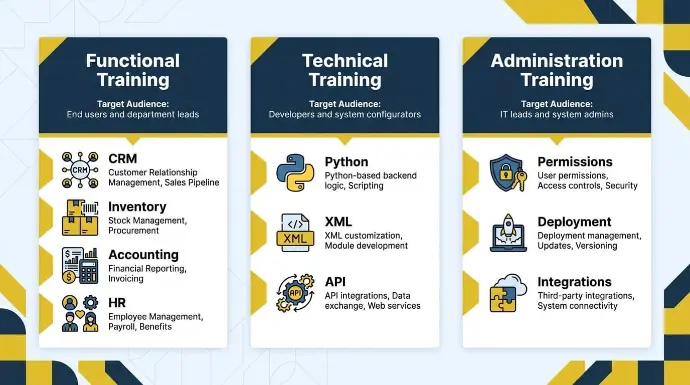
Tout le monde ne suit pas la même formation Odoo. La plateforme couvre des dizaines de modules dans les domaines de la finance, des opérations, des ventes, des ressources humaines et de la gestion de projet, et une formation efficace des utilisateurs d'Odoo aide les gens à acquérir une meilleure compréhension des systèmes ERP dans des fonctions clés telles que les ventes, la comptabilité et les opérations quotidiennes, ce qui peut favoriser l'avancement professionnel. Ce qu'un gestionnaire d'entrepôt doit apprendre n'a rien à voir avec ce qu'un développeur ou un administrateur système doit savoir.
Regrouper tout le monde dans le même programme de formation est l'une des erreurs les plus courantes que les organisations commettent lors d'un déploiement d'ERP.
Les trois parcours de formation essentiels : Gestion de projet
La formation Odoo se divise en trois parcours distincts, chacun correspondant à un profil d'utilisateur et à un ensemble de responsabilités différents. Le tableau suivant décrit à qui chaque parcours s'adresse et ce qu'il couvre, et de nombreux programmes identifient également un Chef de projet interne ou un Utilisateur clé dédié pour une formation approfondie afin que cette personne puisse servir de support de première ligne.
Voie de formation | À qui cela s'adresse | Ce que cela couvre |
Entraînement fonctionnel | Utilisateurs finaux et chefs de département | Utilisation quotidienne du module : GRC, Inventaire, Comptabilité, RH, et flux de travail opérationnels |
Formation technique | Développeurs et configureurs de systèmes | Logique backend basée sur Python, personnalisation XML, développement de modules et intégrations d'API |
Formation en administration | Responsables TI et administrateurs système | Gestion des déploiements, autorisations des utilisateurs, contrôles d'accès et intégrations tierces |
Mélanger ces pistes, ou sauter complètement la distinction, crée de la confusion et ralentit l'adoption dans tous les départements simultanément.
Pourquoi la formation basée sur les rôles surpasse les aperçus complets du système
Les aperçus génériques ont un résultat prévisible : les utilisateurs repartent en sachant un peu sur tout et pas assez sur quoi que ce soit qu'ils utilisent réellement. Un représentant des ventes qui passe deux heures à apprendre la configuration du module de comptabilité n'est pas mieux préparé ; il est plutôt plus accablé.
La formation basée sur les rôles associe les objectifs d'apprentissage directement aux fonctions professionnelles. La différence pratique est significative :
- Un représentant des ventes a besoin de maîtrise du CRM, de gestion de pipeline et de suivi des activités, pas d'une présentation des méthodes d'évaluation des stocks.
- Un opérateur d'entrepôt a besoin de flux de travail de gestion des stocks, pas de structures de permissions utilisateur
- Un responsable financier a besoin d'une profondeur dans le module de comptabilité, pas d'une personnalisation XML au niveau des développeurs
Notre approche chez Cudio est axée sur les processus, et non sur les fonctionnalités. Nous enseignons aux utilisateurs des flux de travail complets dans Odoo afin que les employés comprennent l'impact en aval de leur travail, et pas seulement comment naviguer dans les menus. Des scénarios réels de bout en bout, et non des visites de boutons. La formation uniquement par vidéo échoue souvent lorsque les utilisateurs ne comprennent pas pourquoi des données spécifiques doivent être saisies.
Que se passe-t-il lorsque l'entraînement est sauté ou précipité
Omettre ou compresser la formation n'est rarement une décision délibérée. Cela se produit généralement parce que les délais de mise en service se resserrent, que les budgets changent ou que la formation est considérée comme une formalité plutôt que comme une phase stratégique. Les conséquences ne sont en rien mineures.
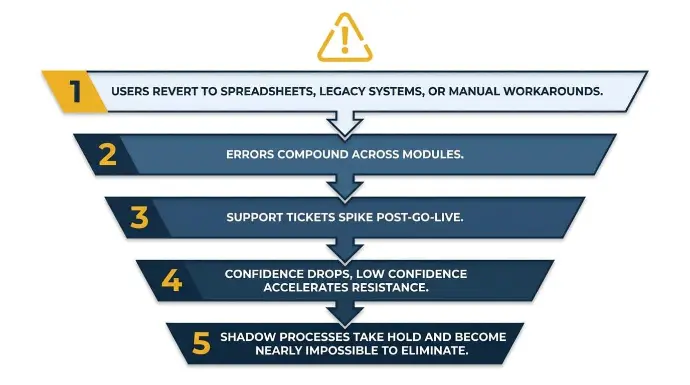
Le Modèle d'Échec d'Adoption
Lorsque les utilisateurs ne reçoivent pas de formation pratique adéquate, les résultats sont prévisibles et cohérents dans chaque engagement que nous avons observé :
- Les utilisateurs retournent aux tableurs, aux systèmes hérités ou aux solutions manuelles, érodant discrètement la valeur de l'ensemble de l'investissement Odoo
- Les erreurs s'accumulent à travers les modules parce qu'un utilisateur mal formé affecte les processus en aval dans les départements connectés
- Les demandes de support augmentent après le lancement, consommant des ressources informatiques et retardant la stabilisation
- La confiance diminue, et la faible confiance accélère la résistance au sein de l'équipe
- Les processus cachés s'installent et deviennent presque impossibles à éliminer une fois établis
Ce ne sont pas des cas marginaux. C'est le résultat par défaut lorsque l'adoption par les utilisateurs est considérée comme une réflexion après coup dans la planification de l'implémentation. Nous avons construit tout notre modèle de soutien post-mise en service autour de la prévention de cela.
La gestion du changement n'est pas optionnelle
Techniquement, des programmes de formation solides échouent toujours lorsque les utilisateurs ne sont pas psychologiquement prêts à adopter un nouveau système. La résistance aux nouveaux outils, la peur de la perturbation de l'emploi et le manque de confiance sont des problèmes comportementaux, pas des problèmes de formation.
Les aborder nécessite une stratégie parallèle : des plans de communication qui expliquent le pourquoi du changement, un parrainage exécutif qui signale l'engagement organisationnel, et des boucles de rétroaction qui donnent aux utilisateurs une voix pendant le déploiement.
Sans cette fondation, même une formation pratique bien conçue tombe sur des équipes réceptives. La gestion du changement ne remplace pas la formation. C'est ce qui permet à la formation de s'ancrer.
Quand former : Timing à travers les phases de mise en œuvre
Quand la formation a lieu, cela compte autant que la manière dont elle est dispensée. Une formation mal chronométrée, même de haute qualité, perd rapidement son impact. Notre méthodologie intègre des jalons de formation dans chaque phase d'implémentation, pas seulement dans les semaines précédant le lancement.
Le calendrier de formation
La structure suivante reflète notre approche du timing de la formation dans le cadre d'un engagement Odoo standard.
Phase | Concentration de la formation |
Début du projet | Vue d'ensemble exécutive : à quoi s'attendre et comment soutenir l'adoption |
Configuration et Construction | Formation approfondie pour les super utilisateurs et les utilisateurs avancés pour les champions internes |
Pré-UAT | Formation basée sur les rôles pour tous les utilisateurs finaux avant qu'ils ne valident le système |
Pré-lancement | Pratique en environnement de simulation sur les tâches opérationnelles quotidiennes que les utilisateurs effectueront dès le premier jour |
Après le lancement : Jours 1 à 30 | Sessions de renforcement, heures de bureau et résolution rapide des problèmes pendant l'hypercare |
Après le lancement : Jours 31 à 90 | Sessions de remise à niveau, identification des lacunes et formation sur les fonctionnalités avancées |
En cours | Intégration des nouveaux employés, formation sur la mise à niveau de version et amélioration continue |
La formation avant l'UAT est essentielle. Si les utilisateurs n'ont pas été formés avant qu'on leur demande de valider le système, ils ne peuvent pas vous dire si la configuration correspond à leurs flux de travail réels. Ils cliquent à travers des scripts de test sans contexte.
Voir notre processus de mise en œuvre et notre approche de formation
Formats de livraison : Choisir les bonnes séances de formation
Chaque équipe n'apprend pas de la même manière, et chaque module Odoo n'a pas la même complexité. Le format que vous choisissez influence la façon dont votre équipe retient et applique ce qu'elle apprend.
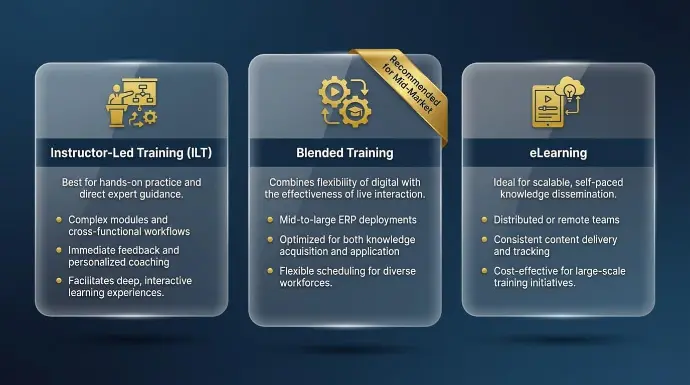
Les Trois Formats Principaux
Chaque format sert différentes structures d'équipe et objectifs d'apprentissage.
Voici comment nous pensons aux compromis :
- La formation dirigée par un instructeur (FDI) est la plus efficace pour les modules complexes et les flux de travail interfonctionnels où les questions-réponses en direct ajoutent une réelle valeur. Les équipes financières travaillant sur le module de comptabilité, ou les responsables des opérations configurant la gestion des stocks multi-entrepôts, tirent le meilleur parti d'un facilitateur en direct qui peut traiter les cas particuliers en temps réel pour un groupe ou un cadre de classe.
- La formation en ligne offre de la flexibilité pour les équipes distribuées ou à distance. Les utilisateurs peuvent revisiter le contenu à leur propre rythme, ce qui le rend efficace pour renforcer les concepts après une première exposition. Les tutoriels officiels d'Odoo Learn proposent un contenu de cours vidéo basé sur des modules, accompagné de courts quiz. Cela fonctionne bien pour des flux de travail standardisés qui ne nécessitent pas beaucoup d'interprétation contextuelle.
- La formation mixte combine des sessions en direct structurées avec du contenu vidéo à la demande. Pour les déploiements ERP de taille moyenne à grande, c'est généralement l'approche la plus efficace. Les sessions en direct couvrent des flux de travail complexes, et le contenu enregistré gère la répétition et l'intégration des nouvelles recrues. Le module eLearning interne d'Odoo permet également aux organisations de créer du contenu d'intégration personnalisé et d'évaluer le personnel grâce à des certifications sur mesure.
Pour la plupart de nos clients du marché intermédiaire, la formation mixte est la recommandation par défaut. Elle s'adapte aux différents départements, prend en compte les différents styles d'apprentissage et offre à l'entreprise une bibliothèque de formation vivante qu'elle peut utiliser après que nous ne serons plus intégrés au quotidien.
Créer un programme qui reste vraiment en place
Choisir le bon format de livraison n'est qu'une partie de l'équation. Les organisations qui connaissent une adoption durable considèrent la formation comme un programme, et non comme un événement unique. Cela signifie développer des capacités internes et planifier un apprentissage qui se poursuit bien au-delà du jour du lancement.
Le Modèle de Super Utilisateur et de Champion Interne
Une seule séance de formation externe ne peut pas soutenir l'adoption par les utilisateurs au sein d'une organisation en croissance. Le modèle de formation des formateurs résout ce problème en désignant un Chef de projet interne ou un Utilisateur clé comme champion, qui reçoit la formation la plus approfondie et spécifique à son rôle, sert de soutien de première ligne après le lancement, puis diffuse ce savoir au sein de ses équipes de manière utile.
La sélection efficace des champions ne concerne pas seulement l'aptitude technique. Un champion qui comprend le système mais qui manque de crédibilité auprès de ses pairs ne sera pas consulté lorsque ses collègues rencontreront des obstacles. Le bon profil combine les deux. Les attributs que nous recherchons chez un champion interne solide sont :
- Reconnu par ses pairs comme une ressource fiable, pas seulement une autorité technique
- Formé au-delà d'une familiarité superficielle, couvrant les cas limites et la logique des flux de travail
- Autonomisé pour répondre aux questions sans escalader chaque problème à un consultant externe
- Positionné comme faisant partie de la stratégie de gestion du changement plus large dès le départ
Ce modèle réduit la dépendance à l'égard du soutien externe et construit une connaissance institutionnelle durable directement au sein de l'entreprise.
Notre structure de formation par niveaux
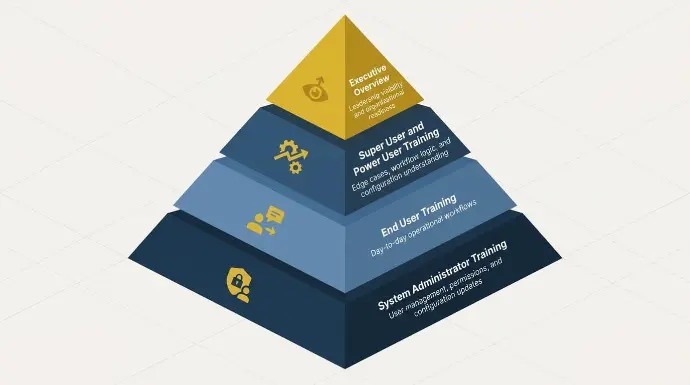
Nous structurons chaque programme de formation autour de quatre niveaux. Chaque niveau sert un objectif et un public différents au sein de l'organisation.
- Vue d'ensemble exécutive : À quoi s'attendre et comment soutenir l'adoption. Axé sur la visibilité du leadership et la préparation organisationnelle, et non sur la navigation dans le système.
- Formation pour super utilisateurs et utilisateurs avancés : Formation approfondie spécifique au rôle pour les champions internes. Couvre les cas limites, la logique des flux de travail et la compréhension de la configuration à un niveau qui leur permet de soutenir leurs équipes.
- Formation des utilisateurs finaux : Formation opérationnelle quotidienne pour le personnel général, strictement limitée aux flux de travail qu'ils exécuteront.
- Formation d'administrateur système : Pour ceux qui maintiendront le système à long terme. Couvre la gestion des utilisateurs, les autorisations et les mises à jour de configuration.
Selon le plan, les avantages peuvent également inclure un parcours de certification ou de diplôme pour les utilisateurs qui réussissent les évaluations, en particulier dans les parcours avancés ou administratifs, ajoutant une crédential plus professionnelle au programme.
Apprentissage après le lancement
La plupart des organisations considèrent la formation comme un événement préalable au lancement.
Les opérations en direct mettent en lumière ce que les simulations ne font jamais : les cas limites, les exceptions de processus et les flux de travail qui se comportent différemment dans des conditions réelles. De nouveaux employés rejoignent également après le lancement, et sans une bibliothèque de formation vivante, l'intégration devient incohérente et lente.
Nous intégrons un accès à la formation continue dans chaque engagement. Notre Bibliothèque de vidéos de formation Odoo donne aux équipes un accès à la demande à un contenu structuré qu'elles peuvent revisiter à mesure que les flux de travail évoluent et que de nouveaux employés arrivent.
À quelle vitesse les équipes deviennent-elles compétentes ?
Comprendre le calendrier typique de compétence aide à établir des attentes réalistes pour le leadership et empêche la fausse conclusion selon laquelle une faible adoption au cours de la deuxième semaine signifie que la mise en œuvre a échoué.
Chronologie typique de la compétence
En nous basant sur notre expérience de plus de 50 implémentations d'Odoo, voici à quoi ressemble généralement la courbe de compétence pour les utilisateurs finaux :
Période | À quoi s'attendre |
Semaine 1 à 2 après le lancement | Les utilisateurs accomplissent des tâches de base avec un soutien fréquent. Normal et attendu |
Mois 1 | Les flux de travail routiniers sont effectués de manière indépendante, avec des questions occasionnelles |
Mois 2 à 3 | Confiance croissante, moins de billets de support, les utilisateurs commencent à explorer des fonctionnalités avancées |
Mois 3 à 6 | Maîtrise complète des tâches quotidiennes, les utilisateurs identifiant des opportunités pour une optimisation supplémentaire |
Mois 6 et au-delà | Des utilisateurs avancés émergent, suggérant des améliorations et formant eux-mêmes les nouvelles recrues |
L'autosuffisance pour la plupart des équipes clientes arrive entre six et douze mois après le lancement. L'objectif tout au long du processus est l'autonomisation, et non la dépendance.
Étude de cas : Lexington Medical
Lexington Medical, opérant dans 30 pays et cinq filiales, a fait face à l'un des défis de formation les plus complexes que nous ayons gérés. Leur équipe devait être compétente dans les nomenclatures multi-niveaux, le suivi des lots, la gestion des dates d'expiration, les flux de travail de sous-traitance et les transactions interentreprises, dans plusieurs pays et environnements réglementaires.
Notre consultante en comptabilité fonctionnelle, Daniela Melo, qui possède plus de 10 ans d'expérience en ERP et en finance et a géré plus de 30 projets Odoo, a dirigé le programme de formation en parallèle de la mise en œuvre.
Résultats :
- Le nombre de jours jusqu'à la clôture financière réduit de plus de 50 %
- Le taux d'erreur a été considérablement réduit dans une opération de 30 pays
- Le système a évolué avec une croissance mondiale rapide sans nécessiter de logiciel supplémentaire
Ce type de compétence développe des compétences pratiques pour le monde professionnel, et Odoo est de plus en plus reconnu sur le marché du travail, de nombreux étudiants le signalant parmi les logiciels les plus utilisés durant leurs stages.
Comme l'a dit Rowan de Lexington Medical : « Grâce à notre partenariat avec Cudio, nous avons pu améliorer les flux de travail existants dans Odoo et développer des solutions personnalisées qui ont réduit nos jours de clôture de plus de 50 % tout en réduisant notre taux d'erreur. »
Lire l'étude de cas complète de Lexington Medical
Comment savoir si votre entraînement porte ses fruits
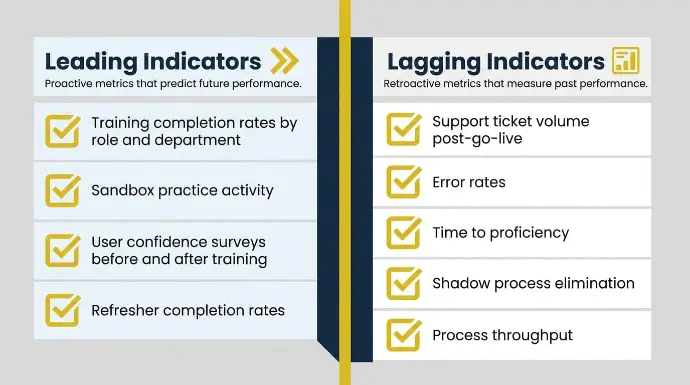
Savoir quel format utiliser et quand le déployer est précieux, mais cela ne vous mène qu'à un certain point. Les décideurs ont besoin d'indicateurs concrets liés au comportement du système, aux repères de compétence et aux résultats commerciaux, pas seulement aux scores des enquêtes post-formation.
Indicateurs avancés
Ces indicateurs signalent si l'adoption est sur la bonne voie avant que les problèmes ne deviennent visibles dans les opérations.
- Taux d'achèvement de la formation par rôle et par département : Les bonnes personnes complètent-elles le bon curriculum avant le lancement ?
- Activité de pratique dans le bac à sable : Les utilisateurs s'engagent-ils réellement avec le système dans l'environnement de test avant le lancement ?
- Enquêtes de confiance des utilisateurs avant et après la formation : La confiance est fortement corrélée à la vitesse d'adoption.
- Taux d'achèvement des mises à jour : Les équipes qui effectuent des vérifications de connaissances périodiques sont moins susceptibles de développer des lacunes cumulatives à mesure que les flux de travail évoluent.
Indicateurs retardés
Ces indicateurs confirment si la formation se traduit par une performance opérationnelle réelle :
- Volume des billets de support après le lancement : Un volume de billets en déclin est un signe fiable de succès en matière d'adoption. Des taux de billets élevés indiquent des lacunes dans la formation, et non des problèmes de logiciel. Le suivi des catégories de billets révèle exactement quels flux de travail ont été sous-formés.
- Taux d'erreur : L'utilisation incorrecte du système se manifeste par des erreurs de données ou des pannes de processus. La surveillance des taux d'erreur par module permet d'identifier où un renforcement est nécessaire.
- Temps d'acquisition des compétences : Combien de temps avant que les utilisateurs accomplissent des tâches de manière autonome et précise.
- Élimination des processus cachés : Les utilisateurs maintiennent-ils encore des tableurs et d'anciens systèmes, ou ont-ils complètement effectué la transition ?
- Débit du processus : Les utilisateurs terminent-ils leur travail plus rapidement qu'avant la mise en œuvre ?
Ensemble, ces indicateurs offrent aux leaders opérationnels et aux directeurs informatiques une image claire de là où la formation est efficace et où elle nécessite un renforcement.
Parlez à notre équipe de votre programme de formation Odoo
Comment Cudio forme les équipes à utiliser Odoo correctement
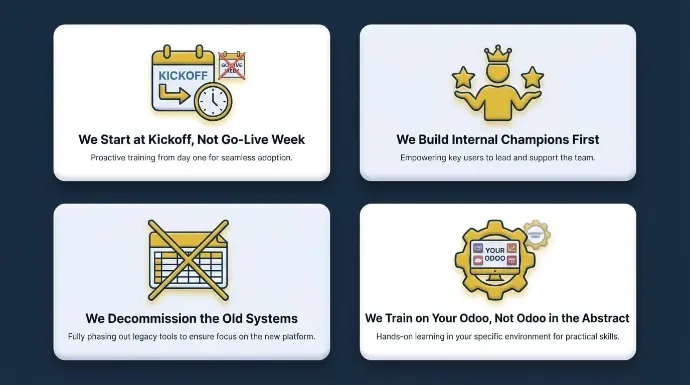
À travers nos plus de 50 mises en œuvre et 35 projets de sauvetage, nous avons affiné notre méthodologie de formation pour aborder les schémas qui nuisent le plus à l'adoption.
Notre approche est fondée sur quatre principes qui contrecarrent directement ce que nous voyons échouer sur le marché.
Nous commençons au lancement, pas à la semaine de mise en service
Une formation entassée dans la dernière semaine avant le lancement signifie que les utilisateurs s'exercent une fois, puis opèrent immédiatement dans un environnement en direct sans temps pour le renforcement et sans familiarité avec le bac à sable. Nous commençons la formation au lancement du projet.
Les dirigeants obtiennent un aperçu au début. Les super utilisateurs sont formés en profondeur pendant la phase de construction. Les utilisateurs finaux se forment avant la validation utilisateur (UAT) afin de pouvoir valider de manière significative. Cette séquence n'est pas négociable dans nos engagements.
Nous construisons d'abord des champions internes
Lorsque des questions se posent après le lancement, il doit y avoir quelqu'un dans l'entreprise ayant une connaissance approfondie du système.
Nous identifions et formons en profondeur des champions internes avant le déploiement plus large. Leur défense et leur soutien sont plus durables que la dépendance continue à un fournisseur.
Lorsqu'un champion comprend le système au niveau de la logique de flux de travail, et pas seulement la navigation de surface, il peut gérer la majorité des questions post-lancement en interne.
Nous mettons hors service les anciens systèmes
Les utilisateurs retournent aux tableurs et aux systèmes hérités lorsque le chemin de retour vers les anciennes habitudes est encore ouvert. Une partie de notre programme de formation consiste à décommissionner explicitement les outils et les processus qui sont remplacés.
Cela peut parfois être inconfortable à court terme, mais c'est essentiel pour une véritable adoption. Si l'ancien système est toujours disponible, certains utilisateurs continueront à l'utiliser indéfiniment.
Nous formons sur votre Odoo, pas sur Odoo de manière abstraite
La formation générique ne reflète pas le comportement réel d'un système configuré en production.
Chaque programme de formation que nous proposons est adapté aux flux de travail spécifiques à votre secteur, à la manière dont vos équipes personnalisent le système, à vos modules Odoo et aux processus exacts que votre entreprise utilise, y compris les modifications à faible code dans Odoo Studio telles que l'ajout de champs ou de vues personnalisées. La formation CRM devrait également couvrir des tâches pratiques de gestion des enregistrements, comme le maintien des profils d'entreprise et individuels, des adresses et des étiquettes clients pour les clients.
La différence entre former des utilisateurs sur Odoo de manière abstraite et les former sur votre Odoo est la différence entre une familiarité superficielle et une véritable compétence. Les sessions spécifiques aux utilisateurs peuvent également personnaliser les éléments de base du tableau de bord, tels que la configuration de l'écran d'accueil, l'organisation des applications et les badges de notification.
La formation est là où le ROI est construit
Les capacités d'Odoo ne sont aussi précieuses que la capacité de votre équipe à les utiliser. La formation n'est pas une simple case à cocher pour l'intégration. C'est le mécanisme qui transforme un système configuré en performance commerciale mesurable.
Notre approche de formation structurée, basée sur les rôles et par phases, est ce qui distingue nos mises en œuvre des projets qui deviennent opérationnels techniquement complets mais qui sont bloqués sur le plan opérationnel.
Les clients qui ont réalisé des réductions de 50 % du temps de clôture financière, éliminé de 40 à 60 heures de travail administratif hebdomadaire et développé leur entreprise sans augmenter leur effectif n'y sont pas parvenus uniquement grâce à des logiciels.
Ils y sont parvenus grâce à des équipes qui ont été correctement formées, soutenues par la stabilisation et habilitées à posséder le système à long terme.
C'est ce vers quoi nous travaillons dans chaque engagement, du lancement jusqu'à la première année d'utilisation en production.
Commencez votre conversation de formation Odoo avec nous
Questions Fréquemment Posées
Les questions ci-dessous reflètent ce que les entreprises demandent le plus souvent lors de la planification des programmes de formation Odoo.
Est-ce qu'Odoo est difficile à apprendre pour les utilisateurs non techniques ?
Odoo est conçu en tenant compte des utilisateurs finaux, et la plupart des modules fonctionnels sont navigables sans connaissances techniques. La complexité varie selon le module. La comptabilité et la gestion des stocks multi-entrepôts ont des courbes d'apprentissage plus abruptes que le CRM ou les RH. La formation basée sur les rôles qui se concentre uniquement sur ce dont un utilisateur a réellement besoin réduit considérablement la difficulté perçue. La plupart des utilisateurs atteignent une maîtrise indépendante de leurs flux de travail quotidiens dans un délai de quatre à huit semaines après le lancement.
Quelles options de certification Odoo sont disponibles ?
Odoo offre certifications fonctionnelles et techniques officielles couvrant une gamme de modules et de niveaux de compétence. Les certifications fonctionnelles nécessitent généralement de 20 à 40 heures de préparation, selon l'expérience préalable. Les certifications techniques exigent une préparation plus approfondie, en particulier autour de Python et du développement de modules.
De nombreux forfaits de formation comprennent également des évaluations qui permettent aux participants d'obtenir une certification ou un diplôme Odoo dans le cadre de leur parcours d'apprentissage. La certification fournit une référence de compétence formelle qui complète les programmes de formation internes. Obtenir un diplôme peut renforcer un CV et attirer des entreprises et des clients à la recherche de candidats compétents en Odoo et en ERP.
Combien de temps dure un programme de formation Odoo typique ?
La plupart des programmes structurés durent entre quatre et douze semaines, selon la taille de l'équipe, la portée du module et le format de livraison. Les déploiements plus importants avec plusieurs départements et des flux de travail complexes nécessitent naturellement des délais plus longs. Le calendrier devrait être défini lors de la phase de découverte, et non décidé comme une réflexion après coup lors de la planification du projet.
La formation Odoo peut-elle être personnalisée pour nos flux de travail spécifiques ?
Oui, et cela devrait l'être. La formation générique reflète rarement le comportement réel d'un système configuré en production. Le contenu de la formation devrait être adapté pour refléter vos flux de travail spécifiques à l'industrie, vos configurations de modules personnalisés et les processus exacts que votre entreprise exécute dans Odoo. C'est la différence entre former des utilisateurs sur Odoo de manière abstraite et les former sur votre Odoo.
Quelle est la différence entre les ressources de formation à la gestion des stocks d'Odoo Community et d'Odoo Enterprise ?
Les ressources communautaires sont en grande partie open-source et maintenues par la communauté. Les matériaux de formation pour l'édition Entreprise, y compris les parcours d'apprentissage et de certification officiels d'Odoo ainsi que la documentation, sont plus structurés et couvrent des fonctionnalités exclusives à l'édition Entreprise, telles que le reporting avancé, certaines intégrations et les capacités de fabrication. La plupart de nos clients utilisent l'édition Entreprise. Contactez Odoo pour comparer les options d'édition et clarifier la disponibilité actuelle des licences et des ressources de formation.
Que se passe-t-il si notre équipe n'adopte pas Odoo après le lancement ?
L'adoption faible après le lancement est presque toujours un problème de formation et de gestion du changement, et non un problème de logiciel. La première étape consiste à diagnostiquer où se situe l'écart : quels modules ont une faible utilisation, quels rôles reviennent à des solutions de contournement, et si des processus parallèles se sont installés dans les opérations commerciales. À partir de là, une formation de renforcement ciblée, l'activation de super utilisateurs et, dans certains cas, la reconfiguration des flux de travail peuvent récupérer l'adoption en abordant des aspects clés, en générant des idées pratiques et en reconstruisant la compréhension de l'ERP à travers les ventes, la comptabilité, les achats, les ressources humaines et les fonctions connexes grâce à des sessions de formation sur mesure, y compris des rappels gratuits qui aident les équipes à appliquer ce qu'elles apprennent dans leur vie professionnelle quotidienne. Si la situation est plus difficile, nous offrons une structure Services de sauvetage et de réparation Odoo pour les mises en œuvre qui ont stagné ou échoué après le lancement.