
Staying on Odoo v12 or v13 costs mid-market businesses an average of $110,000 in hidden expenses over two years. This is driven by a 25% legacy Enterprise license surcharge, unsupported Python 3.6 vulnerabilities, and the ongoing monthly maintenance of obsolete custom code.
We get it. Upgrading Odoo feels heavy. There is always a peak season, a team change, or a budget cycle in the way. We hear this from almost every client we speak to who is still on legacy versions. Then we show them the actual numbers. The conversation does not take long after that.
At Cudio, we help mid-market businesses diagnose what staying on v12/v13 is actually costing them, quantify the upgrade path, and execute migrations that protect custom logic where it still adds value. In most cases, the financial case for upgrading closes within 12 months.
This guide answers the most critical questions about legacy Odoo systems:
- How does the 25% legacy surcharge impact your Odoo Enterprise invoice?
- What are the compliance costs of obsolete Python 3.6 and PostgreSQL 10?
- Which v17/v18 native features eliminate custom code debt?
- What is the timeline and cost of a structured Odoo upgrade?
Show Me What Upgrading Odoo Would Actually Cost Me
Key Takeaways
- Staying on older Odoo versions stopped being neutral in early 2026. Odoo now adds a 25% surcharge to Enterprise contracts that are more than 3 major versions behind. V12 and v13 both sit inside that window. Every renewal after March-April 2026 carries that extra cost.
- The stack under your Odoo system is a bigger problem than the surcharge. Python 3.6 reached end of life in October 2021, with 200+ security vulnerabilities. PostgreSQL 10 lost support in November 2022. Your JavaScript libraries are frozen at 2019 versions. No regular security patches or bug fixes are coming for any of this.
- For a typical 40-user deployment, the cost of staying exceeds $110,000 over 2 years. That is $12,000 in surcharges, $72,000 in specialist DevOps labor, and $16,000 in reactive custom code fixes. Upgrading Odoo to the latest version costs $40,000-$90,000 one-time. It pays for itself in the first year.
- Much of your custom development solves problems Odoo already fixed. Demand forecasting, automated reconciliation, multi-company P&L, and mobile WMS flows are all standard in the new version. Maintaining custom modules for those is technical debt you pay for every month.
Why “Staying” on Odoo v12/v13 Is Now a Costly Business Decision
We want to be straight with you. Many businesses stay on older Odoo versions, not because they ran the numbers. They stay because upgrading Odoo feels risky, and no one wants to take ownership of the project. That is fair. The Odoo upgrade process can go wrong. When it does, it is visible.
But in 2026, staying is the riskier path. Delaying upgrades used to be passive. Now it is an active cost decision. There is an additional cost on your invoice. There is a documented security gap. And the distance between what your team can do and what Odoo users on current versions can do keeps growing.
Odoo v12 came out in October 2018. V13 followed in October 2019. Both sit outside Odoo's three-version support window. Odoo keeps all versions indefinitely, but adds a 25% surcharge to any Enterprise contract that is more than 3 versions behind. In early 2026, that covers v12 through v15.
How Your Odoo Invoice Changes After 2026: The New 25% Legacy Surcharge
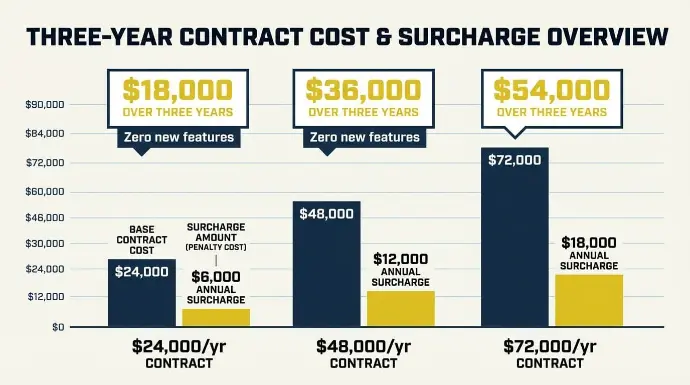
Here is a scenario we have seen more than once. A 30-user Odoo v13 Enterprise company receives its April 2026 renewal. There is a new line: a 25% surcharge for the legacy version. No one warned them. Now they pay $6,000 more per year for the same Odoo system they had last year. No new features. No security patches. Nothing.
The rule is simple. Any Enterprise instance running more than 3 major Odoo versions behind the current release incurs a surcharge at renewal. In early 2026, with Odoo 18 current, that means older versions from v12 through v15. The extra cost runs every renewal until you upgrade your Odoo system.
Here is what it looks like at common contract sizes:
- $24,000/year contract: $6,000 annual surcharge, $18,000 over three years of delaying upgrades
- $48,000/year contract: $12,000 annual surcharge, $36,000 over three years
- $72,000/year contract: $18,000 annual surcharge, $54,000 over three years
None of that buys new features. It is a carrying cost for outdated software. It is billed by the vendor. And it grows each year. The logic that made delaying upgrades feel like saving money has flipped completely.
One of the first things we do at Cudio is pull up a client's contract. We show them exactly what the surcharge adds up to over their planning window. It is a short conversation.
Show Me What Upgrading Odoo Would Actually Cost Me
Why Your Maintenance Bill Keeps Growing: Technical Debt on v12/v13
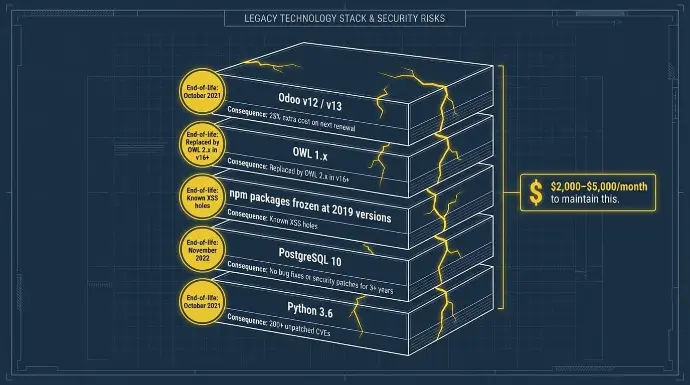
The surcharge is easy to see. The hidden costs of running older systems are harder to address. They build quietly until something breaks.
Here is the exact stack your Odoo system depends on today:
Component | What Your Odoo System Runs | End-of-Life Date | What That Means for You |
Python | Python 3.6 | October 2021 | 200+ unpatched CVEs. No security patches coming. |
PostgreSQL | PostgreSQL 10 | November 2022 | No bug fixes or security patches for 3+ years. |
JavaScript libraries | npm packages frozen at 2019 versions | Ongoing drift | Known XSS holes. No vendor patch path. |
Odoo JS framework | OWL 1.x | Replaced by OWL 2.x in v16+ | Bugs accumulate. No upstream fixes from Odoo. |
Odoo version | v12 (Oct 2018) / v13 (Oct 2019) | Outside the 3-version window in 2026 | 25% extra cost on next renewal. No new security patches. |
Python 3.6 has 200+ security vulnerabilities with no patches in sight. PostgreSQL 10 has had no bug fixes since November 2022. This is not a theoretical risk. Those CVEs sit in databases that compliance auditors search.
Technical support and DevOps labor for a self-hosted v12/v13 environment runs $2,000-$5,000 per month. At $3,000 per month, that is $72,000 over two years. This is technical debt you actively pay for every month just to maintain the status quo on older systems.
The 4x Custom Module Penalty
Here is another hidden cost that catches teams off guard. What happens to your custom modules when you finally upgrade your Odoo system?
The new version runs OWL 2.x on the frontend, a revised ORM, and a new controller structure. Your existing customizations do not move over without work. The gap between a planned upgrade process and a rushed one is large:
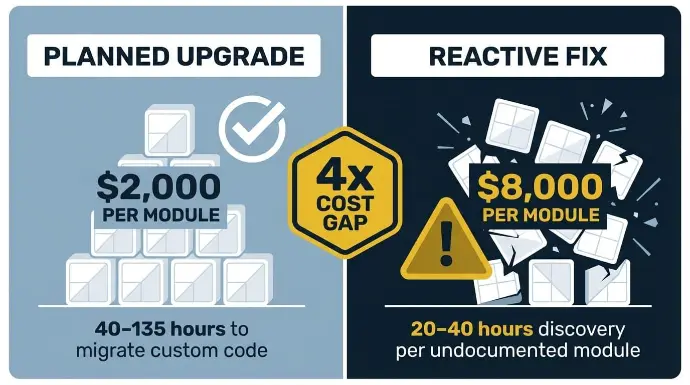
- Planned refactor of a custom module in a structured process: about $2,000 per module
- Reactive fix mid-upgrade under time pressure: about $8,000 per module
- That is a 4x extra cost gap on every single module in your codebase
Developers report 40-135 hours to migrate custom code across multiple modules. Emergency go-live support during a rushed production upgrade costs 2-3x the normal rate. That is system downtime plus emergency costs hitting at the same time.
One more thing worth knowing. Many contractors who built your v12/v13 custom development are no longer in business. Modules with no internal docs need full archaeology before migration can start. Add 20-40 hours of discovery for each undocumented module before a single line is rewritten.
Talk to Cudio About My Custom Module Stack
Security, Compliance, and Integration Risks on Odoo v12/v13
We talk to many v12/v13 Odoo users who say the system works fine. No issues. We understand why it feels that way. The instance is up. Orders are running. No one has reported a breach.
But the security risks on a v12/v13 stack do not announce themselves. A payment gateway fails reconciliation without warning. A compliance audit flags your PostgreSQL version. A shipping API starts returning errors, and someone builds a manual workaround. By the time any of that surfaces, it is already expensive.
Security and Compliance
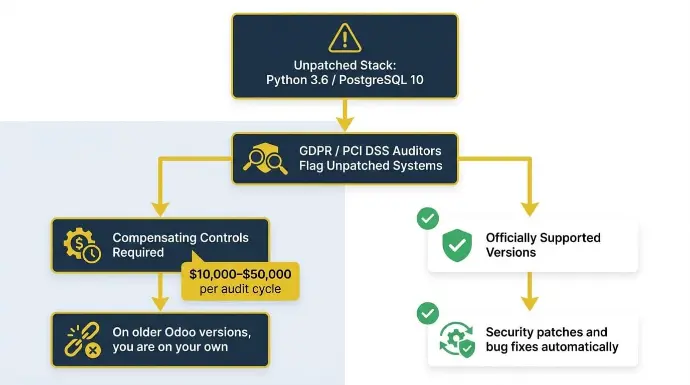
GDPR and PCI DSS auditors flag unpatched operating systems and stacks. Compensating controls for a production ERP system on unpatched older versions cost $10,000-$50,000 to implement and re-certify at every audit. On officially supported versions, Odoo Enterprise customers get security patches and bug fixes automatically. On older Odoo versions, you are on your own.
Payment gateways, including Stripe, Adyen, and PayPal, no longer certify integrations against older versions. When they update their APIs for PCI compliance, your older version connector does not receive the update. The result is silent integration failures that show as reconciliation gaps.
API Deprecations
UPS and FedEx have started dropping the API versions that v13's shipping connectors call. When a deprecated endpoint goes offline, the fallback is manual CSV reconciliation. Teams report 20-40 hours per week on this kind of manual work, where integration failures have accumulated.
New Features in v17/v18 Your Team Cannot Access on Older Versions
If you have been on v12/v13 for a few years, your team has adapted. They built workarounds. They know where the gaps are. That takes real effort, and we respect it.
The problem is that those workarounds have a cost. That cost grows every year as the gap between older Odoo versions and the latest release widens.
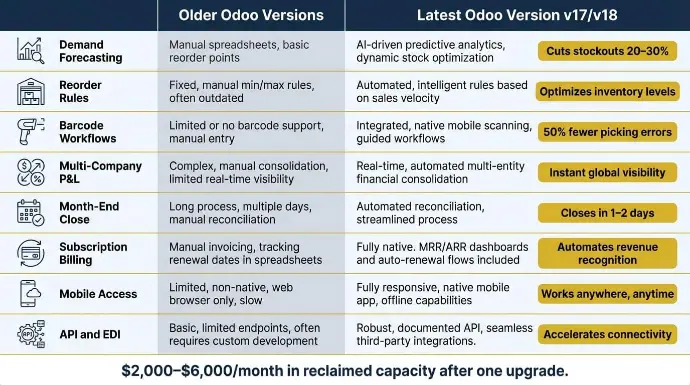
Here is what the new Odoo version ships out of the box that most older version users are either missing or building custom development to get:
What You Need | Older Odoo Versions Today | Latest Odoo Version (v17/v18) |
Demand forecasting | Manual reorder points. Someone owns a spreadsheet. | Native ML model. Cuts stockouts 20-30%. |
Reorder rules | Basic min/max. No dynamic MOQ logic. | Dynamic MOQs tied to lead times and sales. Cuts excess stock by ~15%. |
Barcode workflows | Manual pick/pack via basic scanner. | Full WMS barcode flows via mobile. 50% fewer picking errors. |
Multi-company P&L | Custom code plus manual exports. | Native real-time dashboards with inter-company eliminations. |
Month-end close | Heavy manual reconciliation. Takes 5 days. | Automated engine. Closes in 1-2 days. Performance improvement every month. |
Subscription billing | No native module. Third-party apps or custom development required. | Fully native. MRR/ARR dashboards and auto-renewal flows included. |
Mobile access | A desktop is only for most business operations. | Full PWA. Field teams run everything from mobile. |
API and EDI | REST API v1. No native webhooks. Integration failures are common. | REST API v2 plus event-driven webhooks and OCA EDI support. |
The reconciliation engine alone recovers 40-80 hours of finance team time per month. At $50-$75 per hour fully loaded, that is $2,000-$6,000 per month in reclaimed capacity. Every month. After one upgrade.
Cost Comparison: Staying on v12/v13 vs. Upgrading to v17/v18
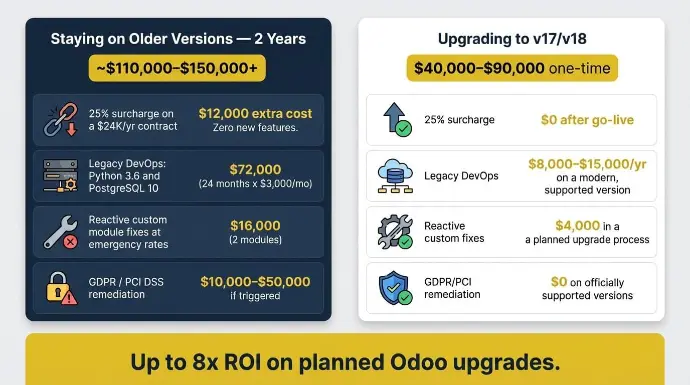
The table below covers a 40-user company on Odoo v13 Enterprise, self-hosted on-premise, with 8,000-10,000 lines of custom code across 8-10 modules, and mid-range DevOps costs.
Cost Item | Staying on Older Versions for 2 Years | Upgrading Odoo to v17/v18 |
25% surcharge on a $24K/yr contract | $12,000 extra cost. Zero new features. | $0 after go-live. |
Legacy DevOps: Python 3.6 and PostgreSQL 10 | $72,000 (24 months x $3,000/mo) | $8,000-$15,000/yr on a modern, supported version |
Reactive custom module fixes at emergency rates | $16,000 (2 modules) | $4,000 in a planned upgrade process |
GDPR / PCI DSS remediation on an unpatched odoo system | $10,000-$50,000 if triggered | $0 on officially supported versions |
Estimated 2-Year Total | ~$110,000-$150,000+ | $40,000-$90,000 one-time, lower every year after |
Novobi's 2025 migration research reports up to 8x ROI on planned Odoo upgrades versus reactive ones. The $40,000-$90,000 upgrade cost is a strategic investment with a documented payback period. Think of it that way. The stay cost compounds every two years. Every month you delay the upgrade process, the math gets harder.
Get My Free Odoo Upgrade Cost Breakdown
How to Upgrade from v12/v13 Without Breaking Your Business
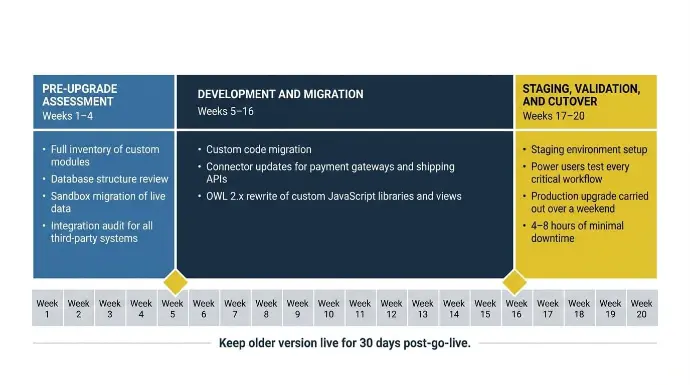
The Odoo upgrade process from v12/v13 to the latest version is a five to seven-version jump. It is manageable with careful planning and a structured process. Here are the three phases:
Phase 1: Pre-Upgrade Assessment (Weeks 1-4)
A proper assessment prevents about 50% of budget overruns. It covers a full inventory of custom modules and existing customizations, a database structure review, a sandbox migration of your live data using official migration scripts, and an integration audit for all third-party systems and third-party apps.
Phase 2: Development and Migration (Weeks 5-16)
Custom code migration runs in parallel with connector updates for payment gateways and shipping APIs. OWL 2.x requires rewriting custom JavaScript libraries and views. Common older-version patterns, such as api.multi and deprecated field types, need targeted fixes. This is also when your Odoo partner captures performance improvements and performance optimization in the upgraded database structure.
Phase 3: Staging, Validation, and Cutover (Weeks 17-20)
Validation runs on a staging environment built from a live copy of your data. Power users test every critical workflow. A clean production upgrade is carried out over a weekend with careful planning. Multi-entity operations consistently hit 4-8 hours of minimal downtime in this model. Keep the older version environment live for 30 days post-go-live. Business continuity and long-term stability depend on having a rollback point.
At Cudio, clients who come to us after a connector break or an audit flag almost always face a longer, more expensive project than they would have if they had started with careful planning six months earlier.
Is the Upgrade Case Already Closed for Your Odoo System?
Run through these questions to see if your own cost structure has already made the decision:
- Is your Enterprise renewal after March-April 2026? The extra cost is live or incoming.
- Have you had payment gateway or integration failures in the last 6 months tied to older version endpoints?
- Have your DevOps costs risen as maintaining older systems has become harder?
- Do you maintain custom development that copies features now in the latest version?
- Does your Odoo system run Python 3.6 and PostgreSQL 10 in a context where GDPR or PCI DSS audits apply?
- Are Odoo users on your team reporting system stability issues or slow reports?
If most of your answers are yes, the cost of staying already beats the cost of upgrading Odoo on an annual basis. The question is not whether to upgrade. It is about planning a smooth transition with minimal system downtime and full business continuity.
Conclusion
Odoo v12 and v13 made sense in 2019. In 2026, running older Odoo versions means paying a 25% premium for outdated software with no regular security patches, while maintaining custom code that the new version has already replaced.
At Cudio, we help businesses see their true stay costs, scope the upgrade process clearly, and run a structured migration with minimal downtime. If you want to know what upgrading your Odoo system looks like for your specific setup, that is what we are here for.
Book My Free Odoo Upgrade Assessment
FAQs
These are the questions we hear most from Odoo users as they work through the upgrade decision.
Is it ever okay to stay on older Odoo versions a bit longer?
Staying on older Odoo versions is only reasonable for very small deployments with no integrations, minimal custom code, and a low-value contract where the 25% extra cost is immaterial. Once your Odoo system relies on payment gateways or multi-company flows, the operational risk from integration failures and outdated software outweighs the cost of delaying upgrades within one renewal cycle.
Should I upgrade directly to v17/v18 or hop through intermediate versions?
You should upgrade directly to the latest Odoo version in a single pass using the official migration scripts. Incremental hops through older versions add 20-50% to total migration hours without adding business value, since each intermediate Odoo version requires its own code migration and validation cycle.
Do I need a full reimplementation or can I migrate my existing customizations?
Most mid-market businesses can migrate existing customizations through a structured technical upgrade rather than a full reimplementation. The decision depends on how many of your custom development copies feature the latest version. If over 60% of your custom modules replicate new features now native to v17/v18, retiring that code and upgrading directly is often the faster, cleaner path.
My current Odoo partner says my existing customizations make upgrading too risky. What should I do?
When an Odoo partner says upgrading is too risky, it usually means they lack experience with legacy version migration, rather than that the upgrade is impossible. Ask them for a formal pre-upgrade assessment with a documented module inventory, per-module-hour estimates, and a sandbox migration of your production database to identify any real-breaking changes.
How long does the Odoo upgrade process from v12/v13 typically take?
The Odoo upgrade process takes 4-8 weeks for small instances with fewer than 5 custom modules, and 10-16 weeks for standard mid-market deployments with 8-15 modules and 3-5 integrations. Start discovery at least 6-9 months before your target go-live so your timeline is driven by technical readiness, not a license renewal deadline.