
You approved the development budget. The system went live. Everything looked fine.
Then the upgrade quote arrived. It was three times what you originally paid to build the thing.
That’s the moment when over-customization stops being a technical problem and starts being a financial one. The numbers bear this out: Between 55% and 75% of ERP projects fail to meet their original objectives according to research by Panorama Consulting and Gartner, and only 31% are completed on time and on budget according to the Standish Group CHAOS Report. Over-customization is one of the primary drivers of both statistics.
This article walks through exactly what over-customization means, the six warning signs that it’s already happened, and what it costs over three years.
Key Takeaways
- Over-customization is not a day-one problem. It compounds quietly and surfaces at the worst moment, usually when a forced upgrade or integration failure leaves no time to plan a fix.
- Six technical red flags signal your system is at risk. Direct core file edits, hardcoded database IDs, no Git history, zero documentation, fragile QWeb templates, and tightly coupled API references each independently block a clean upgrade.
- Technical debt is a tax on everything you build next. McKinsey research shows it diverts 10 to 20% of IT budgets toward fixing existing debt rather than building new capability. In an over-customized Odoo environment, that tax applies on top of every maintenance and upgrade cost.
- The three-year cost gap is significant. An over-customized Odoo environment typically costs 2.5x to 4x more over three years than a well-built one, even when the initial quote was lower.
- A codebase audit identifies risk before it forces your hand. A structured module review tells you what is safe, what is fragile, and what needs remediation before the next migration window.
What Odoo Over-Customization Actually Means
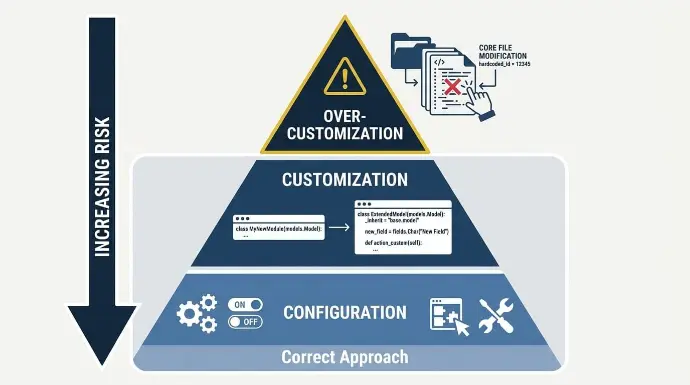
Not every modification to Odoo is a problem. The issue is knowing where the hierarchy of change was skipped.
Odoo is designed around three levels of extension. Most implementation problems trace back to jumping straight to the third:
- Configuration: Built-in settings, Odoo Studio, automated actions, and native module workflows. No code required. Upgrades stay clean because no source files are touched.
- Customization: Separate Python modules using Odoo's ORM inheritance model (_inherit on a model class) to extend or override behavior. Core files remain untouched. This is the correct approach when the configuration cannot meet the requirement.
- Over-customization: Editing Odoo's core source files directly, hardcoding database record IDs into business logic, or writing tightly coupled modules that reference internal APIs or private database structures that change between major versions.
Over-customization rarely arrives as one bad decision.
It arrives through scope creep: One reasonable custom field leads to a workaround module, which creates a dependency on an internal Odoo method, which blocks the next major version migration entirely. Panorama Consulting's 2024 ERP Report found that 51% of ERP budget overruns stem from additional technology requirements nobody originally planned for. Scope creep in customization is exactly that pattern.
6 Warning Signs Your Odoo System Has Already Gone Too Far
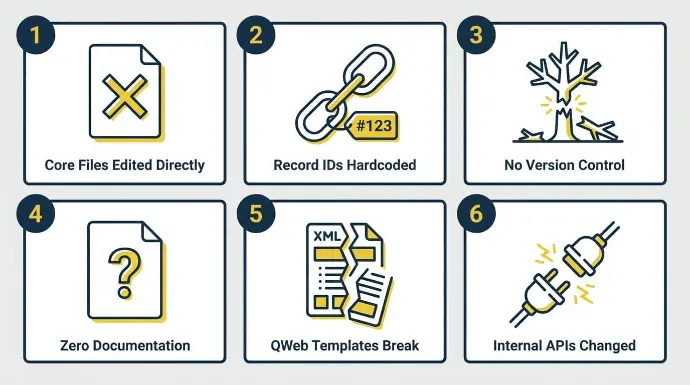
Most Odoo implementations don’t fail dramatically. They degrade quietly, one shortcut at a time, until the system is too fragile to upgrade or hand off cleanly.
These are the six technical warning signs that the line has already been crossed. These are:
Pitfall 1: Core Files Were Edited Directly
The Standish Group's CHAOS Report found that only 31% of IT projects are completed on time and on budget.
Direct core file edits are one of the most reliable ways to land in the other 69%. Gartner's research, cited by ECI Solutions, shows more than 70% of ERP implementations fail to reach their original business case goals. Systems built on edited core files cannot absorb the annual Odoo version release without custom logic disappearing silently.
- The technical problem: A developer modified files inside Odoo's core addons directory, such as /odoo/addons/sale/models/sale_order.py, instead of creating a separate custom module. The correct pattern is a custom module with its own /models/sale_order.py that declares _inherit = 'sale.order'. When inheritance is used, the custom file extends the class. When core files are edited, the changes live inside Odoo's own source.
- Why it matters: Every Odoo major version upgrade overwrites core source files. The upgrade process replaces /odoo/addons/sale/models/sale_order.py with the new version. Your changes disappear with no warning, no error, and no log entry. The business discovers the loss in production, usually through a broken workflow or a missing field.
- The fix: Every customization must exist as a separate module with its own manifest.py, using _inherit to extend core models. If direct edits exist in your codebase today, those modules need to be refactored before any upgrade work begins. A codebase scan identifies these files within a few hours.
Critical Warning: Direct core file edits are the single highest-risk item in any Odoo codebase. If your developer modified files inside Odoo's own addons directory rather than creating separate inheriting modules, this must be remediated before any upgrade is attempted. The failure mode is silent: Your customization disappears the moment Odoo overwrites the file during an upgrade. |
Pitfall 2: Record IDs Are Hardcoded in the Code
Panorama Consulting's 2024 ERP Report found that 64% of ERP projects experience budget overruns, with 35% citing scope expansion as a primary cause. Hardcoded record IDs are a direct form of hidden scope: they look like a small implementation shortcut but create silent data corruption risk that surfaces weeks after a database migration, not on the day the code was written.
- The technical problem: Specific database record IDs are written directly into business logic. For example: if self.partner_id.id == 47: apply_discount(). The integer 47 is the ID of a specific partner record in one specific database. Every Odoo database assigns its own IDs. Your development, staging, and production databases all have different ID sequences.
- Why it matters: When data is migrated, a database is restored from backup, or a new environment is provisioned, ID 47 no longer refers to the intended record. The code executes silently against the wrong data or raises a record-not-found error. Because the failure isn’t always immediately visible, it can corrupt data for weeks before anyone notices.
- The fix: All record references must use XML IDs instead of integer IDs. An XML ID is a stable string identifier defined in a data file, such as module_name.record_xml_id, that resolves correctly across all environments. Any custom module containing hardcoded integer IDs needs to be refactored before migration.
Pitfall 3: No Version Control Was Ever Used
The same Panorama Consulting 2024 data found that 39% of ERP budget overruns are caused by underestimating project staffing or organizational issues. When no version control exists, every new developer who touches the system must be paid to rediscover what the previous one built. That rediscovery cost is billed to you, on every change request, for the entire life of the implementation.
- The technical problem: No Git repository was set up. All custom module code lives on a server or in a shared folder with no commit history. There is no record of what changed, when, or why. Changes cannot be reviewed, compared, or rolled back.
- Why it matters: When a change breaks something in production, there’s no way to identify what changed or revert it cleanly. Onboarding a second developer means starting from zero context. Every change request requires re-reading the full codebase before a single line can be written.
- The fix: A Git repository with meaningful commit messages, paired with proper documentation for maintainability and handoff, is non-negotiable on any Odoo project. If no repository exists, establishing one and committing the current codebase is a prerequisite to any further development. A partner who doesn’t use Git on every project isn’t equipped to hand off work cleanly.
Pitfall 4: Zero Technical Documentation Exists
McKinsey's research into technical debt, published in Tech Debt: Reclaiming Tech Equity, found that technical debt amounts to up to 40% of a company's entire technology estate.
Around 30% of CIOs surveyed reported that more than 20% of their technology budget is diverted to resolving technical debt rather than building new capability.
In an undocumented Odoo system, that tax starts accumulating the day the first developer leaves the project. A follow-up McKinsey analysis on breaking technical debt's vicious cycle confirmed that companies pay an additional 10 to 20% on every IT initiative simply to navigate existing debt.
- The technical problem: No written record exists of what was customized, which modules were built, which models were extended, or why specific decisions were made. Business logic lives entirely in one developer's memory.
- Why it matters: Every subsequent development request begins with weeks of discovery work billed at your expense. A new partner can’t produce a reliable upgrade impact assessment without understanding what the custom modules do. The risk of a change breaking something unintended is high because the dependency map exists nowhere.
- The fix: Each custom module should have written documentation covering its purpose, the business requirement it addresses, the models it inherits from, and any non-obvious implementation decisions. Written for the next developer, not the end user. It doesn’t need to be extensive; it needs to be accurate and findable.
Pitfall 5: QWeb Report Templates Break on Minor Updates
The Standish Group's CHAOS 2020 Report found only 31% of IT projects succeed, with 50% challenged and 19% failing completely. QWeb template failures during a version upgrade are a reliable trigger for a project moving from "on track" to "challenged," because they take invoice printing, delivery slips, or purchase order documents offline at the exact moment when go-live pressure is highest.
- The technical problem: Custom QWeb templates were built by editing Odoo's core report XML files directly, or by writing templates that reference internal field paths that change between versions. A template referencing object.invoice_line_ids[0].product_id.default_code will break if Odoo renames or restructures that path in a new release, affecting invoice printing, delivery slips, purchase order documents, and custom reports. The correct approach is a custom module using t-inherit and t-xpath to extend the base template without modifying it.
- Why it matters: A routine Odoo update can take invoice printing, delivery slips, or purchase order documents offline. The error is typically a Python traceback that requires a developer to trace the broken xpath expression back to a changed internal structure. In a business shipping daily, losing invoice printing is not a minor inconvenience.
- The fix: All custom QWeb reports must be built as inheriting templates using t-inherit and t-xpath in a separate custom module. The base template is never modified. When Odoo updates the base template structure, the custom module can be adjusted independently without touching core files.
Pitfall 6: Custom Modules Reference Internal APIs That Change Between Versions
The ISACA 2024 Emerging Tech Risk Report classifies technical debt as a governance failure that creates audit gaps, documentation weaknesses, and increased security vulnerability exposure.
Custom modules built on internal Odoo APIs are a direct form of that governance failure: The debt is invisible until a version migration exposes it.
IBM research consistently shows that software maintenance consumes 50 to 75% of total software costs over a product's lifetime. For over-customized ERP systems, that ratio skews significantly higher because every upgrade requires manual remediation rather than routine testing.
- The technical problem: Custom modules call Odoo's private internal methods, import from internal utility paths, or depend on database table structures not part of Odoo's public API contract. For example, importing from openerp.tools.misc or referencing ir_rule records by their internal table structure directly. These paths and structures change between major versions. When they do, the custom module throws import errors or runtime exceptions that block the entire migration from completing.
- Why it matters: This is the failure mode that produces the largest upgrade quotes. When a module cannot load because its internal API references have been removed or renamed, the migration halts. The module must be rewritten for the new version at full development cost, often under time pressure because the upgrade was triggered by a security vulnerability or end-of-support deadline.
- The fix: Custom modules must only use Odoo's documented public API: the ORM (models.Model, fields, api decorators), the standard action and view XML structure, and the published Python APIs for mail, workflow, and reporting. If a method or import path is not in Odoo's official developer documentation, it should not appear in production code, which improves upgrade safety by keeping custom code on documented public APIs.
How Over-Customization Blocks Every Future Upgrade
Panorama Consulting's 2023 data shows 47% of ERP implementation projects experienced cost overruns.
Upgrade projects on over-customized systems account for a disproportionate share of those cases, because the architecture that seemed fine at go-live becomes the ceiling on every future change. Odoo is a flexible ERP system, and as an ERP system its modular architecture supports change when extensions are done correctly.
Only 49% of ERP implementations go live on schedule, according to Panorama's 2024 data, and timeline risk compounds significantly when the codebase cannot absorb a version migration without a rebuild.
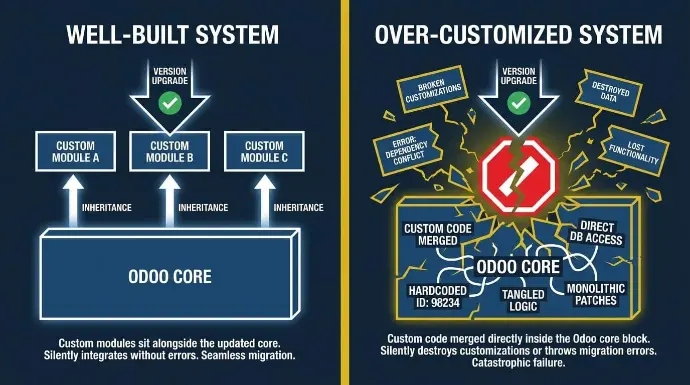
Odoo releases a major version every year. Each release modifies core files, renames internal methods, restructures database schemas, and deprecates private APIs. That’s not a flaw in the platform; it’s how it improves.
A system built with proper inheritance absorbs those changes, and disciplined modular development is what keeps custom work isolated during Odoo upgrades. Custom modules sit alongside the updated core and, in most cases, continue working with minor adjustments to any changed API hooks.
A system with direct core edits, hardcoded IDs, or private API references cannot absorb those changes. The upgrade either silently destroys customizations or throws migration errors that halt the entire process.
Most businesses only confront upgrade blockage when a security vulnerability forces immediate action. By then, the cost is at its highest, and the available time is at its shortest.
The Multi-Channel Integration Fragility Nobody Warns You About
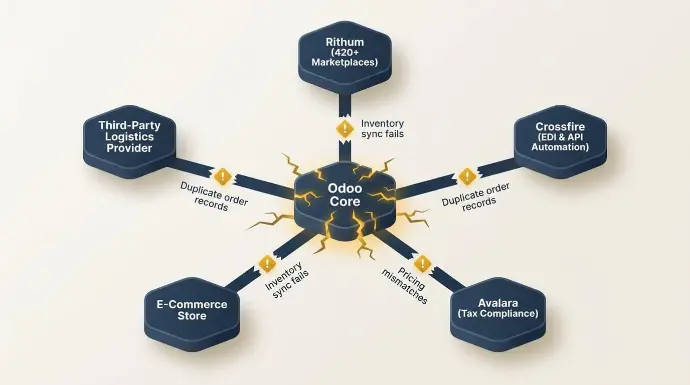
Odoo's native integration layer depends on stable internal APIs and predictable data structures. E-commerce connectors, marketplace feeds, and logistics providers all sync against those stable endpoints. Over-customization removes that stability.
When core files are edited or modules reference hardcoded database IDs, integration sync points become brittle. A change in one area cascades outward.
The symptoms in production:
- Inventory sync fails across sales channels overnight, leaving counts out of alignment between Odoo and marketplace listings
- Duplicate order records appear with no clear trigger
- Pricing mismatches surface between Odoo and connected sales channels and nobody can immediately trace them
- Connector logs show no error because the failure is in the customized Odoo layer underneath the integration, not in the connector itself
Multi-channel operators carry disproportionate risk. We connect Odoo to the third-party systems businesses depend on, including payment gateways and logistics providers, through Rithum for 420-plus marketplaces, Crossfire for EDI and API automation, and Avalara for tax compliance.
Each integration surface is another point where a fragile Odoo layer can silently fail, and the cost of third party integrations rises fast when the environment is already brittle.
A business running a direct e-commerce store, two marketplace channels, and a third-party logistics provider has four separate failure points in a poorly architected environment.
What Over-Customization Actually Costs Over Three Years
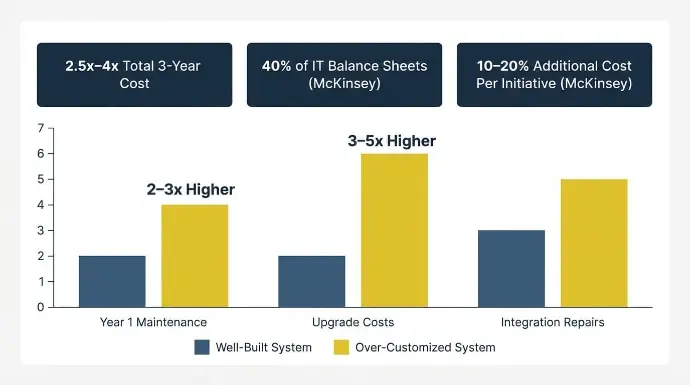
The real cost isn’t what you paid to build the system. It’s what you pay for ongoing maintenance, repair it, and eventually rebuild it, compounded across three years.
McKinsey research found that technical debt accounts for approximately 40% of IT balance sheets, and companies pay an additional 10 to 20% on every IT initiative solely to navigate legacy code and brittle dependencies. In an over-customized Odoo environment, that premium applies to every bug fix, every feature request, and every upgrade attempt.
IEEE software engineering benchmarks consistently show that over a full software lifecycle, maintenance costs total two to four times the original development investment. For a system built with poor architecture, that ratio skews to the high end quickly.
A well-built implementation costs more on day one. The initial quote for a properly architected Odoo environment runs higher than a shortcut build, but a cleaner architecture is usually more cost effective over total cost of ownership than an over-customized build. What changes is everything that comes after.
Year one maintenance on a well-built system is low.
On an over-customized one, it runs two to three times higher, driven by bug fixes and the developer time required to trace undocumented dependencies before any change can be made. Upgrade costs on a clean system are minor adjustments.
On an over-customized one, they run three to five times higher and often require partial or full rebuilds. Integration repairs are minimal when the architecture is sound. When it’s not, they’re frequent, especially across multi-channel environments where each additional sync surface is another fragile point.
Over three years, an over-customized Odoo environment typically costs 2.5 to 4 times what a well-built one would have cost over the same period. Panorama Consulting's 2024 data puts the median ERP project cost at $450,000. A 3x cost overrun on that figure isn’t an edge case. It’s what happens when architecture decisions made in week two compound across three years of maintenance and upgrade cycles.
For Almac Imports, the right architecture from the start contributed to 40% sales growth with no additional customer service headcount. For R&W Rope, a properly scoped implementation saved $33,000 annually in software costs and eliminated 40 to 60 hours of weekly administrative work.
See How Cudio Helps Almac Imports
Scope Creep as the Root Driver of Runaway Cost
Scope creep is how most businesses arrive at this cost profile without ever making a single obviously bad decision.
Each request looks reasonable in isolation: a custom field here, a workflow adjustment there, a module built to handle an edge case that the native tools almost covered. 35% of ERP budget overruns are caused by scope expansion during implementation. Over-customization is scope expansion applied to the development layer, where the debt compounds across every subsequent change request.
The technical debt accumulates quietly, and the system drifts further from a maintainable state with every addition.
The moment businesses typically discover this is when the upgrade quote arrives. What should be a routine version migration comes back priced at three times the original build cost, because the custom modules are so tightly coupled to internal structures that nothing can move forward without a rebuild.
Configuration First, Then Customization: A Practical Decision Framework
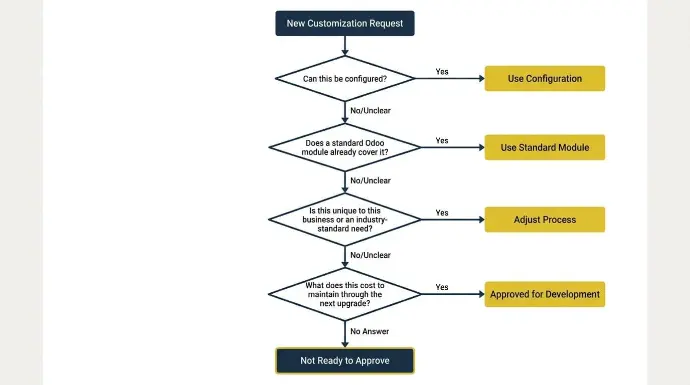
Before writing code, verify that native Odoo configuration options cannot meet the requirement. That means working through settings, Odoo Studio, automated actions, and standard modules before a developer opens a text editor.
Odoo Studio alone covers custom fields, modified views, automated actions, and approval workflows without Python or XML. Only 7% of companies use their ERP systems entirely as-is, meaning 93% need some degree of configuration or customization. The distinction is in how that customization is implemented, not whether it happens at all.
Before approving any customization request, these four questions should have clear answers:
- Can this be configured? Has the team fully explored Studio, automated actions, and native module settings before requesting development work?
- Does a standard Odoo module already cover it? Available Odoo apps from the marketplace may handle the requirement without custom code.
- Is this unique to this business or an industry-standard need? If no other business in your industry requires this, the process may need adjustment rather than the software.
- What does this cost to maintain through the next upgrade? If the developer cannot answer this, the customization is not ready to approve.
Odoo standard is a cloud-only subscription with limited integrations and starts at about $9.10 per user per month, which is why it fits simpler needs better than heavy customization.
The goal should be disciplined customization, with a documented rationale for every line of code and a clear answer to what it will cost to carry that code through the next version migration.
What a Well-Audited, Well-Built Odoo System Looks Like
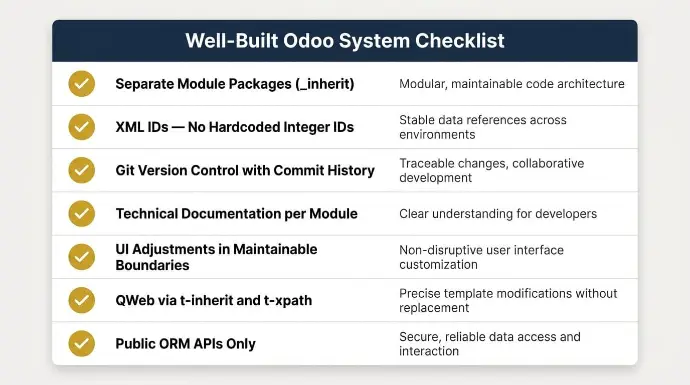
A well-built Odoo environment isn’t one with zero customization. It’s one where every customization is traceable, documented, and built to survive an upgrade, so teams can still tailor Odoo to specific business needs without sacrificing maintainability.
In practice, that means:
- Custom modules exist as separate packages with their own manifest.py, using _inherit on the model class rather than modifying core files
- All record references use XML IDs, not hardcoded integer IDs, ensuring they resolve correctly across development, staging, and production databases
- Changes are tracked in Git with meaningful commit messages, making the history readable and the codebase handable to any qualified developer
- Technical documentation covers module purpose, inherited models, and any non-obvious implementation decisions
- Limited user interface adjustments stay within maintainable module boundaries, which can improve the user experience and reduce training time
- QWeb report customizations use t-inherit and t-xpath in separate modules rather than editing core report XML
- All API references are from Odoo's public ORM and documented module APIs, not from internal utility paths or private methods that change between versions
At Cudio, we’ve completed 62 Odoo projects and more than 32 rescue engagements, many on systems built without version control, documentation, or proper inheritance architecture. Our Odoo customization services and disciplined Odoo development build every module using the ORM framework and inheritance model. If the system is already past that point, our Odoo rescue service identifies five to seven quick wins within the first week before any larger remediation begins.
Final Words
Over-customization is the most expensive mistake in Odoo ERP implementation, and it compounds silently until an upgrade or integration failure forces the issue at the worst possible moment.
Configuration-first thinking and proper inheritance aren’t optional best practices. They’re how Odoo was designed to be extended. Skipping them doesn’t save time; it borrows it.
We built Cudio because we lived through this problem ourselves before we started helping others fix it.
The questions below reflect what operators and IT leads typically ask once they recognize the warning signs described above.
Frequently Asked Questions
Managing or fixing an Odoo system often comes down to how well the original build was done. Here are quick answers to the most common questions about customizations, audits, and rescue work.
How do I find out if my Odoo developer used inheritance or edited core files?
Check the module structure directly. Proper customizations live in separate custom modules with their own manifest.py files and use _inherit = 'model.name' to extend existing models. If you see changes inside Odoo’s core /addons or /odoo directories, that indicates a core modification. A qualified technical audit can quickly confirm this across the entire codebase.
Can a badly customized Odoo system be fixed incrementally, or does it always require a full rebuild?
It depends on how deep the customization issues go. Some systems can be repaired step by step by refactoring high-risk modules first, while others with complex workflows or extensive custom development make phased repair inefficient. Others have tightly coupled dependencies, including new functionality added in tightly coupled ways, that make incremental fixes inefficient or risky. A proper audit will determine whether a phased cleanup or a full rebuild is the more practical path.
How often should an Odoo system undergo a customization audit?
A yearly audit is a good baseline, ideally before major version upgrades. For systems with frequent development or ongoing customization, every six months is more appropriate. Regular reviews help prevent technical debt from building up to the point where upgrades become expensive or unstable.
What should I look for when hiring an Odoo implementation partner?
Look for a certified Odoo partner or an experienced Odoo development company with strong engineering practices, not just sales claims. They should clearly explain how they use inheritance, how they structure modules, and how they manage Odoo upgrades safely through version control and modular architecture. Practical experience with systems similar in size and complexity to yours matters more than badges or titles.
Is Odoo Studio sufficient for most business customization needs?
Odoo Studio is a powerful tool for simple changes like fields, views, and basic automation without writing code. However, it supports workflow customization and some advanced features, but it still has limits when dealing with deeper business logic, multi-model workflows, or advanced reporting. In those cases, odoo erp customization beyond Studio and built-in settings is required to maintain stability and scalability.
What is the difference between a rescue engagement and a standard implementation?
A rescue engagement focuses on diagnosing and stabilizing an existing broken or unstable system, identifying what can be fixed versus what must be rebuilt. A standard implementation starts from a clean initial setup with full discovery before configuration begins, whether the plan stays standard or moves toward an Odoo custom build. Both approaches rely on understanding the full system before making changes, but they start from very different conditions. Custom Odoo implementations often take weeks to months to deploy because the scope must be designed, built, tested, and stabilized.