ERP system integration connects your enterprise resource planning (ERP) software with other business applications, enabling data to flow automatically across departments. If your systems feel disconnected or hard to manage, that broken data flow is the root cause.
ERP system integration connects your enterprise resource planning software with other business applications so data flows automatically across departments.
ERP consolidation goes further — it brings functions like inventory management, CRM, accounting, and supply chain management into a single system, reducing complexity. If your systems feel disconnected, that broken data flow is the root cause.
At Cudio, we help mid-market businesses simplify fragmented systems and build ERP setups that actually work in real operations.
In this guide, we cover:
- Where ERP integrations fail — and the data mapping, API, and middleware decisions that cause silent breakdowns
- When to integrate vs. consolidate — a direct framework for deciding whether to connect an external tool or replace it with a native Odoo module
- How to design for real-time data and scalability — covering REST API, webhook, iPaaS, and ESB architecture in Odoo contexts
- Practical steps to simplify your system — a 6-step ERP integration strategy you can start in under an hour
If your setup feels overly complex, this is where to start.
Get My Free ERP Assessment Today
Key Takeaways
- Most organizations overcomplicate their ERP system integration by connecting too many tools that should be consolidated. Instead of fixing fragmented business processes, they add more integrations, which increases long-term complexity.
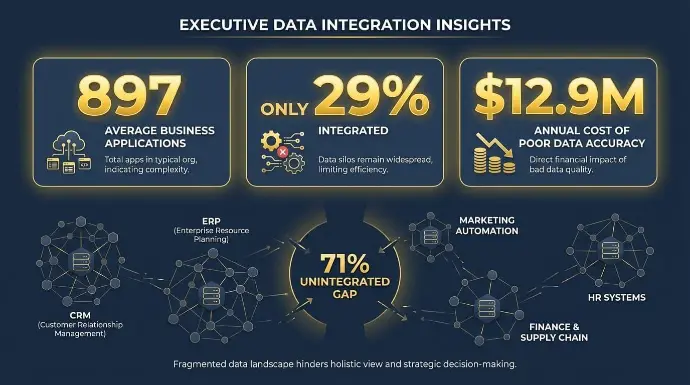
- The problem is widespread. According to the 2025 MuleSoft report, companies use an average of 897 applications, but only 29% are integrated. This creates data silos that cost businesses around $12.9M annually. Companies with strong ERP foundations also see up to 10.3x ROI from AI, compared to just 3.7x with fragmented systems.
- Platforms like Odoo ERP software address this problem by combining CRM, sales, inventory management, accounting, HR, and eCommerce into a single system. In many cases, the focus shifts from integration to deciding which external tools are truly necessary.
- Not all integration methods scale well. Point-to-point setups are prone to failure, ESBs require significant expertise, and iPaaS can introduce hidden costs. Odoo’s built-in APIs and webhooks often cover most needs without relying heavily on third-party integration platforms.
Why Does ERP Integration Feel Broken for Growing Businesses?
Growing businesses average three to five disconnected systems before they hit a data crisis — and the crisis usually arrives the night before a board meeting. One inventory valuation in your accounting software. A different number in your warehouse ERP. A third figure from your ecommerce platform.
YoYour warehouse ERP system shows one number. Your ecommerce platform shows another. Your accounting software disagrees with both — and your operations manager is six hours into a spreadsheet that only exists because your so-called integrated ERP system still requires manual data entry, CSV exports, and copy-paste work to produce numbers that actually match.
This is not an edge case. The 2025 MuleSoft Connectivity Benchmark found that organizations run an average of 897 business applications, with only 29% integrated. That gap is where the manual work lives.
The 2025 MuleSoft Connectivity Benchmark found that organizations average 897 business applications with only 29% integrated. Gartner's 2025 research quantified the cost: poor data accuracy from unintegrated ERP systems costs enterprises an average of $12.9 million per year.
The root cause is too many ERP systems competing for ownership of the same customer data, supply chain records, and general ledger postings, with no single platform designated as the operational truth.
What Does ERP System Integration Actually Mean in an Odoo Context?
ERP system integration connects a core enterprise resource planning, or ERP platform with other business applications so that key data domains stay consistent across business operations.
In Odoo, those domains include sales orders, inventory management records, customer data, product catalogs, and general ledger postings.
What makes Odoo different as an ERP solution is that many of those domains are already unified inside the platform.
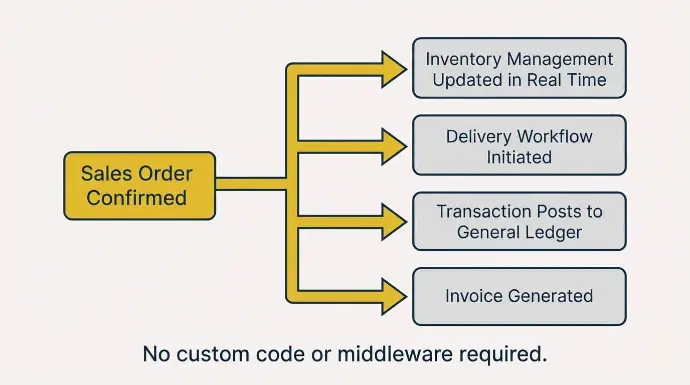
When a sales order is confirmed in Odoo, it automatically triggers a chain of connected actions:
- Inventory management records are updated in real time
- The delivery workflow is initiated
- The transaction posts to the general ledger
- An invoice is generated through automated business processes
That is not ERP integration. That is how the integrated ERP system works natively, without custom code or middleware.
The ERP system integration question in Odoo deployments concerns external ERP systems that sit outside this native flow. For most omnichannel business operations, these include:
- Shopify, BigCommerce, and other ecommerce platforms have not been replaced by Odoo's native eCommerce module
- EDI portals for B2B supply chain management transactions that Odoo's native purchase and sales flows do not cover
- Amazon, Walmart, and marketplace channels require dedicated ERP integration connector tools
- 3PL providers and external warehouse ERP systems where Odoo inventory management has not been deployed
- Business intelligence integration tools like Power BI or Snowflake that need Odoo as their primary data integration source
When a sales order is created in Shopify and needs to flow into Odoo within 200 milliseconds and be reserved against inventory management stock, that is the ERP software integration requirement.
Everything else, the accounting entries, the supply chain updates, the invoice generation, Odoo handles internally as integrated business software without any connector needed.
Is Your ERP Integration a Bandage or a Real Solution?
Most businesses treat ERP integration like a wiring problem. Every new tool gets connected with scripts or connectors, creating a fragile web of dependencies. Over time, this leads to sync failures, duplicate data, and constant maintenance.
The better approach is consolidation. Before integrating another system, ask whether that function already exists inside your ERP. With platforms like Odoo ERP software, core areas like customer relationship management (CRM), accounting, inventory management, and HR are already built in.
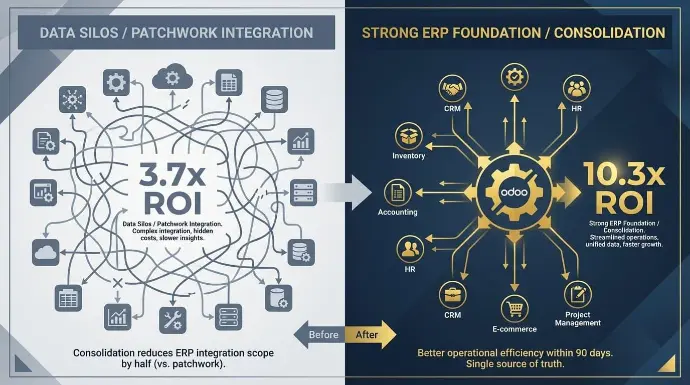
The business impact is concrete. Research from Integrate.io confirms that companies with strong ERP integration foundations achieve 10.3x ROI from AI investments, compared with 3.7x for those with data silos. For Odoo users, the fastest path to that foundation is to consolidate first, rather than adding more connectors.
At Cudio, the first thing we do with a new Odoo client is run a system inventory. In most cases, we find three to five business applications that they are paying for separately that Odoo ERP software already handles. Consolidating those reduces the ERP integration scope by half and typically delivers better operational efficiency within 90 days.
Get My Free ERP Assessment Today
Quick Answer: Should You Integrate or Consolidate in Odoo?
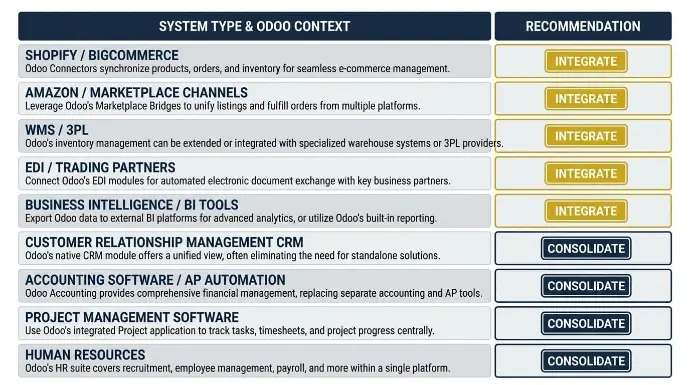
Consolidate into Odoo when the function overlaps with a native Odoo module.
- Basic customer relationship management
- AP automation in accounting software
- Project management software
- Human resource management, leave tracking, and
- Standard purchasing workflows
These are all areas where Odoo's integrated ERP solutions frequently replace standalone ERP systems at no additional license cost, eliminating manual data entry and data silos.
Integrate with Odoo when the external ERP system does something Odoo genuinely cannot replicate.
Your Amazon marketplace channel, your specialized 3PL with its own supply chain management system, your EDI trading partner network, and your business intelligence integration platform all typically remain external and connect to Odoo via dedicated ERP integration methods.
System Type | Recommendation | Odoo Angle |
Shopify / BigCommerce (ecommerce platforms) | Integrate or Replace | Odoo eCommerce handles customer and product data natively |
Amazon / Marketplace Channels | Integrate | Requires a dedicated connector; Odoo does not replace marketplaces |
WMS / 3PL (supply chain management) | Integrate | Odoo inventory management handles most WMS needs natively |
EDI / Trading Partners | Integrate | Odoo supports EDI via native B2B flows or middleware |
Business Intelligence Integration / BI Tools | Integrate | Odoo feeds Spreadsheet, Power BI, or Snowflake as a data source |
Customer Relationship Management CRM | Consolidate | Odoo CRM covers pipeline, leads, and customer data natively |
Accounting Software / AP Automation | Consolidate | Odoo Accounting handles vendor bills and eliminates manual data entry |
Project Management Software | Consolidate | The Odoo Project covers tasks, timesheets, and milestones |
Human Resources / Human Resource Management | Consolidate | Odoo HR handles leave, expenses, payroll, and recruitment |
One practical note on ecommerce ERP integration: Odoo's native eCommerce module connects directly to Odoo inventory management, accounting, and customer relationship management (CRM) in real time.
For businesses currently running Shopify with an Odoo connector, evaluate whether the Odoo website and eCommerce modules can replace external ecommerce platforms entirely, eliminating the connector and its associated manual data entry overhead.
ERP Integration Methods: What Works With Odoo ERP Systems
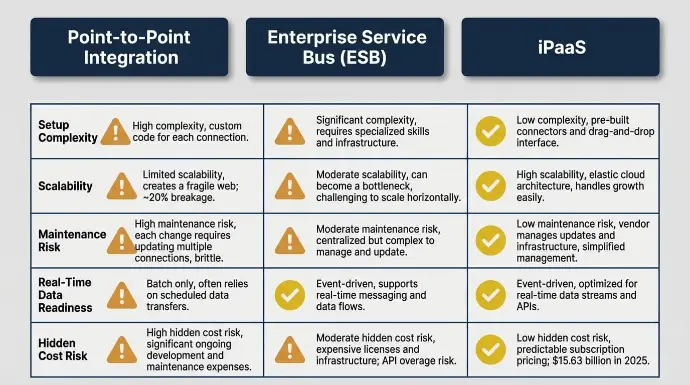
Odoo supports three main ERP integration methods. Here is how they apply specifically to Odoo ERP software deployments across different business operations scenarios.
Dimension | Point to Point Integration | Enterprise Service Bus ESB | iPaaS |
Setup Complexity | Low | High | Medium |
Scalability (3+ ERP systems) | Poor | High | High |
Maintenance Risk Per Update | ~20% breakage | Medium | Low |
Real Time Data Readiness | Batch only | Depends on config | Event-driven |
Hidden Cost Risk | Low upfront | License and technical expertise | API overage risk |
Point to Point Integration for Odoo ERP Systems
Point-to-point integration connects Odoo directly to one external ERP system using custom code, native connectors, or Odoo's built-in REST API. This works for small stacks with two or three external business applications and a technically capable team.
The limitations surface quickly: Odoo releases a major version annually, and each release carries roughly a 20% chance that a point-to-point integration relying on undocumented endpoints or direct database access will break, requiring custom code fixes before business operations resume normally.
Using Odoo's versioned API endpoints rather than direct database queries is the minimum requirement for any point-to-point integration that needs to survive an upgrade cycle. Data silos from point-to-point integration approaches compound over time across business functions and undermine the very purpose of enterprise resource planning (ERP) systems.
Enterprise Service Bus for Odoo ERP Integration
Enterprise service bus architecture makes sense for Odoo ERP systems in complex manufacturing or distribution environments where Odoo needs to share data with on-premise MES tools, legacy supply chain management systems, or EDI hubs.
The enterprise service bus (ESB) provides centralized data mapping, error handling, and governance that ad-hoc scripts cannot.
However, an enterprise service bus requires specialized technical expertise and significant upfront investment.
iPaaS and Cloud-Native ERP Software Integration
Integration Platform as a Service delivers cloud-based ERP software integration to Odoo using pre-built connectors, low-code orchestration, and centralized monitoring. The global integration platform market was valued at $15.63 billion in 2025 and is projected to reach $19.15 billion in 2026.
For Odoo specifically, iPaaS platforms such as Celigo, Jitterbit, and Boomi offer pre-built Odoo connectors for sales orders, inventory management, customer data, and products.
Gartner forecasts that 40% of enterprise resource planning ERP business applications will be integrated with task-specific AI agents by the end of 2026, making real-time data infrastructure the defining ERP integration strategy investment of this period.
Odoo ERP Integration Domains: What Each Connection Must Do
This section focuses on Odoo-specific scenarios in which ERP integration strategy decisions have the greatest impact on business performance. Successful ERP integration achieves a 49% improvement in business process efficiency. In Odoo deployments, that operational efficiency gain shows up first in order processing and data accuracy.
eCommerce Platforms and Marketplace ERP Integration
For marketplace channels like Amazon and Walmart, dedicated ERP integration tools are required.
The key requirement is that marketplace orders flow into Odoo in near real time, update the same inventory management pool as all other sales channels, and generate the correct accounting entries automatically upon confirmation to maintain data accuracy across ERP systems.
For ecommerce platforms like Shopify or BigCommerce, evaluate whether Odoo's native eCommerce module can replace the external tool entirely, eliminating the ERP integration and its manual data entry overhead, before building a connector.
Customer Relationship Management CRM and Sales ERP Integration
Odoo's customer relationship management module covers the full pipeline: customer data, lead scoring, email campaigns, call logging, and activity tracking.
For many mid-market businesses, this eliminates the need for separate CRM systems entirely, along with the ERP integration challenges that come from keeping customer data synchronized across disparate systems.
Where external CRM systems remain, CRM-ERP integration must keep customer data, credit limits, and invoice status synchronized bidirectionally so marketing and sales teams see accurate data without switching between business applications.
Inventory Management, Supply Chain, and 3PL ERP Integration
Odoo inventory management handles multi-warehouse supply chain management, lot and serial number tracking, putaway rules, barcode scanning, and automated reordering natively.
For businesses running a separate warehouse management system alongside Odoo, assess whether Odoo's inventory management capabilities can replace it.
For 3PL partners, bidirectional ERP software integration is required: real-time stock levels flow out to the 3PL, and pick, pack, and ship confirmations flow back into Odoo to update inventory management and maintain seamless data flow and data integrity across the supply chain.
Business Intelligence Integration and Reporting
For organizations requiring advanced business intelligence integration in Power BI, Tableau, or Snowflake, Odoo serves as the primary data integration source.
Odoo Spreadsheet provides a native integration between Odoo ERP data and spreadsheet-style analysis, meeting most mid-market business needs.
The key requirement for any business intelligence integration is data accuracy: every KPI should trace back to a transaction in the Odoo ERP system, not to a manual data entry export or a calculation that bypasses the integrated ERP system.
What Are the Biggest Odoo ERP Integration Risks?
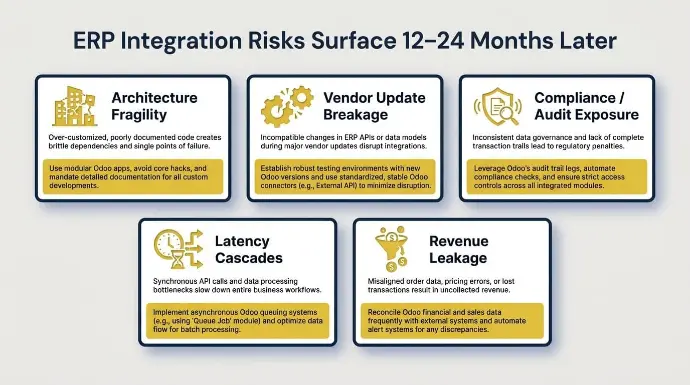
ERP integration challenges in Odoo deployments rarely surface at go-live. They surface 12-24 months later. Without proper governance, ERP integration methods introduce new risks to business operations. Knowing the failure modes in advance improves business performance and reduces the likelihood of encountering them.
Risk Category | Cause | Odoo-Specific Mitigation |
Architecture fragility | Point-to-point integration scripts break on Odoo upgrades | Use Odoo's versioned REST API; avoid direct database writes |
Vendor update breakage | Annual Odoo releases cause custom code to drift | Test on Odoo.sh staging branches before every upgrade |
Compliance/audit exposure | Fragmented GL data across Odoo and external accounting software | Consolidate into Odoo Accounting; use lock dates for data integrity |
Latency cascades | Batch syncs between Odoo and ecommerce platforms cause overselling | Switch to event-driven webhooks for seamless data flow under 200ms |
Revenue leakage | Manual data entry between Odoo and standalone ERP systems | Activate Odoo automated invoicing from confirmed sales orders |
Red flags specific to Odoo ERP integration landscapes: custom code that bypasses Odoo's ORM and breaks on every major ERP system version; ERP integration methods that duplicate customer data between Odoo and an external system without a clear data integrity designation; fiscal positions that differ between Odoo ERP software and external accounting software creating data accuracy gaps; and spreadsheet bridges maintained by one person that translate between Odoo exports and the format required by external business management software.
Get My Free ERP Assessment Today
How Do You Build an Odoo ERP Integration Strategy in 2026?
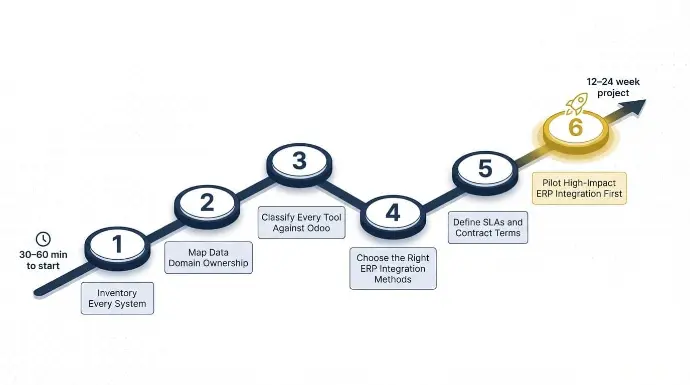
This ERP implementation roadmap starts with 30-60 minutes of initial work and expands into a 12-24 week project if you proceed.
Step 1: Inventory Every System Touching Your Business Operations
List every ERP system that touches orders, inventory management, supply chain, customer data, and general ledger across your business operations. Note the owner, annual cost, and the manual data entry currently required to keep it synchronized with the Odoo ERP software. Most operators discover that Odoo already covers at least two or three of the business applications on their list.
Step 2: Map Data Domain Ownership Across ERP Systems
Identify which ERP system is the current master for each data type. In a typical mid-market Odoo deployment, customer data often lives in both Odoo and a CRM system with no clear data-mapping direction, and inventory management is split between Odoo and a warehouse tool. Document where data silos appear and how they are resolved today, usually through manual data entry by one person.
Step 3: Classify Every Tool Against Odoo's Native Business Functions
For each external business application, ask: Does Odoo already handle this? If yes, the tool is a consolidation candidate. Reserve the integrate category for business applications that genuinely do something Odoo cannot replicate, such as marketplace channels, specialized 3PL supply chain management, enterprise asset management tools, or EDI hubs.
Step 4: Choose the Right ERP Integration Methods
For one or two external connections, Odoo's native REST API with custom code may be sufficient. For three or more active ERP integration connections, or for environments where Odoo version upgrades need to be managed without breaking external business applications, a managed integration platform with pre-built Odoo connectors significantly reduces the long-term maintenance of ERP systems.
Step 5: Define SLAs and Contract Terms Before Signing
For any external ERP integration that touches Odoo's order, inventory management, or sensitive data: specify API uptime of 99.9% or higher, real-time data response times under 200ms for seamless data flow, disclosed API call caps with sample monthly volume calculations, and change notification requirements. Vague unlimited usage language in integration platform contracts is rarely unlimited in practice.
Step 6: Pilot High-Impact ERP Integration First
Start with the ERP integration that causes the most damage to business operations when it fails, typically, ecommerce erp integration to Odoo or Odoo to 3PL supply chain management. Stabilize before adding lower-risk connections such as business intelligence integration feeds or secondary marketplace channels.
What Happens When Businesses Outgrow Patchwork ERP Integration?
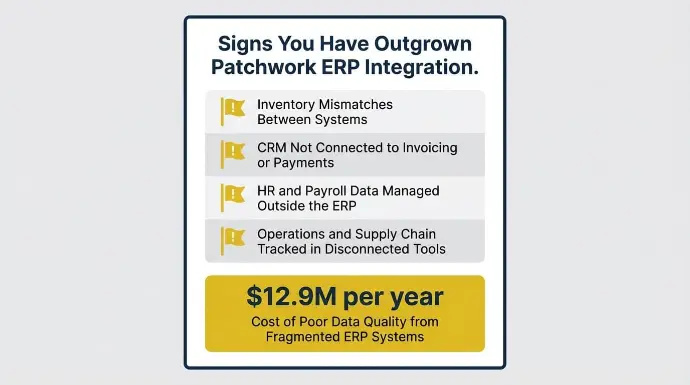
Sometimes the issue is not missing integrations. It is that Odoo has only been implemented partially, while the rest of the business still runs on separate systems.
A common sign is when the month-end becomes a heavy manual process. If teams rely on spreadsheets, duplicate data entry, or cannot automate workflows, the problem is not integration. It is that the ERP is not covering enough of the business.
Other clear signals include:
- Inventory mismatches between systems
- Sales teams using a CRM that is not connected to invoicing or payments
- HR and payroll data managed outside the ERP
- Operations and supply chain are tracked in disconnected tools
This pattern is common across growing businesses. Odoo gets deployed for accounting first — but CRM, inventory, and project management stay in separate tools. Over time, point-to-point integrations multiply, data synchronization breaks down, and teams absorb the cost in manual reconciliation hours.
Gartner's research puts a number on it: poor data quality from fragmented ERP systems costs enterprises an average of $12.9 million per year. The integrations were never the fix — they were the delay.
The solution is usually not adding more connectors. It is expanding Odoo to cover these core functions, creating a single system that actually supports the entire business.
Decision Checklist: Integrate or Consolidate in Your Odoo ERP System?
Ask yourself these questions to clarify your ERP integration strategy:
- Is this tool doing something that an Odoo module already covers across your business functions, even partially?
- How many manual data entry corrections per week are required to keep this tool synchronized with Odoo ERP systems?
- Are inventory management discrepancies appearing at month-end that trace back to customer and product data living outside Odoo?
- Does your customer service software connect to live Odoo order history, or do teams need to switch between ERP systems?
- Is your current ERP integration stack consuming more in maintenance and integration platform licensing than the equivalent Odoo module would cost?
- Are AI features in Odoo underperforming because the real-time data flowing into them is incomplete or delayed by batch ERP integration syncs, creating data silos?
If most answers point to data silos, manual data entry workarounds, and rising maintenance costs, expanding the Odoo ERP implementation to cover more business functions is the path to better business performance. If your core business operations are well-managed in Odoo and a handful of specialized ERP systems genuinely need connecting, a well-architected integration platform deployment is the right investment for successful ERP integration.
Conclusion: The Right ERP Integration Strategy for Your Growth Stage
The real question is simple: are you using Odoo as your core ERP platform, or just adding it to an already fragmented stack?
Integration still matters for systems Odoo cannot replace, like marketplace channels, 3PL logistics, or external data platforms. But for core functions such as CRM, accounting, HR, and operations, adding more tools often creates unnecessary complexity. This is where consolidation delivers more value than more connections.
At Cudio, we help businesses simplify their ERP environment by removing redundant systems, strengthening what belongs inside Odoo, and integrating only what truly needs to stay external. The result is a cleaner, more reliable setup that actually supports growth.
Get My Free ERP Assessment Today
FAQs
Below are practical answers to common questions about ERP integration challenges and ERP integration methods in Odoo deployments in 2025-2026.
What are the benefits of ERP integration in an Odoo Deployment?
The primary benefit of ERP integration in Odoo is eliminating the data silos that force teams into manual reconciliation. When sales orders, inventory, and accounting share one data flow, reporting becomes real-time instead of end-of-month. Businesses that complete ERP integration see an average 49% improvement in business process efficiency. For Odoo deployments specifically, this often means retiring 2-3 standalone tools that Odoo already covers natively.
How much does Odoo ERP integration typically cost in 2026?
Odoo ERP integration costs vary based on complexity. A simple two-system setup can cost in the low five figures, while larger environments with multiple systems can reach six figures. You should also plan for ongoing costs, such as support and updates. Most businesses allocate an extra 15–25% for post-go-live improvements and maintenance.
Should I use Odoo's native API or a third-party integration platform?
If you only have one or two integrations, Odoo’s native API is usually enough. It is faster and more cost-effective for smaller setups. For more complex environments with multiple systems, a third-party platform reduces maintenance effort. The right choice depends on your scale and internal technical capability.
How do I reduce the risk of Odoo ERP integrations breaking during version upgrades?
To reduce risk, avoid direct database customizations and use stable API connections. Always test integrations in a staging environment before upgrading. Monitoring key data flows, such as orders and inventory, helps catch issues early. A structured upgrade process is the best way to protect your operations.