



A typical ERP system consists of five core architectural levels: the Presentation Layer (UI), Application Layer (Business Logic), Data Layer (Database), Integration Layer, and Reporting/Analytics Layer.
This architecture ensures seamless data flow between critical functions like finance, HR, and inventory.
This guide explores these layers, modern AI enhancements, and how to choose between Tier 1 and Tier 2 systems. Choosing the wrong ERP tier is one of the most costly mistakes a growing business can make — find the right ERP tier for your business with a guided assessment from our ERP architects.
Key Takeaways
- A typical ERP system includes multiple architectural layers that support automation, data flow, and alignment with current business processes.
- Odoo, a modular ERP platform, allows each ERP module, such as finance, HR, and inventory, to be configured based on detailed system requirements.
- Selecting the right ERP system means evaluating deployment models, integration options, and how well the platform supports long-term software development and scalability.
- A successful new ERP system implementation depends on clean organization's data, clearly defined workflows, and structured ongoing support for updates, training, and risk management.
What Are the Core Architectural Layers of a Typical ERP System?
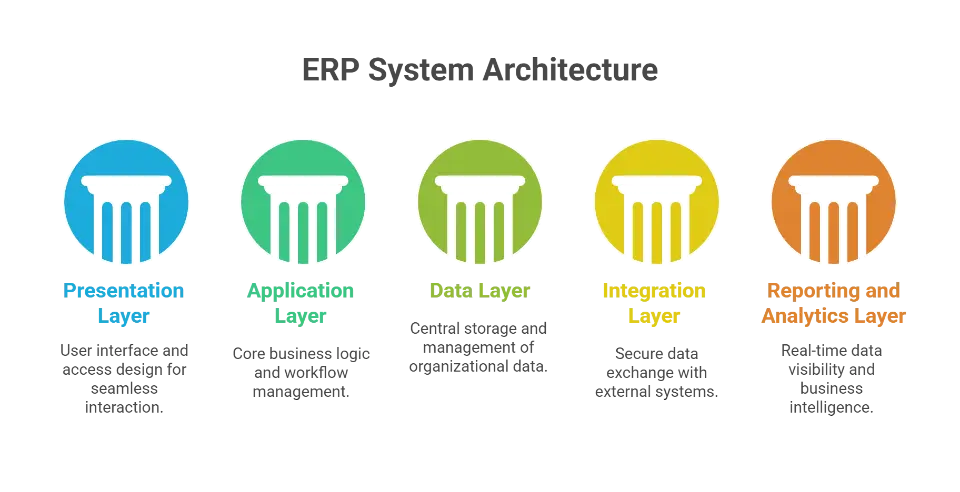
According to a 2020 review on ERP Systems Architecture, modern platforms operate through distinct layers that separate user interface, logic, and data storage to ensure scalability. These layers form the foundation of enterprise resource planning, helping companies streamline operations and scale with confidence.
Presentation Layer (User Access and Interface Design)
The Presentation Layer is the interface where end-users input data and view system outputs. In modern platforms like Odoo, this layer utilizes web technologies to render dashboards, navigation menus, and forms that adapt dynamically to user roles. A well-optimized presentation layer is critical for reducing training time and ensuring high user adoption rates.
Odoo sits firmly in the Tier 2 category but scales well into enterprise territory — see how Cudio deploys Odoo ERP solutions across industries and business sizes for businesses with complex, multi-entity needs.
User permissions, custom views, and mobile responsiveness can all be adjusted during setup. This layer also uses QWeb templates for flexible UI customization, particularly helpful in manufacturing and warehouse environments.
Application Layer (Business Logic and Operational Workflows)
The Application Layer executes the core business logic and rules that govern organizational workflows. Odoo’s modular design allows logic to be configured in areas like inventory, procurement, sales, and manufacturing. Automations, approval chains, and validation rules ensure process consistency.
Here, Cudio often maps real-world workflows into Odoo’s logic engine by customizing server actions, automating process triggers, and aligning module behavior with actual operational needs across departments.
Talk to Cudio About Workflow Design
Data Layer (System Storage and Database Management)
The Data Layer serves as the central repository for all organizational records, including transactions, inventory counts, and financial ledgers. Systems like Odoo utilize robust relational database management systems (RDBMS) such as PostgreSQL to ensure structured, reliable storage for high-volume queries. Proper indexing and management at this level are essential to prevent system latency as historical data grows.
Data health is critical. Index optimization, structured ETL pipelines, and pre-go-live data validation are best practices at this level.
Integration Layer (Connecting External Systems)
The Integration Layer manages the secure exchange of data between the ERP core and external third-party applications. Odoo executes this through RESTful APIs and middleware that sync critical datasets—such as tax rates from Avalara or orders from Shopify—in real-time. A dedicated integration layer prevents data silos and ensures the ERP remains the single source of truth.
To reduce errors and improve sync reliability, Cudio creates tailored integration frameworks using REST APIs, middleware routing, and data transformation rules that reflect actual system dependencies and sync intervals.
Reporting and Analytics Layer (Data Visibility and Business Intelligence)
Data becomes actionable at this layer. Odoo includes real-time dashboards, pivot views, and custom reports to track KPIs across departments.
Advanced reporting setups often combine Odoo data with external tools like Power BI, allowing teams to gain predictive insights, monitor inventory trends, and react to shifting business needs based on live data streams.
How Do Modern Enhancements Expand ERP Architecture?
While a typical ERP system includes core layers like application logic and databases, modern solutions like Odoo extend functionality with AI, real-time integrations, and mobile readiness. These enhancements support more agile ERP implementations, enabling systems to respond to changing business demands without needing a full rebuild.
Understanding these advanced layers is essential when selecting or optimizing a new ERP system, especially one designed to scale with evolving business processes.
Integration and Extension Layer
This layer allows the ERP to communicate with existing business applications such as tax platforms, e-commerce channels, and logistics providers. In Odoo, this is handled through RESTful APIs, XML-RPC endpoints, and connector modules that can sync product data, customer details, and order statuses automatically.
When implemented properly, this layer supports:
- Real-time data exchange through scheduled sync jobs and webhooks
- Mapping between external fields and internal Odoo models
- OAuth2 authentication for secure third-party access
- Integration with platforms like Shopify, Avalara, or 3PL providers
Cudio designs and deploys robust integration frameworks for companies adopting Odoo. This includes middleware logic to match external data formats with Odoo’s structure, syncing high-volume inventory management transactions, and configuring fallback protocols to maintain data consistency.
Ask Cudio About Integration Setup
AI and Machine Learning Enhancements
AI features in Odoo include smart inventory forecasting, automated lead scoring, dynamic task prioritization, and predictive maintenance alerts. These rely on accurate historical data and consistent business logic across workflows.
Common use cases involve:
- Forecasting demand using sales trends from the sale.order model
- Auto-adjusting stock reorder rules in the stock.rule module
- Identifying workflow bottlenecks in the project.task pipeline
To unlock these benefits, organizations must first normalize their data and optimize logic flows. Cudio supports this by cleaning and aligning historical data during data migration, developing Python-based logic for AI triggers, and connecting ERP datasets to external machine learning tools.
Mobile and IoT Readiness
ERP systems now support device-level inputs from field workers, warehouse scanners, or production equipment. Odoo enables mobile operations through responsive views, barcode apps, and custom modules that connect to IoT networks.
A mobile-ready ERP setup includes:
- Custom screens for handheld devices using QWeb or Owl framework
- MQTT-based connections for streaming IoT data
- Event-driven updates pushed directly into the database
Cudio builds tailored mobile configurations for companies managing large inventories or remote operations. This includes creating offline-capable interfaces, syncing mobile inputs with core modules, and deploying responsive dashboards for field teams. Whether implementing a cloud-based ERP system or maintaining an on-premises ERP system, these enhancements are aligned with your detailed system requirements.
Schedule a Mobile Integration Call
How Are ERP Systems Classified by Tier?
Vendors of ERP systems are commonly grouped into tiers based on their platform’s scalability, depth of features, and fit for business size and complexity. Understanding how a typical ERP system includes different functions depending on its tier helps organizations make informed decisions during ERP selection.
Tier 1 ERP Systems
A 2024 systematic review of ERP integration defines Tier 1 systems as solutions designed for large-scale enterprises that require multi-entity support, advanced compliance, and high user volume capacity.
These solutions support high volumes of users, advanced compliance requirements, and deeply layered business processes.
A robust Tier 1 ERP solution must support flexible deployment (including on-premises ERP systems and cloud-based ERP systems), multi-entity data structures, and complex business logic.
Examples: SAP S/4HANA, Oracle Cloud ERP, Microsoft Dynamics 365, and Odoo Enterprise (when implemented at scale)
Although traditionally placed in Tier 2, Odoo has increasingly become a Tier 1 alternative when customized and deployed for large enterprises. Its modular architecture allows organizations to build a distributed system with unified data, integrated workflows, and enterprise-level controls. Multi-company setups, advanced intercompany accounting, and granular role-based access controls make it suitable for global operations.
With the right implementation strategy, Odoo supports:
- Multi-company, multi-currency, and multi-language environments
- Intercompany consolidation and cross-entity approvals
- Enterprise-grade inventory management across multiple warehouses
- Custom-built modules for manufacturing, financial consolidation, or region-specific compliance
- Tight integration with existing business applications and external APIs
Cudio delivers this at scale by architecting Odoo for Tier 1 use cases. Through Python-based module development, PostgreSQL optimization, and detailed configuration of Odoo's underlying XML views and server actions, Cudio builds Tier 1 ERP systems that rival traditional enterprise platforms.
Tier 2 ERP Systems
Tier 2 platforms cater to mid-sized organizations that have moderate to high operational complexity but limited IT resources. These systems often include core features like finance, human resources, and procurement but are easier to implement than Tier 1 solutions.
Odoo can still serve as a Tier 2 solution, especially in its out-of-the-box form. Its core apps support essential workflows, and with optional development, can be scaled up gradually based on company growth. The strength of Odoo lies in its ability to grow from Tier 2 to Tier 1 as business requirements evolve.
Tier 3 ERP Systems
Tier 3 ERPs are designed for small businesses with narrow scopes. These systems are easy to set up and cost-effective but may lack the flexibility and depth needed for complex industries.
They offer:
- Basic reporting and limited automation
- Faster deployment but minimal customization
- Often lack structured data migration workflows or integration options
Businesses outgrowing Tier 3 software often move directly to Odoo due to its scalability and open-source flexibility.
What Is a Two-Tier ERP Strategy?
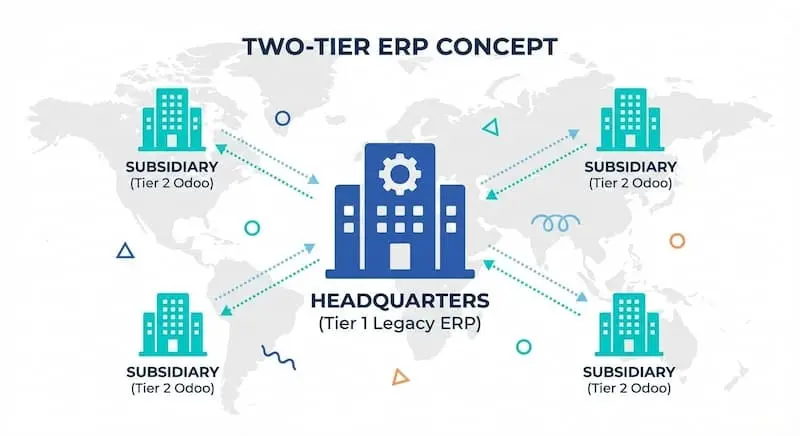
A two-tier ERP approach uses two systems within one organization: a centralized ERP for corporate-level functions and a separate ERP for business units, subsidiaries, or regional teams. This strategy is effective for large enterprises that need to maintain standardization at the top while allowing operational flexibility at the local level.
In many cases, companies retain a legacy on-premises ERP system for global finance or compliance, while deploying a more agile cloud-based ERP system like Odoo at the subsidiary level.
Why Odoo Works for Two-Tier ERP
Odoo's modular and API-friendly architecture makes it a strong fit for two-tier ERP setups. Subsidiaries can use Odoo for inventory management, local accounting, and human resources, while maintaining integration with the corporate Tier 1 system.
With built-in connectors and third-party integrations, Odoo can sync essential data like invoices, purchase orders, and performance metrics to the primary system in near real time.
Some key advantages of using Odoo in a two-tier configuration include:
- Support for multiple legal entities with configurable rules
- Ability to localize tax logic, currencies, and compliance workflows
- Lightweight deployment and quick configuration for new business units
- Centralized or independent data migration processes as needed
How Cudio Supports Two-Tier ERP Models
For businesses adopting Odoo in a two-tier structure, Cudio helps align local setups with enterprise standards by building multi-tenant environments, automating intercompany syncs, and defining structured data migration pipelines between systems. Cudio also ensures each instance complies with defining detailed system requirements, such as regional reporting formats, localized charts of accounts, and operational workflows.
Which Functional Modules Make Up the Application Layer?
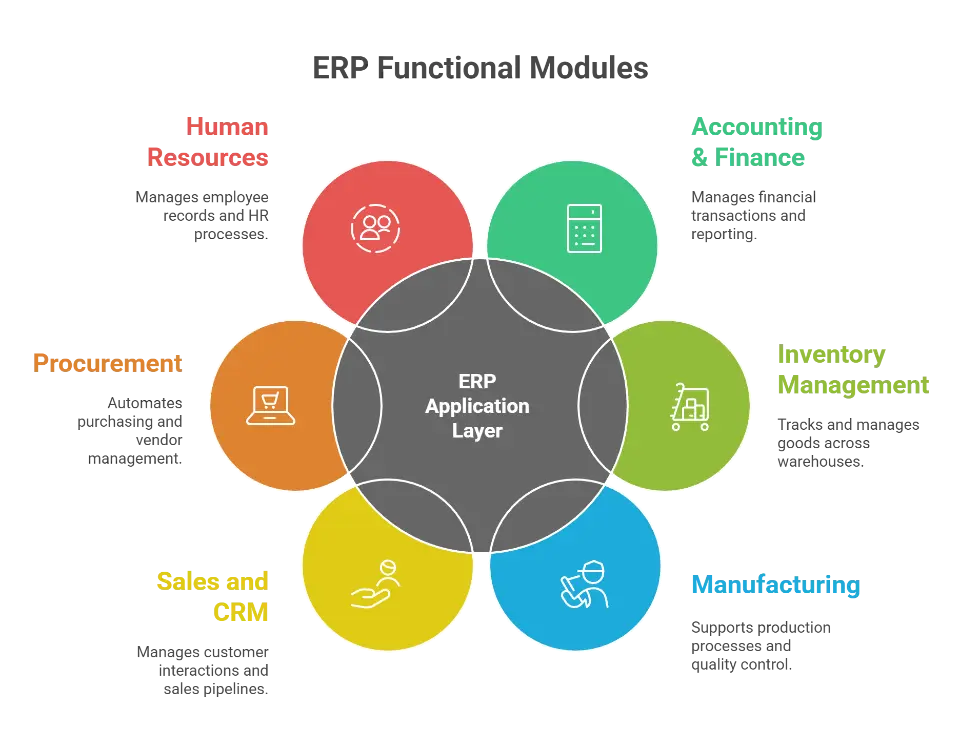
A standard ERP architecture integrates specific functional modules—including Finance, Procurement, and Manufacturing—to automate workflows and centralize data. Each ERP module focuses on a specific function, such as finance, procurement, inventory, or workforce management.
Together, these modules form a centralized platform to align and automate current business processes across departments.
Common ERP Modules and Their Functions
Using Odoo as an example, here’s how functional modules work:
- Accounting & Finance: Handles payables, receivables, asset management, and multi-currency support. Odoo’s Finance app includes automated reconciliation, audit trails, and real-time financial statements.
- Inventory Management: Tracks goods across multiple warehouses. Odoo provides automated reordering rules, barcode scanning, FIFO/LIFO cost methods, and real-time stock visibility.
- Manufacturing: Supports bill of materials (BoMs), work orders, routings, and maintenance. Odoo’s Manufacturing module allows shop floor control and integrates with quality and PLM.
- Sales and CRM: Manages leads, quotations, customer relationships, and sales pipeline analytics. All data connects directly to invoicing and fulfillment modules.
- Procurement: Automates purchase workflows, vendor management, and RFQs. Odoo links procurement directly to inventory levels and sales forecasts.
- Human Resources: Offers modules for employee records, time tracking, contracts, leaves, and appraisals. With built-in payroll integrations and self-service portals, Odoo supports HR operations in both central and remote teams.
Each ERP module shares data through a single database, helping eliminate redundancy and enable consistent, accurate decision-making across teams.
How Is Security Managed Across ERP Levels?
In a typical ERP system, access control is critical for protecting sensitive data and ensuring users only interact with information relevant to their job roles.
Role-based access control (RBAC) is the framework most systems use to enforce these restrictions. In Odoo, this is managed through user groups, access rights, and record rules, ensuring users across departments only see and modify what they’re authorized to.
Odoo applies layered security at both the application level and the data model level. Here's how it works:
- User Groups: Define access to menus, views, and actions. For example, HR managers may have access to payroll data, while general employees see only their own records.
- Access Rights: Control create, read, write, and delete permissions for each model (e.g., products, invoices, timesheets).
- Record Rules: Define which data records users can interact with. For instance, a regional sales manager can only view orders from their assigned territory.
- API and External Access: When Odoo is integrated with existing business applications, tokens and scoped permissions govern how external systems interact with the ERP database.
Odoo’s modular architecture means each ERP module has its own security rules, but these can be centrally managed and adapted during configuration.
ERP Implementation Timeline and Phases
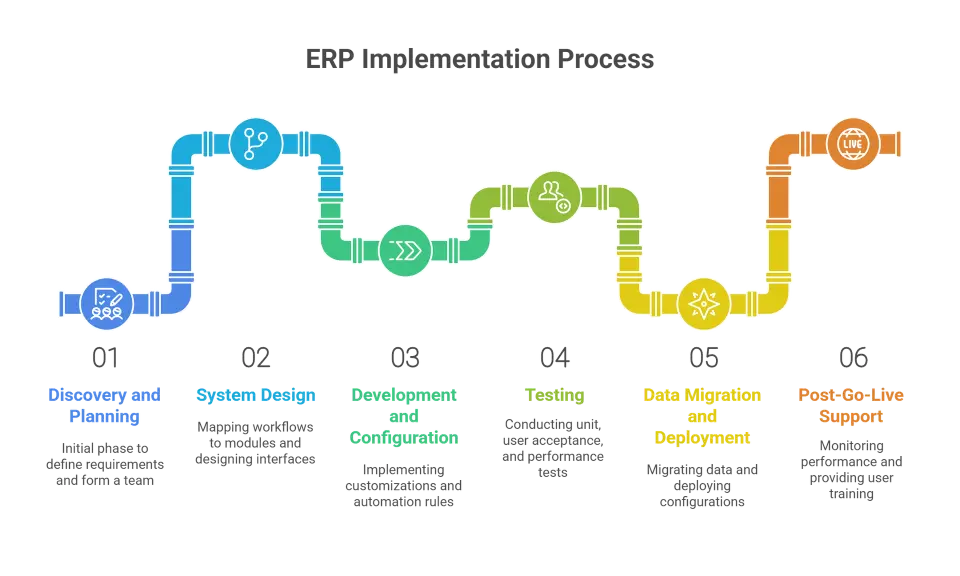
Implementing a new ERP system involves a structured, multi-phase process that ensures business continuity while upgrading technology. A typical ERP system includes six major phases: planning, design, development, testing, deployment, and post-launch support.
In systems like Odoo, this timeline can vary depending on system complexity, the number of integrated modules, and the scope of customization.
Phases of ERP Implementation
- Discovery and Planning: This initial phase includes defining detailed system requirements, forming a project team, and setting timelines. In Odoo, this often involves choosing the right modules (e.g., inventory, finance, HR) and determining whether to use a cloud-based ERP system or an on-premises ERP system.
- System Design: Functional workflows are mapped to Odoo modules. This includes decisions on business logic, data flow, and user access layers. Design also covers user interfaces, report structures, and integration points with existing business applications.
- Development and Configuration: Customizations, server actions, and automation rules are implemented. Odoo’s open architecture allows specific configurations for manufacturing lines, sales pipelines, or multi-warehouse inventory management.
- Testing: Includes unit testing, user acceptance testing, and performance validation. Sample data sets are imported to simulate real operations across finance, inventory, and procurement modules.
- Data Migration and Deployment: Legacy data is migrated into Odoo. Cudio uses structured ETL processes and SQL scripts to move data cleanly and verify accuracy across models. Configurations are then moved to production.
- Post-Go-Live Support: After deployment, businesses monitor performance, correct any configuration gaps, and provide user training. Odoo's flexibility makes it easier to adjust workflows post-launch.
A successful implementation hinges on following each step carefully while adapting the system to match real-world business requirements.
How Does Deployment Impact ERP Architecture?
Choosing between a cloud-based ERP system and an on-premises ERP system affects performance, deployment speed, infrastructure, and long-term scalability. Odoo supports both models, allowing businesses to match deployment strategy to internal IT capabilities and compliance needs.
Odoo’s Cloud Deployment
Odoo Online and Odoo.sh provide hosted solutions that include automatic updates, integrated backups, and rapid setup. This model suits businesses looking for:
- Quick implementation timelines
- Minimal infrastructure costs
- Scalable resource allocation
- Accessibility from any location or device
For companies with remote teams or lean IT departments, cloud-based ERP offers simplicity and faster ROI.
Odoo’s On-Premises Deployment
When local control over security, data storage, or compliance is necessary, Odoo’s on-premises version allows full customization and infrastructure ownership. This model is commonly chosen by organizations that:
- Require offline access or internal hosting
- Operate in regulated industries
- Need tight control over system updates and customizations
- Have in-house DevOps or IT administration teams
Odoo can be installed on dedicated servers with PostgreSQL, allowing precise tuning of performance and storage settings.
So how do the two deployment models compare in practical terms? The table below highlights the key differences to help make the decision easier.
Feature | Cloud-Based ERP (Odoo Online/Odoo.sh) | On-Premises ERP (Odoo Community/Enterprise) |
Deployment Time | Fast (days to weeks) | Longer (weeks to months) |
Cost Structure | Subscription-based, lower upfront costs | Higher upfront costs, lower long-term subscription |
System Control | Limited (managed by Odoo) | Full administrative control |
Customization | Limited (within Odoo.sh) | Full flexibility with server access |
Updates & Maintenance | Handled automatically | Requires manual updates and DevOps support |
Compliance Control | Best for general compliance | Ideal for strict data regulations |
Accessibility | Anywhere via browser | Typically internal network, VPN required |
Ideal For | Startups, SMBs, distributed teams | Enterprises, regulated industries, IT-heavy teams |
How Much Does ERP Implementation Cost by Size?
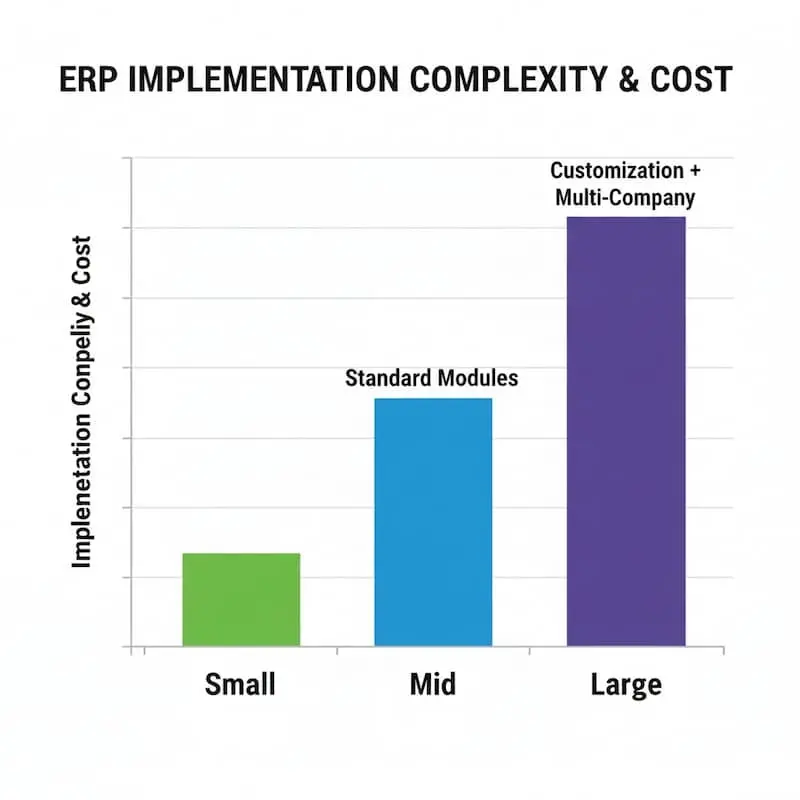
The cost of ERP implementation is directly influenced by company size, process complexity, and customization requirements. A typical ERP system includes licensing, development, and training costs, but these vary based on deployment method and number of modules.
Small Businesses
For smaller companies using Odoo Community or a minimal Enterprise license, costs can remain under $7,000 per user. Standard modules like inventory, sales, and human resources can be deployed with minimal configuration.
Mid-Sized Organizations
At this level, companies often implement additional Odoo modules like manufacturing, payroll, and advanced accounting. Integration with existing business applications also becomes more common. Average costs may range between $8,000 and $12,000 per user, including development and data migration.
Large Enterprises
High user counts, multi-company environments, and custom features significantly increase costs. Full-scale Odoo rollouts may involve complex API layers, custom security rules, and phased deployments across departments.
Cudio works with organizations of all sizes to accurately scope costs and phase rollouts, reducing project overruns while maximizing long-term ROI.
Integration Architecture of ERP Systems
Integration plays a major role in how a typical ERP system includes external functionality. In Odoo, APIs, connectors, and middleware create links between internal modules and third-party platforms like payment gateways, logistics apps, and tax engines.
Odoo’s Integration Capabilities
Odoo’s framework supports:
- RESTful APIs for pushing and pulling data between systems
- XML-RPC for batch operations and bulk imports
- Scheduled server actions for real-time syncing
Integration needs vary by industry. A retailer may sync Odoo with Shopify and Stripe, while a manufacturer integrates with barcode scanners and EDI platforms.
Cudio helps build stable integration layers using Python-based middleware, ensuring seamless communication between Odoo and external systems while preserving data integrity.
Business Intelligence Integration in ERP Systems
To maximize ERP value, real-time visibility into business metrics is essential. A typical ERP system includes a reporting and analytics layer that transforms raw data into actionable insights.
Odoo Reporting and BI Options
Odoo’s built-in tools support:
- Custom dashboards and pivot reports
- Graph and Kanban views for performance tracking
- Drill-down reports on sales, inventory, and purchasing
Advanced users can export data to external BI platforms like Power BI or Tableau. This is especially useful when analyzing trends across modules like CRM, finance, and manufacturing.
Strategic Recommendations for ERP Buyers
Selecting an ERP system is about more than software features. It requires aligning system architecture, implementation capabilities, and support with business goals. A typical ERP system includes many moving parts, and clarity during evaluation ensures better outcomes.
Practical ERP Buying Tips
- Match system tier to operational complexity
- Evaluate deployment models based on compliance or IT readiness
- Prioritize essential modules, then plan for future expansion
- Consider vendors who provide both technical expertise and strategic alignment
In platforms like Odoo, long-term success depends on selecting modules that reflect real business logic, not just generic templates. This requires hands-on support during setup and post-launch stages.
Conclusion
Understanding how many levels a typical ERP system includes provides the foundation for making informed technology decisions. From the user interface to the integration and analytics layers, each level plays a critical role in streamlining operations, improving visibility, and aligning ERP software with real business needs.
Odoo serves as a clear example of how modern ERP systems bring flexibility, modularity, and scalability to organizations of all sizes. Whether deployed in the cloud or on-premises, its layered architecture supports everything from inventory management to human resources and beyond.
Of course, getting the full value from enterprise resource planning depends not just on the software itself but on how well it’s implemented. This is where a knowledgeable partner can make all the difference.
Cudio helps growing companies configure, customize, and maintain their ERP systems with precision, from workflow design to data migration and performance tuning.
Talk To A Cudio ERP Specialist
Frequently Asked Questions
Still have questions? No worries, we can help!
How many levels does a typical ERP system include?
A typical ERP system includes five core levels, and there may be a sixth level for AI enhancements. This structure ensures comprehensive coverage of business processes.
What are the core application modules in an ERP system?
The core application modules in an ERP system are Financial Management, Procurement, Inventory and Supply Chain, HR and Payroll, and Manufacturing and Projects. These modules work together to streamline operations across various business functions.
What is the difference between cloud-based and on-premise ERP systems?
Cloud-based ERP systems are more cost-effective and quicker to implement, whereas on-premise ERP systems allow for enhanced control but demand higher initial investments and continuous maintenance.
What are the key benefits of integrating Business Intelligence (BI) with ERP systems?
Integrating BI with ERP systems significantly enhances decision-making and operational efficiency by merging data from various departments, facilitating predictive capabilities, and enabling customized reports and dashboards. This integration leads to more informed strategic planning and improved responsiveness to market changes.
How do Tier 1, Tier 2, and Tier 3 ERP systems differ?
Tier 1 ERP systems are suited for large multinational corporations with complex needs, while Tier 2 targets mid-sized businesses with more robust functionality. In contrast, Tier 3 systems focus on small businesses requiring simplified applications for specialized markets.