Warehouse mistakes are expensive. A single mis-pick can ripple into customer dissatisfaction, expedited freight, and margin erosion. When inventory numbers stop matching reality, trust breaks down fast, not just in the warehouse, but across sales, finance, and leadership.
Many businesses find themselves weighing different ERP options. For example, it can be useful to see how Dolibarr compared to Odoo to understand the range of available solutions.
When evaluating ERP and WMS systems, it's important to consider the total cost of ownership. This includes not only the initial purchase price but also hidden ERP implementation costs that can arise during the project.
At Cudio, we’ve stepped into more than 35 rescue projects where warehouse challenges were blamed on “needing a WMS,” when the real issue was architectural misalignment. At other times, companies tried to force ERP to handle warehouse execution beyond its capabilities.
Book My Free ERP Impact Assessment with Cudio
This guide cuts through the noise.
We’ll break down:
- What ERP actually governs
- What WMS truly controls
- When ERP warehouse functionality is enough
- When a dedicated WMS is justified
- And how to design a staged, low-risk roadmap
Because this isn’t a feature comparison.
It’s an architectural decision.
Key Takeaways
- ERP and WMS solve different problems. ERP orchestrates enterprise-wide processes and financial control. WMS optimizes execution inside the warehouse at the bin and task level.
- Many mid-market businesses are “WMS-enough” with a properly configured ERP. Modern ERP warehouse modules with barcode workflows and real-time visibility often eliminate double entry and disconnected systems.
- A dedicated WMS becomes necessary when complexity crosses a threshold. Multiple DCs, thousands of SKUs, advanced picking strategies, automation, or 3PL multi-client operations typically justify specialized execution software.
- The decision is architectural, not binary. Your real options are: ERP-only, ERP extended with warehouse enhancements, or ERP as a system of record integrated with a specialist WMS.
- Implementation risk is real. Median ERP projects cost ~$450,000 and run 15+ months (Panorama 2024). A phased, low-risk roadmap is far safer than a big-bang rollout.
ERP vs WMS at a Glance
Before we go deeper, here’s a side-by-side view to clarify the distinction.
Dimension | ERP Systems | Warehouse Management Systems |
Primary Role | Enterprise-wide coordination and financial control | Real-time execution of warehouse operations |
System Altitude | Strategic and cross-functional | Operational and task-level |
Core Focus | Financial management, planning, governance | Throughput, accuracy, movement efficiency |
Inventory View | Warehouse or location-level inventory management | Bin, shelf, pallet-level precision |
Order Flow | Sales order processing and customer relationship management | Picking, packing, and shipping execution |
Purchasing | Supplier management and purchase order control | Receiving validation and putaway direction |
Manufacturing | MRP, work orders, demand planning | Component staging and task execution support |
Data Granularity | Transaction-based updates | Real-time task and movement tracking |
Operational Goal | Alignment of sales, supply, and cash flow | Increased operational efficiency in warehouse operations |
Reporting | Financial reporting and enterprise dashboards | Productivity metrics, pick accuracy, and labor tracking |
Users | Finance, sales, purchasing, executives | Warehouse supervisors, pickers, and floor managers |
What Is a Warehouse Management System (WMS)?
A warehouse management system is not accounting software. It is not forecasting software. It is not a planning tool.
It is execution software.
Businesses running complex fulfilment operations often find that a unified platform outperforms a bolted-on WMS — explore how Cudio deploys Odoo ERP and warehouse management for logistics operations at scale.
A WMS tells your warehouse team what to do next in real time. Through handheld scanners, mobile devices, and barcode workflows, it directs work step by step. Pick this pallet. Store that case in this bin. Replenish this location before the next wave drops.
If your ERP knows you have 500 units in stock, a WMS knows exactly where those 500 units are stored, which lot expires first, and the most efficient path to retrieve them.
That level of control is what drives operational precision.
What WMS Controls on the Floor
Warehouse management is about movement, validation, and optimization. A dedicated WMS manages:
- Receiving against advance shipping notices with quantity and quality checks
- Directed putaway based on slotting logic, velocity, and storage rules
- Internal replenishment from reserve to pick locations
- Slotting optimization to reduce travel time and increase throughput
- Picking execution using discrete, batch, wave, or zone strategies
- Packing and cartonization logic for box optimization
- Carrier integration, label printing, and shipment confirmation
- Cycle counting and real-time discrepancy handling
The system prioritizes tasks dynamically. It balances labor. It reduces congestion. It enforces scanning at every step to prevent silent errors.
This is how high-volume warehouse operations aim for 99 percent-plus accuracy and measurable gains in operational efficiency.
Core Warehouse Management Capabilities
Most standalone WMS platforms include:
- Location management down to bin, shelf, and zone
- Lot and serial tracking for compliance and traceability
- FEFO and FIFO rotation rules
- Task queues and workload prioritization
- Barcode or RFID verification at every movement
- Carrier integrations for rate shopping and tracking
These capabilities are built for execution depth, not enterprise financial oversight.
Where Advanced WMS Becomes Critical
In more complex environments, warehouse management expands into:
- Labor management with productivity metrics
- Task interleaving to eliminate wasted travel
- Dock scheduling and yard management
- Direct integration with conveyors, ASRS systems, and robotics
At that level, the warehouse becomes algorithm-driven.
This is why high-throughput distribution centers and sophisticated 3PL environments rarely rely on ERP alone for warehouse execution. The warehouse management depth required simply exceeds what most ERP warehouse modules are designed to handle.
At Cudio, we have seen both sides. We have worked with teams who added a WMS too early, unnecessarily increasing integration complexity. We have also supported operations that clearly outgrew their ERP warehouse layer and needed specialized execution tools.
The key question is not whether WMS is powerful.
The question is whether your warehouse's complexity truly requires it.
If you are unsure whether your performance ceiling is caused by process gaps or system depth, start there.
See How Cudio Helps Businesses Simplify Warehouse Architecture
What Is an Enterprise Resource Planning (ERP) System?
An enterprise resource planning system is your system of record.
It is where financial truth lives. It is where customer orders originate. It is where purchase orders flow to suppliers. It is where leadership sees the health of the entire enterprise, not just one department.
While a warehouse management system optimizes physical execution, an ERP governs the structure, controls, and visibility across the business.
Common ERP platforms include SAP, Oracle NetSuite, Microsoft Dynamics 365, Odoo, Acumatica, and Epicor. Each connects multiple business functions into a unified database designed to eliminate silos.
What ERP Actually Manages
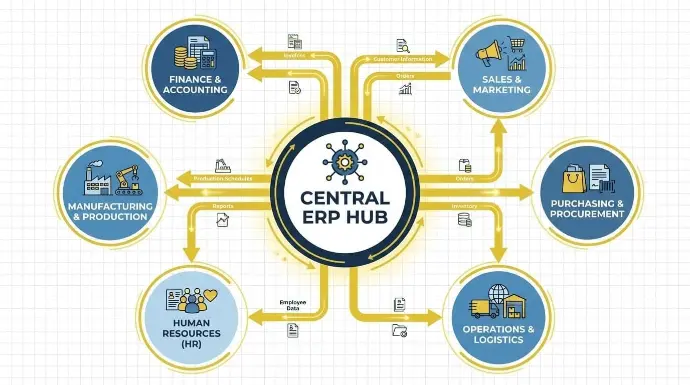
A properly implemented ERP system spans the core domains of your operation:
- Finance and accounting, including general ledger, accounts payable and receivable, cost accounting, and financial reporting
- Sales through quote-to-cash workflows, order management, pricing, and commission tracking
- Customer relationship management covering contact management, opportunity tracking, and service history
- Purchasing, including vendor management and purchase order control
- Inventory management with stock levels, valuations, and reorder logic
- Manufacturing, including bills of materials, work orders, MRP, and production scheduling
- Human resources, such as payroll, time tracking, and employee records
- Project management with resource allocation and billing
- Business intelligence dashboards, KPIs, and historical data analysis
The value of ERP is connection.
When a sales order is entered, the system can check available inventory, trigger production if needed, create purchase orders for missing components, calculate margins, and update financial forecasts in a single coordinated flow.
That level of integration is what gives leadership confidence in the numbers.
Where ERP Touches the Warehouse
Most ERP systems include some level of warehouse functionality. This often includes:
- Stock movements between locations
- Basic picking lists generated from sales orders
- Simple putaway rules
- Barcode scanning via mobile applications
For straightforward warehouse operations, this can be sufficient.
But depth varies significantly across vendors and editions. An ERP warehouse module may handle standard receiving and shipping well, yet struggle with advanced picking strategies, multi-step workflows, or high-volume automation environments.
This is where architectural decisions become critical.
ERP vs WMS: Key Differences in Scope and Capability
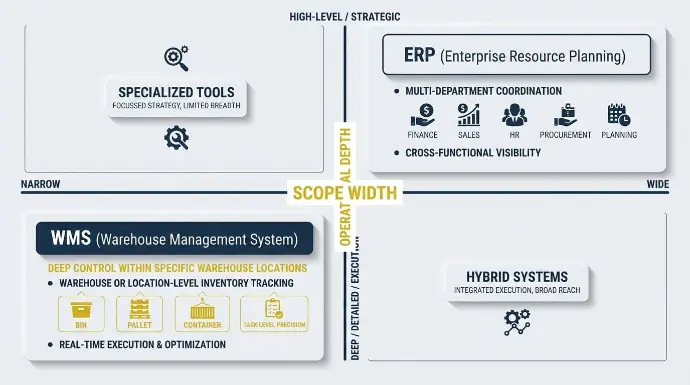
When leaders evaluate a warehouse management system WMS against ERP, the real issue is not features. It is altitude.
ERP governs the entire business. Warehouse management governs execution inside the warehouse.
Confusing those roles is where costly architecture mistakes begin.
Scope: Enterprise Control vs Execution Precision
ERP coordinates cross-functional business processes across finance, sales, purchasing, and human resources. It connects various business functions into one structured system of record.
A warehouse management system WMS focuses narrowly but deeply on warehouse activities and execution.
Here are the key differences:
Dimension | ERP | Dedicated WMS |
Primary Focus | Multi-department coordination across different business functions | Deep control within specific warehouse locations |
Users | Finance, sales, supplier management, management, and human resources | Warehouse supervisors, pickers, receivers |
Data Granularity | Warehouse or location-level inventory tracking | Bin, pallet, container, and task-level precision |
Update Frequency | Transaction-based | Real-time data-driven task execution |
Core Value | Financial reporting, governance, business intelligence | Warehouse efficiency and throughput |
ERP supports financial reporting, cost accounting, project management, and enterprise-level business intelligence dashboards built on historical data and structured business data.
A dedicated WMS focuses on optimizing warehouse operations, reducing travel time, increasing inventory accuracy, and improving task management on the floor.
Data Model Depth: Inventory Tracking at Two Levels
ERP handles inventory tracking at a higher level. You might see “150 units in Warehouse A” with status codes such as available or reserved.
A warehouse management system WMS drills down further:
- Which storage locations hold those units
- Which lot numbers are assigned
- Expiration sequencing
- Current tasks tied to that inventory movement
That level of detail drives measurable gains in inventory visibility and supports 99.8%+ inventory accuracy in high-performing operations.
This is why many dedicated WMS solutions outperform ERP systems in environments that require advanced warehouse management or strict inventory control.
Execution Style: Recording vs Directing
ERP is transaction-oriented. A user posts a receipt, confirms a shipment, or adjusts inventory. The system records what happened.
A dedicated WMS is directive. It assigns tasks dynamically. It prioritizes picking waves. It pushes work to barcode scanners. It manages labor management metrics in real time.
In other words:
ERP documents business operations.
Warehouse management software actively drives them.
That difference becomes critical in complex operations, especially when multiple sales channels, tight SLAs, or high order volumes are present.
In most mature organizations, ERP remains the backbone for:
- Financial reporting
- Supplier management
- Cost accounting
- Order management system logic
- Cross-functional business management
A dedicated WMS operates as a standalone system, responsible for execution, and provides accurate inventory visibility and shipment confirmations back to the ERP.
The relationship between WMS and ERP systems should be clearly defined:
- ERP owns master data and financial postings
- WMS owns warehouse management functionality and execution detail
For example, platforms such as Microsoft Dynamics, SAP, and other ERP solutions often include an ERP WMS module. These modules may support basic warehouse management, but they do not always match the specialized functionality of dedicated WMS software in high-throughput environments.
When warehouse layout optimization, advanced picking logic, or automation integration becomes central to performance, modern WMS solutions offer depth that most ERP capabilities cannot replicate.
ERP Warehouse Module vs Dedicated WMS
This is where most executive teams pause.
“Can our ERP warehouse module handle this, or do we actually need a dedicated WMS?”
It is the right question. And it is also where costly over-engineering often begins.
What an ERP Warehouse Module Typically Handles Well
Most modern ERP platforms include robust warehouse management functionality for structured, moderately complex environments.
An ERP warehouse module usually supports:
- Receiving against purchase orders with quantity validation
- Basic putaway rules by product category or zone
- Pick list generation directly from sales orders
- Pack and ship workflows tied to carrier integrations
- Stock transfers between storage locations
- Cycle counting and reconciliation
- Reporting on stock movements and inventory levels
For many mid-market operations, this is enough.
If you are shipping a few hundred orders per day, managing a few thousand SKUs, and running standard carton or pallet picking, ERP-driven warehouse processes often perform reliably.
We have seen teams achieve strong inventory accuracy and clean financial alignment simply by properly configuring what they already owned.
In these cases, the bottleneck is rarely a lack of software. It is process discipline, scanning adoption, or data hygiene.
What a Dedicated WMS Adds
A dedicated WMS steps in when operational complexity exceeds the design limits of an ERP module.
Dedicated WMS platforms introduce:
- Advanced picking strategies, including wave, zone, batch, and cluster optimization
- Dynamic slotting recommendations based on velocity and seasonality
- Task interleaving to reduce empty travel time
- Detailed labor management with defined KPIs and productivity standards
- Intelligent cartonization logic
- Complex returns workflows with disposition rules
- Direct integration with conveyors, sorters, ASRS systems, and robotics
- Multi-client segregation and billing for 3PL environments
At this level, the focus shifts from inventory tracking to throughput engineering.
Throughput, not just accuracy, becomes the constraint.
Where the Line Has Shifted
The gap between ERP and WMS is not what it was ten years ago.
Some ERP platforms have significantly expanded their warehouse management capabilities.
For example, Odoo, with its Inventory and Barcode applications, supports:
- Mobile barcode scanning
- Multi-step receiving and delivery flows
- Directed putaway rules and routes
- Wave picking
- Real-time inventory visibility connected directly to sales, purchasing, MRP, and accounting
For many mid-market businesses, this architecture eliminates the need for a separate WMS entirely.
But that does not mean ERP replaces best-of-breed WMS in every environment.
In high-speed logistics operations, major 3PL networks, omni-channel distribution centers, or highly automated facilities, ERP warehouse modules typically cannot match the configurability and throughput optimization of specialized WMS platforms.
How ERP and WMS Work Together in Practice
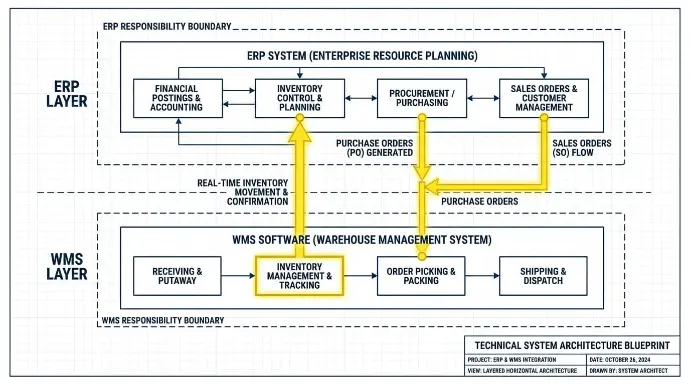
When ERP and WMS are structured correctly, they strengthen your entire business.
When they are not, they quietly erode warehouse efficiency, distort inventory tracking, and create tension across business operations.
At Cudio, we have led ERP implementation projects across manufacturing, distribution, and multi-entity supply chain management environments. We have also stepped into more than 35 failing system projects where unclear ownership between wms and erp systems created operational instability.
The issue is rarely the software itself. It is structured.
Let’s walk through how this should work in practice and where it often breaks.
Step 1: Define System Roles Clearly Across the Entire Business
Before integrating any warehouse management software, define the boundaries of responsibility.
ERP solutions should have:
- Financial postings and inventory control
- Master data governance
- Procurement and supplier management
- Planning logic across the supply chain
- Reporting across various business functions
A warehouse management system WMS should own:
- Real-time inventory movement
- Task assignment to warehouse staff
- Execution inside storage locations
- Optimizing warehouse operations minute by minute
When these roles blur, business processes break down.
We have seen organizations run inventory adjustments in both systems, resulting in weeks of reconciliation. We have also seen dedicated WMS solutions overstep into financial territory, creating audit risk.
Clarity here protects customer satisfaction and financial accuracy.
If your WMS and erp systems feel unstable, start with role definition before adding complexity.
Book My Free ERP Impact Assessment with Cudio
Step 2: Structure Inbound Flows to Protect Inventory Accuracy
Inbound receiving is foundational to supply chain management.
A clean structure looks like this:
- ERP generates purchase orders
- Orders flow to wms software
- The warehouse management system WMS directs receiving
- Staff scan items and confirm quantities
- The WMS assigns optimal storage locations
- ERP updates valuation and financial entries
ERP governs business management and financial reporting.
The warehouse management system WMS governs execution and inventory tracking at the bin level.
When inventory movement is confirmed in one system but not properly synchronized, inventory visibility breaks down.
At Cudio, we often find that performance issues blamed on warehouse staff are actually integration design flaws.
If inbound discrepancies are growing, it may not be a labor problem. It may be architectural.
Book My Free ERP Impact Assessment with Cudio
Step 3: Align Outbound Fulfillment for Operational Stability
Outbound order flows must align with both supply chain operations and accounting rules.
A properly structured outbound process:
- ERP captures the order
- ERP releases approved orders to the warehouse management software
- WMS builds optimized pick waves
- Staff scan during picking and packing
- WMS confirms shipment
- ERP triggers invoicing and revenue recognition
When this flow is misaligned, you see:
- Orders marked shipped before physical dispatch
- Invoicing delays
- Inventory inaccuracies across multiple sales channels
Optimizing warehouse operations without accounting for the financial impact damages the entire supply chain.
We have helped companies reduce fulfillment disputes by restructuring data flows between their ERP and WMS.
If fulfillment friction is increasing between finance and operations, your system design likely needs review.
Book My Free ERP Impact Assessment with Cudio
Step 4: Connect Planning to Execution Without Overlap
Warehouse efficiency depends on the separation between planning and execution.
The warehouse management system WMS handles real-time task management and inventory movement.
ERP handles:
- Safety stock recalculation
- Procurement planning
- Cost accounting
- Human resources allocation
- Business intelligence reporting
When ERP implementation fails to align planning with execution, purchasing teams lose confidence in system recommendations.
We frequently see ERP wms module configurations that technically work but do not reflect operational velocity.
Cudio bridges that gap by aligning data models with complex real-world operations.
If your planning team regularly overrides system suggestions, it is time for a structural reassessment.
Book My Free ERP Impact Assessment with Cudio
Step 5: Establish Clean Data Ownership to Protect the Entire Supply Chain
Integration failure rarely comes from APIs.
It comes from unclear ownership.
In a stable structure:
- ERP owns master SKUs, suppliers, and financial rules
- WMS owns detailed inventory movement and storage locations
- Inventory balances sync bidirectionally with validation
Without this clarity, inventory tracking becomes inconsistent, and warehouse management functionality degrades.
We have rescued projects where inventory control deteriorated because both systems were acting as standalone systems of record.
That is never sustainable.
Clear governance protects long-term scalability.
Book My Free ERP Impact Assessment with Cudio
When an ERP-First Approach Is Enough (with Odoo as a Reference)
Before investing in a separate WMS, we always ask clients one direct question:
Is this truly a warehouse management limitation, or is your ERP simply not configured to support your warehouse correctly?
At Cudio, we have led Odoo ERP implementations for manufacturers, distributors, and omni-channel retailers. In many of those cases, leadership initially believed they needed a dedicated WMS. After auditing their architecture, we discovered the real issues were disconnected workflows, underused Odoo Inventory features, and inconsistent barcode adoption.
That distinction matters. Solving an integration problem with another system often increases complexity rather than reducing it.
When Odoo ERP Alone Is Enough
An ERP-first model using Odoo Inventory and Barcode applications works extremely well in environments like:
- 1 to 3 warehouses with structured layouts
- A few thousand active SKUs
- Pallet, carton, or shelf picking rather than advanced piece-level wave strategies
- Limited or no warehouse automation
- Standard carrier integrations such as UPS, FedEx, or DHL
- B2B or moderate B2C order volumes rather than high-velocity marketplace fulfillment
In these scenarios, Odoo’s native warehouse management functionality is often more than sufficient.
We have helped companies reduce 14 disconnected systems to a single Odoo environment, eliminating reconciliation work across accounting, purchasing, and warehouse execution.
What Odoo Inventory and Barcode Actually Deliver
When properly implemented, Odoo provides:
- Barcode-driven receiving tied directly to purchase orders
- Lot and serial number capture during inbound processing
- Directed putaway rules based on product category, storage type, or routes
- Multi-step pick, pack, and ship workflows
- Wave picking capabilities within Odoo Inventory
- Real-time available-to-promise visibility for sales teams
- Automated replenishment rules connected to procurement
- Multi-warehouse transfers with full traceability
- Direct integration between warehouse movements and accounting valuation
Because Odoo integrates inventory, accounting, purchasing, MRP, and sales in one database, every inventory movement automatically updates financial reporting.
This eliminates the “we ship fast, but finance is blind” problem.
That architectural advantage is one of the reasons Odoo has continued to scale globally, reporting $712M in revenue and $554M in annual recurring revenue in 2025, with 7,089 employees worldwide.
Real Example from a Mid-Market Client
One retail client operating with 1,500 SKUs and a 2-50 person warehouse team implemented Odoo Barcode under Cudio’s guidance.
Before implementation:
- 12 orders picked per hour
- 5 percent error rate
- Daily manual inventory checks
- Limited visibility for purchasing
After ERP-based barcode enforcement inside Odoo:
- 18+ orders per hour
- 99 percent pick accuracy
- Manual daily counts eliminated
- Purchasing gained reliable consumption visibility
No dedicated WMS was added.
The improvement came from proper Odoo configuration, structured training, and enforcement of barcode discipline.
We have seen similar gains across manufacturing environments where Odoo MRP and Inventory operate together within a single unified ERP.
Why We Recommend Prototyping in Odoo First
Before committing to a standalone WMS, we often advise clients to prototype their key warehouse flows inside Odoo:
- Test receiving against purchase orders
- Test directed putaway logic
- Test wave picking
- Test cycle counting
- Measure throughput and error rates
If Odoo handles 80 percent of your complexity efficiently, introducing a dedicated WMS may not be justified.
And if complexity truly exceeds Odoo’s warehouse management functionality, we intentionally design a structured integration architecture rather than reactively.
Where Cudio Comes In
Cudio is a certified Odoo implementation and configuration partner with over 30 years of combined tech and operational leadership experience.
Seven of our team members previously led Odoo implementations internally as COOs, GMs, and operations leaders. We understand warehouse execution from an operator’s perspective, not just a software perspective.
We have:
- Rescued 35+ failing ERP projects
- Maintained a 96 percent customer retention rate
- Helped businesses reduce system sprawl from 14 platforms down to one unified Odoo environment
Our role is not to push complexity.
It is to determine whether your warehouse challenge requires advanced warehouse management software or simply a well-structured Odoo ERP foundation.
If you are unsure whether Odoo Inventory is enough for your operation:
Get Your Free Tech Stack Value Assessment
When a Dedicated WMS Is the Smarter Add-On
There is a point where a better configuration is no longer enough.
Some operations genuinely outgrow what an ERP warehouse module can handle. When that threshold is crossed, forcing ERP into an advanced warehouse management role creates technical debt, fragile workarounds, and frustrated warehouse teams.
Below are the most common signals we see when a dedicated WMS becomes the smarter strategic move.
Signals That Complexity Has Outgrown ERP
When warehouse scale and operational intensity increase, the pressure on execution systems rises quickly. The following indicators typically justify evaluating a dedicated WMS:
- Multiple high-volume distribution centers operating simultaneously
- Frequent re-slotting due to seasonality or SKU velocity shifts
- Multi-stage wave, zone, or batch picking with algorithmic optimization needs
- Thousands of order lines per day with tight carrier cut-offs
- Same-day or next-day SLA commitments that demand precision scheduling
In these environments, warehouse throughput becomes a competitive advantage. Static logic within ERP systems often cannot optimize to the required level.
When Value-Added Services Increase Execution Complexity
As warehouse services expand beyond basic pick-pack-ship, the depth of execution becomes more critical.
Operations that include the following typically stretch ERP beyond comfortable limits:
- Kitting and light assembly on the warehouse floor
- Late-stage customization or postponement workflows
- Specialized packaging requirements by the customer
- High-volume returns with structured disposition paths
These processes require granular task control and orchestration. That is where advanced WMS platforms provide measurable gains.
3PL Environments Accelerate the Need
If you operate as a third-party logistics provider, the complexity curve rises even faster.
In 3PL models, the following demands frequently justify a dedicated WMS:
- Multi-client inventory segregation with strict data isolation
- Client-specific labeling, compliance, and SLA logic
- Activity-based billing by pick, pallet, or service
- Client-facing visibility portals
- Complex multi-path returns workflows
In these cases, warehouse software is not just an operational tool. It is part of your revenue model.
ERP warehouse modules, including Odoo, handle structured distribution well. But multi-client billing and compliance-heavy operations often require deeper specialization.
Automation Is Often the Deciding Factor
Once automation is introduced, architectural requirements change significantly.
If your warehouse includes or plans to implement:
- Conveyors
- Sortation systems
- ASRS solutions
- Shuttle systems
- Robotic picking technology
Then, real-time control loops become essential.
ERP systems such as Odoo, Microsoft Dynamics 365, NetSuite, or Acumatica are not designed to orchestrate automation hardware at millisecond precision.
At that point, a dedicated WMS becomes the execution engine coordinating physical equipment while ERP remains the financial system of record.
What a Clean Architecture Looks Like
When implemented correctly, the structure remains disciplined:
- ERP owns master data, costing, planning, and financial posting
- WMS owns physical execution and task orchestration
- Integration synchronizes orders, inventory, lots, and shipment confirmations
The goal is not to replace ERP. It is protecting financial integrity while elevating execution performance.
At Cudio, we have taken on projects where a WMS was added reactively, without clear ownership. The result was reconciliation chaos and declining trust in inventory.
A dedicated WMS should be a strategic escalation, not a panic decision.
Decision Framework: ERP Only, ERP-Extended, or ERP + WMS
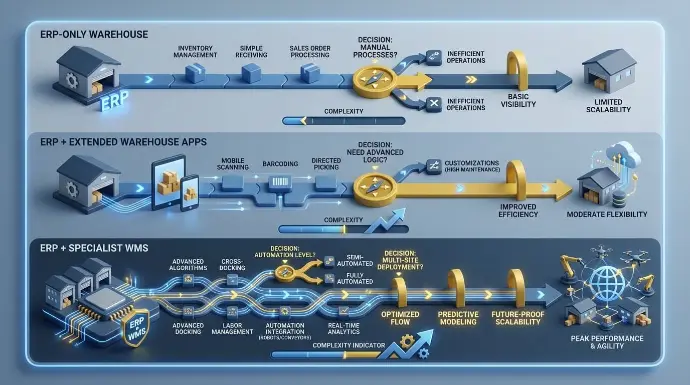
Choosing your warehouse systems architecture is not about picking software. It is about aligning technology with operational complexity, warehouse layout realities, and long-term growth plans.
There are three practical paths. Each works at a different stage of operational maturity.
Path 1: ERP-Only Warehouse
For many organizations, the smartest move is not adding another system. It is fully activating what already exists.
An ERP-only approach makes sense when order volumes are moderate, SKU counts are manageable, and workflows can be standardized around barcode scanners and directed processes. If automation is minimal and the core frustration is fragmented data rather than physical bottlenecks, ERP capabilities are often enough.
In this model, the ERP warehouse module is configured properly. Receiving is barcode-driven. Putaway rules reflect real warehouse layout logic. Picking follows structured workflows. Financial postings, cost accounting, and inventory adjustments remain automatically synchronized.
The key is discipline. Configure the system fully. Define clear key performance indicators. Measure results for 6 to 12 months. Many organizations discover that once inventory visibility stabilizes, they can manage inventory levels accurately without introducing a standalone system.
Path 2: ERP + Extended Warehouse Apps
Sometimes ERP covers most requirements, but operational depth needs refinement.
This is the middle ground. Core warehouse operations are stable, but advanced routing logic, compliance workflows, or industry-specific enhancements are required. Leadership wants to remain within one ecosystem, and integration tolerance is low.
Instead of jumping immediately to specialized solutions, targeted extensions can deepen wms functionality while preserving centralized business data. This strengthens process automation without fragmenting the order management system or disrupting financial reporting.
Here, the focus shifts from replacement to enhancement. Identify the exact gaps. Extend selectively. Maintain control across production processes, purchasing, and finance.
For many growing businesses, this step provides the necessary evolution without architectural disruption.
Path 3: ERP + Specialist WMS
As complexity increases, so do the limits of an ERP warehouse module.
High-volume fulfillment across multiple sales channels, multi-client environments, automation integration, advanced labor management requirements, or stringent compliance demands all push execution beyond standard ERP depth.
In these cases, a warehouse management system serves as the execution engine, while ERP remains the financial and master data backbone. Historical data, cost accounting, and enterprise reporting stay centralized. The WMS handles operational intensity and advanced wms functionality.
This structure requires maturity. Clear data ownership rules. Strong integration governance. And a realistic understanding of ongoing maintenance.
It is not about adding tools for sophistication. It is about preserving scalability as operations become more complex.
Quantitative Signals That Clarify Direction
If you are unsure which path fits, measurable indicators help.
- Under 500 order lines per day often support ERP-only.
- 500 to 2000 may justify ERP-extended.
- 2000+ frequently pushes toward deeper wms functionality.
- Under 5,000 active SKUs per location typically remain manageable in ERP systems.
- Higher SKU counts with frequent velocity swings often require more advanced logic.
- Special handling below 10 percent usually fits ERP.
- Above 30 percent often signals the need for deeper execution systems.
Regulatory pressure, automation investment, and integration maturity also influence direction.
Cost, Risk, and Implementation Considerations
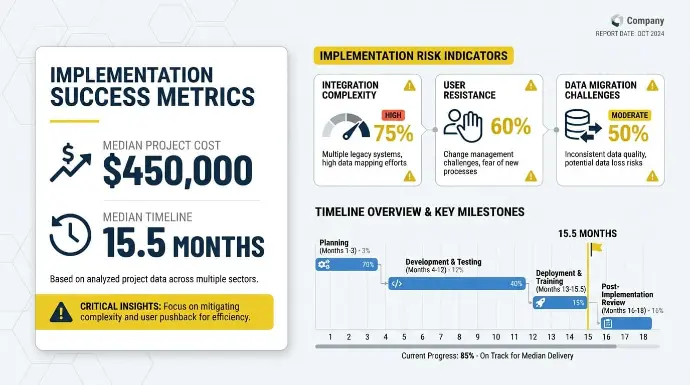
The biggest mistake leaders make is comparing ERP and WMS purely on license price.
The real trade-off is timeline, operational risk, organizational change, and long-term maintenance. Software cost is visible. Disruption cost is not.
ERP Implementation Benchmarks
Independent data gives useful context.
Panorama Consulting’s 2024 ERP Report, based on 131 projects from August 2022 to December 2023, found:
- Median project cost: $450,000
- Median timeline: 15.5 months
- Common risks: Integration complexity, user resistance, and data migration challenges
These are median outcomes. Complex operations, heavy customization, or poorly scoped projects often exceed these figures by a significant margin.
ERP implementation is not a plug-and-play upgrade. It affects finance, sales, purchasing, human resources, inventory, and reporting. It requires clean master data, executive alignment, and change management discipline.
The Big-Bang Risk
One of the clearest warnings from Panorama’s 2024 report is against “big bang” implementations where ERP, WMS, and other major systems go live simultaneously. Their conclusion is blunt: “It is too risky for most organizations.”
When everything changes at once, root causes become unclear. If shipments are delayed, is it data migration? Picking logic? Financial posting? Integration failure?
Phased rollouts dramatically reduce this risk. They limit disruption, protect customer commitments, and allow teams to adapt in controlled stages. This is especially critical in 24/7 operations or businesses with strong seasonal peaks.
Checklist: How to Decide Between ERP and WMS for Your Warehouse
A structured approach lowers exposure while preserving flexibility.
Phase 1: Stabilize ERP Core
Implement or optimize finance, sales, and purchasing with clean master data. Ensure inventory valuation and reporting are reliable.
Phase 2: Activate ERP Warehouse Flows
Deploy barcode scanning, directed putaway, and structured picking. Measure baseline KPIs for accuracy, dock-to-stock time, and picks per hour.
Phase 3: Evaluate Operational Ceilings
If throughput, accuracy, or execution complexity hits a ceiling, assess whether configuration changes solve the issue or whether WMS integration is justified.
Phase 4: Introduce WMS (If Needed)
Implement during lower-volume periods. Run parallel validation before full cutover. Define strict data ownership between systems.
This staged model allows validation. Many organizations discover that ERP-only or ERP-extended is sufficient before committing to the long-term maintenance of dual systems.
Checklist: Aligning Operations, Finance, and IT
Before choosing architecture, leadership teams should align around facts, not assumptions.
Operational Questions
- How many order lines do we process daily? What happens during peak weeks?
- How many active SKUs are in each facility?
- How many warehouses or fulfillment locations do we operate?
- What picking methods are used today: discrete, batch, zone, wave?
- What automation exists or is planned within 3 to 5 years?
- What percentage of orders require special handling?
Data and Integration Questions
- Where does inventory truth live today?
- How many systems hold overlapping stock data?
- How much manual reconciliation happens weekly?
- Do sales, purchasing, and accounting see real-time inventory visibility?
- What internal integration resources exist: IT staff, middleware, API expertise?
Finance and Governance Questions
- Which system should be responsible for inventory costing and valuation?
- Does finance require real-time reporting or end-of-day visibility?
- Who owns the audit trail for inventory adjustments?
- How are physical counts reconciled against financial records today?
These conversations surface architectural risk early, before contracts are signed.
Rules of Thumb
While every operation is unique, patterns emerge.
Prioritize ERP-first if:
- Complexity is low to medium
- Pain comes from disconnected data and double-entry
- Budget or timeline constraints are tight
- No significant automation is planned
Plan for ERP + WMS if:
- Volume and operational variability are high
- Advanced picking or value-added services are core
- 3PL multi-client operations are involved
- Automation is already deployed or planned
Final Thoughts
ERP and WMS are not competing systems. They solve different layers of the same operational puzzle.
ERP protects financial integrity and connects your entire business. A WMS sharpens execution inside the warehouse. The real decision is not which software is more powerful, but which structure supports your complexity, growth plans, and risk tolerance.
Many organizations discover that optimizing ERP workflows solves more than expected. Others reach a scale where a dedicated WMS becomes necessary. The difference lies in sequencing and architectural discipline.
If you want a clear, unbiased assessment of your warehouse systems strategy, Cudio can help you map the right path.
Book My Free ERP Impact Assessment with Cudio
FAQs
Have questions? Our team at Cudio is happy to guide you.
Do I still need a WMS if my ERP already has a warehouse module?
Not always. Many businesses run effectively on an optimized ERP warehouse module for years. The real triggers for a WMS are persistent picking bottlenecks, inability to support wave or zone strategies, or upcoming automation that ERP cannot coordinate. Before investing in new software, benchmark your KPIs such as picks per hour, dock-to-stock time, and error rates after full ERP optimization. In many cases, the issue is configuration and process design, not missing software.
Can a WMS replace an ERP system entirely?
No. A WMS is built for warehouse execution, not full financial and operational governance. It does not manage general ledger, accounts payable, purchasing workflows, human resources, or customer relationship management at an enterprise level. Even when advanced, a WMS should complement ERP, not replace it. As companies scale, ERP remains the financial and master data backbone.
What data must stay synchronized between ERP and WMS?
Items, customers, suppliers, and financial postings typically belong in ERP. Bin-level inventory, lot and serial tracking, and shipment confirmations belong in WMS. Purchase orders, sales orders, and inventory balances must sync reliably. Clear ownership and automated integration prevent reconciliation issues.
How do I estimate whether my warehouse is “complex enough” for a dedicated WMS?
Look at volume, SKU count, picking complexity, and automation plans. More than 5,000 SKUs, multiple facilities, or heavy wave picking often justify deeper functionality. Chronic inventory errors or labor bottlenecks are strong indicators. Quantify the financial impact before deciding.
Is it safer to implement ERP and WMS at the same time or in phases?
Phased implementation is safer. Rolling out everything at once increases operational risk and troubleshooting difficulty. Stabilize ERP first, optimize warehouse workflows, then add WMS only if needed. Avoid major go-lives during peak seasons.