


If your finance team exports spend data from Ramp, re-enters it in Odoo, and then checks every record again at month-end, the systems are not reducing work. They are moving it around. A Ramp Odoo integration can remove those duplicate steps, but only when the accounting structure, master data, access model, and exception handling behind the connector are ready.
At Cudio, we handle the Odoo side of integrations as an accounting and systems-design project, not a connector installation. Our experience across 62+ delivered Odoo projects and 32+ rescue engagements has shown us where mappings, record rules, custom modules, and undocumented ownership decisions break under live transaction volume.
This guide shows how to integrate Odoo with Ramp through PARA’s connector, from purchasing access and authenticating both platforms to validating mappings, testing accounting outcomes, and monitoring the live sync.
Key Takeaways
Ramp connects to Odoo through a partner integration provided by Para Consulting.
The connector can synchronize expenses, bills, reimbursements, purchase orders, receipts, vendors, users, statements, and accounting master data.
The connector uses Ramp OAuth 2.0 authorization and an Odoo URL, database name, admin email, and API key or password.
Odoo sends accounts, analytic accounts, purchase orders, receipts, and users to Ramp, while Ramp sends card transactions, reimbursements, bills, vendors, and statements to Odoo.
A test sync must validate mappings, permissions, exception handling, and close procedures before live transactions depend on the connection.
Ongoing ownership matters because accounting structures and business workflows change after launch.
What a Ramp Odoo Integration Does
Ramp’s spend management platform manages corporate spend, cards, expenses, reimbursements, procurement, and bill payments, while Odoo ERP manages the accounting and operational records that give those transactions context. Ramp’s official Odoo integration overview confirms that Para Consulting provides the connection and maintains the setup, troubleshooting, and feature-support documentation.
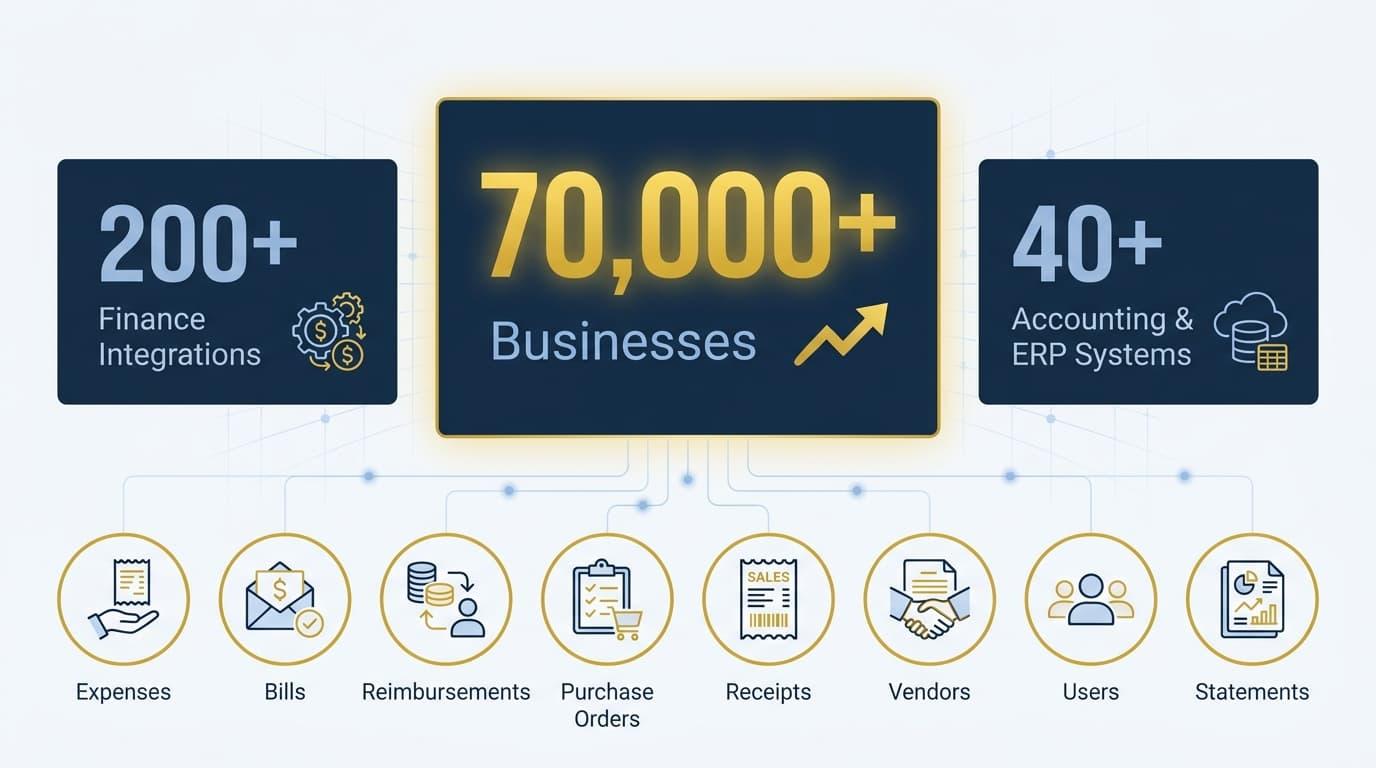
Ramp reports that more than 70,000 businesses worldwide use its finance platform. Its current integration directory lists more than 200 finance integrations across accounting, banking, procurement, receipt automation, HR, and other workflows.
The same directory includes 40-plus accounting and ERP systems. That scale matters because the Ramp layer is designed for spend management and to code and move financial activity into an accounting system, while Odoo, a modular, open-source ERP system used to support broader business operations, must still validate the resulting records against its own model constraints and access rules.
This also gives finance teams real time visibility into company spending and cash flow before entries settle fully in Odoo. The Para connector is described as a real time connection, not guaranteed continuous, and records can still fail because of missing accounts, inactive vendors, closed periods, invalid taxes, insufficient permissions, required analytic dimensions, or custom Odoo constraints.
The integration page states that the connector syncs key records, including expenses, bills, reimbursements, purchase orders, receipts, vendors, users, statements, the chart of accounts, and analytic accounts.
That range makes preparation more important because key master data and chart of accounts analytic mapping need to be correct to keep systems aligned with up-to-date information.
The connector listing states that transactional data is processed without being retained by the integration. It also says credentials and tokens are encrypted in Azure SQL Database, access is enforced through Azure role-based access control, and actions are logged with audit trails that support financial reporting.
For failed records, the integration may temporarily retain an internal record ID and failure timestamp. These controls reduce exposure, but they cannot repair incorrect mappings, duplicate partners, or invalid Odoo data.
What Data Syncs and Provides Real Time Visibility When You Integrate Odoo With Ramp
PARA’s published Ramp and Odoo mappings document the direction and Odoo outcome for each major workflow.
The table below translates those mappings into the records finance and operations teams should validate, and approved Ramp transactions typically sync to Odoo within minutes depending on the workflow and job status to support a single source for accounting review.
Data flow | Record created or updated | Technical behavior to validate |
|---|---|---|
Odoo to Ramp: chart of accounts | Ramp GL accounts | Code, name, deprecated status, and account updates. |
Odoo to Ramp: analytic accounts | Ramp accounting fields | Plans and accounts used on transactions, bills, and reimbursements. |
Ramp to Odoo: card transactions | Expenses and expense reports | Ready to sync trigger, attachments, analytic distribution, journal entries, and automated transaction categorization that reduces manual reconciliation. |
Ramp to Odoo: reimbursements | Vendor bill, payment, and entries | Employee-as-vendor mapping, payment link, and analytic tags. |
Ramp to Odoo: Bill Pay | Vendor bill, payment, and entries | Two-stage sync, In Payment status, and amount due. |
Odoo to Ramp: purchase orders | Ramp purchase orders | Vendor, dates, order number, and line-level product details. |
Odoo to Ramp: PO receipts | Received Ramp PO quantities | Validated receipt and original PO-line matching. |
Odoo to Ramp: users | Ramp users | Name, email, phone, active status, creation, and updates. |
Ramp to Odoo: vendors | Odoo partner records | Contact mapping, supplier rank greater than zero, and vendor records consistency if data quality allows. |
Ramp to Odoo: statements | Vendor bill, payment, and entries | Liability, accounts payable, cashback, and settlement postings. |
How Ramp Transactions Appear in Odoo
The same PARA mapping documentation above shows that each workflow produces a different Odoo document and accounting result.
Understanding those outcomes before setup makes the test plan much more precise.
Card Transactions Become Odoo Expenses
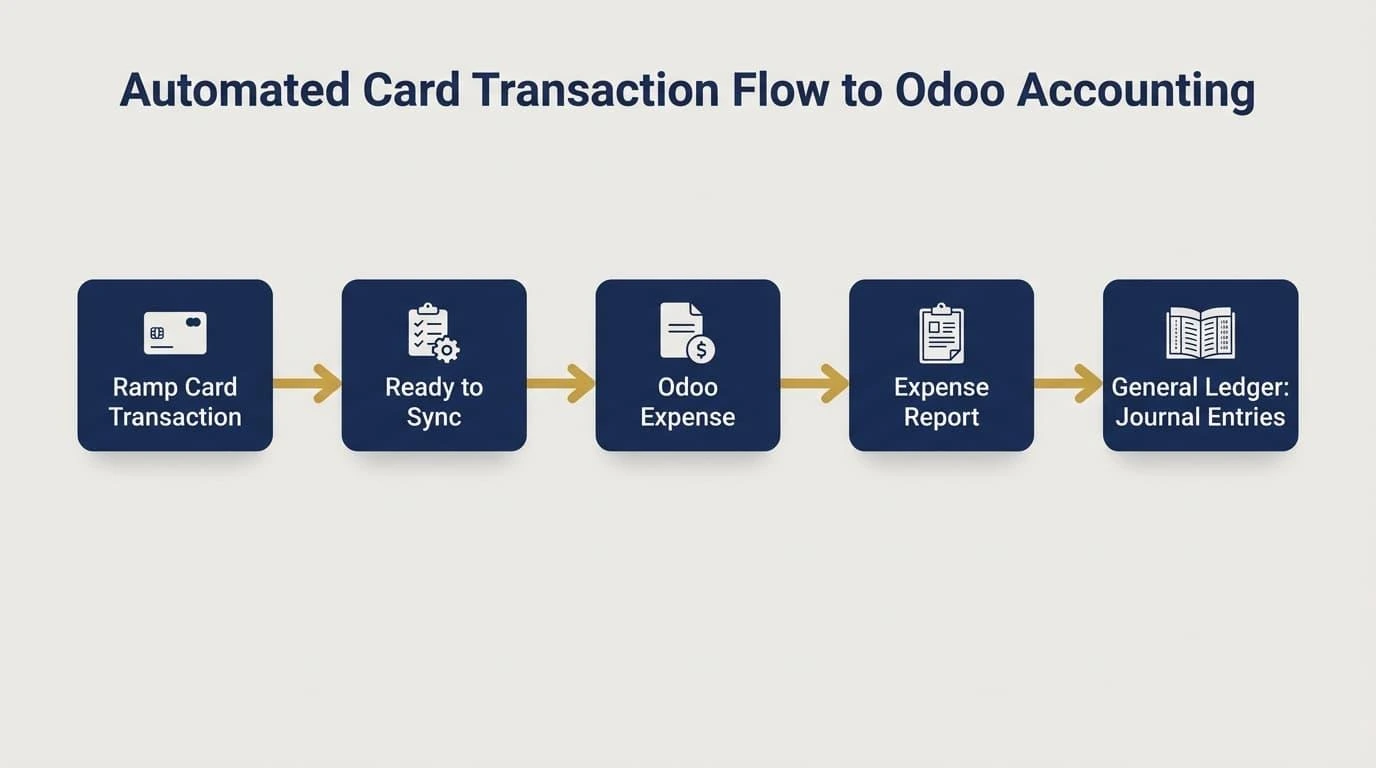
When a Ramp card transaction is approved and marked Ready to Sync, the connector automatically syncs expenses into Odoo as an expense and attaches it to an expense report.
This eliminates manual entry and duplicate entry for card-expense posting. PARA also documents corresponding journal entries that update the general ledger for stronger expense management.
Test the expense account, employee, receipt attachment, tax treatment, analytic distribution, expense-report grouping, posting date, policy checks, and automated categorization. The Ramp transaction should not be considered complete until the Odoo expense and its journal impact reconcile to the source amount, which reduces errors in month-end review.
Reimbursements Become Bills and Payments
A Ramp reimbursement is sent after approval, payment delivery, and the Ready to Sync state. Odoo receives a vendor bill using the employee as the vendor, a linked bill payment, posted entries for the expense and settlement, and Ramp accounting fields as analytic distribution tags.
The partner relationship matters here. Confirm that the employee maps to the intended payable record, the bill and payment use the correct journals and dates, and the linked payment does not duplicate an existing reimbursement.
Ramp Bill Pay Uses a Two-Stage Sync
Bills created in Ramp Bill Pay as part of Ramp’s spend management workflow first become vendor bills in Odoo. When Ramp later records the payment, the connector creates an Odoo bill payment and applies it to the bill.
PARA documents that the paid bill moves to In Payment and its amount due becomes zero. Validate the liability, cash movement, analytic tags, payment journal, and reconciliation behavior instead of checking only that the vendor bill exists, since automated matching supports faster closes by limiting manual reconciliation and reduces manual work for AP teams.
Purchase Orders and Receipts Move From Odoo to Ramp
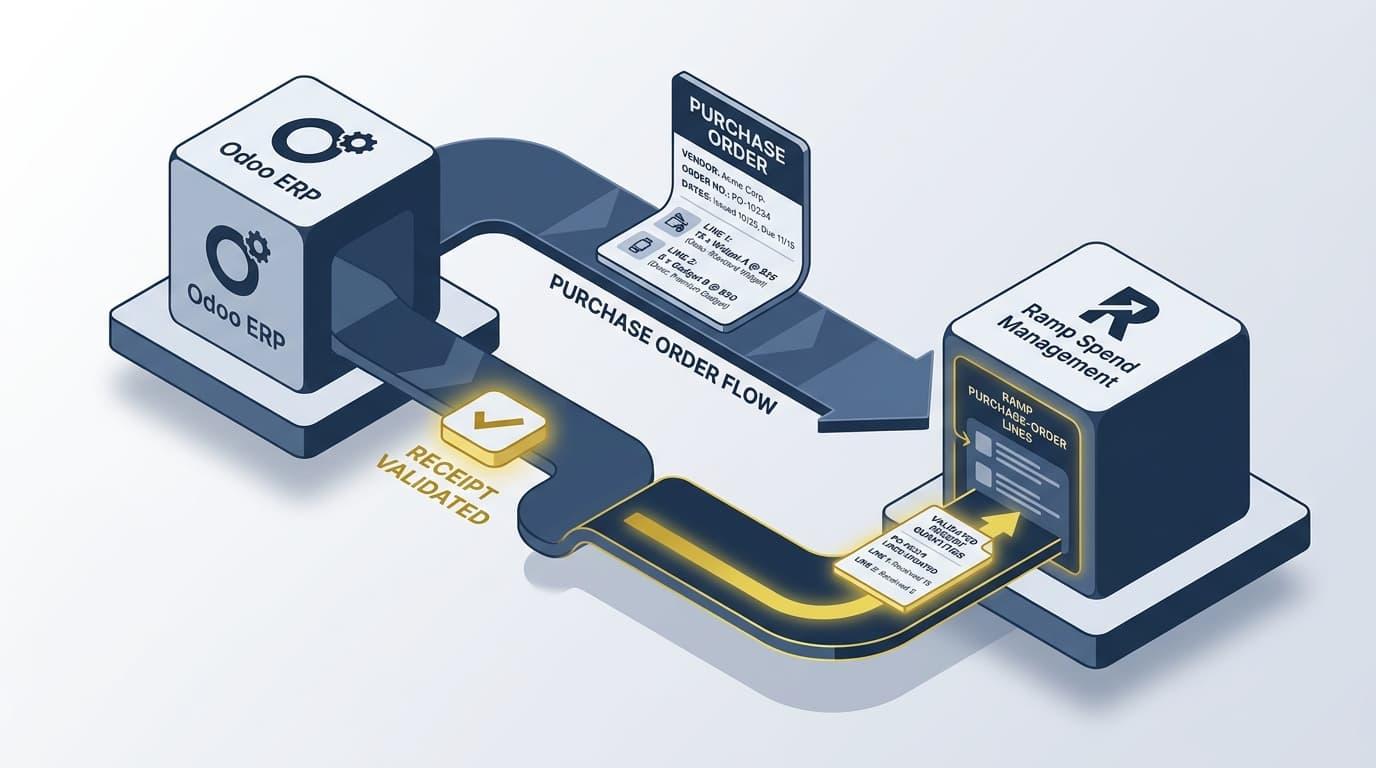
Odoo purchase orders sync to Ramp with the vendor, order number, dates, and each line’s product, quantity, price, and description. After a receipt is validated in Odoo, received quantities are sent to the corresponding Ramp purchase-order lines.
Test partial receipts, multiple receipts, changed quantities, canceled lines, and vendor matching. The Ramp purchase order should preserve line-level context so finance can compare ordered, received, billed, and paid amounts.
Vendors, Users, and Statements Follow Separate Rules
Odoo users move to Ramp with name, email, phone, and active status, while Ramp vendors move to Odoo as partner records with supplier rank greater than zero. These opposite directions make ownership and duplicate prevention essential.
Ramp statements and cashback activity create an Odoo vendor bill and payment. PARA describes a debit to the Ramp liability account, a credit to accounts payable for Ramp, and a credit to the cashback contra-expense account, so those destinations must be mapped and reconciled before production use.
How to Integrate Odoo With Ramp in 8 Steps
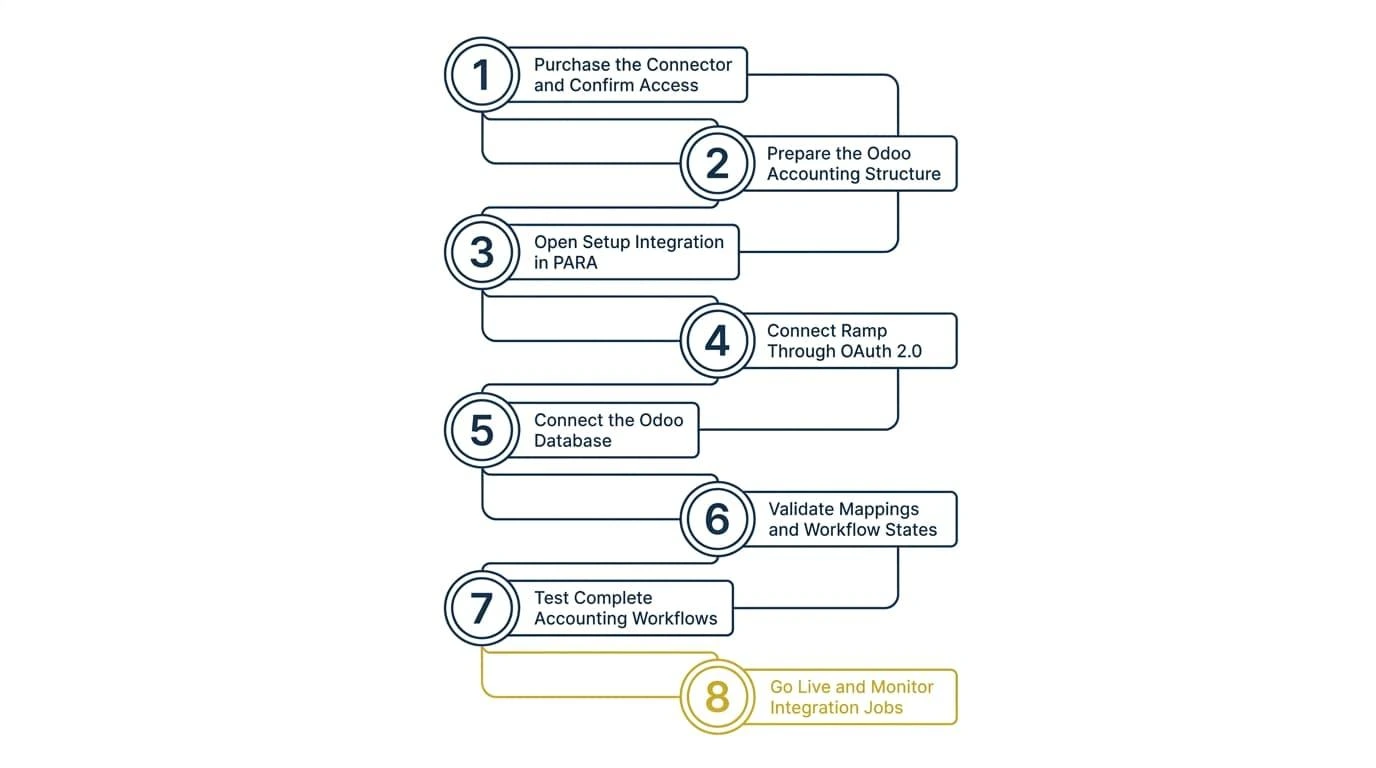
The connection is completed inside PARA’s integration dashboard, but a production-ready setup begins before credentials are entered. Follow these eight steps in order.
1. Purchase the Connector and Confirm Access
PARA requires purchased integration access before setup. Obtain dashboard credentials through your Ramp sales representative or PARA contact, then name the people responsible for finance configuration, Odoo administration, and integration monitoring.
PARA’s official integration setup instructions explain that its dashboard displays recent jobs, credential warnings, and integration errors. Confirm access before scheduling configuration work.
2. Prepare the Odoo Accounting Structure
Review the chart of accounts, account types, taxes, journals, currencies, fiscal positions, posting periods, and analytic plans. Every Ramp category, entity, department, departments, location, or custom dimension needs a valid Odoo destination that belongs to the correct company and matches business needs across companies.
In Odoo, vendors are partner records, so matching must distinguish a commercial entity from its contacts and addresses. Merge duplicates, standardize vendor records, and verify each partner’s tax ID, company, payment terms, currency, and payable account.
Reimbursements may also depend on employee and payable records. Confirm the connector’s matching key for each record type, such as an external ID, email, tax identifier, or provider-specific key, before allowing automatic creation.
Complete the analytic structure under Accounting, Configuration, Analytic Accounting, and Analytic Plans. Odoo supports structured analytic accounting through plans and accounts that PARA maps into Ramp accounting fields, helping keep key master data accurate in one platform.
3. Open Setup Integration in PARA
Sign in at integration.paraconsulting.co and review the dashboard for credential warnings or existing errors. Select Setup Integration from the left menu, where Ramp and Odoo appear as separate connections.
Do not enter production credentials until the Odoo data review is complete. The dashboard validates connectivity, but it cannot determine whether accounts, partners, analytics, or approval rules are correct.
4. Connect Ramp Through OAuth 2.0
Select Configure beside Ramp, then Connect to Ramp. PARA redirects the administrator to Ramp’s OAuth 2.0 consent screen, where the requested access must be approved.
After authorization, Ramp should display as Connected with a green confirmation. PARA states that it stores the resulting credentials in encrypted form.
5. Connect the Odoo Database
Select Configure beside Odoo and enter the base URL, database name, admin email, and API key or password. The base URL is the domain used to access Odoo, including a custom domain or on-premises host when applicable.
To locate the database name, enable developer mode in Odoo and check the value beneath the profile name. Use a dedicated integration user rather than an employee’s everyday administrator account. If the connector setup requires it, scheduled actions under Odoo Settings can automate data fetching from Ramp.
Select Validate Connection. A green banner confirms valid credentials while keeping Odoo’s access model and single database integrity intact. Then select Connect to Odoo and confirm that both platform cards show Connected without credential errors.
For Odoo 19 environments, JSON-2 requests use bearer authentication and inherit the user’s access rights, record rules, and field access. PARA permits an Odoo API key or login password in its setup form, so use the method documented for the connector and your Odoo version.
"At Cudio, we operate on the rule that if an entry is not explicitly documented in a formal decision log, the decision simply does not exist." Gordon Cummins, CEO of Cudio
6. Validate Mappings and Workflow States
Build a mapping specification for every synced object as a management tool for keeping both systems aligned. Record the Odoo model and field, Ramp field, direction, transformation, matching key, required value, document trigger, and error owner.
Pay particular attention to Ready to Sync in Ramp. PARA documents this trigger for card transactions and reimbursements, which then create Odoo expenses or vendor bills and related accounting entries, with approval-triggered syncing reducing manual entry for finance teams.
Validate how Odoo accounts become Ramp GL accounts, how analytic accounts become Ramp accounting fields, and how those fields return as analytic distribution tags. Approval flow in Ramp and policy checks must not bypass required controls or create conflicting controls with Odoo.
7. Test Complete Accounting Workflows
A connection test only proves that the systems can communicate. A business test proves that the resulting accounting entries are usable.
Test expenses, bills, reimbursements, receipts, partners, purchase orders, taxes, multi-currency transactions, analytic distributions, attachments, failed records, corrections, and reversals.
Validate both the created record and its accounting effect in Odoo, noting greater efficiency for financial reporting, instead of checking only the Ramp status.
End-to-end testing should also prove the integration helps finance teams save hours each month through automated syncing.
Run negative tests for closed periods, archived accounts, duplicates, missing dimensions, unauthorized companies, and invalid taxes. Confirm automated categorization and synced records reduce manual reconciliation during month end, so finance teams save hours monthly with automated reconciliation. Capture the error, confirm retry behavior, and prove a retry cannot create a second Odoo record.
"Before any code moves into production, we gather nine key stakeholders on a single shared screen for a full-scale simulation." Gordon Cummins, CEO of Cudio
8. Go Live and Monitor Integration Jobs
Name an owner for sync monitoring, an owner for finance mappings, and a technical escalation contact. Monitoring should confirm the live integration replaces csv uploads and other manual handoffs between systems.
Define response steps for authentication failures, closed periods, duplicates, missing dimensions, and rejected records.
Set monitoring around failed-record metadata, not only connector availability. Repeated failures for one model or company often point to a mapping, permission, or data-quality issue rather than an outage.
Schedule the launch outside a critical close window. Keep the first live batch controlled, reconcile it completely, and expand only after record counts, balances, attachments, analytic allocations, and document states match the approved test cases.
If the Odoo environment needs structured preparation, our Odoo integration and configuration services cover readiness audits, mapping specifications, access reviews, test scenarios, and Odoo-side troubleshooting. We scope that work around the actual models and finance workflows the connector must support, so controlled live syncing avoids manual CSV imports and keeps up-to-date information available for close review.
When to Work With an Odoo Integration Partner
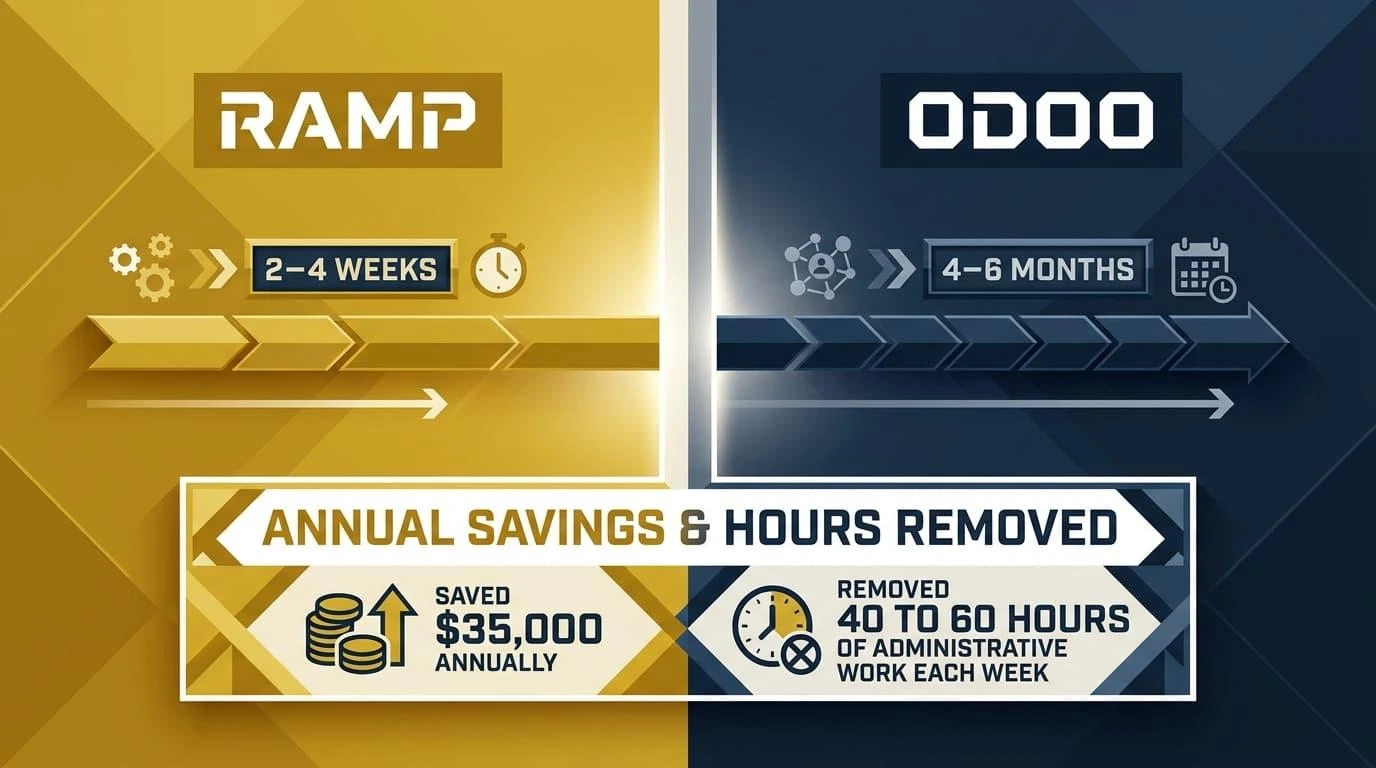
A standard, well-documented Odoo environment may be manageable internally. Most companies keep Odoo as the core ERP and layer Ramp onto it because deployment timelines differ substantially: Ramp typically goes live in 2–4 weeks, while Odoo implementations often take 4–6 months.
The risk changes when the database includes multiple companies, custom accounting logic, incomplete analytic plans, undocumented modules, record-rule conflicts, or reports the finance team already questions.
In those environments, connecting Ramp can expose existing structural problems across every synchronized transaction.
We help by tracing each Ramp workflow to the exact Odoo model, account, journal, partner rule, analytic distribution, and document state it should affect. Our team also tests custom modules and permissions, defines exception ownership, and verifies that the resulting bills, expenses, payments, and journal entries reconcile before finance depends on them.
Our 140-point diagnostic identifies those dependencies before configuration begins. This operator-led approach has produced measurable improvements beyond the connector itself.
After we unified R&W Rope’s disconnected systems in Odoo, the company saved $35,000 annually and removed 40 to 60 hours of administrative work each week.
The goal is not simply to make Ramp and Odoo exchange data. It is to give finance a controlled integration that keeps the accounting system and spend management workflows aligned as the business grows.
Get Your Ramp Odoo Integration Production-Ready With Cudio
Ramp Odoo Integration Readiness Checklist for Finance Teams
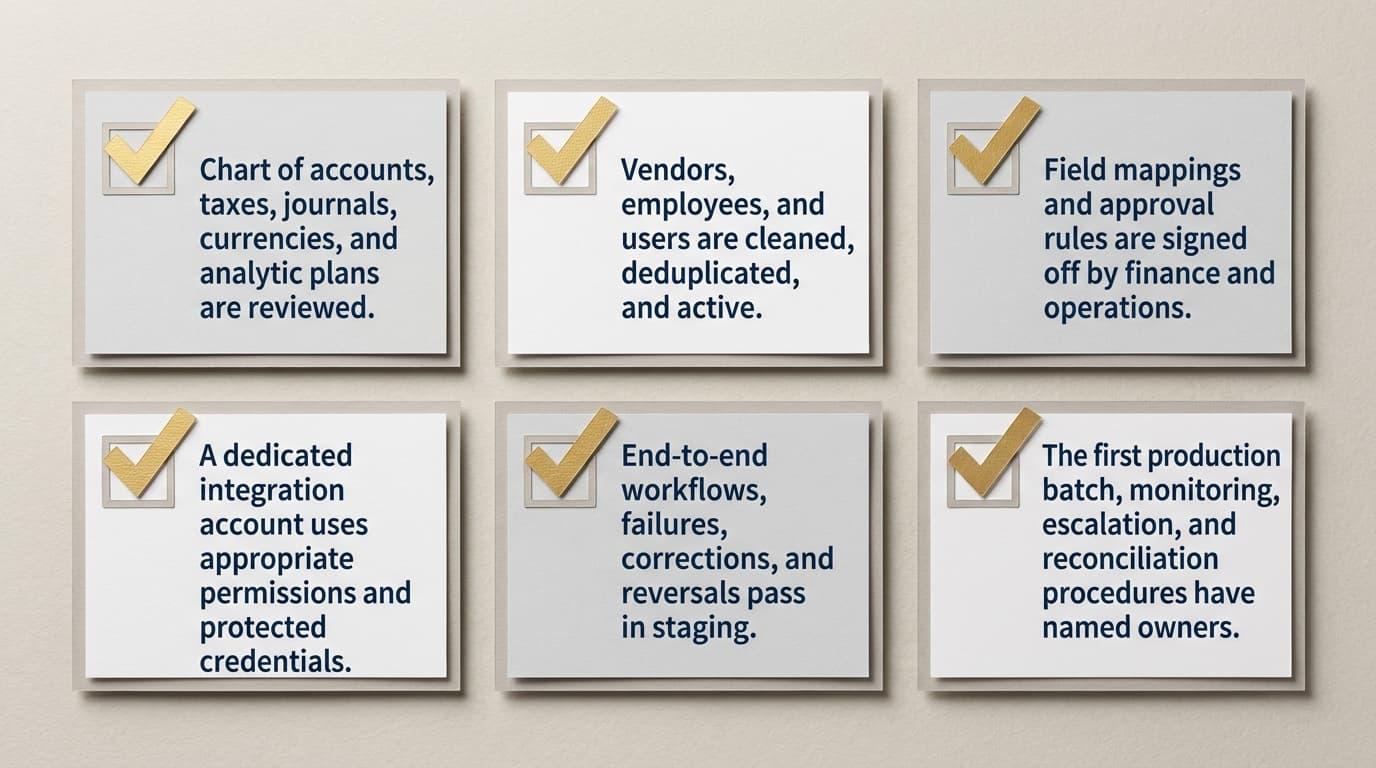
Use this checklist as a final gate before enabling the production connection.
The supported Odoo version, hosting model, how odoo works in your environment, connector scope, and sync directions are confirmed.
The chart of accounts, taxes, journals, currencies, and analytic plans are reviewed, including chart of accounts analytic mapping validation.
Vendors, employees, and users are cleaned, deduplicated, and active.
Every synced object has a documented source of truth, business owner, and owner for key master data.
Field mappings and approval rules are signed off by finance and operations.
A dedicated integration account uses appropriate permissions and protected credentials.
End-to-end workflows, failures, corrections, and reversals pass in staging, confirming less manual work and stronger financial reporting outcomes.
The first production batch, monitoring, escalation, and reconciliation procedures have named owners.
Integrate Odoo With Ramp Without Creating Reconciliation Problems
Knowing how to integrate Odoo with Ramp involves more than connecting two credential sets. The goal is a single source of up-to-date information for company spending and accounting outcomes, with each workflow creating the expected Ramp or Odoo record with the correct company, account, tax, partner, analytic distribution, currency, attachment, payment state, and journal entry.
The reliable sequence is clear: Prepare Odoo, connect Ramp through OAuth 2.0, validate the Odoo database credentials, document each data mapping, test the Ready to Sync workflows, reconcile the first production batch, and monitor failed jobs.
That real-time connection reduces errors and manual reconciliation when the systems aligned remain in place; skipping those controls turns near real-time synchronization into near real-time error propagation.
We bring more than 30 years of combined leadership experience across IT, finance, and operations to this work.
That operator perspective keeps the integration focused on accurate accounting and maintainable workflows, with Odoo ERP as the backbone for business operations while Ramp controls how money is spent before records reach accounting, not simply a successful API response.
Get Your Ramp Odoo Integration Production-Ready Today
FAQs About Ramp Odoo Integration
The questions below address the setup details finance and operations teams most often need to confirm before moving forward.
Is the Ramp Odoo integration native?
Ramp integrates with Odoo through Para Consulting. Ramp directs setup, troubleshooting, and feature-support questions to that integration partner.
How often does Ramp data sync with Odoo?
The integration is described as near real-time, with approved transactions typically appearing within minutes, though exceptions can delay the sync.
Actual processing can still be interrupted by authentication, mapping, validation, or record-level errors, so teams should monitor failed syncs to help finance teams work from up-to-date information.
Can Ramp integrate with a multi-company Odoo setup?
Ramp supports complex ERP environments, but entity-level requirements need to be confirmed for the specific connector setup. Each company’s accounts, currencies, vendors, analytic structure, and intercompany rules should be tested separately.
Who should maintain the integration after launch?
Finance teams and AP teams should split ownership between mappings, reconciliation, and bill workflows, while a technical owner monitors credentials, logs, and connector health. Both teams should review changes that affect accounts, dimensions, entities, approvals, or custom modules so systems aligned remains the goal and financial reporting stays accurate.