
Your inventory says one thing, but your accounting says another. Sales can’t see warehouse stock in real time, and your team is quietly patching the gaps in spreadsheets every day. That’s usually when businesses start seriously evaluating Odoo.
At Cudio, we work with companies operating across 10 to 14 disconnected tools that were never designed to scale together. Across 62+ successful Odoo projects, we’ve seen how quickly operational bottlenecks grow when systems, workflows, and departments stop communicating properly.
Odoo can solve that extremely well, but only when the platform matches the complexity, processes, and growth stage of the business, and when it’s implemented by the right team from the start. This guide breaks down where Odoo works best, where it falls short, and how to know whether your business is actually ready for it.
Request a Free Operational ERP Assessment
Key Takeaways
- Odoo works best for growing SMBs trying to replace disconnected systems with one operational source of truth.
- The implementation partner often has a bigger impact on project success than the ERP platform itself.
- Odoo’s modular architecture allows businesses to scale operations without constantly replacing software.
- Heavy customization and poorly built integrations can create upgrade issues and long-term technical debt.
- ERP success depends just as much on operational readiness, process ownership, and training as software selection.
Why Businesses Start Looking at Odoo in the First Place
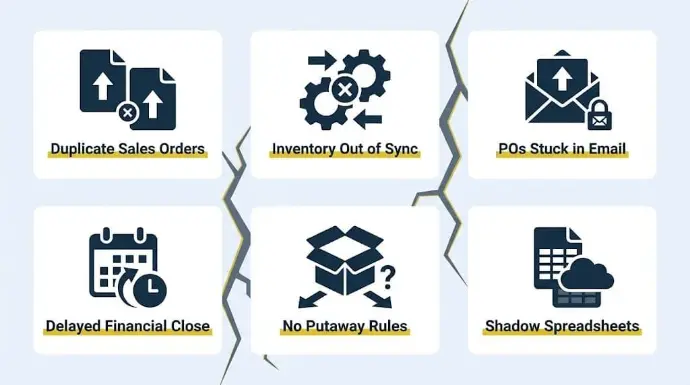
Most businesses don’t start evaluating Odoo because they want ERP software. They start looking because operations are becoming harder to manage and they need an erp solution that gives them one system instead of multiple tools.
Sales orders sitting in Shopify aren’t syncing with the Odoo Inventory module, stock valuation methods like FIFO or AVCO are producing mismatches, and the Accounting module is generating reconciliation errors because journal entries are being posted manually across disconnected systems.
The warning signs usually look like this:
- Duplicate sales order lines and vendor bills caused by manual re-entry across platforms
- Inventory on-hand quantities out of sync due to missing stock moves or unvalidated receipts
- Purchase orders and RFQs stuck in email chains instead of flowing through an automated procurement workflow
- Delayed financial closes because bank statements aren’t reconciled against posted journal entries in real time
- Warehouse operations running without proper putaway rules, reordering rules, or route configurations, causing fulfillment delays
- Teams maintaining shadow spreadsheets because the system of record has no single source of truth across the sales, inventory, and accounting modules
At Cudio, we have seen rescue environments running across 14+ disconnected tools where operational visibility had almost completely broken down. The issue wasn’t a lack of software; it was that outdated systems and disconnected tools were never designed to share a centralized database, so data flow across departments kept breaking without manual intervention.
Businesses that consolidate onto a single unified Odoo instance consistently report fewer reconciliation bottlenecks, reduced duplicate data entry, and more reliable financial reporting.
As an all in one platform for the entire business, not separate apps, Odoo integrates accounting, CRM, inventory, and HR in a single platform to eliminate disconnected tools and data silos.
When the Sales, Inventory, Purchase, and Accounting modules operate on one centralized database, a confirmed sales order automatically triggers stock moves, updates on-hand quantities, and generates a draft invoice, all without a single manual handoff between departments.
“Your ERP is currently embezzling from your profit margins. You won’t find this theft on your P&L, but it’s happening every single time a team member ‘just handles’ a manual workaround because the system is too clunky to do it right.”
Gordon Cummins, CEO of Cudio (source)
This is usually the point where businesses begin seriously considering Odoo implementation, not because they need more software, but because they need their manufacturing, warehouse, and finance operations to finally run as one integrated system.
What Makes Odoo Different From Traditional ERP Systems
The operational problems above are exactly why Odoo’s architecture matters so much. The platform was designed to reduce fragmentation, not just add more software into the stack.
The Single-Database Architecture Changes Operational Visibility
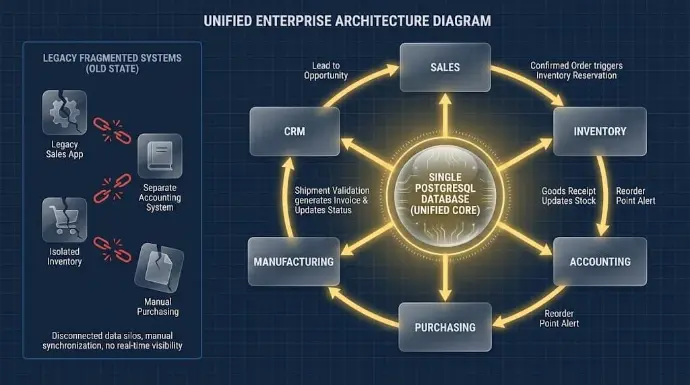
Most ERP problems are not caused by missing features. They happen because departments are operating from different versions of the same data. Sales sees one inventory number, accounting sees another, and warehouse teams are working from delayed syncs that already became outdated hours ago.
Odoo approaches this differently through a unified PostgreSQL relational database structure. Instead of running disconnected applications stitched together through exports or middleware, Odoo modules operate inside the same environment, which also supports cleaner data flow across departments and third party tools. Sales, Inventory, Accounting, Purchasing, CRM, and Manufacturing all write to the same database in real time.
That changes operational visibility significantly:
- Confirmed sales orders can automatically trigger inventory reservations
- Shipment validation can generate invoices instantly
- Procurement workflows can trigger replenishment rules automatically
- Accounting entries update alongside inventory valuation movements
- Role-based permissions control exactly which teams can access or approve data
This becomes especially important in order-to-cash workflows where delays between systems create reconciliation issues and reporting inaccuracies.
A 2025 integration‑architecture review of Odoo’s API‑based workflows highlights that API‑friendly ERP designs improve automation reliability, data accuracy, and inventory synchronization, especially for multi‑channel businesses managing marketplace operations across several platforms. This architecture is also more flexible than outdated ERP systems that depend on brittle syncs.
Odoo can connect with existing tools through APIs, support broader integrations with third party tools, and be deployed in the cloud or on premise depending on technical needs.
When the architecture is configured properly, teams stop spending time verifying whether the data is correct and start operating from the same source of truth.
The architecture also changes how businesses scale operationally over time.
Why Modular ERP Matters for Growing Companies
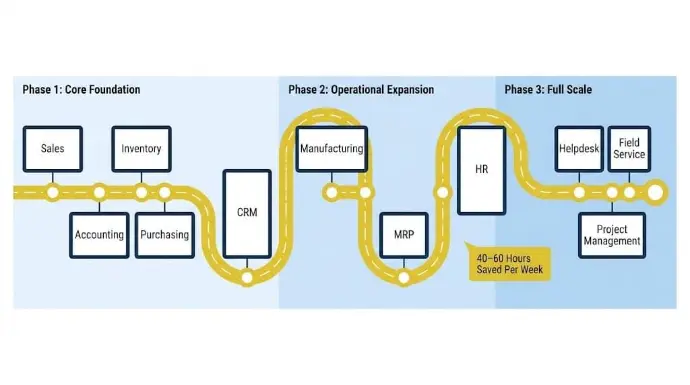
A major reason growing businesses choose Odoo is that Odoo suitable for scaling companies comes from its modular structure, which lets them start with only what they need and expand later as businesses grow. That means teams can implement only the necessary applications first instead of deploying a full ERP suite at once, reducing disruption and implementation costs.
Most phased deployments start with essential modules like:
- Sales
- Inventory
- Accounting
- Purchasing
- CRM
A company can even begin with one app and add only the modules required over time, which supports cost savings and a cost effective rollout.
As the business grows, additional workflows can be layered into the same environment through Manufacturing, MRP, HR, Helpdesk, Field Service, or Project Management modules without rebuilding the system from scratch.
This modular approach works particularly well for SMBs and mid-market businesses, replacing fragmented software stacks. Industry research consistently shows Odoo performs strongest in operationally growing companies that need scalability without enterprise-level ERP overhead.
At Cudio, we structure implementations around phased operational rollouts rather than forcing every department into the system at once.
Our team maintains a catalog of 1,600+ business use cases that helps map which core modules should be prioritized first based on business size, business needs, and growth plans, which automations belong later, and where operational bottlenecks are most likely to appear during growth.
R&W Rope followed this exact path. After replacing QuickBooks, Fishbowl, and Shopify with a unified Odoo environment, the company reduced administrative workload by 40 to 60 hours per week while saving roughly $35,000 annually in operational costs.
Get My Free Odoo Implementation Assessment
The Types of Businesses That Usually Succeed With Odoo
Not every business gets the same value from Odoo. The strongest results usually come from companies dealing with operational complexity that disconnected software can no longer handle cleanly.
SMBs Replacing Fragmented Tech Stacks
Odoo performs especially well for SMBs as a cost-effective ERP system for a small business and for small business owners who have outgrown fragmented tools, particularly inventory-heavy businesses managing purchasing, warehousing, fulfillment, and accounting across multiple systems.
This includes distributors, manufacturers, wholesalers, and multi-channel retail companies that have already outgrown spreadsheets and entry-level software stacks.
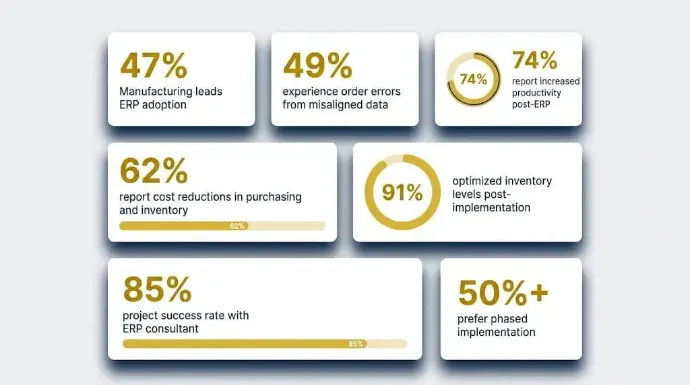
Manufacturing leads ERP adoption, accounting for 47% of new implementations, and the reason is straightforward: Operational complexity in these environments scales faster than disconnected tools can handle. Odoo offers inventory management and accounting inventory in one environment, which helps daily operations run more cleanly.
These businesses usually start experiencing operational strain in areas like:
- BoM management across manufacturing workflows, including multi-level Bills of Materials with phantom and kit component types
- Purchasing approvals and supplier tracking, where RFQ-to-PO workflows are still managed manually through email chains
- Warehouse transfers between locations without properly configured putaway rules or inter-warehouse route logic
- Fulfillment synchronization delays caused by stock moves not validating against real-time on-hand quantities
- Limited accounting visibility across departments due to disconnected journal entry workflows and delayed bank reconciliation
The compounding cost of these gaps is well documented.A 2024 survey found that 49% of wholesalers and manufacturers experience order errors due to misaligned pricing or inventory data; nearly half of all orders are exposed to avoidable risk caused directly by systems that don’t share a live data layer.
Businesses that consolidate these workflows into a single unified environment consistently report measurable operational gains. Around 74% of businesses report increased productivity and improved efficiency following ERP implementation, with roughly 62% reporting meaningful cost reductions specifically in purchasing and inventory control.
The modular design also lets teams start with the essentials and add capability as they grow, which keeps adoption manageable for non-technical users and avoids unnecessary complexity.
The most commonly realized benefit, reported by nearly 91% of companies in at least one phase post-implementation, was optimized inventory levels.Companies that work with an ERP consultant during implementation report an 85% project success rate, compared to significantly lower rates for self-managed rollouts.
Over 50% of businesses prefer a phased implementation strategy over a big bang approach, which is exactly how Cudio structures its deployments. Odoo's open source framework also makes it easier to adapt the system to a unique business as needs change without the cost profile of proprietary platforms.
At Cudio, these are often the businesses that benefit most from phased Odoo implementation. Once inventory, purchasing, accounting, and fulfillment begin operating inside the same environment, operational friction drops significantly because teams stop managing disconnected workflows manually.
This fit is strongest when the right ERP system needs to support growth organically without forcing a major reinvestment as the company expands.
Operational complexity increases even further once businesses begin selling across multiple channels and entities simultaneously.
Multi-Channel and Multi-Entity Businesses
Multi-channel operations create a completely different level of ERP complexity. Inventory allocation across Amazon, Walmart, wholesale accounts, brick-and-mortar stores, and ecommerce channels becomes difficult to control when every platform updates stock levels independently, especially for businesses that need to integrate ecommerce and coordinate sales across multiple entities as they scale.
According to Cin7’s 2025 State of Inventory Intelligence Report, 50% of product businesses cite outdated inventory systems as a top growth barrier, and 42% point specifically to unintegrated inventory and ecommerce platforms as the core constraint holding them back from scaling.
A separate 2025 analysis found that more than a quarter of multichannel sellers are still relying on spreadsheets to manage inventory across platforms, a gap that widens with every additional sales channel added.
This is where properly integrated Odoo environments become far more valuable operationally. Businesses can centralize:
- Marketplace synchronization through structured connector middleware
- Inventory allocation logic tied directly to validated stock moves in the Inventory module
- multi company support with intercompany journal entries and consolidated financial reporting
- Consolidated operational reporting across entities and channels from a single dashboard
- Tax automation workflows via Avalara AvaTax, which handles automated sales tax calculation across 70,000+ US and Canadian jurisdictions directly within Odoo
- EDI and API communication between platforms with field mapping, sync monitoring, and exception handling layers
At the integration layer, this involves structured JSON-RPC or XML-RPC API communication, field mapping between systems, sync monitoring, and exception handling to prevent fulfillment or accounting failures when marketplace data changes unexpectedly, while also connecting to third party tools already used in multichannel operations when reliable connectors are in place.
Simons Shoes faced this exact challenge while managing inventory feeds and marketplace operations across online and physical retail channels.
After implementing Odoo’s Inventory, POS, Purchasing, and Sales modules alongside Cudio’s Rithum-Odoo Connector, the business gained real-time sales and inventory visibility through centralized dashboards, reduced manual tracking errors, and accelerated marketplace product launches to as little as one to two weeks per new channel.
See How Cudio Helped Simons Shoes
When Odoo Is the Wrong Fit
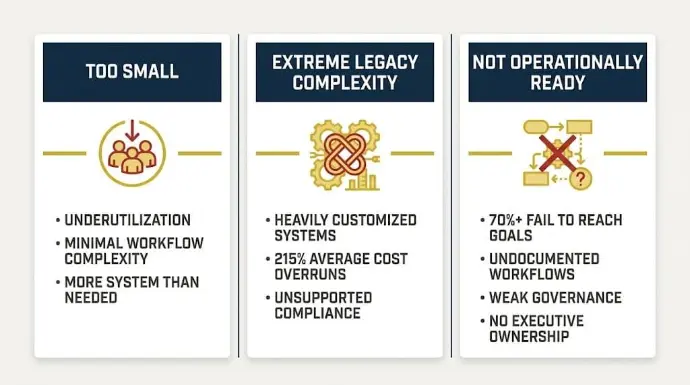
Odoo solves a lot of operational problems well, but not every business should implement it. Knowing where the platform stops making sense is just as important as knowing where it performs best.
Businesses That Are Too Small
Very small businesses may not yet need an ERP system at their current stage. If operations are still manageable through basic accounting software, lightweight inventory tools, and simple workflows, Odoo can introduce more implementation overhead than operational value.
The issue isn’t the platform itself; it’s underutilization. Although the first app is free and Odoo uses a subscription model with monthly fees for each added app or user, even that can be more system than a very small team needs before real complexity appears.
ERP systems require setup, governance, user training, maintenance, and process alignment to work properly. For businesses with straightforward operations and minimal workflow complexity, that level of infrastructure may simply be unnecessary at the current stage.
SMBs typically complete ERP implementations within three to nine months, and even a well-scoped rollout demands meaningful internal bandwidth that smaller teams may not yet have available.
Odoo becomes far more valuable once inventory, purchasing, fulfillment, reporting, and accounting start creating operational friction across multiple systems, when the cost of staying disconnected is clearly higher than the cost of consolidating.
The opposite problem appears at the other end of the complexity spectrum.
Businesses With Extreme Legacy Complexity
Some enterprise environments carry layers of legacy architecture that make ERP modernization significantly more difficult, regardless of the platform chosen. Compared with other ERP systems and other ERP solutions, the risk still comes from legacy complexity more than from the software itself.
This can include heavily customized proprietary systems, unsupported compliance frameworks, deeply embedded integrations, or highly regulated operational environments where even small workflow changes require extensive validation.
In these cases, the challenge is rarely just software migration. It’s untangling years of operational dependency built across multiple systems, databases, and approval structures.
According to Panorama Consulting’s 2025 ERP Report, discrete manufacturing environments experience average cost overruns of 215% during implementation, a figure driven almost entirely by underestimated legacy complexity, not software capability gaps.
This is especially common in organizations dealing with:
- Deep legacy ERP entanglement across multiple custom modules
- Highly regulated operational workflows requiring validation at every process change
- Unsupported compliance requirements tied to proprietary data structures
- Infrastructure with limited API flexibility or undocumented integration dependencies
- Highly customized internal applications embedded directly into finance or manufacturing processes, where heavy customization often requires Python expertise and deep knowledge of the Odoo framework
Implementing Odoo in these environments can be technically complex and resource-intensive because legacy dependencies are difficult to unwind.
At Cudio, we would rather identify operational fit problems early than force an ERP rollout into an environment where the risks outweigh the value.
The larger failure point, however, usually has nothing to do with software limitations.
Companies That Are Not Operationally Ready
Most troubled ERP projects fail long before go-live.According to Prosci’s 2025 Unlocking ERP Implementations study, ERP projects fall below expectations between 11% and 31% of the time, with the primary driver being organizational unreadiness rather than platform capability; choosing software is only half the battle if the business is not prepared to execute it well.
Gartner research puts the broader failure rate even higher, estimating that more than 70% of ERP implementations fail to reach their original business case goals, andPanorama Consulting confirms that most of those failures trace directly back to organizational misalignment, underdeveloped governance, and overconfidence in timelines, not flawed software.
The warning signs usually appear during process discovery, data cleanup, and internal ownership discussions:
- Undocumented operational workflows with no agreed source of truth
- Weak internal governance and no change management structure
- No executive ownership or sponsorship during implementation
- No dedicated process owners assigned by department
- Dirty migration data spread across disconnected legacy systems
A proper Odoo ERP implementation includes setup, workflow configuration, integrations, data migration, and team training, which is especially important for businesses with more complex requirements.
Odoo’s own implementation data highlights this clearly. Businesses using structured implementation guidance through Odoo Success Packs reported implementation success rates near 98%, compared to roughly 65% for self-managed rollouts.
The difference is not software capability alone, as implementing Odoo successfully depends on readiness, governance, and alignment with business objectives, alongside leadership involvement, implementation structure, and operational accountability.
This is why Cudio places such a heavy emphasis on operational ownership and implementation transparency from the beginning.
Clients receive real-time visibility into project activity, including detailed 15-minute timesheet tracking and implementation progress across departments. That level of structure helps prevent the communication breakdowns and governance failures that commonly derail ERP projects later.
Cudio also sees this pattern repeatedly in rescue environments. Many failed implementations were not caused by Odoo itself, but by rushed rollouts, unclear ownership, undocumented workflows, and weak implementation governance from the start.
Get My Free Odoo Rescue Assessment
Odoo Community vs Enterprise: Which One Actually Fits Your Team?
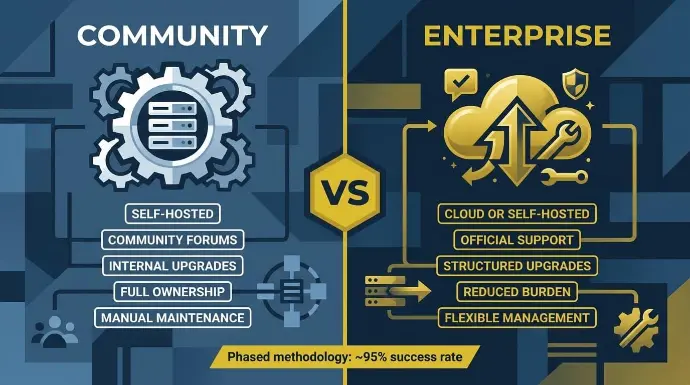
The Community vs Enterprise decision isn’t really about which version is “better,” but about how much operational responsibility your team can realistically handle long term.
Odoo Community gives you full control. You self-host the environment, manage infrastructure internally, maintain modules yourself, and take ownership of upgrades when new versions release.
That works well for businesses with strong in-house technical teams and clear governance around maintenance. For teams that want less internal technical responsibility, odoo enterprise is often the better fit.
Enterprise removes a large part of that burden. You get official support, easier upgrade paths, managed hosting options, and tools that reduce day-to-day administrative overhead.
The tradeoff looks like this:
Area | Community | Enterprise |
Hosting | Self-managed | Cloud or self-hosted |
Upgrades | Your responsibility | Structured upgrade support |
Support | Community forums | Official support escalation |
Maintenance | Fully internal | Reduced operational burden |
Infrastructure | Fully owned internally | Flexible management |
Odoo also offers a large app ecosystem with over 43,000 applications, but app volume does not remove the need for maintenance discipline.
The harsh reality is that “free” software rarely stays cheap inside a growing business. Most ERP costs come from implementation, customization, migration, cleanup work, user training, and ongoing support, not the license itself. In the Community edition, the open source community is a major source of modules, shared knowledge, and continuous improvement.
The same thing happens with the implementation strategy. Businesses that rush deployments or treat ERP like a simple software installation usually struggle later. Research around phased Odoo implementation methodologies reports success rates near 95% when rollouts are handled in structured stages instead of trying to force every workflow live at once.
Odoo Cost Effectiveness: What It Actually Costs Beyond the Subscription Fee
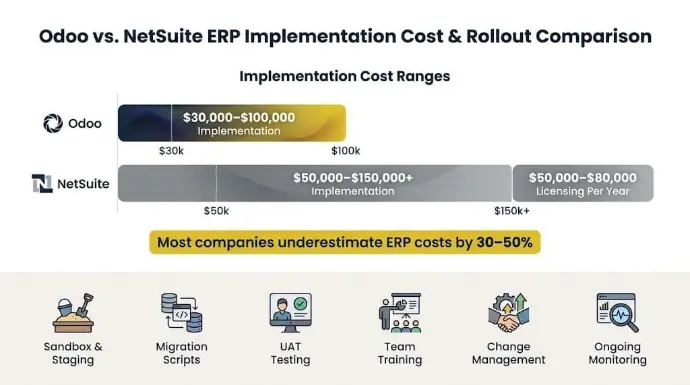
Most businesses underestimate Odoo costs because they focus too heavily on the software subscription itself, even though Odoo uses a modular pricing model.
In reality, the higher costs usually come from implementation work, data cleanup, integrations, training, and long-term maintenance.
Nearly half of all organizations significantly underestimate their data migration budget during planning alone, and most companies underestimate total ERP implementation costs by 30 to 50%, a gap that rarely stays manageable once the project is underway.
That is especially true when teams compare Odoo with traditional systems that require a significant upfront investment and ongoing licensing fees.
A proper rollout often includes:
- Sandbox and staging environments for testing before production deployment
- Migration scripts for legacy data cleanup, deduplication, and field mapping validation
- Module testing and UAT across departments before go-live
- User acceptance testing against real operational data
- Team training, onboarding, and change management
- Ongoing integration monitoring, version compatibility checks, and post-go-live maintenance
This is why rushed ERP budgeting creates problems later.Businesses that underbudget implementation end up cutting corners on testing, migration validation, or user onboarding, which typically creates larger and more expensive operational issues after go-live.
When it comes to total cost of ownership, Odoo compares favorably against traditional enterprise ERP platforms.A mid-market Odoo deployment typically runs $30,000–$100,000 in implementation costs, compared to $50,000–$150,000+ for NetSuite implementations at similar user counts, with NetSuite licensing alone starting at $50,000–$80,000 per year.
For small business teams, Odoo is often more budget-friendly because the subscription model lets them pay only for the applications they need, which can lower total cost of ownership versus systems like SAP Business One and Microsoft Dynamics 365.
The businesses that budget realistically tend to see far smoother rollouts because they leave room for testing, governance, and stabilization instead of treating ERP like a quick software installation.
Lexington Medical is a strong example of what a properly structured implementation delivers. After implementing and scaling Odoo across operations in 30 countries, covering complex multi-level BoMs, intercompany transactions, and multi-subsidiary financial reporting, the company reduced financial close time by 50% while significantly cutting error rates, without requiring additional software platforms to manage global complexity.
Customization, Integrations, and the Hidden Risk of “Chaos Code”
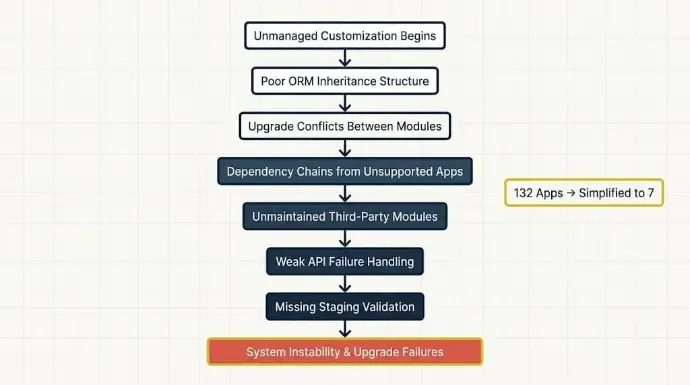
This is where many Odoo environments either stay scalable long term or slowly become impossible to maintain.
Odoo stands out for flexibility, and its open-source nature gives businesses unusual freedom to customize workflows and processes without the high costs of proprietary systems, but that same freedom creates maintenance risk when customization is unmanaged. Odoo is highly customizable, but customization comes with tradeoffs.
Every custom module, third-party dependency, or poorly structured integration adds maintenance overhead that eventually affects upgrades, performance, and operational stability.
The biggest risks usually come from:
- Poor ORM inheritance structure
- Upgrade conflicts between modules
- Dependency chains tied to unsupported apps
- Unmaintained third-party community modules
- Weak API failure handling
- Missing staging validation before deployment
This is why “custom code is future pain” becomes very real inside heavily modified environments. A customization that solves a short-term workflow problem today can quietly create upgrade failures and operational instability later if it wasn’t built properly from the start.
Upgrading custom code to new Odoo versions can also become complex and expensive once those dependencies pile up.
Cudio has rescued 32+ broken Odoo systems, many of them heavily over-customized environments with little documentation, unsupported community apps, and fragile integrations holding critical workflows together.
Every rescue begins with health diagnostics across roughly 140 operational and technical metrics to identify where the environment is actually failing.
One rescue project arrived running across 132 separate apps. After simplifying the environment into seven properly configured applications, the business gained more stability and visibility almost immediately because the operational complexity was no longer fighting the system architecture itself.
Upgrade-safe development, controlled integrations, and structured staging validation matter far more than businesses usually realize during initial implementation, because open-source flexibility is valuable but it does not replace disciplined architecture and upgrade planning.
Get My Free Odoo Rescue Assessment
Is Your Business Actually Ready for Odoo?
Choosing Odoo is one decision. Determining whether you're ready depends on key factors beyond software preference alone.
Most implementation problems start with internal readiness gaps, not software limitations. Weak governance, undocumented workflows, and poor ownership structures create problems long before the system even reaches go-live. The right ERP should fit current operations as well as future growth plans in business today.
The businesses that usually implement successfully have a few things already in place:
- Clear process ownership across departments
- Structured data governance before migration
- Dedicated super users internally
- Realistic UAT and rollout timelines
- Leadership actively involved during implementation
- Phased rollout governance instead of rushed deployment
This is why implementation readiness matters so heavily. ERP systems expose operational weaknesses very quickly. Poor process ownership, weak approval structures, inconsistent reporting logic, and messy migration data become far more visible once departments begin operating inside one environment.
Final Words
Odoo becomes extremely powerful once a business reaches the point where disconnected systems, manual reconciliation, and fragmented workflows start limiting growth.
The software matters, but implementation discipline matters more. Strong governance, clean architecture, realistic rollout planning, and the right implementation partner are usually what separate scalable ERP environments from expensive operational problems later.
Through implementation and rescue work, Cudio has seen both outcomes repeatedly. That’s why our team approaches ERP from an operator, finance, and workflow perspective first, not just a technical one.
Frequently Asked Questions
Here are some of the most common questions businesses ask before moving forward with Odoo.
How long does an Odoo ERP implementation usually take?
Most Odoo implementations take anywhere from two to six months, depending on operational complexity, module scope, integrations, data quality, and internal readiness. A phased rollout is usually more stable than attempting to deploy every workflow at once.
Can Odoo handle multi-company operations?
Yes. Odoo supports multi-company operations, with strong multi company support when configured correctly, including consolidated reporting, intercompany workflows, and separate ledgers inside the same environment.
Proper configuration is important, especially for permissions, accounting visibility, and inventory movement across entities, and this becomes especially relevant for large businesses managing multiple entities, shared workflows, and robust access controls.
Is Odoo Community enough for a growing business?
It can be, but only if the business has the technical capacity to manage hosting, upgrades, maintenance, and support internally. Many growing businesses eventually move toward Enterprise because operational support and upgrade management become harder to maintain at scale.
What causes most Odoo implementations to fail?
Most failures come from weak governance, rushed rollouts, unclear ownership, poor migration planning, and over-customization, rather than the software itself. ERP projects usually struggle when businesses treat implementation like a software installation instead of an operational transformation.
How much customization is too much in Odoo?
Customization becomes risky once businesses begin heavily modifying core workflows without planning for upgrades, dependencies, or long-term maintenance, and that risk rises further in a manufacturing unit or similarly complex operation where core processes are deeply tailored. Poorly structured custom modules and unsupported third-party apps are some of the biggest causes of future upgrade and stability problems.