


A manufacturer does not need another dashboard that points out a late component after production has already stopped. An omnichannel retailer does not need an AI summary of a stockout after five marketplaces have accepted orders the warehouse cannot fulfill. Operators need earlier signals, clear next actions, and controls that prevent automation from creating a larger problem.
That is where Odoo agentic AI becomes useful, but only when the workflow, data, and approval boundaries are designed correctly. At Cudio, we bring more than 30 years of combined experience across IT, finance, and leadership to complex Odoo environments, including businesses that manufacture, distribute, and sell through multiple channels.
This guide explains what Odoo's agents can actually do, where they can support manufacturing and retail operations, and which decisions should still stay with your team.
Key Takeaways
Odoo agentic AI can retrieve context, use assigned tools, and carry out defined tasks, but it is not an unrestricted autonomous operator.
The strongest manufacturing use cases involve exception handling, procurement preparation, production context, and structured escalation rather than unsupervised purchasing.
Omnichannel retailers can use agents to surface inventory conflicts, classify leads, prepare marketplace responses, and coordinate information across systems.
Existing Odoo rules should handle deterministic processes; AI adds the most value where a workflow requires interpretation, prioritization, or unstructured context.
Clean data, narrow permissions, and measurable approval gates matter more than launching a large number of agents.
What Odoo Agentic AI Actually Means
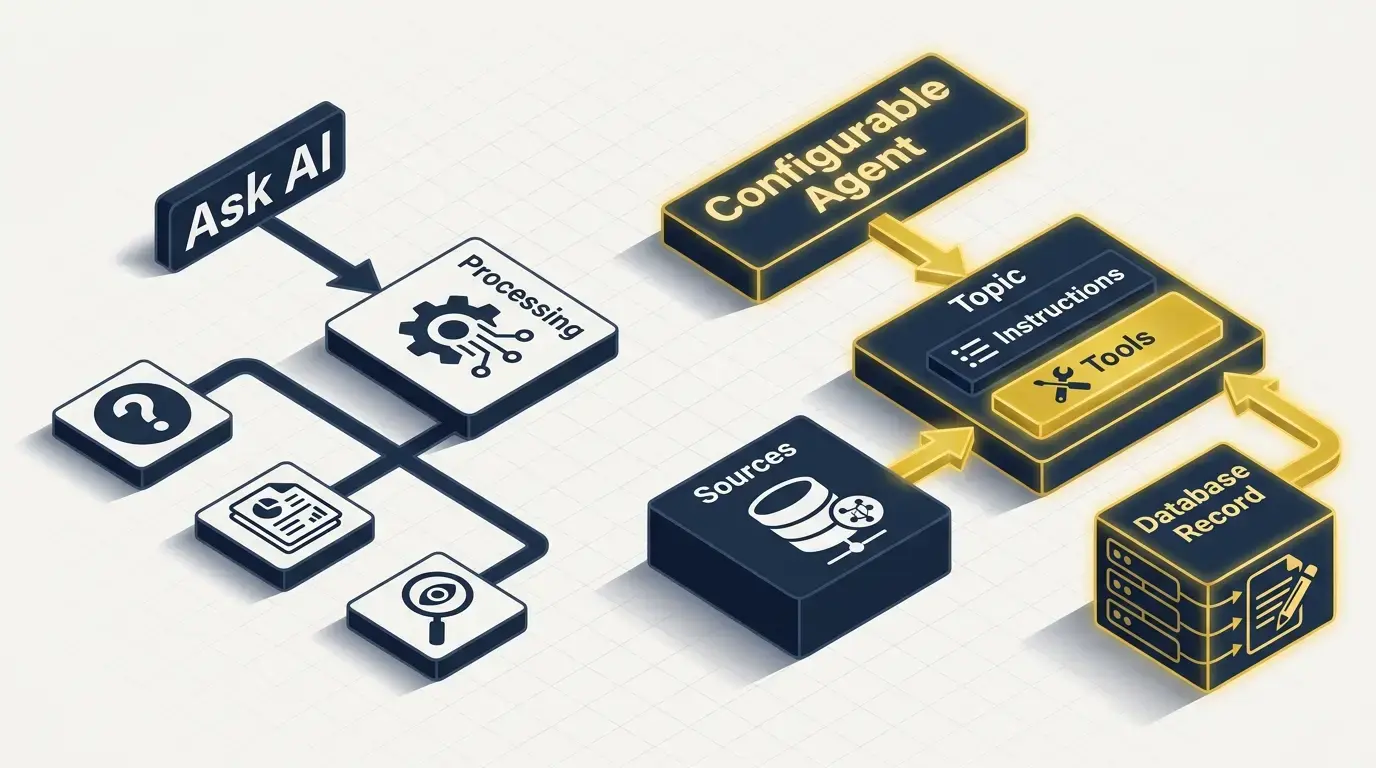
Most ERP AI is still assistive. You ask for a summary, draft, or explanation, and the system responds. Odoo 19 includes that experience through Ask AI as part of its broader ai features and built-in ai app, but configurable agents add another layer: They apply artificial intelligence to bounded tasks using ai prompts, ai fields, Topics, Sources, and assigned tools instead of relying on custom code.
Odoo describes Topics and Sources as the two main components of an agent.
Topics contain instructions and tools that define what the agent can do, while indexed Sources provide the information it can retrieve. The system prompt sets the agent's overall role and behavior, and each Topic has its own Instructions for rules, constraints, and step-by-step workflows. Agents can also be trained with company-specific documents for context so they respond using relevant odoo data and business rules.
The practical distinction is action.
Ask AI can answer questions, open views, display reports, and improve content, but Ask AI cannot alter records. A configurable agent without a Topic is also informational only; Odoo requires a Topic with assigned tools before the agent can complete tasks or change database data.
Odoo 19 ships with preconfigured Topics for Natural Language Search, Information Retrieval, and Create Leads when CRM is installed.
The Natural Language Search Topic lets users query the database more easily, and the underlying ai model can turn plain-language requests into structured results.
Native tools include actions such as opening a view or creating a lead.
Manufacturing purchases, stock-allocation changes, and marketplace exception workflows are not listed as turnkey AI actions, so they should be treated as configured use cases that may require an automated action, server actions, Studio, or custom development. Odoo AI also supports ChatGPT and Google Gemini for integration.
Where Agents Fit in Manufacturing Workflows
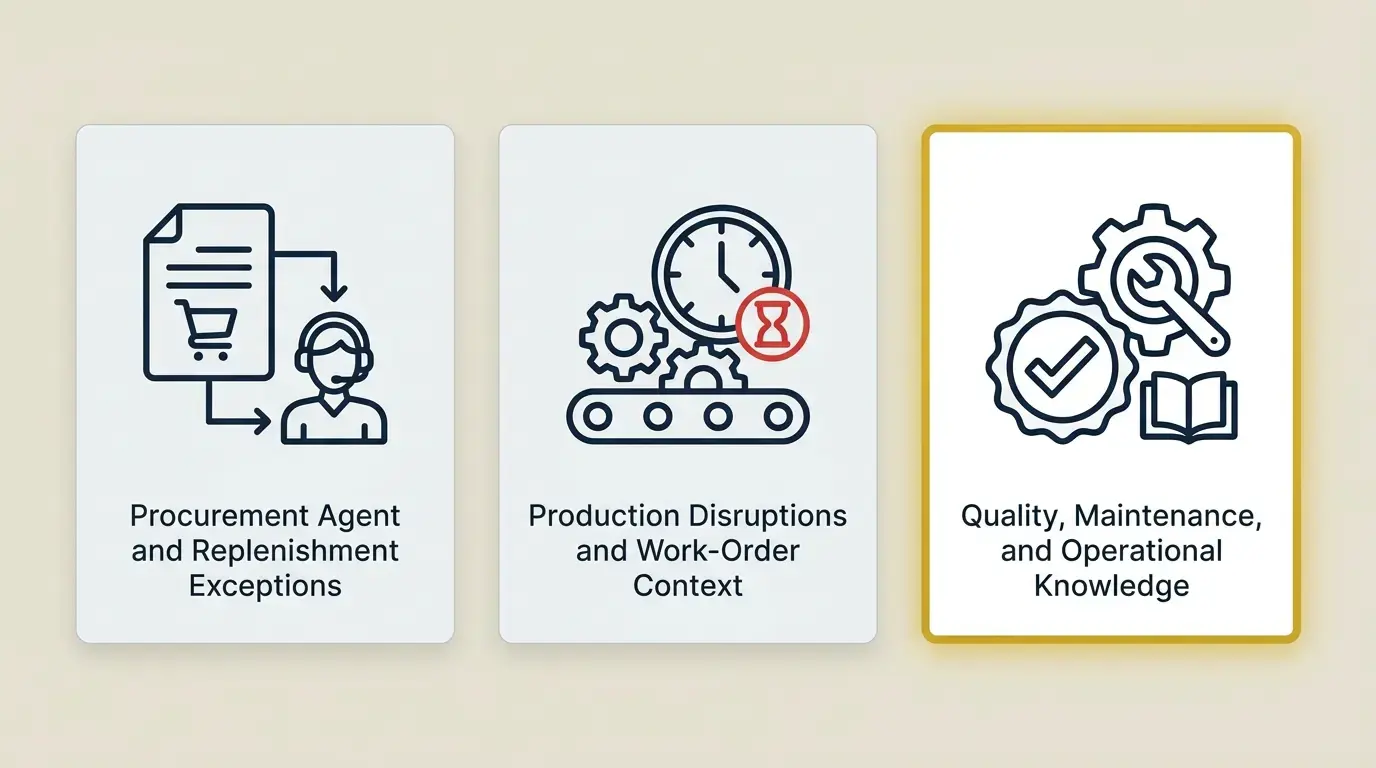
Manufacturing teams deal with high volumes of structured transactions, but their hardest decisions usually happen around exceptions, where agentic AI can support faster decision making.
A supplier slips, a component becomes constrained, a work order falls behind, or a quality issue changes what can ship.
These are good candidates for agent assistance because the system must collect context before a person decides what to do.
A controlled deployment example is a self-optimizing production line that adjusts machine settings in real time.
Procurement Agent and Replenishment Exceptions
Odoo already supports deterministic replenishment without an AI agent. When forecast stock falls below a configured minimum, automatic rules create replenishment orders: An RFQ for products using the Buy route or a manufacturing order for products using the Manufacture route.
Manual rules place the requirement in the Replenishment report for review. By contrast, an agent can monitor stock levels continuously and generate reorder requests automatically, but only within approved workflows.
An agent should not duplicate that native logic. A configured procurement agent could instead collect the records behind an exception, such as the product, forecast quantity, open RFQs, vendor information, and related notes, then present them to a buyer.
Better exception handling can also streamline operations and reduce inventory holding costs by 20%. That workflow is not a documented out-of-the-box manufacturing agent; it would need approved tools or an action built against the relevant Odoo models.
The approval boundary should reflect financial and operational risk. Low-value replenishment from an approved supplier may qualify for a controlled action after testing and within defined business rules.
A substitute component, a new supplier, a large purchase, or a change that affects promised delivery dates should remain subject to human approval.
Production Disruptions and Work-Order Context
A production manager often loses time assembling the story behind a delay. The manufacturing order may be in one view, component availability in another, maintenance notes elsewhere, and supplier messages in the chatter, so managers often have to reconstruct the cause through analysis of past performance.
A narrowly scoped workflow can collect that context and present the affected orders, missing inputs, due dates, and responsible teams together. In predictive maintenance, it can also analyze data from 15,000 sensors to flag likely machine failures earlier, reducing downtime and helping cut maintenance costs by 25%.
AI actions interpret record context and select from tools defined in the action. The trigger and follow-up still need to be configured through Odoo's automation framework; this is not a native promise that every delayed work order will be detected and routed automatically.
When a workflow only needs new fields, views, approval steps, or straightforward automations, building the workflow with Odoo Studio may be sufficient. Python development is more appropriate when the agent needs a new tool that calls complex model logic, validates multi-record conditions, or integrates an external system, though these workflows still require careful planning before automations are granted authority.
This is also where Cudio's standard-versus-custom Odoo framework matters. We first use native MRP, Inventory, Purchase, Quality, and automation features, then add a targeted action or custom module only when standard configuration cannot support the required exception path.
The agent should not independently change a bill of materials, approve a quality deviation, or reschedule a high-priority customer order unless the business has deliberately configured that authority. Those decisions affect cost, compliance, and customer commitments, so the human owner remains accountable.
Quality, Maintenance, and Operational Knowledge
Aeromist shows why connected operational data matters for improving efficiency before any AI layer is added. AI can also support quality control by detecting defects in milliseconds during production.
Cudio replaced fragmented manufacturing and commerce tools with an Odoo environment that delivered real-time inventory tracking, automated forecasting, and streamlined production workflows, so defect alerts or related records can be generated automatically once the workflow and data foundation are in place. Agentic workflows become far more useful once manufacturing, inventory, and sales share reliable records.
Build My Connected Manufacturing System
Where Agents Fit in Omnichannel Retail
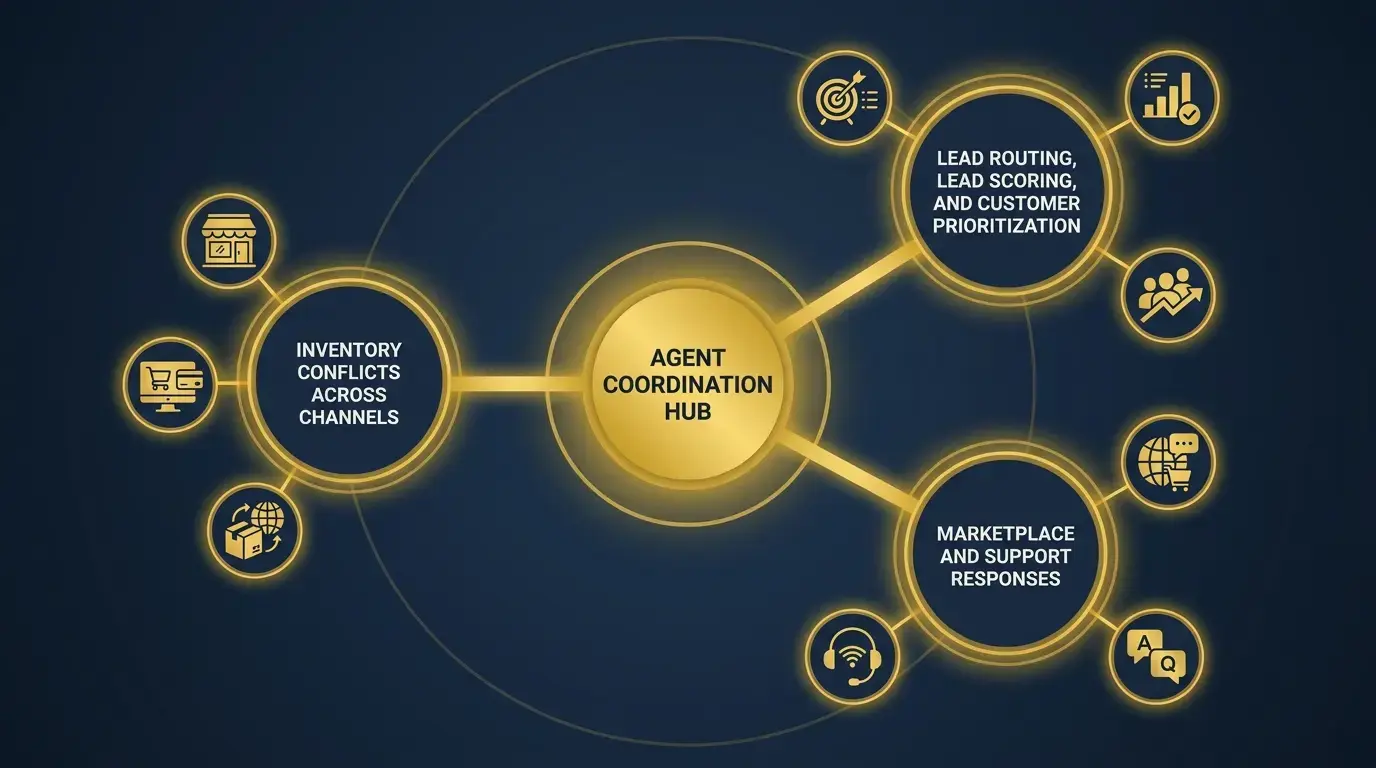
Omnichannel retail creates a different type of pressure. The business must coordinate inventory, orders, customer messages, pricing, and fulfillment across stores, e-commerce sites, and marketplaces. AI can help interpret and route this activity, but the source of truth still needs to be clear.
Inventory Conflicts Across Channels
An agent can surface products with rising order demand, constrained available-to-promise inventory, or repeated fulfillment exceptions. It can collect the affected orders and channels, then route the issue to the correct owner with the relevant context already assembled.
However, an agent should not be described as a replacement for inventory synchronization. If marketplace quantities and Odoo stock records are not connected correctly, the business needs an integration fix. AI cannot reason its way around stale feeds, failed webhooks, or duplicate SKU mappings.
Retailers moving from disconnected inventory, POS, and commerce tools need to establish the system of record before adding agents. Cudio's approach to retail migration into connected Odoo covers the operational foundation: Consistent product identifiers, validated stock by location, mapped order states, and tested channel integrations. An agent can then work from governed records instead of trying to compensate for broken data movement.
Lead Routing, Lead Scoring, and Customer Prioritization
Odoo includes a preconfigured Create Leads Topic when CRM is installed, so lead creation is a documented native agent capability. Assignment by territory, channel, account type, or revenue band is a separate workflow.
It should use existing CRM assignment rules where possible or a specifically configured action when the business logic goes beyond the standard setup.
The useful distinction is between classification and commitment. An agent can identify whether an inquiry relates to wholesale pricing, a marketplace order, a product issue, or a high-value account. It can create or assign the record when permissions allow, but discount approvals, contract terms, and unusual customer commitments should remain controlled by the appropriate team.
Marketplace and Support Responses
Agents are also well suited to repetitive questions with defined source material. They can retrieve return policies, product information, order status, and troubleshooting content, and support agents can use a detailed prompt built from past conversations and website links when drafting replies, then escalate when a request falls outside their scope.
That can reduce response time without giving the agent freedom to invent policy. The system prompt and Topic instructions should tell it when to stop, which sources it may use, and which conditions require a person, while simple automations can start with email drafts or email templates for low-risk support and sales communication. High-risk issues such as refunds beyond policy, chargebacks, safety complaints, and legal threats should route immediately.
Simons Shoes provides a practical picture of the connected environment this requires. Cudio implemented Odoo inventory, point of sale, purchasing, and sales modules, then connected Rithum. The business gained real-time sales and inventory data through Odoo dashboards while increasing e-commerce revenue.
Connect My Omnichannel Operations
If manufacturing or retail workflows still depend on disconnected systems, a structured Odoo ERP implementation foundation must come before agent configuration. Process mapping, model ownership, migration validation, and integration testing give the agent defined records and exception paths to work with.
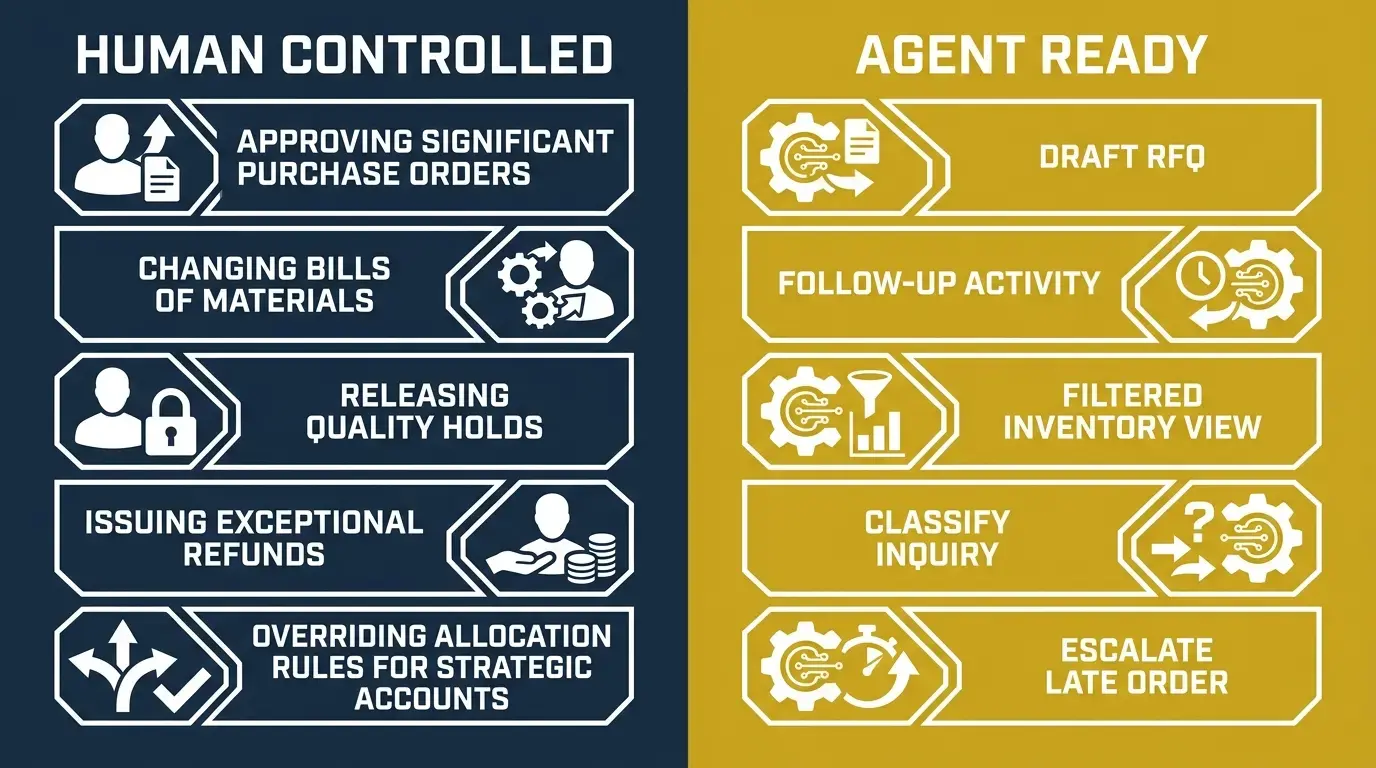
What Should Remain Human Controlled
The right question is not, 'Can the agent perform this action?' It is, 'What happens if the action is wrong, late, duplicated, or based on incomplete context?'
The answer determines the approval level.
Keep a human decision in the loop when a task changes financial exposure, product safety, regulatory posture, production specifications, supplier relationships, or customer promises.
That includes approving significant purchase orders, changing bills of materials, releasing quality holds, issuing exceptional refunds, and overriding allocation rules for strategic accounts.
Lower-risk work can move further toward automation. An agent may prepare a draft RFQ, create a follow-up activity, open a filtered inventory view, classify an inquiry, escalate a late order, or handle updating records to remove manual steps in routine workflows. The team can then review the action history and adjust the scope before granting more authority.
This is why agentic AI should be deployed in stages. Start with retrieval, move to recommendations, introduce limited write actions, and expand only after the output is accurate, the exception path works, and human validation remains in place for critical decisions.
What Must Be Ready Before Deployment
Your ERP 'failure' is actually a slow-motion car crash.
An Odoo AI deployment is primarily a data and process project. The model provider matters, but provider selection will not fix duplicated vendors, inconsistent SKUs, missing lead times, or contradictory procedures. Do not wait too long to modernize workflows, because companies delaying AI adoption face higher costs and lost efficiency.
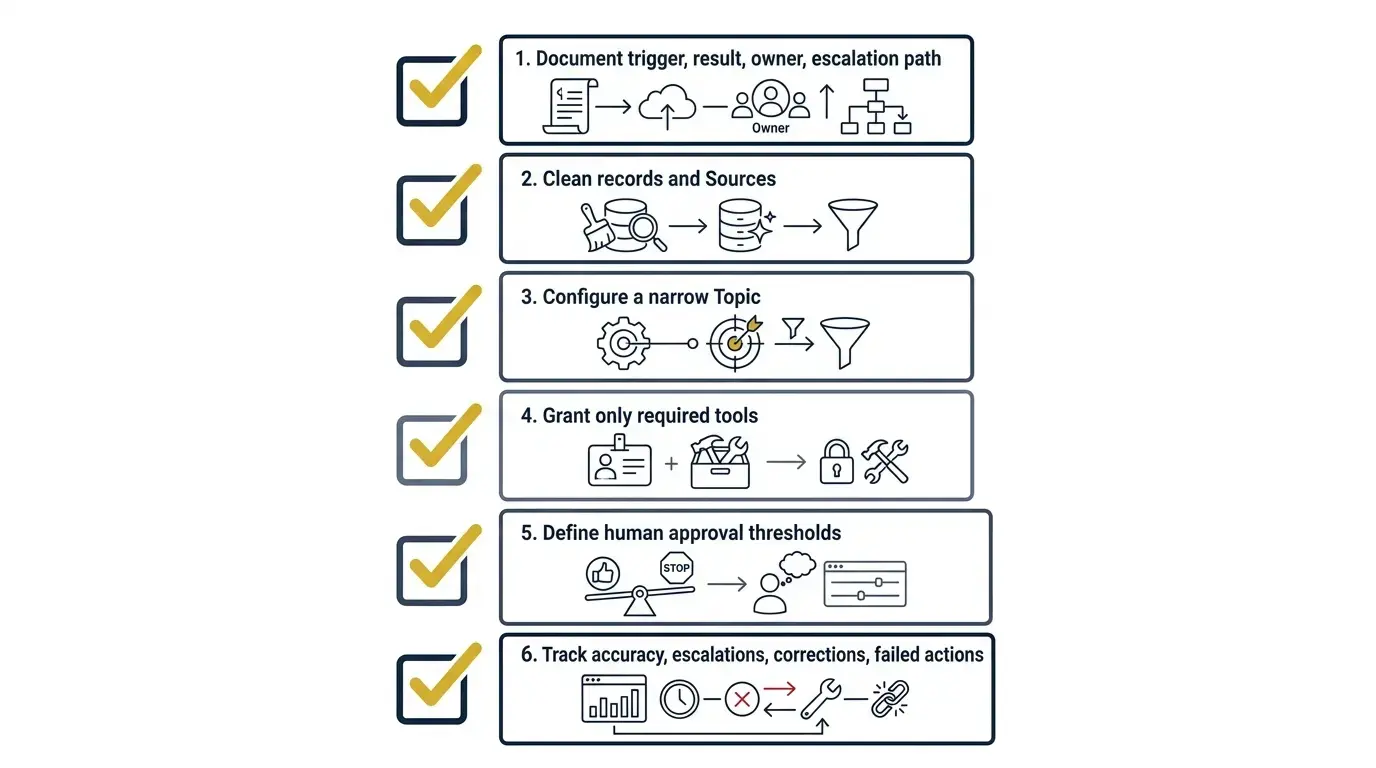
Before enabling an operational agent, document its trigger, expected result, owner, and escalation path. Clean the records and Sources it will use, configure a narrow Topic, grant only the required tools, and define human approval thresholds based on the company’s industry requirements.
Odoo Sources can be PDFs, web links, files in Documents, or Knowledge articles, as well as company documents that give the agent better operational context; enabling Restrict to Sources limits the agent to active indexed material. Then track accuracy, escalations, corrections, and failed actions before expanding its authority.
Odoo supports multiple versions of OpenAI and Google Gemini models, and custom API keys are optional in some deployments. Organizations may still use their own credentials for tighter control over provider permissions, version changes, and internal policy. Provider cost, availability, and data-handling requirements should be reviewed as part of deployment governance.
Odoo has allowed us to quickly and efficiently expand our operations globally while accommodating complex BOMs and business structures in a way that would be very difficult with other ERP systems. Through our partnership with Cudio, we have been able to improve existing workflows in Odoo and build out custom solutions that have reduced our days to close by over 50% while reducing our error rate. — Rowan, Lexington Medical
That result did not come from adding an AI layer to disconnected operations. It came from improving workflows and building the right Odoo environment first. The same principle applies to agents: automation performs best when the underlying system already reflects how the business should operate.
Turn Odoo Agentic AI Into Controlled Operational Value for Business Processes
Odoo agentic AI can do more than summarize records. In a properly configured environment, agents can retrieve context, use approved tools, and help move defined work forward across manufacturing and omnichannel retail.
The value does not come from removing people from every decision. It comes from reducing manual retrieval and repetitive tasks to streamline operations, preparing consistent actions, and escalating exceptions before they become production delays, stockouts, or customer problems, not replacing human judgment.
Cudio brings operator experience, more than 30 years of combined technical and business leadership, and a track record across complex manufacturing and retail environments.
We can assess which workflows are ready for agents, which need cleaner data or stronger integration, and where human approval should remain mandatory. Before scaling agents, manufacturing companies should evaluate readiness based on workflow maturity, data quality, and approval structure.
The following questions address the most common concerns operators raise before deploying agents in a live Odoo environment.
Ready to talk through your AI rollout plan? Assess My Odoo AI Readiness
Frequently Asked Questions About Odoo Agentic AI
Still exploring what Odoo Agentic AI can do? Here are quick answers to the most common questions businesses ask before adopting AI-powered workflows.
Does Odoo 19 have Agentic AI?
Yes. Odoo 19 includes configurable AI agents that can assist with tasks using assigned topics, tools, prompts, and data sources. It also includes an integrated ai app with core ai features such as ai fields and natural-language-driven workflows. What an agent can do depends on its configuration, permissions, and the Odoo apps installed. Proper setup is essential to ensure agents perform only approved actions.
Can Odoo AI create purchase orders automatically?
Yes, Odoo AI can support purchase order automation when configured appropriately. Odoo already generates replenishment orders through inventory rules, and AI can assist with additional purchasing workflows; it can also automate bank statement reconciliation for low-risk, repeatable finance tasks. However, businesses should keep approval processes in place for high-value purchases and other critical transactions, and approvals are still required for critical decisions.
Can an Odoo Agent manage inventory across marketplaces?
Yes, an Odoo Agent can help manage inventory across marketplaces when reliable integrations are in place. It can identify inventory conflicts, retrieve order information, and route exceptions for review. However, it still depends on accurate synchronization between Odoo and external sales channels.
What is the difference between Ask AI and an Odoo Agent?
Ask AI is Odoo's conversational assistant that answers questions, retrieves information, and helps users navigate the system. An Odoo Agent goes further by using assigned tools and permissions, including ai prompts and server actions, to perform predefined business tasks with less custom code in simpler workflows. In short, Ask AI provides information, while an Agent can take approved actions.
Does Odoo AI require an OpenAI API key?
No. Odoo supports multiple AI providers, including ChatGPT and google gemini, and not every deployment requires a custom API key. Some businesses choose to use their own API credentials to manage costs, provider settings, and internal security policies. The best approach depends on your deployment requirements.
What should we automate first with Odoo Agentic AI?
Start with repetitive, low-risk business processes that have clear rules and clean data, especially early use cases that remove manual steps from repetitive tasks. Common first use cases include procurement exception summaries, lead classification, inventory issue routing, delayed order notifications, and invoice OCR for document-heavy workflows. Automating these workflows delivers value while minimizing operational risk.