



Odoo Community is a free, open-source (LGPLv3) ERP designed for technical teams capable of self-managing infrastructure, updates, and manual support. Another open-source option is Dolibarr, so it's worth exploring a Dolibarr vs Odoo comparison.
In contrast, Odoo Enterprise ($19.90–$24/user/mo) is a fully managed proprietary solution that includes official support, cloud hosting, mobile applications, and advanced automation for accounting and inventory.
For businesses ready to commit to the Enterprise tier, the next logical step is ensuring you're on the latest release — discover what's involved in upgrading to Odoo 18 Enterprise with expert support before locking in your edition choice.
The Odoo Community, also known as the community edition or community version, offers open-source freedom powered by community support.
Meanwhile, Odoo Enterprise and the Enterprise Edition focus on automation, mobile access, and official backing.
Making the right edition choice requires up-to-date information — visit Cudio's Odoo insights hub for the latest analysis on Odoo Enterprise features, licensing changes, and ROI benchmarks
With over 13 million users worldwide, Odoo dominates the SMB market. While Community accounts for a significant portion of installations, Enterprise is the standard for organizations requiring audited financial workflows and scalability. If you've outgrown spreadsheets, Odoo might be the right solution.
If you're still weighing the trade-offs, get expert advice on which Odoo edition suits you — our consultants can model the ROI of Enterprise features against your specific use case.
Key Takeaways
- Odoo Community is fully open source (LGPLv3), free to download with $0 license cost, but requires self-hosting and in-house or partner technical expertise for support and upgrades.
- Odoo Enterprise in 2025 typically costs about €19.90–$24 per user/month, includes cloud hosting, official support, automatic upgrades, mobile apps, and dozens of extra modules not available in Community.
- Enterprise is generally better for growing SMEs that need advanced accounting, multi-company flows, mobile access, and service-level agreements, while Community is better suited to startups and technically strong teams that can self-manage infrastructure.
- You can start with Community and later switch to Enterprise by adding the Enterprise code and upgrading the database, so the decision is not irreversible—though the reverse path requires significant effort.
- Community’s free license is often offset by infrastructure, development, and upgrade costs, while Enterprise bundles them into a predictable subscription fee.
What Are the Critical Feature Differences Between Community and Enterprise?
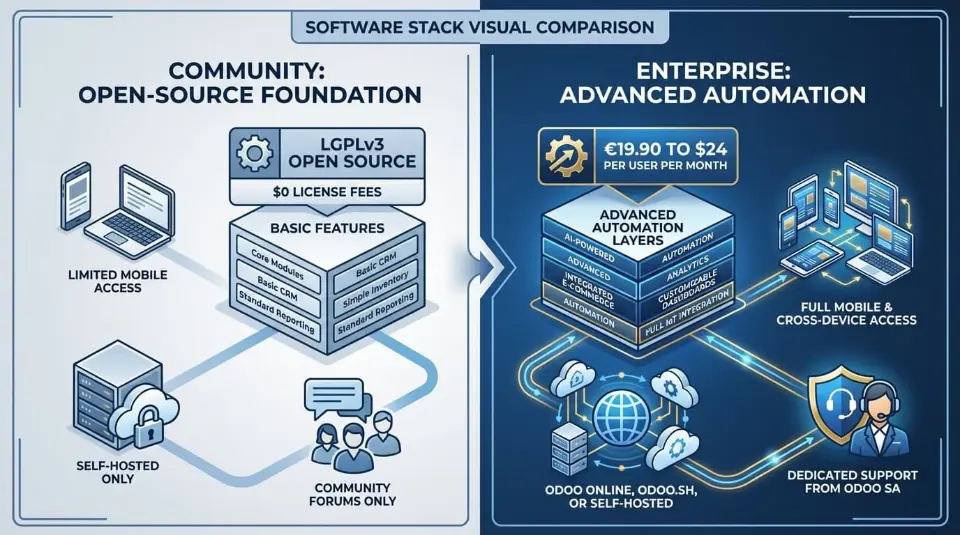
Choosing between Odoo Community and Odoo Enterprise affects far more than features alone. Both run on the same Odoo ERP foundation, but they differ sharply in cost structure, automation, support, upgrades, and long-term maintenance. This side-by-side comparison breaks down the real operational differences businesses face in 2026.
Category | Odoo Community Edition | Odoo Enterprise Edition |
License type | LGPLv3 is fully open source | Proprietary shared-source license |
License cost | $0 license fees | €19.90 to $24 per user per month |
Core ERP system | Same Odoo core framework | Same Odoo core framework |
CRM, Sales, Purchase | Included | Included |
Inventory management | Basic stock operations | Advanced automation and routing |
Barcode scanning | Not available | Included |
Multi-warehouse support | Limited | Fully supported |
Manufacturing | Basic MRP | Advanced planning and reporting |
Accounting features | Basic bookkeeping only | Automated reconciliation, multi-currency, tax rules |
Bank synchronization | Not available | Plaid, Yodlee, Salt Edge integrations |
Recurring invoicing | Not included | Fully supported |
Subscriptions module | Not available | Included |
Helpdesk with SLAs | Not available | Included |
Quality and maintenance apps | Not available | Included |
Marketing automation | Limited | Included |
Website optimization tools | Basic | A/B testing, analytics, forms |
Mobile apps | No mobile access | Android and iOS apps |
User interface | Standard web UI | Improved interface and usability |
Customization approach | Developer-based coding | Odoo Studio low-code customization |
Upgrade safety | High risk with custom code | Upgrade-friendly customizations |
Upgrade service | Manual using OpenUpgrade | Official upgrades included |
Support model | Community forums only | Dedicated support from Odoo SA |
Hosting options | Self-hosted only | Odoo Online, Odoo.sh, or self-hosted |
Infrastructure management | Fully customer-managed | Managed or optional self-hosting |
Maintenance responsibility | Internal team | Odoo SA and certified partners |
Access to new features | Delayed | Immediate access |
Best suited for | Startups, dev teams, simple workflows | SMEs, scaling companies, complex operations |
Long-term cost structure | Variable and unpredictable | Predictable subscription model |
Odoo Community vs Enterprise Overview
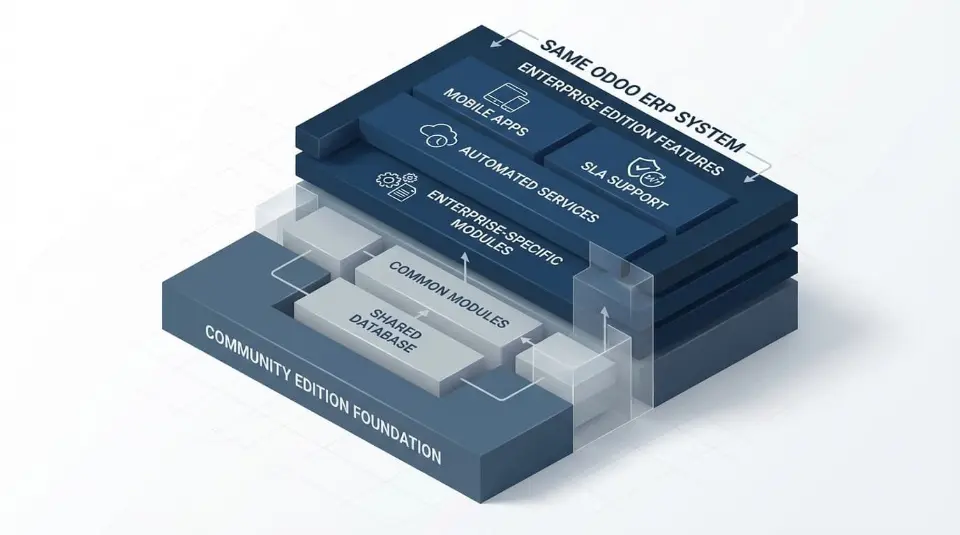
Many business decision-makers misunderstand the architectural relationship between Odoo Community and Enterprise, often viewing them as distinct products rather than a tiered software stack. These are not two different products, but rather two versions of the same platform. For a broader comparison, see Acumatica and Odoo.
Both run on the same Odoo ERP system, share the same database structure, and follow the same development roadmap across all Odoo versions. The difference is not the core technology. It is who carries the responsibility once the system goes live.
Shared Core Platform
The community edition is the foundation of every Odoo deployment. It is fully open source and provides the base modules for CRM, Sales, Purchase, Accounting basics, and inventory management. The enterprise edition does not replace this system. It sits on top of it.
Every installation of the enterprise version still runs the community code underneath. Products, orders, accounting entries, and workflows behave the same at the database level. From a technical standpoint, both editions are the same ERP system.
What changes is what you get on top of that foundation.
Same Codebase, Very Different Reality
While the platform is shared, the experience is not.
While the Community Edition provides the core Python-based ERP framework, it excludes critical operational layers found in Enterprise. Specifically, it lacks official Mobile Apps for iOS/Android, SLA-backed support, and automated upgrade services, forcing users to rely on community forums and manual OpenUpgrade scripts for maintenance.
Community users depend heavily on community forums, GitHub patches, and partner contracts. That model works only if your team has strong technical expertise and accepts full responsibility for uptime, security, and upgrades.
The enterprise edition activates proprietary modules that radically change daily operations. Advanced accounting, automated inventory management, barcode scanning, carrier integrations, helpdesk SLAs, and analytics are not optional add-ons. They are built-in features maintained by Odoo SA.
This is the true split between the two Odoo versions.
Purpose of Each Edition
The community edition exists for developers and technically capable teams. It favors control over convenience. If something breaks, it is your job to fix it. If an upgrade fails, the downtime is yours to absorb. Community support is collaborative, not guaranteed.
The enterprise version exists for businesses that want the ERP to run the company, not become the company’s side project. Odoo enterprise users receive official upgrades, structured releases, and dedicated support. The software is maintained, tested, and updated without relying on internal developers.
Enterprise users typically scale faster because they utilize pre-built, maintained modules for complex workflows, whereas Community users must invest engineering hours into rebuilding or maintaining existing features.
Key Differences Between Odoo Community vs Enterprise Edition
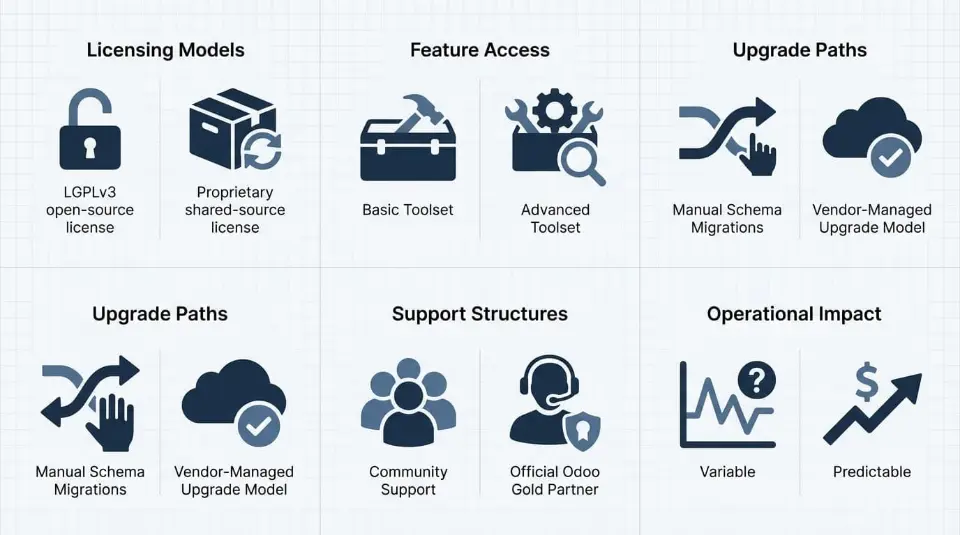
Although Odoo Community and Enterprise are built on the same Python-based ERP framework using PostgreSQL, they behave very differently once deployed in real business environments. The distinction is not the core technology but how responsibility, risk, and long-term cost are handled after implementation.
Both editions rely on the same database structure and workflow engine across Odoo versions. Orders, products, accounting entries, and inventory records all follow the same data model. What changes is how the system is licensed, which features are available, who provides support, and how upgrades are executed.
Licensing Model
The community edition is distributed under the LGPLv3 open-source license. This allows unrestricted access to the source code and full freedom to modify or extend the system. Internal developers or implementation partners can rewrite modules, alter workflows, and maintain complete ownership of the deployment.
What the license does not include is accountability. There is no contractual obligation from Odoo SA to resolve bugs, provide security patches, or assist during upgrades. Any issue that arises becomes the responsibility of the organization running the system.
The enterprise edition uses a proprietary shared-source license. While the code remains visible and customizable, usage is governed by subscription terms. In exchange, Odoo SA becomes responsible for maintaining enterprise modules, issuing certified updates, and ensuring compatibility between releases. This significantly reduces operational and compliance risk for growing organizations.
Feature Access
Both editions include the same foundational ERP components:
- CRM and lead management
- Sales and purchasing workflows
- Manufacturing basics
- Core accounting functions
- Standard inventory management
The separation begins when automation, integration, and scale are introduced.
With the community edition, many advanced workflows must be built or maintained manually. Functions such as automated reconciliation, shipping integrations, and warehouse scanning are not available out of the box.
The enterprise edition activates additional layers directly on top of the same core system, including:
- Live bank synchronization using Plaid, Yodlee, and Salt Edge
- AI-powered OCR for vendor bills
- Automated reconciliation and cash management
- Barcode scanning and advanced warehouse routing
- Shipping carrier integrations
- Subscriptions and recurring invoicing
- Customer portals and digital signatures
- Advanced reporting and dashboards
Community users can approximate some of these capabilities using OCA modules, but each additional dependency increases maintenance complexity and upgrade risk.
Role of Certified Odoo Partners in Enterprise Deployments
While Odoo Community relies heavily on internal teams and community forums, many businesses eventually require structured partner support to maintain system stability and reduce operational risk.
This is where certified Odoo partners play a critical role.
As an Official Odoo Gold Partner, Cudio has delivered implementations ranging from 18 to 100+ users. In our experience auditing failed Community deployments, we find that organizations without dedicated internal DevOps teams face significantly higher long-term costs due to manual upgrade failures and database inconsistencies.
With 12 certified Odoo experts and active certifications spanning Odoo versions 16 through 19, Cudio provides hands-on technical and functional coverage throughout the full ERP lifecycle. Our experience includes more than 79 documented project references, with deep specialization in manufacturing and maintenance workflows.
In Community deployments, partner support remains optional and non-binding. There is no guaranteed response time, no SLA, and no escalation path. Fix timelines depend entirely on internal capacity or external consultants.
Enterprise deployments operate differently.
Enterprise users benefit from a contractual support framework that combines Odoo SA’s official support with certified partner delivery. This includes:
- Official functional and technical support from Odoo SA
- Unlimited bug fixes within supported versions
- Priority security patches
- Structured partner SLAs with defined response and resolution targets
Cudio works within this Enterprise framework to bridge strategy and execution. Our team assists with implementation design, upgrade planning, performance tuning, validation of inventory logic, and post-go-live optimization. This ensures the ERP remains stable as transaction volume, automation, and data complexity increase.
Contact our Certified Odoo Experts
Upgrade Responsibility
Upgrades represent one of the most significant long-term differences.
Community upgrades are fully self-managed. They typically involve:
- Manual schema migrations
- ETL scripts for data transformation
- Dependency alignment across OCA modules
- Resolution of PostgreSQL conflicts
- Extensive regression testing
Most teams rely on the OpenUpgrade framework, which is community-maintained and may not support every module or customization. As systems grow, this process introduces mounting technical debt and increasingly expensive upgrade cycles.
Enterprise follows a vendor-managed upgrade model. Odoo SA provides an official database upgrade service, automatically migrates enterprise modules, and ensures compatibility with each major release. Custom modules still require testing, but the core platform upgrade becomes predictable and repeatable rather than a high-risk project.
How This Affects Real Business Operations
Because both editions share the same foundation, the choice rarely depends solely on functionality. It depends on how much operational risk a business is prepared to absorb.
The community edition fits organizations with strong technical teams that can manage infrastructure, Docker containers, PostgreSQL tuning, dependency conflicts, and manual upgrades internally.
The enterprise edition fits organizations that treat the ERP as business-critical infrastructure. It prioritizes automation, continuity, predictable costs, and reduced maintenance overhead.
Both editions run the same engine. Only one includes the responsibility for keeping it running.
What Is the Total Cost of Ownership (TCO): Free vs. Subscription?
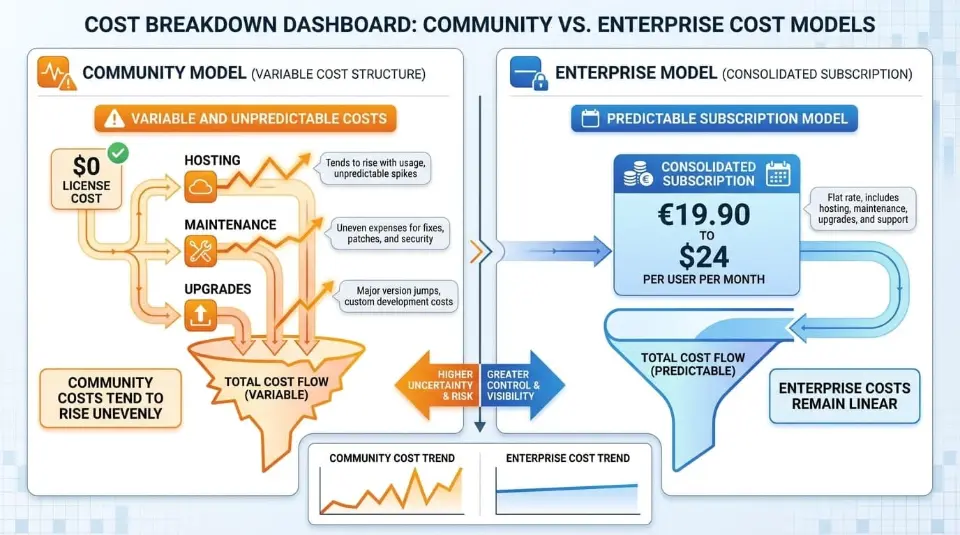
When evaluating odoo community vs enterprise, pricing is often where confusion starts. On paper, one option appears free while the other carries recurring license fees. In reality, the difference is not about price alone but about how costs surface over time and who carries operational responsibility.
Odoo offers two primary editions, each built on the same Odoo ERP foundation but governed by very different ownership models. Understanding these cost structures is critical before committing to either Odoo edition.
Odoo Community License Structure and Cost Breakdown
The Community edition is released under the LGPLv3 license and is available at a $0 license cost. It is a true open-source platform, developed and maintained by the Odoo Community Association, with contributions from developers worldwide.
This model eliminates upfront license fees and provides unlimited access to the source code. For many community users, this makes the platform attractive during early-stage deployment.
However, “free” applies only to the software license itself.
Once deployed in production, Community introduces several unavoidable operational costs:
- Hosting infrastructure, typically on AWS, Azure, or Google Cloud. Minimum recommended setup begins at 4 CPU cores, 16 GB RAM, and 60 GB NVMe storage
- Database administration and maintenance, including PostgreSQL tuning and backups
- System monitoring and security, usually involving Nginx, SSL certificates, and alerting tools
- Upgrade labor, handled manually using OpenUpgrade or custom ETL scripts
- Support reliance on community forums, documentation, and paid consultants
For Community deployments, these costs scale directly with usage. As transaction volume, inventory movement, and user count increase, so does the complexity of infrastructure and maintenance.
This is where many organizations underestimate the long-term impact of Community. The license may be free, but the system still requires engineering resources to maintain stable business operations.
Enterprise Version Pricing and Subscription Model
The Enterprise edition follows a subscription-based model governed by a formal license agreement with Odoo SA.
Last 2025, pricing is reported at:
- €19.90 per user per month, flat-rate, unlimited apps
- Alternate listings place starting cost around $24 per user per month
Unlike Community, the Enterprise subscription fee bundles multiple operational services into a single predictable cost.
The paid version includes:
- All Enterprise-only applications and extra modules
- Official technical and functional support from Odoo SA
- Database upgrade service with upgrades included
- Access to Odoo Studio for easy customization
- Mobile apps for Android and iOS
- Optional Odoo Online SaaS or Odoo.sh cloud hosting
- Continuous access to recent features and new features as they are released
For enterprise users, this model eliminates the need to budget for infrastructure engineering, security patching, or major version migrations separately.
Instead of paying unpredictably for fixes and upgrades, the company pays a recurring subscription fee that remains stable as usage grows.
Total Cost of Ownership Comparison for Each Odoo Edition
The real comparison between community vs enterprise becomes clear only when costs are evaluated across three to five years rather than at launch.
With Community, expenses remain variable and difficult to forecast. Costs fluctuate based on system complexity, integrations with other systems, and upgrade frequency.
Typical long-term Community expenses include:
- Cloud hosting that increases with the database size
- External partner retainers for maintenance and troubleshooting
- Manual upgrade projects every major Odoo release
- Technical debt from custom modules and OCA dependencies
- Downtime risk during upgrades or performance failures
Enterprise centralizes those variables into a predictable structure.
Over the same period, Enterprise users pay:
- A consistent subscription fee per user
- No separate license fees per app
- No upgrade project costs for core modules
- No mobile access charges
- No separate hosting contracts when using Odoo cloud hosting
This difference becomes especially evident for organizations managing inventory across warehouses, using recurring invoicing models, or undertaking complex operations involving multiple departments.
Community costs tend to rise unevenly. Enterprise costs remain linear.
Predictable vs Variable Expenses
The most important pricing distinction is not the monthly amount. It is predictability.
Community operates on variable cost exposure. Expenses appear as infrastructure upgrades, consultant invoices, emergency fixes, or delayed upgrades that accumulate technical debt.
Enterprise operates on a predictable operational cost. The subscription fee absorbs infrastructure, upgrades, and platform evolution under a single contract managed by Odoo SA.
For businesses with limited scale and strong internal engineering, Community may remain cost-effective. For organizations supporting growing business operations, Enterprise pricing is often less expensive than the cumulative costs of self-managed ownership.
This is why many companies begin on Community and later migrate. The decision is rarely driven by features alone but by operational maturity and business needs.
In short, Community minimizes upfront spending. Enterprise minimizes long-term uncertainty.
That is the real pricing difference between the two.
Odoo Community vs Enterprise Feature Comparison
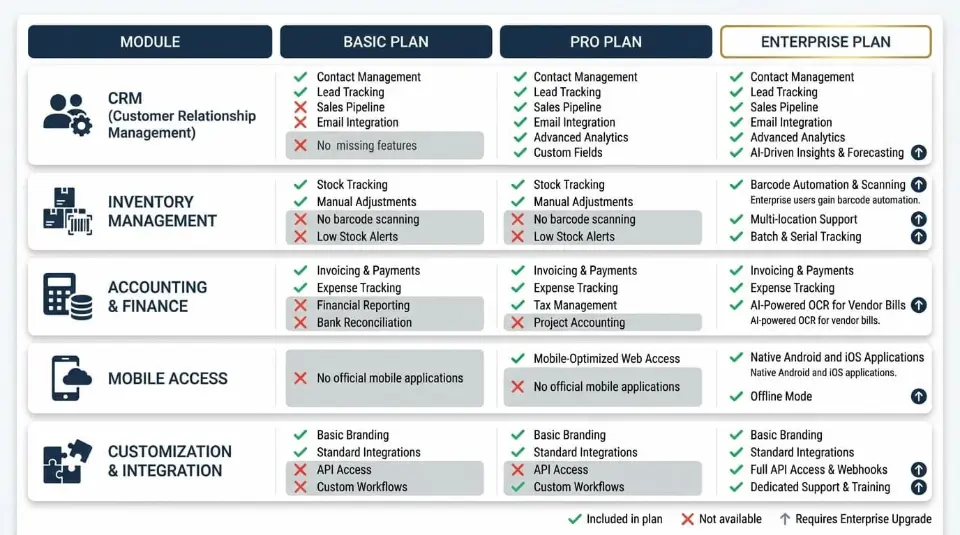
When comparing Odoo Community vs Enterprise, the difference is not whether the ERP works. Both editions run on the same Odoo core. The real gap lies in how well each version supports real-world business operations, scaling, automation, and long-term maintenance.
At a high level, Odoo offers two primary editions built on the same architecture, but designed for very different operational realities.
Core ERP System Features Available in Both Editions
Both editions share the same foundation of the Odoo ERP system. The Community version is not a demo or trial. It includes essential modules that allow a company to operate without license fees.
Both editions provide:
- CRM for leads and opportunity tracking
- Sales for quotations and order processing
- Purchase for supplier and procurement management
- Inventory basics for stock moves and internal transfers
- Manufacturing fundamentals for bills of materials and production orders
This shared core makes Odoo one of the most flexible open source ERP platforms available. For small teams with simple workflows, the Community edition can already support daily operations reliably.
The difference becomes apparent as process complexity increases.
Inventory Management Capabilities in Odoo Community vs Enterprise
Odoo Community restricts inventory management to basic stock operations, lacking native support for barcode scanning, shipping carrier integrations, and multi-warehouse routing. As order volumes increase, these limitations necessitate manual picking workflows or complex third-party OCA module dependencies.
However, Community users quickly encounter constraints such as:
- No barcode scanning
- No native shipping carrier integrations
- Manual picking and packing workflows
- Limited multi-warehouse automation
As order volume grows, these limitations increase fulfillment errors and manual workload.
The Enterprise version addresses these gaps directly. Enterprise users gain barcode automation, mobile scanning, multi-location routing, carrier integrations, and automated inter-company stock flows. These features are critical for retail, distribution, and manufacturing environments operating at scale.
Advanced Enterprise Version Modules Not Available in Community
The strongest functional separation appears in Enterprise-only modules.
The Community edition focuses on core ERP coverage. The Enterprise edition transforms Odoo into a fully integrated business platform.
The Odoo Enterprise Edition activates five critical proprietary modules not available in Community:
- Accounting Automation: Features AI-powered OCR for vendor bills and live bank synchronization via Plaid/Yodlee.
- Subscription Management: Natively handles recurring invoicing and deferred revenue recognition.
- Helpdesk SLAs: Includes ticket tracking, escalation rules, and customer satisfaction ratings.
- Studio Customization: A low-code environment for modifying views without altering the underlying Python codebase.
- Mobile Accessibility: Native Android and iOS apps for real-time field and warehouse operations.
These modules are maintained directly by Odoo SA, reducing compatibility risks and upgrade failures that commonly affect Community deployments relying on third-party extensions.
Where Businesses Commonly Struggle During Upgrades and Scaling
This is where many companies hit friction.
As operations grow, Community deployments often accumulate:
- Heavy customization that breaks during upgrades
- Inconsistent data models across modules
- Manual integrations between accounting, inventory, and sales
- Unclear upgrade paths between Odoo versions
Without structured testing and validation, these issues surface only after go-live.
Cudio helps solve this gap by auditing ERP workflows before and after migration. Our team identifies hidden data inconsistencies, validate inventory logic, test accounting flows, and ensure Enterprise-only modules are configured correctly before launch. This prevents silent failures that typically appear weeks after deployment.
Talk to Our Team to Get Started
User Experience and Interface Differences in Community vs Enterprise
Both editions share the same visual structure, but daily usability differs significantly.
Enterprise delivers smoother navigation, clearer dashboards, and a more consistent interface across modules. This improves adoption across non-technical departments such as finance, operations, and customer service.
Mobile Access Limitations in Odoo Community Edition
Odoo Community does not support official mobile applications.
Access is limited to web browsers, which creates usability constraints:
- No push notifications
- Slower approvals
- Limited usability for warehouse and field staff
- Reduced productivity outside the office
For desktop-only teams, this may be manageable. For distributed operations, it becomes a blocker.
Mobile Apps and Usability in the Enterprise Version
The Enterprise edition includes native Android and iOS applications.
These apps provide:
- Real-time approvals and notifications
- Mobile barcode scanning
- Offline-friendly workflows
- Faster task execution for field and warehouse teams
Combined with the improved interface, Enterprise significantly increases operational speed and data accuracy.
Cudio supports this transition by mapping mobile workflows to real business processes. We align warehouse scanning, approvals, and reporting with how teams actually operate, not just how modules are installed. This ensures mobile access improves efficiency instead of creating parallel workflows.
Talk to Our Team to Get Started
Customization Options in Odoo Community vs Enterprise ERP System
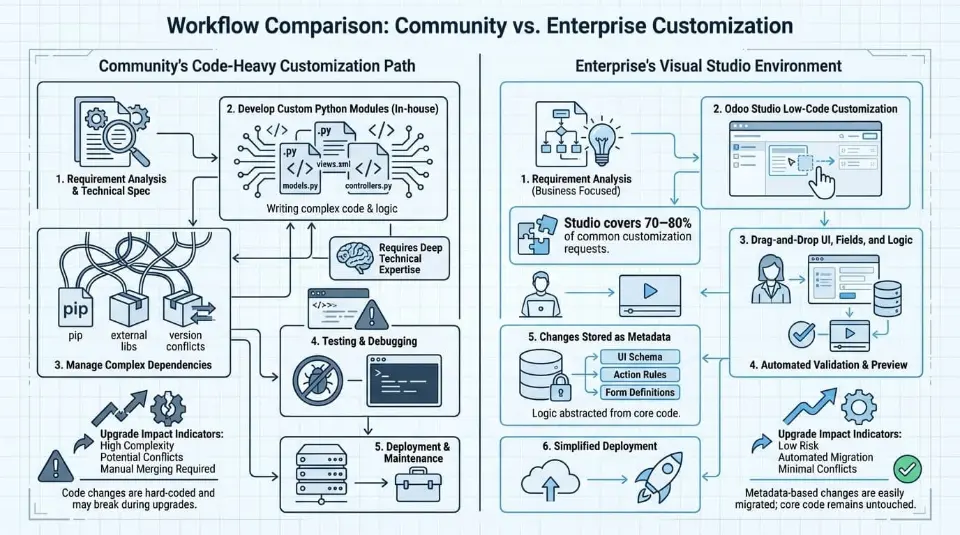
Customization is one of the biggest decision factors in odoo community vs enterprise. Both editions allow modification, but the methods, risk levels, and long-term maintenance impacts differ significantly.
The Community edition prioritizes developer freedom. The Enterprise edition prioritizes stability and upgrade safety.
Developer-Based Customization in Odoo Community
The community edition is a fully open-source platform released under the LGPLv3 license. This gives developers unrestricted access to the Odoo codebase.
Customization in the Odoo community version happens almost entirely at the code level using Python, XML, and JavaScript. Teams can modify core models, business logic, reports, and workflows without technical limitations.
This flexibility is powerful, but it comes with trade-offs.
Most Community deployments rely on:
- Custom Python modules written in-house
- Extensions from the Odoo Community Association (OCA)
- Direct modifications to views and workflows
While this approach gives full control, it demands strong technical expertise. Every customization increases the complexity of dependencies across Odoo versions.
Upgrade impact is the biggest risk.
When new Odoo versions are released, Community users must manually refactor custom modules, resolve PostgreSQL schema conflicts, and revalidate integrations. Tools like OpenUpgrade help, but they are community-maintained and may not support all modules immediately.
This often leads to:
- Delayed upgrades
- Accumulated technical debt
- Rising maintenance effort over time
For many community users, the freedom to customize eventually becomes an operational liability rather than an advantage.
Low-Code Customization Using Odoo Studio in the Enterprise Version
The enterprise edition takes a different approach.
Instead of relying entirely on developers, the Odoo Enterprise version includes Odoo Studio, a built-in low-code customization environment.
Odoo Studio allows:
- Adding fields without writing code
- Modifying screens and layouts visually
- Creating approval rules and automated actions
- Designing custom PDF reports
- Building lightweight internal apps
These changes are stored as metadata rather than hard-coded logic, which makes them upgrade-safe.
This is a major difference in community vs enterprise architecture.
With Studio, most functional changes survive version upgrades without refactoring. This dramatically reduces long-term maintenance costs and lowers dependency on developers.
For Enterprise users, Studio covers 70–80% of common customization requests without touching the core codebase.
That difference alone explains why many organizations migrate when scaling.
Hosting and Technical Setup for Odoo Community vs Enterprise
Hosting responsibility is one of the most underestimated key differences between editions.
Self-Hosting Requirements for Odoo Community ERP System
The Odoo Community Edition does not include hosting.
Community users must manage the full infrastructure stack themselves.
This includes:
- Linux servers, typically Ubuntu LTS
- PostgreSQL database management
- Reverse proxy configuration (Nginx)
- Application servers (Gunicorn)
- Backups, monitoring, and disaster recovery
Minimum recommended infrastructure starts at:
- 4 CPU cores
- 16 GB RAM
- 60 GB SSD
As user count increases, server requirements scale quickly. Deployments supporting 50+ users often require separate database servers with 32–64 GB RAM and NVMe storage.
In addition to hardware, Community hosting demands ongoing DevOps work:
- Security patching
- SSL certificate renewal
- Performance tuning
- Database optimization
- Log monitoring
For companies without dedicated infrastructure teams, these requirements introduce hidden costs and operational risk.
Cloud Hosting Options in the Enterprise Version
The enterprise version provides multiple hosting models supported directly by Odoo SA.
Enterprise users can choose between:
- Odoo Online for fully managed SaaS deployments
- Odoo.sh for managed PaaS with custom code support
- Self-hosted Enterprise with official upgrade services
These options remove most infrastructure responsibility from the business.
With Enterprise cloud hosting:
- Backups are automated
- Security updates are applied centrally
- Monitoring and performance optimization are handled by Odoo SA
- Infrastructure scales with usage
This significantly reduces maintenance overhead and improves the predictability of uptime.
Support, Maintenance, and Upgrade Differences Between Community vs Enterprise
The support structure is another decisive factor in the Odoo Community vs. Enterprise comparison.
Support Limitations in Odoo Community Edition
The Community edition does not include official support.
Community users rely on:
- Community forums
- GitHub issues
- OCA maintainers
- Paid third-party partners
There is no guaranteed response time, no SLA, and no obligation to resolve bugs.
Upgrades are also fully self-managed. Database migrations, testing, and issue resolution are handled entirely by the internal team.
For small systems, this may be manageable. For production ERP environments, it becomes increasingly risky.
Official Support and Upgrade Services in the Enterprise Version
The Odoo Enterprise Edition includes official support from Odoo SA.
Enterprise users receive:
- Functional and technical support
- Security patches and bug fixes
- Official database upgrade service
- Faster access to new features
- Compatibility assurance for Enterprise modules
Upgrade execution is handled by Odoo SA, significantly reducing downtime and migration risk.
For organizations running mission-critical systems, this dedicated support structure is often the deciding factor.
Scalability and Business Operations Impact
The long-term impact of each edition becomes clear as data volume and complexity increase.
Where Odoo Community Works Best for Small Business Needs
The Community edition performs well when:
- Teams are under 10–15 users
- Workflows are simple and centralized
- Inventory management is basic
- Accounting requirements are minimal
- Strong in-house technical expertise exists
For startups and internal tools, Community remains a cost-effective ERP system.
Why the Enterprise Version Supports Growing Business Operations
The Enterprise edition is built for scale.
It supports:
- High transaction volume
- Multi-company accounting structures
- Regulatory and compliance reporting
- Automated inventory management
- Recurring invoicing models
- Advanced HR and service workflows
Enterprise users benefit from predictable performance and reduced operational friction as complexity increases.
This makes Enterprise better suited for distribution, manufacturing, and service-driven organizations operating across multiple departments.
Odoo Community Workarounds vs Enterprise Built-In Tools
Many Community deployments attempt to replicate Enterprise functionality using alternatives.
Common workarounds include:
- OCA modules replacing paid apps
- Third-party accounting integrations
- External helpdesk platforms
- Custom barcode solutions
While these tools can work, they introduce trade-offs:
- Fragmented integrations
- Higher upgrade risk
- Inconsistent maintenance schedules
- Increased testing effort per upgrade
Enterprise provides these capabilities natively, with upgrades included and compatibility maintained by Odoo SA.
The difference is not whether Community can do it, but how much long-term maintenance the business is willing to absorb.
Which Odoo Edition Fits Your Business Needs?
Your ideal Odoo edition depends on how complex your operations are today and where your business is headed.
Best Use Cases for Odoo Community Edition
The Community edition fits organizations that:
- Have limited budgets
- Prefer open source control
- Employ experienced developers
- Operate simple workflows
- Accept manual upgrades and maintenance
Best Use Cases for the Enterprise Version
The Enterprise version fits companies that:
- Require stable scaling
- Manage complex operations
- Need mobile access
- Depend on accounting automation
- Operate multi-warehouse or multi-company structures
- Want predictable upgrade paths
Decision Checklist Before Choosing an Odoo Edition
Before selecting an Odoo edition, evaluate:
- Required modules across departments
- Internal technical skills and DevOps capacity
- Expected growth over the next 3–5 years
- Tolerance for upgrade downtime
- Long-term maintenance and support costs
The choice between community vs enterprise is not about features alone. It is about how much operational risk your organization can realistically manage as the system evolves.
In 2026, that distinction matters more than ever.
Final Words
Odoo offers two versions built on the same open-source foundation, but they serve very different purposes. The Community edition keeps costs low and gives technical teams full control, yet long-term maintenance, limited support, and missing advanced tools can increase potential costs over time. The Enterprise version adds a predictable subscription fee, upgrades included, recurring invoicing, mobile access, and continuous access to recent features and new features released by Odoo SA.
The real difference in community vs enterprise comes down to scale, support, and sustainability. Community suits experimentation and simple setups, while Enterprise delivers stability, additional features, extra modules, and stronger customization options for growing operations.
If choosing between the two feels unclear, Cudio can help assess your workflows, hosting needs, and growth plans to ensure your Odoo setup supports the business long after implementation.
Talk to Our Team to Get Started
FAQs
Quick answers to the most common Odoo Community vs Enterprise questions.
Can I start with Odoo Community and later move to Enterprise?
Yes, many businesses follow this path. You can upgrade by adding the Enterprise license and converting your existing Odoo database. Data, users, and configurations remain intact during migration. This allows flexibility between community vs enterprise as business needs evolve.
Is Odoo Community suitable for mission-critical accounting?
Odoo Community supports only basic accounting functions. It lacks automation such as bank synchronization, recurring invoicing, and compliance localization. Enterprise adds advanced financial controls, audit-ready tools, and continuous access to new features. For regulated or multi-currency operations, Enterprise is the safer option.
Do I need Odoo Enterprise if I host on my own servers?
No, Enterprise is not tied to a hosting model. Both Community and Enterprise can be self-hosted on AWS, Azure, or on-premise infrastructure. The difference lies in features, support, and upgrades included. Enterprise also provides optional cloud hosting through Odoo Online or Odoo.sh.
How often do Odoo versions change, and who handles upgrades?
Odoo releases one major version every year. Enterprise customers receive official upgrade services from Odoo SA as part of the subscription. Community users must rely on internal developers, OpenUpgrade, or partners. This increases maintenance effort and long-term potential costs.
What happens to my third-party and custom modules during an upgrade?
Enterprise upgrades automatically cover official modules. Custom code and extra modules still require testing and adjustment. Community users must manually coordinate upgrades across multiple third-party sources. This difference heavily impacts customization options, support needs, and upgrade stability.