If your Odoo construction project management setup is live, but your back office is still reconciling costs from spreadsheets, you don’t have a platform problem.
You have a configuration problem. At Cudio, we’ve helped over 62 construction and project-based firms deploy Odoo, and the disconnect shows up the same way every time: modules activated in isolation, cost data that never reaches the right place, and finance manually closing out jobs at month-end.
This guide covers how to wire Odoo's Project, Purchase, Inventory, Accounting, and Field Service modules together so that data flows automatically from the job site to the back office. We will show you where the common breaks happen, how to fix them, and what the system looks like when everything is connected correctly.
Key Takeaways
- When Odoo's modules are connected correctly, a confirmed purchase order immediately posts cost to the project analytic account and updates the budget dashboard, with no manual steps in between.
- The right activation sequence is Project and Timesheets first, then Purchase and Inventory, then Accounting, then Field Service. Turning everything on at once is the fastest way to kill adoption.
- Odoo captures committed cost at purchase order confirmation, not at vendor bill matching. That is a 30-to-60-day earlier warning on budget overruns.
- Task dependencies lock successor tasks at Waiting status until every predecessor is marked complete. That is how schedule cascades work on a multi-trade job.
- For project-based manufacturers, the data gap starts upstream of purchasing. BOM accuracy between CAD and Odoo directly determines whether production and financial reporting can be trusted.
Why Odoo Construction and Project Management Deployments Break the Same Way
The most common failure isn’t a missing module, but a missing connection.
Firms go live with Project running as a standalone task tracker, Purchase raising orders that never post to a project cost center, and Field Service logging updates that nobody in finance can see.
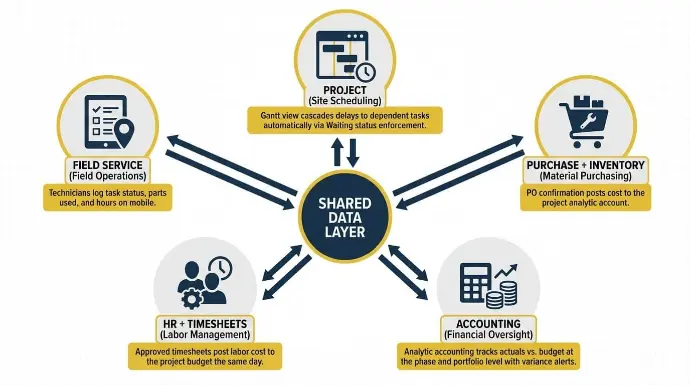
What makes Odoo different from a stack of point tools is a shared data layer that turns it into connected construction management software, integrating project management with access to real time data.
Every module reads from and writes to the same database. When a purchase order is confirmed against a project, Odoo can simultaneously post an analytic cost entry, reduce the inventory forecast, and flag a budget variance if spend crosses a threshold. None of that happens if the modules aren’t connected.
When stock drops below a defined minimum, reorder rules auto-replenish materials based on current inventory levels, helping teams avoid material shortages that lead to project delays. That’s the difference between a reactive procurement workflow and a proactive one.
The table below maps each core construction function to the Odoo module that handles it and the specific output that connection produces.
Function | Odoo Module | What the Connection Does |
Site scheduling | Project | Gantt view cascades delays to dependent tasks automatically via Waiting status enforcement |
Material purchasing | Purchase + Inventory | PO confirmation posts cost to the project analytic account; reorder rules fire before stockouts |
Labor management | HR + Timesheets | Approved timesheets post labor cost to the project budget the same day, no payroll wait |
Field operations | Field Service | Technicians log task status, parts used, and hours on mobile; syncs to the project dashboard instantly |
Financial oversight | Accounting | Analytic accounting tracks actuals vs. budget at the phase and portfolio level with variance alerts |
Connecting Scheduling, Procurement, and the Field
The three connections that matter most in any Odoo construction project management setup are scheduling with task dependencies, purchasing and inventory as a single workflow, and timesheet-to-cost, including subcontractor management.
Each one needs to be wired correctly before the next layer goes on top.
Scheduling That Cascades Automatically
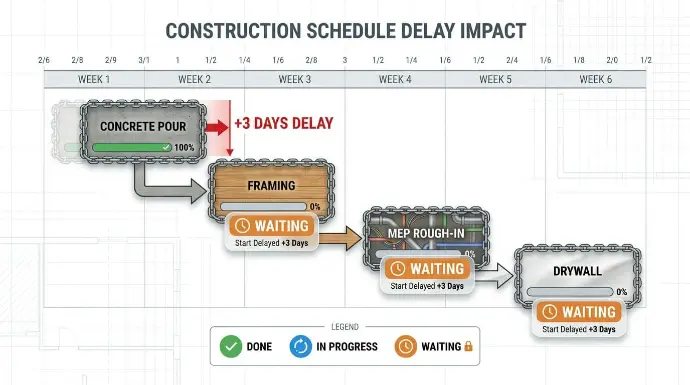
Odoo's Project module supports project planning with Gantt charts for tracking milestone scheduling across start and end dates, task durations, and cross-project visibility. The dependency feature is where the construction value sits. You configure dependencies in the Blocked By tab on each task. Once set, Odoo enforces them: the successor task locks at Waiting status and cannot advance to In Progress until every predecessor is marked Approved, Canceled, or Done.
The Odoo project task dependencies feature lets you draw those connections directly in the Gantt view. For a construction job, the concrete pour blocks framing, which blocks MEP rough-in, which blocks drywall.
Visual timelines help project managers build task dependencies and map milestones with calendar views, making it easier to visualize project timelines and keep project timelines current. When the pour slips three days, every downstream task updates automatically.
The Kanban view runs alongside the Gantt and serves site supervisors and trade leads. It supports task assignment by letting teams move work through different construction phases while tracking what is blocked, what is in progress, and what is ready to close.
Together, Gantt charts and Kanban boards give a clear read on schedule status at a glance. The colored status dot signals on track, at risk, or blocked without opening the record.
Purchase and Inventory as One Workflow
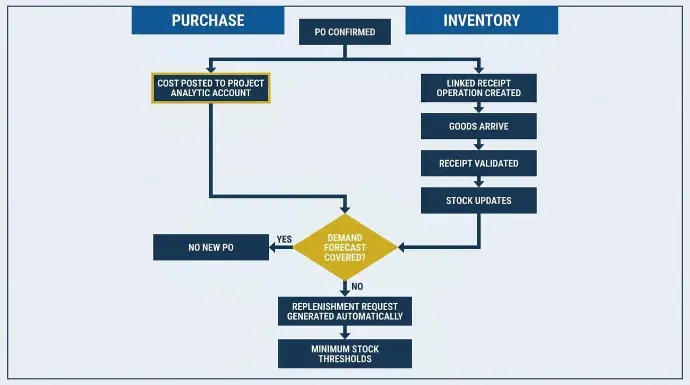
The biggest scoping mistake in construction ERP is treating Purchase and Inventory as separate modules. In Odoo, they’re one workflow, and the inventory module manages procurement, storage, and usage of materials for construction projects. When a PO is confirmed, Odoo creates a linked receipt operation in Inventory. When goods arrive, and the receipt is validated, stock updates and material tracking follows resources from purchase through on-site utilization, with consumption posted to the project analytic account.
The Odoo purchase request for quotation workflow lets procurement staff automate RFQs for raw materials, evaluate three vendor quotes side-by-side in a single request, and streamline the supply chain by confirming the PO in one step without leaving the platform. If the demand forecast is covered, no new PO is created. If not, Odoo generates a replenishment request automatically based on minimum stock thresholds, lead times, and project timelines to predict inventory needs.
For firms running concurrent sites, Odoo offers real-time inventory tracking and real-time stock visibility across multiple sites and different sites, which helps prevent material shortages on-site, reduce waste through automated procurement connected to purchasing, and avoid project delays by ensuring materials are available when needed. We have seen that gap drives significant unnecessary procurement costs across a single year.
Explore Cudio’s Odoo Implementation Process
Timesheet-to-Cost and Subcontractor Billing
When a site worker logs hours against a project task, the Timesheets module captures the entry. It also gives project managers and site teams real-time collaboration on labor and subcontractor activity, so staffing costs stay visible to finance and human resources as work progresses.
Once a manager approves it, the labor cost posts to the project analytic account at the employee's internal cost rate the same day, not at payroll close. Finance sees an accurate labor cost picture in real time alongside material costs from purchase orders, which helps various teams stay aligned on actual staffing and field execution.
Subcontractor management uses the vendor PO model. You raise a PO, link it to the project via analytic distribution, and define milestone or time-and-materials billing within the PO lines. When the subcontractor invoices, the vendor bill matches the PO, and the cost posts automatically.
For construction companies, the right tools also include assigning the right people at each stage, with human resources keeping roles covered across changing crews and locations.
What Odoo does not handle natively is retention. If your subcontractor contracts include withholding clauses, that requires either a custom field configuration or a third-party module. This needs to be scoped before go-live, not discovered after. Over 32 of our completed projects were Odoo rescues, and subcontractor billing gaps are among the most common root causes we find.
See How Cudio’s Odoo Rescue Service Works
Real-Time Field Data and Budget Control
The Odoo Field Service mobile app handles on-site work end-to-end, letting teams schedule work, update tasks, consume parts, log timesheets, track expenses from mobile devices, and complete on-site invoicing.
The critical integration point is between Field Service and Inventory.
When a technician marks materials as consumed on a task, Odoo validates a stock move against the project location and posts the consumption cost to the analytic account the moment the update is submitted on mobile.
Offline mode matters on active construction sites. Technicians can log task completions, material usage, and hours without a network connection. When connectivity resumes, Odoo syncs the queued entries and processes the inventory moves and analytic postings in sequence.
Its document management also keeps blueprints, permits, and safety contracts stored with project records.
Odoo centralizes updates, documents, messages, and task discussions so teams stay on the same page with the latest updates.
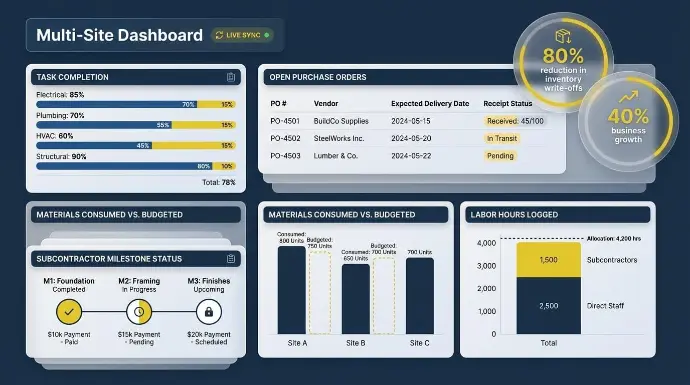
A multi-site manager with this setup has a real-time view of the following across all active jobs from a single dashboard.
- Task completion percentage per project phase and trade package
- Open purchase orders, expected delivery dates, and receipt status per site
- Materials consumed versus budgeted quantity at each location
- Labor hours logged by direct staff and subcontractors against project allocations
- Subcontractor milestone completion status is linked to the payment schedule
For Almac Imports, our Odoo work contributed to an 80% reduction in inventory write-offs and supported 40% business growth. Real-time field visibility, paired with integrated communication inside project tasks, helps improve efficiency by enhancing efficiency, reducing errors, and speeding decisions in construction: site teams ordering materials already in stock at another site.
How Analytic Accounting Controls the Budget in Real Time
Most construction ERP buyers treat budget control as a reporting feature.
In Odoo, it’s a data entry requirement that supports budget management and cost control by linking financial management directly to project activities. Analytic accounts track project profitability by tagging every financial transaction to a project cost center at the point of entry, which helps manage budgets and track expenses in real time.
When you enable Mandatory applicability on an Odoo analytic accounting plan, Odoo will not let a journal entry post without a valid project tag.
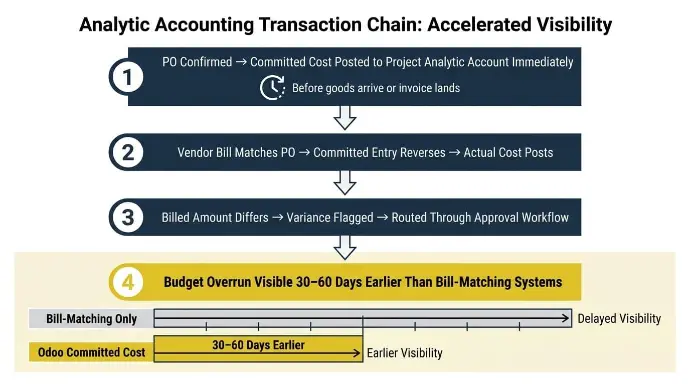
Here’s the specific transaction chain for a construction PO:
- When the PO is confirmed, Odoo posts the committed cost to the project analytic account immediately, before goods arrive or an invoice lands.
- When the vendor bill matches the PO, the committed entry reverses and the actual cost posts in its place.
- If the billed amount differs, Odoo flags the variance and routes it through your approval workflow, tying expenditures back to specific project tasks and project operations for better financial tracking.
- Odoo also reduces manual double-entry by syncing project scope updates with budgets and resource allocations.
A project manager sees a budget overrun 30 to 60 days earlier than in a system that only books costs on vendor bill matching. For a firm running five concurrent jobs, that is the difference between catching a problem and inheriting one. The following controls are available in a correctly configured Odoo deployment:
- Analytic accounting tracks project costs in real time at the phase and portfolio levels
- Budget alerts fire at configurable thresholds when committed spend approaches or exceeds a budget line
- Purchase accruals post committed cost at PO confirmation, giving a 30-to-60-day early warning on overruns
- Approved timesheet labor costs hit analytic accounts the same day, not at payroll close
Financial reports can be generated with a few clicks to monitor financial performance and key performance indicators.
Dynamic milestones can also support progressive customer invoicing where relevant.
Clean Up My Project Financials
Technical Constraints Every Odoo Construction Project Needs to Be Scoped Upfront
Odoo is a strong platform for construction and project-based operations. It is not a purpose-built ERP.
Some construction businesses also need CRM coverage before delivery starts, because a Construction CRM tracks pipeline opportunities from bids to contracts.
The gaps below are real, and finding them after go-live means building workarounds under pressure, which is how implementations become rescue projects.
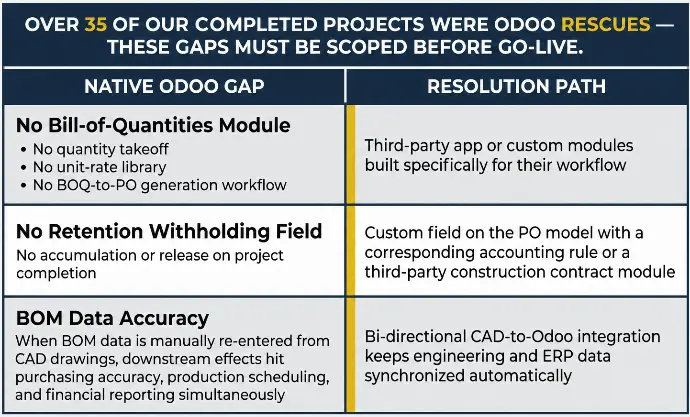
Native Odoo has no bill-of-quantities module. There is no quantity takeoff, no unit-rate library, and no BOQ-to-PO generation workflow.
Firms that require BOQ-based estimating need a third-party app or custom modules built specifically for their workflow. This needs to be scoped around business needs, current processes, and own processes before the implementation begins, not after the core platform is live.
For project-based manufacturers in this space, the data gap starts even further upstream. Odoo's MRP module accuracy depends on BOM data being correct. When BOM data is being manually re-entered from CAD drawings or pushed through an unvalidated export process, the downstream effects hit purchasing accuracy, production scheduling, and financial reporting simultaneously.
A tool like QBuild's CADLink creates a direct bi-directional connection between CAD, PDM, or PLM systems and Odoo, with integration to other systems where construction workflows depend on external tools, so engineering data and ERP data stay synchronized without manual intervention. At Cudio, we work with QBuild on implementations where engineering-to-ERP data accuracy is a core requirement.
Retention billing for subcontractor contracts is not handled natively either. Standard Odoo POs support milestone billing and time-and-materials structures, but there is no retention withholding field that accumulates and releases on project completion. Complex retention requires either a custom field on the PO model with a corresponding accounting rule or a third-party construction contract module.
Our implementation process starts with a 140-point diagnostic that maps every operational workflow before a single line of configuration is written. We price on a fixed-fee basis, so there are no surprise invoices after go-live.
Explore our Odoo Customization Services
Final Words
Odoo for construction is an adaptable solution for the construction industry, giving construction and project-based firms what they need to connect procurement, scheduling, field operations, and financial reporting in one place.
It works when the modules are properly wired so features work seamlessly, when constraints like BOQ, retention, and engineering data accuracy are scoped upfront, and when field teams are trained before go-live; that foundation supports project success and stronger business operations, while Odoo’s modular structure allows it to scale easily from small jobs to complex projects. We’ve helped over 62 firms get there.
Get My Odoo Modules Connected Correctly From Day One
Frequently Asked Questions
Here are the questions we hear most from construction firms and project-based manufacturers at this stage of the process.
How does Odoo enforce task dependencies in construction scheduling?
How Odoo handles dependencies within its real-time project planning and tracking tools is through a predecessor/successor model configured in the Blocked By tab on each task. Once set, the successor locks at Waiting status and cannot move to In Progress until every predecessor is marked Approved, Canceled, or Done.
You can also draw dependencies directly in the Gantt view. For multi-trade schedules, the system enforces your critical path automatically without manual adjustment, which helps manage projects more predictably.
Does Odoo track project costs in real time or only at month-end?
Odoo posts costs to project analytic accounts in real time at the point each transaction is confirmed. A confirmed PO creates an analytic entry immediately. An approved timesheet posts labor costs the same day. A field technician logging material use on mobile triggers an inventory move and an analytic posting on submission.
What modules are essential for a construction Odoo implementation?
Odoo offers the core modules needed to manage projects in construction management workflows: start with Project, Purchase, and Inventory.
These cover the workflows that hit daily site operations hardest and should be stable before anything else goes live. Add Accounting, HR, Timesheets, and Field Service next. Field Service is especially critical because it moves data entry to the point of work, which is one of the platform’s key features and the only way to get real-time field visibility into the back office.
These unique features matter even more as firms expand, and Odoo offers customization to fit unique project requirements.
Does Odoo have a bill-of-quantities module?
Native Odoo does not include a BOQ module. There is no quantity takeoff, unit-rate library, or BOQ-to-PO generation workflow. Construction firms that require BOQ-based estimating need a third-party module or custom development.
This needs to be confirmed and scoped before the implementation begins, not after the core platform is live. If BOQ workflows are critical, implementing Odoo usually requires customization to fit unique project requirements.
How does CAD data affect Odoo manufacturing and purchasing accuracy?
For project-based manufacturers, BOM accuracy directly determines whether Odoo's MRP and purchasing modules function correctly. When engineering data is manually re-entered from CAD drawings or pushed through an unvalidated export, errors compound across purchasing, production scheduling, and cost reporting. A bi-directional CAD-to-Odoo integration, like QBuild's CADLink, keeps engineering and ERP data synchronized automatically. This is a scoping conversation we recommend before implementation begins.
How do we know if our current Odoo setup can be fixed or needs to be rebuilt?
In most cases, a misconfigured environment can be recovered without starting over. We assess this in the first week of every rescue engagement by running health checks across approximately 140 diagnostic metrics, and we identify five to seven quick wins before any larger rebuild work begins.