
Odoo inventory management is a fully integrated, open-source warehouse management system that unifies stock tracking, replenishment, quality control, and multi-warehouse operations into a single platform — eliminating the spreadsheet chaos and disconnected tools that cause stockouts and fulfillment errors.
Unlike standalone WMS solutions, Odoo's inventory module connects natively to purchasing, sales, manufacturing, and accounting, giving businesses one source of truth for every stock movement.
Cudio, an Odoo Gold Partner with 62+ implementations and 100% client retention across 30+ years, helps mid-market companies deploy Odoo inventory systems that typically reach full operational capacity within 8-16 weeks.
This guide covers what the platform does in specific technical terms so you can decide if it fits your operation.
Show Me How Odoo Inventory Works for My Business
Key Takeaways
- Odoo inventory management uses a double-entry stock system. Every unit has a source location and a destination location at all times. Nothing disappears; every unit is traceable from supplier receipt to customer delivery across all warehouses and sales channels.
- The Odoo inventory management system has four replenishment rule types, not just reorder points. Min-max order points, MTO, MPS, and manually forecasted replenishment each fit different SKU types and demand patterns. Using the wrong one creates stockouts or excess stock levels.
- Inbound accuracy determines downstream accuracy. Receiving flows, quality checks, and putaway rules must be mapped to your actual storage locations and warehouse layout. Generic configuration is where most go-live failures occur.
- Odoo inventory supports full barcode scanning, lot tracking, and serial number tracking natively. The barcode app works offline, supports GS1, EAN13, EAN14, and Code128, and runs on any browser-capable device, including Zebra barcode scanners.
- Inventory valuation drives your COGS on every delivery. Odoo supports FIFO, AVCO, Standard Price, and LIFO as valuation methods. This decision must involve your accountant before a single product is configured.
Why Most Inventory Systems Fail Before Odoo Enters the Picture?
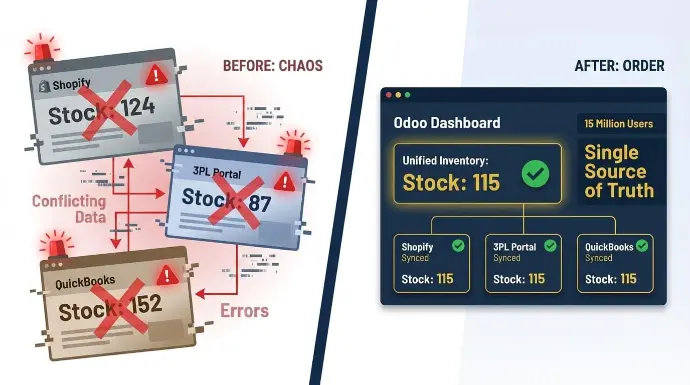
Businesses that struggle with stock accuracy do not have an inventory problem. They have a visibility problem — disconnected systems hide what is in stock, what is committed, and what is in transit.
Your stock exists. It is in a warehouse, moving through a 3PL, or reserved against an open sales order. The problem is that Shopify shows one number, your 3PL portal shows another, and QuickBooks shows something else entirely. Someone on your team spends Monday morning trying to find the real figure before the week can start.
That gap between systems is not just annoying. It is expensive. Here is what it typically costs:
- Oversold orders go out the door because one channel did not see the reservation in another channel
- Emergency POs get placed at full price because no one caught the shortage in time
- Month-end adjustments eat hours that your finance team does not have
- Carrier cutoffs get missed while someone is still reconciling stock counts manually
Odoo's official inventory page describes it as a smart double-entry system in which no stock ever disappears.
Odoo has surpassed 15 million users globally, according to the company's official blog — a scale that reflects sustained market confidence in its inventory and ERP capabilities.
Key Features of the Odoo Inventory Management System in 2025-2026
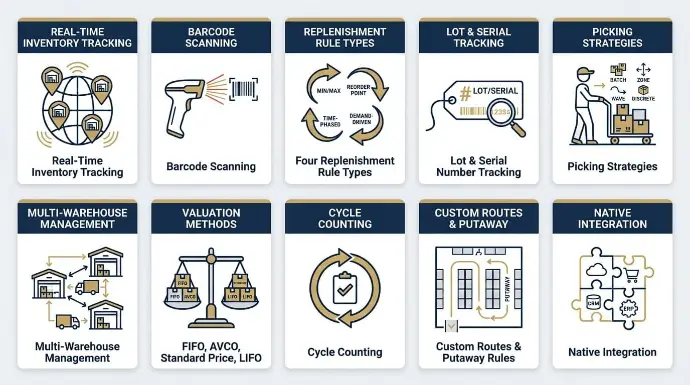
Before we go deep on each topic, it helps to understand what the Odoo inventory management system actually covers out of the box. The core features that matter most in production environments are:
- Real-time inventory tracking of product availability across unlimited warehouses, storage locations, and virtual locations
- Barcode scanning via the Odoo Barcode app, compatible with USB, Bluetooth, and Zebra barcode scanners
- Four replenishment rule types, including min-max reorder points, to automate replenishment and prevent stockouts
- Lot tracking and serial number tracking with forward and backward traceability
- Picking strategies, including batch tracking, wave, cluster, and single-order picks
- Multi-warehouse management with inter-warehouse transfers and in-transit stock visibility
- Inventory valuation methods, including FIFO, AVCO, Standard Price, and LIFO
- Cycle counting without shutting down warehouse operations
- Custom routes and putaway rules for smart storage location assignment
- Native integration with purchasing, sales, manufacturing, and accounting modules
The Double-Entry Stock System: Real-Time Inventory Tracking at Its Core
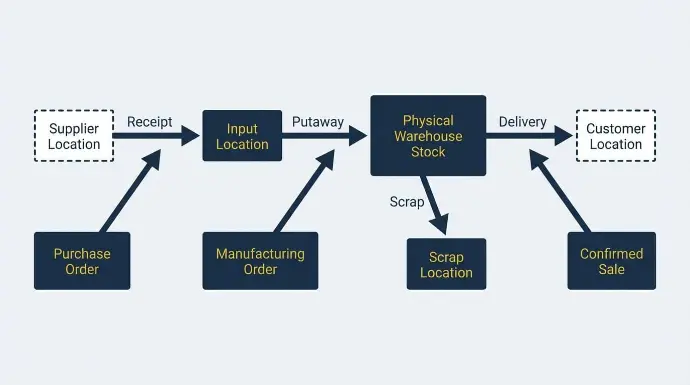
Traditional inventory management software tracks quantities as static snapshots. Odoo inventory tracks movements — every transfer, adjustment, and receipt updates stock levels across all locations in real time.
Every stock move has a source location and a destination location. Receiving goods moves stock from a virtual 'Supplier' location into your physical warehouse. Shipping moves it to a virtual 'Customer' location. Scrap moves it to a 'Scrap' location.
Because every unit always lives somewhere in the system, the double-entry model eliminates phantom stock — discrepancies surface immediately instead of hiding until the next physical count.
You can run inventory reporting on any storage location, physical or virtual, and see exactly what moved in, moved out, and when. This is what makes the audit trail reliable and inventory valuation precise.
This movement-level accuracy feeds directly into Odoo's forecasted stock report, which calculates future availability from confirmed purchase orders, manufacturing schedules, and committed sales orders rather than static quantity snapshots.
Every confirmed sale, manufacturing order, and purchase order creates a pending stock move before the physical movement happens. If stock levels look wrong in Odoo, you trace the specific move that caused it.
Replenishment Rules: Automate Replenishment Before You Run Out
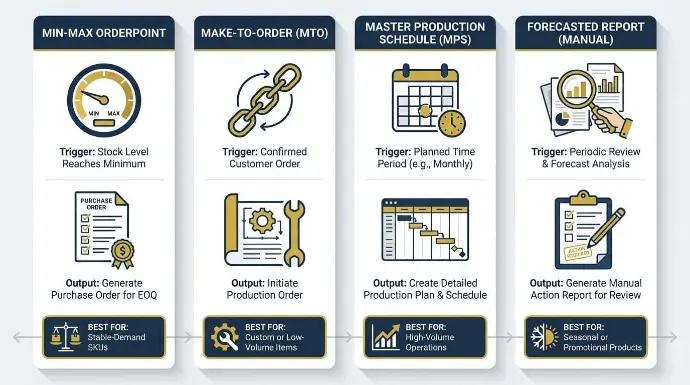
Replenishment is a planning decision you make before stock levels hit zero, not after. Odoo supports four rule types — min-max reorder points, make-to-order, master production schedule, and manual forecasted replenishment — each triggered automatically based on forecasted demand and current on-hand quantities.
Here is how each rule type works and when to use it:
Rule Type | How It Triggers | What It Creates | When to Use |
Min-Max Orderpoint | Forecasted stock drops below the minimum reorder point | Draft purchase order or manufacturing order | Stable-demand SKUs with predictable lead times |
Make-to-Order (MTO) | Sales order or manufacturing order confirmed | Immediate PO or MO linked to that specific demand | Custom or low-volume items you never stock speculatively |
Master Production Schedule (MPS) | Weekly or monthly demand-driven planning cycle | Planner-reviewed quantity suggestions before release | High-volume operations where planners validate before purchasing |
Forecasted Report (Manual) | Buyer reviews the forecasted shortage list | Draft PO or inter-warehouse transfer | Seasonal or promotional products needing human review |
Min-Max Orderpoints: Reorder Points for Stable-Demand SKUs
A min-max order point triggers a draft purchase order when forecasted stock levels drop below the minimum reorder point.
Forecasted stock is not just on-hand inventory. It equals on-hand plus confirmed incoming purchase orders minus confirmed outgoing shipments.
So if you have 50 units on hand but 60 outgoing shipments already confirmed, the forecasted stock is -10, and the reorder point fires before you run out physically.
Set your minimum at your safety stock level. This protects product availability even in your worst-case lead-time scenario.
Set the lead time field on the vendor pricelist to your actual supplier lead time. A product with a 14-day lead time needs its reorder point to fire 14 days before you need the stock, not when you hit zero.
Make-to-Order (MTO): Only Create Purchase Orders When You Have a Confirmed Sale
MTO is a custom route activated on the product form under Inventory > Routes. When a sales order is confirmed, Odoo creates a linked purchase order or manufacturing order immediately. The stock arriving from that purchase order is reserved for that specific customer only; no other sales order can consume it.
Use MTO for custom products and low-volume items with long lead times. Avoid it for fast movers where customers expect same-day or next-day fulfillment, because the fulfillment time equals the full supplier lead time.
Master Production Schedule (MPS): Planner-Reviewed Purchasing
MPS is for purchasing-intensive operations, where a human planner reviews suggested quantities before issuing purchase orders.
Odoo 18 introduced AI-powered reordering suggestions that learn from past sales and lead times. These appear in a spreadsheet-style planning view where planners adjust quantities, override suggestions for promotions or seasonal demand, and release purchase orders in bulk.
Help Me Set Up Replenishment Rules for My Warehouse
Receiving, Quality Control, and Putaway: The Inbound Accuracy Layer
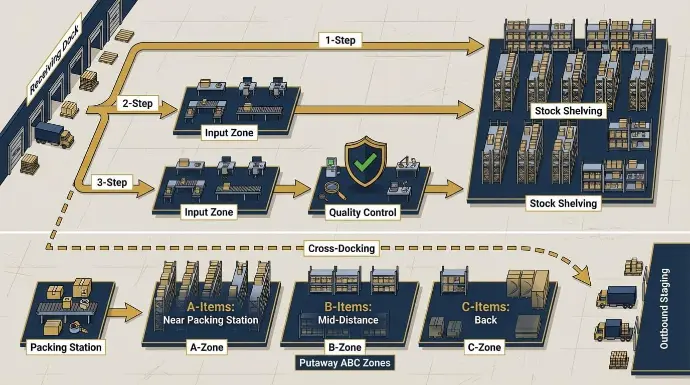
Inbound operations are where inventory tracking accuracy is built or broken. Goods received but not recorded are the single most common source of inventory discrepancies — and in Odoo's double-entry model, an unrecorded receipt means downstream sales orders, valuations, and forecasts all reference the wrong stock count.
Scanning on receipt eliminates it and gives you real-time inventory tracking from the moment stock arrives.
Receiving Flows: One, Two, or Three Steps
Configure the receiving flow per warehouse under Inventory > Configuration > Warehouses
The right choice depends on your quality control requirements. Here are all three options:
- One-step: Goods arrive and move directly into stock. Fast, but there is no quality control checkpoint before the stock becomes available.
- Two-step: Goods first land at an input location. A second transfer moves them into stock after inspection. This is the right default for most mid-market business needs.
- Three-step: Goods arrive at the input, move to a quality control location, and then move to stock only after quality checks are approved. Required for food, pharma, and electronics.
Define quality checks under Quality > Configuration > Control Points. Set control points to trigger on receipt for specific product categories. The receipt cannot be validated until the quality check is closed; the system automatically enforces this.
Putaway Rules: Smart Storage Location Assignment
Putaway rules automatically direct incoming stock to specific storage locations. Without them, the Odoo inventory system stores everything in the generic stock location, which wastes your team's time hunting for products.
With putaway rules configured correctly, the system achieves real-time inventory tracking from the moment a pallet arrives at the dock.
Configure under: Inventory > Configuration > Putaway Rules.
Rules can be based on product, category, package type, or capacity.
The 2025 builds added ABC analysis-based putaway:
- A-items go near the packing station
- B-items go to mid-distance storage locations
- C-items go to the back
Properly configured putaway rules reduce the average travel distance per pick by 15-25%, saving cumulative hours across every warehouse shift.
Cross-docking bypasses storage entirely for items with pending outgoing shipments. When a product arrives, and a confirmed sales order is already waiting, Odoo routes the stock from the receiving dock directly to the outbound staging area.
Lot Tracking and Serial Number Tracking: Traceability from Supplier to Customer
Lot tracking and serial number tracking are the traceability layer of the Odoo inventory management system. Enable them before goods arrive; every subsequent stock move, transfer, and outgoing shipment will automatically capture the lot or serial number.
The system handles both lots and serial numbers. Lot tracking groups interchangeable units under one identifier. Use it for raw materials and batch-produced goods:
- a yogurt production run
- a supplier shipment of screws
- a roll of wire
Serial numbers track individual units. Assign serial numbers to electronics, high-value items, or anything requiring individual warranty management. Each of those serial numbers is then automatically linked to every stock move, outgoing shipment, and customer record.
Enable tracking on the product form under: Inventory > Tracking
Once enabled, every stock move requires a lot number or one of the product's serial numbers. GS1 barcodes encode the lot number, expiry date, and quantity in a single scan, so receiving a GS1-labeled pallet records all three fields simultaneously without manual entry.
Barcode Scanning: The Execution Layer Across Every Warehouse Operation
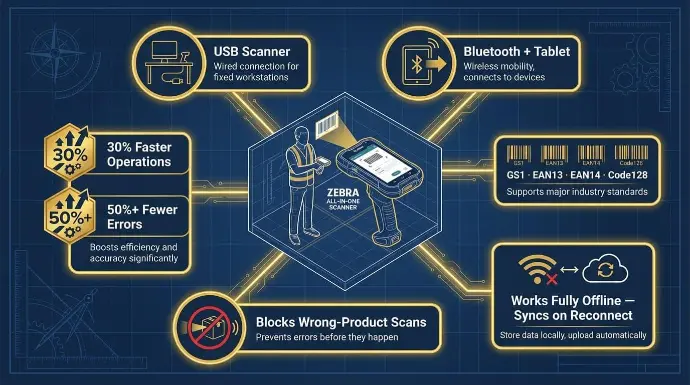
Barcode scanning is how every workflow in the Odoo inventory management system gets executed on the warehouse floor: receiving, putaway, picking, lot tracking, and cycle counting. Wan Buffer reports up to 30% faster warehouse operations and 50%+ fewer errors versus manual data entry.
The three standard hardware setups are:
- USB barcode scanners at fixed receiving desks
- Bluetooth barcode scanners paired with Android or iOS tablets for pickers on the move;
- and Zebra all-in-one barcode scanners for high-volume or cold-storage warehouse operations.
All three run the Odoo Barcode app through a browser, no native app required.
Odoo inventory supports GS1, EAN13, EAN14, and Code128 natively. Enable GS1 nomenclature under Inventory > Configuration > Settings > Barcode Nomenclatures. This is essential for batch-tracking expiry dates and lot numbers from supplier pallets, and for outgoing shipments to major retailers that require GS1 compliance.
When a picker opens the barcode app, they see their assigned operations: receipts to process, transfers to pick, and outgoing shipments to pack. They scan the storage location barcode, then each product barcode. Odoo's official barcode documentation confirms the app blocks wrong-product and over-quantity scans before they create a stock error.
The barcode app works fully offline. Transactions queue locally and sync when WiFi reconnects, as documented by Odoo: 'blazing fast as most operations are performed offline; zero latency scans.' In warehouses with wireless dead zones, this is a hard business requirement, not a nice-to-have.
At Cudio, the clients who get the most from barcode scanning are those who map their storage locations in Odoo before go-live. Every bin gets a printed barcode label. Every putaway rule points to a specific location. The barcode app then becomes a guided system that tells pickers exactly where to go and what to scan, rather than just confirming what they already picked manually.
Get My Free Odoo Inventory Setup Assessment
Picking Strategies: Outbound Fulfillment and Saving Time at Scale
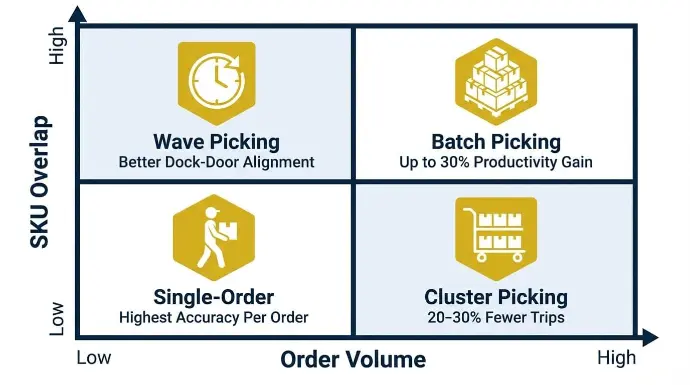
Outbound picking is the warehouse operation that moves confirmed sale items from storage locations to the packing or shipping zone. The Odoo inventory management system supports single-order, batch, cluster, and wave picking strategies.
The Odoo inventory management system supports four picking strategies for warehouse operations. Choosing the right one for your order volume and SKU distribution saves time and reduces errors across every shift.
Here is how each strategy works and where it delivers the most benefit:
Strategy | Best For | How It Works in Warehouse Operations | Typical Gain |
Single-order | Low-volume, high-value outgoing shipments | One picker completes one order end to end | Highest accuracy per order |
Cluster picking | Multiple orders across defined storage locations | Picker carries a multi-bin cart and sorts items per order on the go | 20-30% fewer trips |
Wave picking | Time-based shipping cutoffs | Orders grouped by carrier cutoff, all picked in a single window | Better dock-door alignment |
Batch picking | Many orders share the same SKUs | One picker pulls all units of an item for multiple orders in one trip | Up to 30% productivity gain |
Configure picking through Operation Types under: Inventory > Configuration > Operation Types
Each operation type defines how transfers group, whether a shipping packing step is required before outgoing shipments leave, and which storage locations are used.
Enable batch tracking of picks under Inventory > Configuration > Settings
For warehouses processing 50-500 orders per day, cluster picking with a multi-bin cart reduces total pick time by up to 40% compared to single-order picking, because each trip through the warehouse fulfills multiple orders simultaneously.
One picker carries labeled bins, moves through the storage locations once, and sorts items per sales order on the go.
No secondary sort at packing. Combined with barcode-guided custom routes, this approach reduces both pick time and packing errors.
Inventory Valuation: The Accounting Layer Under Your Warehouse Operations
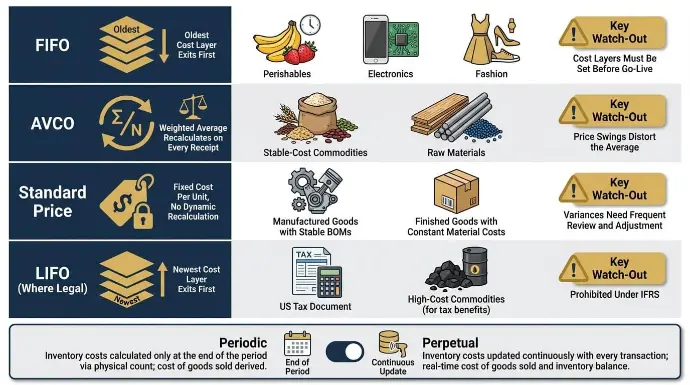
Inventory valuation determines how COGS is calculated on every delivery in the Odoo inventory management system.
Here is how each valuation method works in Odoo inventory and where each one fits:
Valuation Method | How Odoo Calculates COGS | Best Fit | Key Watch-Out |
FIFO | The oldest cost layer exists first on each delivery | Perishables, electronics, fashion | Cost layers must be set before go-live. Retroactive changes require full reevaluation. |
AVCO | The weighted average recalculates on every receipt | Stable-cost commodities, raw materials | Large price swings instantly distort the average across all open stock. |
Standard Price | Fixed cost per unit; variances post to a P&L account | Manufactured goods with stable BOMs | Requires regular standard cost reviews or variances accumulate silently. |
LIFO (where legal) | Most recent cost exits first; prohibited under IFRS | US tax planning in specific industries | Confirm with your accountant before enabling. |
Set the valuation method per product category under Inventory > Configuration > Product Categories.
The category also determines whether inventory valuation is periodic (journal entries at period-end) or perpetual (accounting entry fires on every stock move in real time). Perpetual valuation is right for any business that needs an accurate inventory value on the balance sheet at any point in time.
FIFO requires activating 'Storage Locations' and 'Lots and Serial Numbers' to properly track cost layers. Each receipt creates a cost layer at the purchase order price.
Each delivery consumes the oldest layer first.
At Cudio, we run a dedicated finance session before we touch product configuration during any inventory management system implementation. The most expensive mistake we see is going live on AVCO when the accountant wanted FIFO. A 30-minute conversation before go-live saves weeks of accounting cleanup afterward.
Get My Free Odoo Inventory Setup Assessment
Cycle Counting: Maintain Inventory Accuracy Without Stopping Operations
Full physical counts shut down warehouse operations for 8-48 hours depending on SKU volume, freezing all inbound and outbound movement during the count.
Cycle counting is replaced by continuous, small counts that keep inventory tracking accurate without stopping the business. It is one of the key features that makes the Odoo inventory management system practical for businesses that cannot afford downtime.
Configure counting frequency per storage location:
- A-locations weekly
- B-locations monthly
- C-locations quarterly
Odoo inventory generates count tasks automatically on schedule. Pickers see them in the barcode app alongside their regular picking tasks, no separate process, no additional training.
They scan the storage location barcode, count each product, and submit. Odoo inventory compares the counted quantity to the system quantity and flags variances immediately.
Set variance thresholds under inventory adjustment settings. Variances below the threshold auto-adjust to keep stock levels current. Above the threshold, manager approval is required before the adjustment posts.
All adjustments are logged permanently in the stock move history with user, date, time, and quantity. The audit trail cannot be deleted.
Multi Warehouse Management: Inter Warehouse Transfers and Multi-Site Stock Control
The Odoo inventory management system models each of your multiple warehouses as a separate entity with its own input, quality control, stock, output, and packing locations.
You can manage warehouses across unlimited locations in a single Odoo database. A single dashboard gives you real-time visibility and inventory reporting on on-hand, incoming, and outgoing quantities across all multiple warehouses simultaneously.
Inter-warehouse transfers move stock through a virtual in-transit location. Units leave one warehouse and remain in transit until they are received at the destination. Both sites see the in-transit quantity in their forecasted report for real-time inventory tracking. Neither can sell nor allocate units that are in transit.
Multi-location management across different legal entities is handled through multi-company setups. Each multi-location configuration can have its own inventory rules, warehouses, and accounting.
Separate legal entities can share inventory infrastructure and manage their warehouses under a single system. Intercompany transfers automatically post the correct accounting entries on both sides, the right architecture for holding companies and franchise networks that need to track products across legal boundaries.
How Odoo Inventory Connects to the Rest of Your Business Operations
The Odoo inventory management system shares real-time data with purchasing, sales, manufacturing, and accounting through a single PostgreSQL database.
A confirmed sales order automatically reserves stock, triggers replenishment if inventory drops below the reorder point, and posts the corresponding journal entry — without manual handoffs between teams.
Here is what fires automatically without any configuration:
- Sales: A confirmed sales order reserves stock and creates a delivery for outgoing shipments immediately.
- Purchasing: Validated purchase orders generate receipts. When the receipt is confirmed, stock levels increase, and the supplier's liability is posted to accounting simultaneously.
- Manufacturing: Confirmed manufacturing orders create component reservations, and finished goods move upon completion. The Odoo inventory system always knows which raw materials were consumed and which were produced.
- Accounting: With perpetual inventory valuation, every stock move triggers an accounting entry in real time. No manual journal entries for inventory at month-end.
Is the Odoo Inventory Management System the Right Fit for Your Business?
The Odoo inventory management system works best for a specific range of business needs. It is not the right answer for every warehouse, and being honest about that is part of how we work at Cudio.
Strong fit:
- 2-10 warehouses
- multi-channel retail or wholesale
- 10-500 users, including unlimited users on standard plans, light-to-medium manufacturing with traceability requirements.
The sweet spot is any business consolidating a fragmented inventory management software stack, Fishbowl, QuickBooks, and a standalone warehouse management system, into a single, centralized platform.
May need alternatives:
- Ultra-high-velocity 3PLs processing 100,000+ order lines per day
- operations requiring yard management or cold-chain logistics with specialized hardware.
Build your business case on operational outcomes. How many hours per week does your team spend on manual reconciliation? What is your stockout rate on A-items? What do emergency purchase orders cost in expediting fees? In most mid-market businesses, those costs exceed the Odoo inventory management implementation budget within 12-18 months.
Cudio brings 30+ years of operational experience and a 100% client retention rate to every Odoo inventory management implementation. Seven of our team members ran Odoo in their own businesses before becoming consultants.
We know where generic configuration fails because we have fixed it 32+ times. We are not selling you inventory management software. We are solving a specific operational problem in your business.
Book My Free Odoo Inventory Assessment with Cudio
Conclusion
Odoo's double-entry inventory model ensures every stock move is traced from source to destination, giving operations teams a single accurate count across warehousing, sales, purchasing, and accounting. Cudio has implemented this system 62+ times with a 100% client retention rate — because the platform works when configured around your actual warehouse workflows, not generic defaults.
At Cudio, we ensure this works in practice, not just on paper. With 60+ implementations, we focus on getting the setup right from day one so you avoid costly errors, stockouts, and manual work. If your current setup is slowing you down, we help you turn inventory into a controlled, scalable system that supports growth.
Book My Free Odoo Inventory Assessment with Cudio
FAQs
Still have a few things in mind? Here are straight answers to the key questions.
How long does a typical Odoo Inventory implementation take for a mid-sized business?
Most mid-market rollouts (50-200 users, 2-5 warehouses) take 3-6 months from kick-off to stable go-live. Key timeline drivers include data quality, integration count, routing complexity, and availability of internal process owners. Plan for phased go-lives rather than a single “big bang” date.
Can Odoo handle inventory across multiple sales channels like Shopify, Amazon, and a B2B portal?
Yes. Odoo centralizes inventory for web stores, marketplaces, and offline orders with real-time updates. Connectors or custom integrations are needed for some external platforms. Map channel-specific rules (e.g., safety stock buffers for Amazon) to minimize overselling across channels.
What kind of hardware do I need to use Odoo Inventory in the warehouse?
Most teams use Android or iOS devices with 1D/2D barcode scanners, or dedicated scanner terminals compatible with web browsers. Optional equipment includes label printers, industrial WiFi access points, and scales. Pilot with a small picker team before standardizing hardware.
Does Odoo support RFID or IoT-based inventory tracking?
Odoo supports RFID through middleware that translates tag reads into stock moves. Full IoT-based warehousing often requires custom projects. Evaluate whether barcode scanning already solves 80-90% of your needs before committing to RFID infrastructure.
How do I estimate the total cost of moving my inventory onto Odoo?
Total cost includes licenses, implementation partner fees, data migration, training, and connectors. Mid-market projects typically run tens of thousands of dollars. Build a business case comparing current hours spent on reconciliation, stockouts, and expedited shipping against project costs.