


If you manage inventory across Amazon, Walmart, Shopify, and physical stores, you already know the problem: Odoo shows one stock number, Amazon shows another. Your store team is answering customer questions off a spreadsheet that someone updated two days ago, and a marketplace order just came in for a product that sold out in-store this morning.
At Cudio, we don't treat this as a technology gap. It's a sync gap, and it's one of the most common operational problems scaling omnichannel retailers face.
An Odoo Rithum integration fixes this directly. Odoo runs your operational system of record, including inventory, orders, purchasing, fulfillment, and accounting. Rithum runs the marketplace and commerce operations layer, pushing product data, inventory updates, and order information across every connected channel. Get both systems talking correctly, and your team stops reconciling by hand and starts working from one reliable source of truth.
This guide covers the architecture, what Odoo 19's inventory updates change for omnichannel sellers, where integrations actually fail, and what we at Cudio have learned when building this exact connector for retailers like Simons Shoes.
Key Takeaways
Odoo should be the operational system of record; Rithum extends that data across marketplace channels.
Odoo 19's Click & Collect and per-location inventory visibility give Rithum more accurate data to distribute.
Most integration failures trace back to unclean source data or undefined sync logic, not the technology itself.
Our work with Simons Shoes shows what this looks like when it's built right the first time.
Why Omnichannel Retail Breaks Without Clean Inventory Sync
Adding channels sounds like a growth problem. In practice, it creates an operational one.
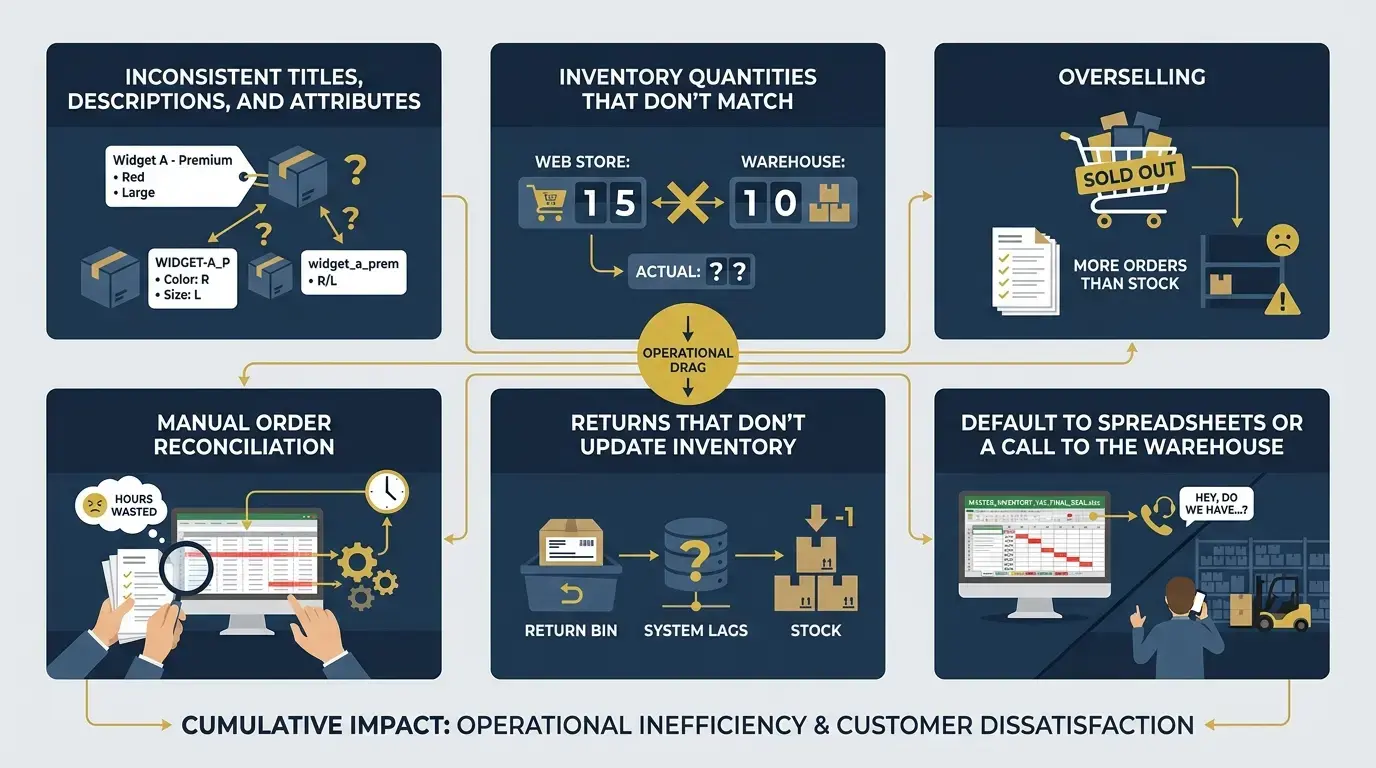
The more channels you add, the more places product data, inventory counts, and order information need to agree. Without a clean sync layer, small gaps compound fast:
Product data entered in multiple places, causing inconsistent titles, descriptions, and attributes
Inventory quantities that don't match because updates from one channel never flow back to the others
Overselling when a product sells in-store but the marketplace listing isn't updated in time
Manual order reconciliation, with someone on your team copying orders between systems
Returns that don't update inventory, leaving stock counts wrong and creating downstream fulfillment problems
Store teams that default to spreadsheets or a call to the warehouse because they don't trust Odoo's numbers
Each problem is manageable alone. Together, they create a compounding drag that slows your team, frustrates customers, and caps how confidently you can expand to new channels. The fix isn't more manual effort; it's an integration that keeps Odoo and your marketplace layer in sync by design.
What an Odoo Rithum Integration Actually Does
Odoo holds the core business operations, such as inventory levels, product records, purchase orders, sales orders, accounting, point of sale, and fulfillment workflows.
It's where your team makes decisions, and it's where the authoritative version of your data should live.
Rithum handles the marketplace-facing side. It supports integration methods including API and EDI, and many implementations use FTP/SFTP EDI-based connections. It formats and publishes product listings, distributes inventory updates to connected channels, syncs order data back into Odoo through Odoo integration services, and reports on marketplace performance through ProductStream for catalog data, DemandStream for marketing flows, and OrderStream for order movement.
Rithum connects to 600+ marketplaces and retail channels, including Amazon, Walmart, and Shopify, giving retailers one layer to manage multi-channel commerce instead of managing each marketplace by hand.
When inventory changes in Odoo, Rithum reflects that update across every relevant listing. When an order comes in through a marketplace, it flows into Odoo for fulfillment.
When a return is processed, the inventory adjustment happens in Odoo and propagates back out.
That's the architecture in principle; getting it to hold up in practice, however, takes clean source data and deliberate design, which we'll get into below.
Why Odoo 19 Matters for Omnichannel Sellers
Odoo 19 shipped several updates that are directly relevant here, and they're not cosmetic.
Click & Collect Stock Availability
Odoo 19's release notes confirm a new widget on the product page that separately shows stock availability for delivery and in-store pickup, based on real stock levels at specific locations. For a retailer with multiple stores and a warehouse, customers can now see whether a product is actually available for pickup nearby before they complete an order, instead of finding out after the fact.
Real Time Per-Location Inventory Visibility
Odoo 19 improves how stock is tracked by location, which matters when you're fulfilling from a warehouse, shipping from stores, and supporting click-and-collect across several sites at once. Knowing exactly where stock sits, and how much is already committed, is the foundation for accurate marketplace listings.
Improved Reordering and Replenishment Logic
Reordering rules now include a demand horizon and clearer deadline fields, reducing the manual effort of keeping stock levels accurate across locations and improving the accuracy of availability data downstream.
None of this replaces the need for a well-designed integration. It gives Rithum better, more granular data to distribute once the integration is in place.
Odoo ERP as the Source of Truth, Rithum as the Marketplace Engine
The architecture of a well-built Odoo Rithum integration follows one principle: Odoo owns the data, Rithum distributes it. This improves order fulfillment efficiency, and faster order processing leads to better customer satisfaction.
Most integration failures we see come from ambiguity about which system is authoritative. When product data gets edited in both Odoo and a marketplace tool, conflicts appear. When inventory gets adjusted in more than one place, quantities drift. When order statuses get managed outside Odoo, fulfillment decisions become unreliable.
The correct model looks like this:
Odoo holds clean product records, accurate inventory quantities, current pricing, confirmed orders, and fulfillment status.
Rithum reads from Odoo, formats the data for each marketplace's requirements, and pushes it to the right channels.
Orders flow back into Odoo for processing, and fulfillment updates flow from Odoo back out through Rithum.
As we tell every client before a project starts: Your ERP is only as valuable as the data inside it. If the source data is wrong, the integration just spreads the problem faster and at a bigger scale. That's why data readiness, not the technical build, is the first conversation we have.
What the Integration Should Actually Sync
A practical Odoo Rithum integration covers more data points than most teams plan for going in.
Sync Category | What It Covers |
|---|---|
Product Records | Titles, descriptions, images, categories, and attributes |
SKUs and Variants | Variant logic, size and color combinations, parent-child relationships |
Pricing Rules | Base prices, channel-specific pricing, promotional pricing |
Inventory Quantities | Available-to-sell by location, with buffer rules applied |
Location Availability | Per-location stock for Click & Collect and fulfillment routing |
Marketplace Listings | Formatted product data pushed to each channel's requirements |
Orders | Marketplace orders pulled into Odoo for fulfillment processing, with invoices generated or uploaded where the workflow requires it |
Fulfillment Status | Shipping confirmations plus shipment tracking details sent back to the marketplace after dispatch |
Returns and Cancellations | Inventory adjustments applied and released in Odoo |
Customer and Shipping Data | Shipping addresses and customer records where applicable |
Every row here requires a deliberate mapping decision: Which Odoo field maps to which Rithum field, what happens when a value is missing, how conflicts get resolved, and how fast a sync needs to propagate on a set schedule, with many setups syncing inventory and other data within 5-10 minutes.
These questions need answers before go-live, not after the first oversell incident.
Common Odoo + Rithum Integration Mistakes
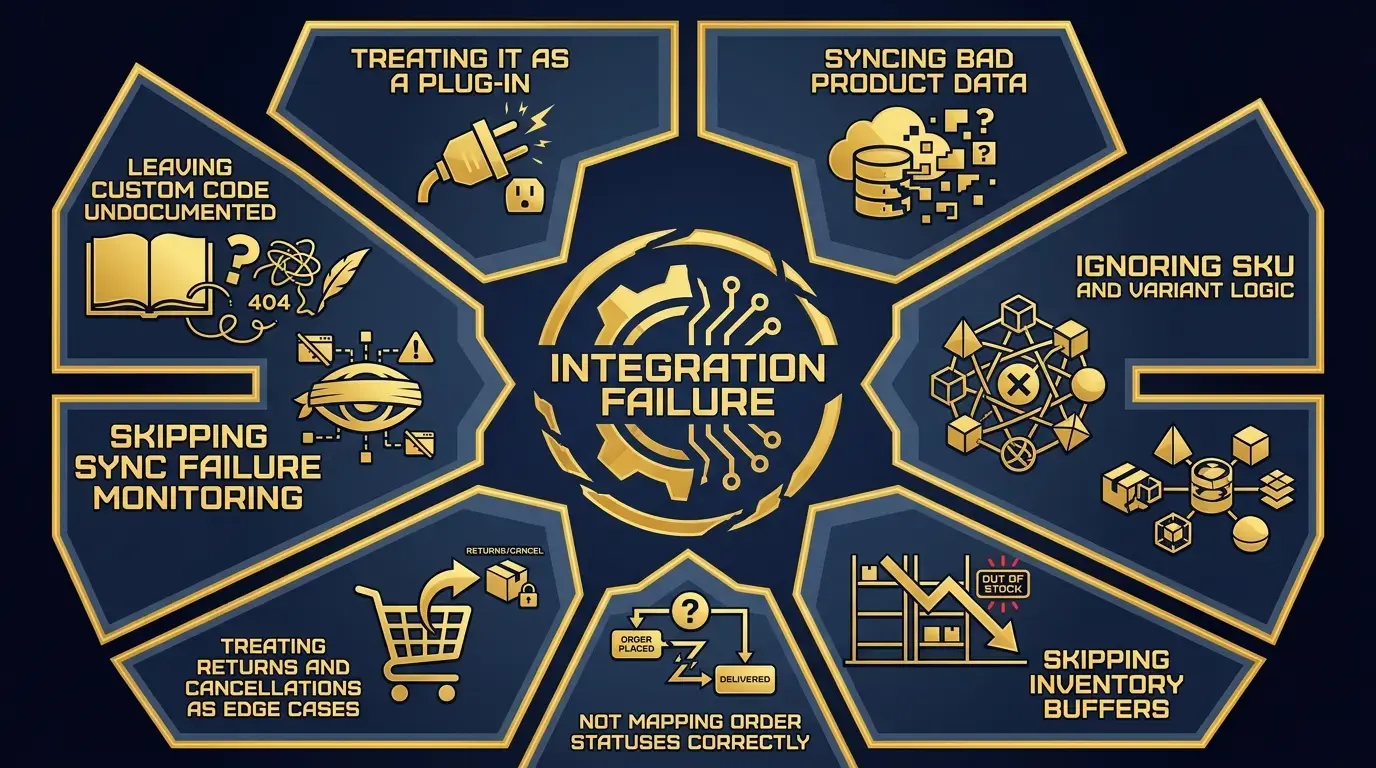
Most integration problems aren't caused by the technology. They're caused by decisions made, or not made, before the integration was built. Common mistakes include:
Treating it as a plug-in: Connecting two systems requires understanding how each one handles data, what the edge cases are, and how failures should be managed. A plug-and-play mindset leaves gaps that only surface under real operating conditions.
Syncing bad product data: If Odoo's product records are incomplete or inconsistent, Rithum distributes that mess to every connected marketplace. Cleaning product data first isn't optional.
Ignoring SKU and variant logic: Mismatched SKU structure between Odoo and Rithum is one of the most common causes of listing errors and order routing failures.
Skipping inventory buffers: Syncing raw inventory quantities without buffers is a reliable path to overselling. Buffers need to be set per channel and per location before launch.
Not mapping order statuses correctly: If Odoo and Rithum use different labels for the same order state, fulfillment decisions break down.
Treating returns and cancellations as edge cases: They're regular operational events. Failures here create inventory inaccuracies that compound over time.
Skipping sync failure monitoring: Network timeouts, API changes, validation errors, and webhook or connection failures cause syncs to fail silently. Without alerting, those failures pile up unnoticed.
Leaving custom code undocumented: Custom field mappings and workflow logic need documentation, or the integration becomes an operational risk with a higher long-term maintenance burden the moment the person who built it moves on.
What We Learned From Simons Shoes
Simons Shoes, a heritage retailer based in Brookline, Massachusetts, is one of the clearest examples we have of what this looks like done right. We implemented Odoo across inventory, POS, purchasing, and sales, then integrated and launched Rithum using our own Rithum-Odoo Connector.
Before the integration, Simons Shoes managed marketplace operations manually, wrestled with vendor inventory feeds that didn't connect cleanly to their systems, and had no real-time visibility across online and brick-and-mortar channels. After it, they gained real-time sales and inventory data through Odoo dashboards and cut the time to launch products on additional marketplaces down to one to two weeks, a significant drop from the manual effort it took before.
What Almac Imports Shows About Inventory Complexity at Scale
Almac Imports is a different kind of proof point, but a relevant one for any retailer thinking about how inventory complexity scales.
When we worked with Almac, a North American wholesale packaging distributor, they were running 10 separate pieces of software to manage a multi-currency, multi-language, multi-company distribution operation that had outgrown its stack.
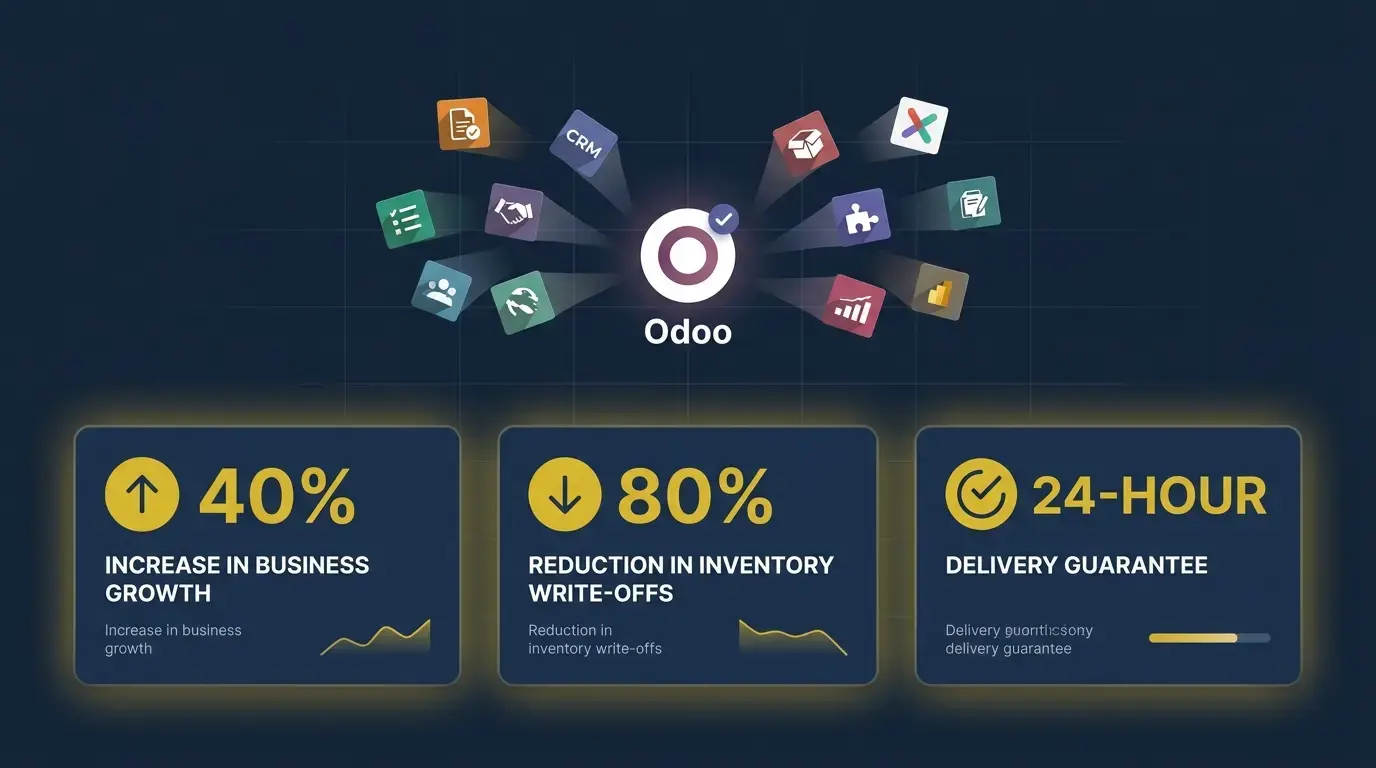
Consolidating onto one Odoo platform delivered a 40% increase in business growth, an 80% reduction in inventory write-offs, and a 24-hour delivery guarantee, all without adding headcount, which mattered for enterprise operations that needed more scalability as complexity increased.
The lesson for marketplace sellers: Inventory complexity doesn't get easier as you add channels; it gets harder. If your inventory logic is unreliable at two channels, it'll be worse at five.
See How Cudio Helped Almac Imports
When an Odoo Rithum Integration Makes Sense
This is worth doing if:
You sell across Amazon, Walmart, Shopify, or other platforms, and managing each channel separately is creating real overhead
Your online and brick-and-mortar inventory aren't reliably in sync
You want Click & Collect to reflect real stock at specific locations, not an aggregate number
Product publishing is slow or manual, and adding a marketplace takes significant effort
Your team doesn't trust Odoo's inventory reports and defaults to spreadsheets
You're expanding to new marketplaces and want a robust solution that supports growth without rebuilding each time
Enterprise implementations can involve a one-time setup cost because of mapping, testing, and workflow complexity.
If several of these apply, the integration is likely to deliver a meaningful operational improvement. If only one or two do, it may be worth fixing the underlying data or workflow issues first.
When You Should Fix Odoo Before Integrating Rithum
Integration doesn't fix a messy Odoo ERP environment. It amplifies it. If any of these are true, the right first step is a cleanup or rescue project, not an integration build:
Product data is inconsistent, with missing attributes or formatting that varies by category
Inventory quantities are unreliable, and your team regularly overrides them by hand
SKU logic is broken or inconsistent across systems
Customizations are undocumented, and implementation risk rises when customization history is unclear
Order statuses aren't standardized, so no one knows where an order actually stands
Connecting Rithum to an Odoo environment in this state won't solve these problems; it'll surface them faster, at greater scale, and in front of your marketplace customers.
Our Odoo Rescue services are built specifically to stabilize and clean an Odoo environment before an integration or upgrade project begins. Getting the foundation right first is always the faster path to a working integration.
How We Approach Odoo-Rithum Integration
That’s why Cudio doesn’t treat an Odoo Rithum integration as a simple connector setup.
Before anything goes live, we look at your data, workflows, marketplace requirements, and fulfillment logic to make sure the integration supports the way your business actually operates.
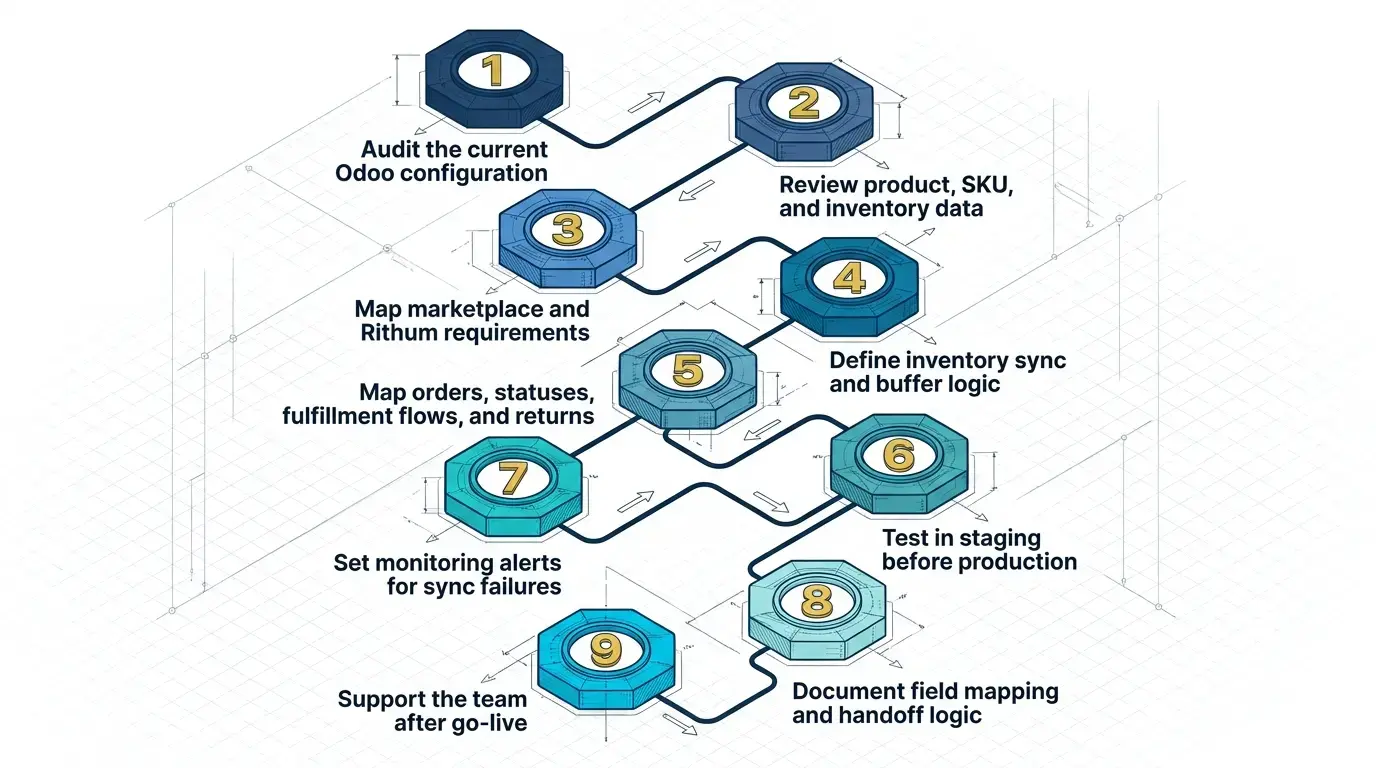
Audit the current Odoo configuration to see what's working, what isn't, where the data quality issues sit, and which odoo version needs to be reviewed for compatibility planning.
Review product, SKU, and inventory data to identify gaps and structural problems that need fixing before integration.
Map marketplace and Rithum requirements so we know what each channel expects in data format, field structure, and listing logic.
Define inventory sync and buffer logic so available-to-sell quantities reflect real operational constraints, not raw stock counts, then configure update frequency and carriers mappings before launch.
Map orders, statuses, fulfillment flows, and returns so every Rithum order state has a corresponding Odoo state, tested end to end.
Test in staging before production to catch edge cases and data conflicts before they touch live orders; the initial connection can often be installed and set up in about 1-2 hours, even though full workflow implementation still requires testing.
Set monitoring alerts for sync failures so errors get caught before they compound, including over 50 webhook events used for real-time synchronization in Odoo.
Document field mapping and handoff logic so the integration stays maintainable by your team and any future partner.
Support the team after go-live, because the first weeks of live operation always surface adjustments staging couldn't fully predict.
This process reflects what we've learned building integrations for retailers like Simons Shoes. The technical build is rarely the hardest part; the design decisions, data preparation, and post-launch support are where the real work happens.
Odoo Rithum Integration Readiness Checklist
Before connecting Odoo and Rithum, it helps to confirm whether your data, workflows, and internal ownership are ready for integration.
Use this checklist to spot gaps early, reduce sync issues, and make sure the setup is stable enough before moving into staging or production.
Item | Status |
|---|---|
Clean, consistent SKU structure across Odoo and marketplace records | |
Product attributes verified and formatted per marketplace requirement | |
Accurate inventory by location, with committed quantities accounted for | |
Stock buffer rules defined per channel and per location | |
Order status logic mapped and documented between Rithum and Odoo | |
Marketplace listing requirements documented per target channel | |
Returns and cancellations tested in staging | |
Sync failure monitoring and alerts configured | |
Full staging test completed end to end | |
Internal owner assigned for integration health |
Working through this list before go-live meaningfully reduces the risk of every failure pattern covered above.
The Bottom Line: One Reliable Flow From Product to Marketplace
An Odoo Rithum integration isn't just about connecting two systems. It gives omnichannel sellers one reliable flow from product publishing to marketplace fulfillment, helping them seamlessly connect marketplace operations with Odoo through a seamless setup that reduces fragmented processes, with inventory accuracy that holds up across every channel you sell on.
Odoo 19's Click & Collect and per-location inventory improvements make this more achievable than in previous versions, and Rithum's marketplace reach means that once it's built correctly, expanding to new channels doesn't mean starting over while also giving teams better insights from real-time data.
We've done this work with retailers like Simons Shoes and seen what it looks like when the integration is built on a solid foundation: real-time inventory visibility, faster marketplace launches, and a team that trusts what the system tells them.
Talk to Cudio About Marketplace Sync
FAQs About Odoo Rithum Integration
These FAQs cover the key questions retailers usually ask before connecting Odoo and Rithum, from what syncs between both systems to why data cleanup, testing, and post-launch support matter.
What is an Odoo Rithum integration?
An Odoo Rithum integration connects Odoo, your system of record for inventory, orders, and fulfillment, with Rithum, which manages marketplace listings, inventory updates, and order sync. Some businesses also integrate Odoo with Rithum through API-based middleware such as Commercium, which connects the two systems via APIs. This allows data to move between both systems automatically, reducing manual work and helping keep your sales channels more accurate.
Can Odoo connect to Amazon and Walmart through Rithum?
Yes. Rithum connects to more than 600 marketplace and retail channels, including Amazon and Walmart. Once Odoo and Rithum are integrated, product data, inventory, and orders can flow between Odoo and those marketplaces without building a separate integration for every channel.
Why does Click and Collect matter for omnichannel sellers?
Click and Collect matters because it connects physical store inventory to the online customer experience. In Odoo 19, an in-store pickup reservation can be reflected in that location’s available stock, which helps prevent the same item from being sold through a marketplace order at the same time.
What should sync between Odoo and Rithum?
Product records, SKUs, variants, pricing rules, inventory by location, marketplace listings, orders, shipment details, fulfillment statuses, returns, cancellations, and shipping data may all need to sync between Odoo and Rithum. Each sync point should be mapped carefully and tested before launch so the integration works the way your operation actually runs. This also includes account-level mapping in the Rithum account for shipping methods and related order data when applicable.
What causes Odoo marketplace integrations to fail?
Odoo marketplace integrations often fail because of poor source data, inconsistent SKU logic, undefined inventory buffers, incorrect order status mapping, untested return flows, missing sync monitoring, or undocumented custom code. These usually are not just technical issues; they are data, workflow, and design decisions that need to be handled before the integration goes live.
Should we clean our Odoo data before integrating Rithum?
In most cases, yes. If your product data, SKU structure, or inventory counts are inconsistent, those issues can spread across every connected marketplace once Rithum starts syncing them, and cleanup should also cover compliance-sensitive handling of customer and order records. Our Odoo Rescue services help stabilize the environment first so the integration has a cleaner foundation.
How can Cudio help with Odoo and Rithum integration?
Cudio supports Odoo and Rithum integration from audit and data preparation to field mapping, staging tests, go-live support, and post-launch monitoring. We use the Rithum-Odoo Connector we built and maintain ourselves, so the process is not based on a generic template. Talk to us about your Odoo and Rithum setup, and we’ll start with an honest read on where your system stands today.