



The Ramp Odoo integration is a system-level API connection that automates financial operations by syncing transactions, bill payments, and reimbursements directly into the Odoo ERP.
This automation reduces vendor processing time from 8 minutes to under 2 minutes, enabling a 3x faster month-end close cycle.
This technical guide analyzes how the integration optimizes spend management:
- How does the API-based data flow function?
- What is the impact of automated chart of accounts mapping?
- How does the integration handle multi-entity and multi-company setups?
- What are the security controls for 'Zero-Touch' automation?
Key Takeaways
- Manual accounting disappears as Ramp expenses, bill payments, reimbursements, and purchase orders sync directly into Odoo without CSV uploads or re-entry.
- Real-time financial visibility improves decision-making, with spend and cash flow reflected in Odoo within minutes of activity.
- Accurate accounting is built in, thanks to a shared chart of accounts and analytic account mapping that reduces posting errors.
- Automation scales with growth, enabling faster month-end close, cleaner audits, and stable operations as transaction volume increases.
The Core Problem Finance Teams Face Without Automation
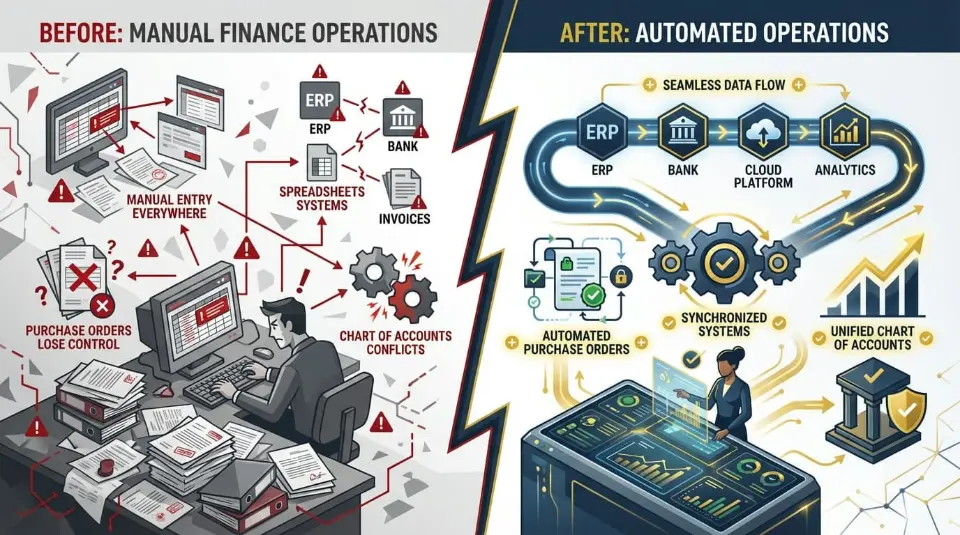
Without automation, finance teams spend too much time moving data instead of managing it. Ramp transactions are live in Ramp, while accounting records reside in the Odoo ERP system. Without a real-time connection, teams are forced to manually bridge the gap.
Where the breakdown happens:
- Manual entry everywhere: Expenses, bill payments, and reimbursements require manual input or CSV uploads into Odoo. Each step increases manual work and slows expense management.
- Disconnected systems: Ramp updates instantly, but Odoo reflects changes later. This delay removes real-time visibility into company spending and cash flow.
- Purchase orders lose control: Without integration, purchase orders, receipts, and invoices live in different tools. Teams cannot clearly track committed spend or enforce approvals.
- Chart of accounts conflicts: Mapping Ramp transactions to the correct chart of accounts and analytic accounts often requires repeated corrections, especially as categories change.
Manual processes reduce accuracy and scale poorly. Rekeying data increases reconciliation time, introduces inconsistencies, and makes audits harder. Reporting becomes reactive rather than real-time.
This is the core challenge Ramp Odoo teams face. Without strong Ramp integrations and a proper Odoo integration, finance teams lose visibility, spend management weakens, and errors multiply as the business grows.
The Ramp–Odoo connection is one example of a broader integration capability — explore Cudio's Odoo third-party API integration services for finance tools to see how other platforms in your stack can be unified.
How Does the Ramp Odoo Integration Synchronize Data with Odoo ERP?
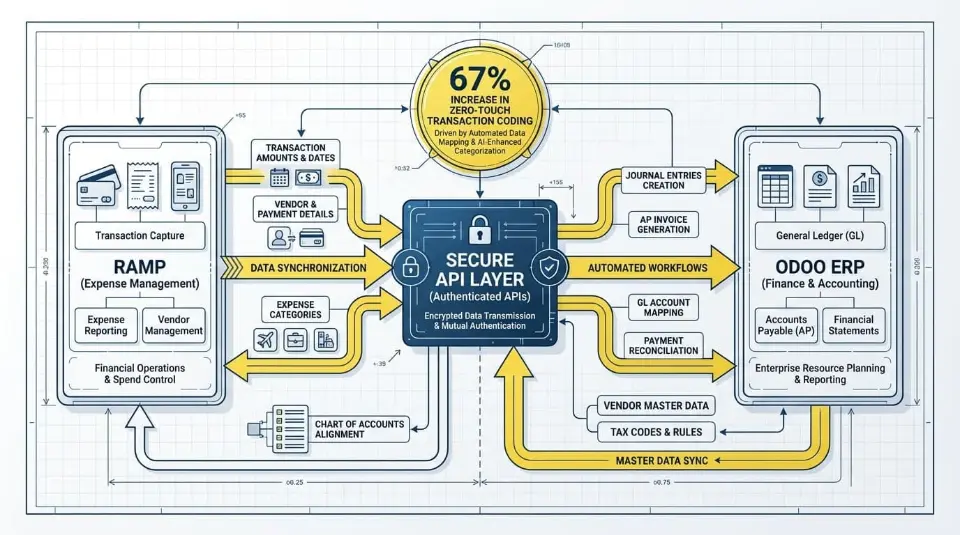
The Ramp Odoo integration operates at the system level using secure API connections, not file transfers or scheduled imports. Instead of exporting spreadsheets, Ramp and the Odoo ERP exchange data directly, allowing financial activity to sync automatically as it happens.
This architecture creates a continuous data pipeline between spend activity and accounting records.
Secure API-Based Data Flow
The Ramp Odoo integration utilizes authenticated APIs to validate requests and apply accounting logic in real-time. This architecture eliminates the need for CSV exports and increases zero-touch transaction coding by 67% compared to manual rule-based systems.
Nothing is pushed manually. No CSVs are uploaded. No data is duplicated.
The integration transmits structured data, including:
- Transaction amount and date
- Vendor and payment details
- Expense category mapping
- Chart of accounts alignment
- Analytic and cost center fields
- Receipt metadata and attachments
Structured data transmission ensures that every Ramp transaction enters Odoo as an accounting-ready object without manual review.
Near Real-Time Synchronization
Transactions sync continuously instead of waiting for batch uploads.
When spend occurs in Ramp, the corresponding entry appears in Odoo within minutes. This near real-time connection enables:
- Immediate visibility into expenses and bills
- Live updates to account balances
- Accurate reporting during the month rather than after close
Finance teams using unified Ramp systems report 3x-faster monthly close cycles, driven by continuous synchronization rather than end-of-month reconciliation.
Automated Coding With Reduced Manual Work
Ramp’s AI-based transaction-coding engine applies learned accounting rules before the data reaches Odoo. Compared to rules-only setups, this delivers a 67 percent increase in zero-touch transaction coding, meaning most expenses require no review before posting.
Automatic receipt matching eliminates over 16 hours of manual work per month by attaching documentation at the transaction level before syncing.
The result is fewer corrections, fewer journal edits, and cleaner records from day one.
What This Means at the ERP Level
Inside Odoo, every synced item becomes a native accounting object:
- Card transactions post as expense records and journal entries
- Approved reimbursements convert into vendor bills and payments
- Bill payments sync with the full general ledger impact
- Statements and cashback create balanced accounting entries
Because the data arrives already structured, Odoo does not need cleanup processing or secondary reconciliation.
How Ramp Odoo Moves Financial Data Across Systems
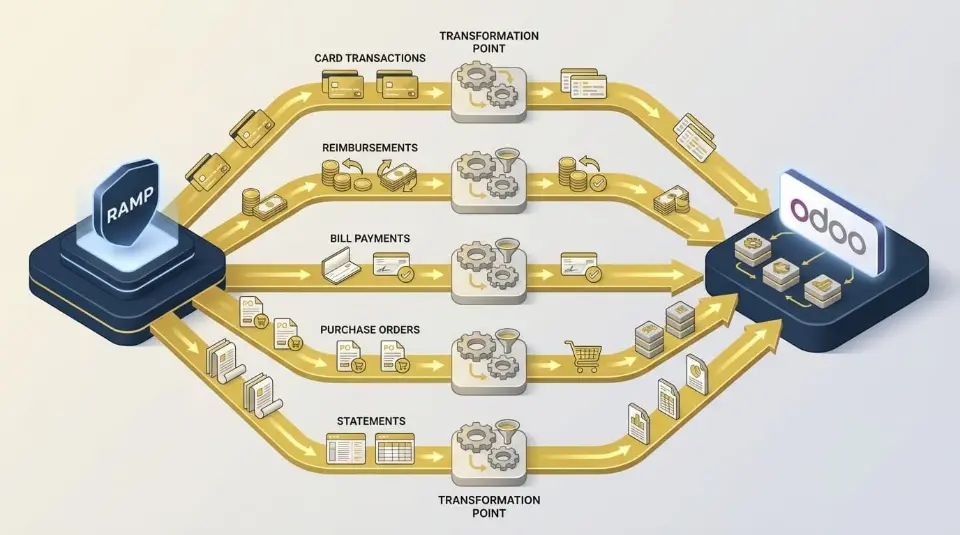
Once the Ramp Odoo integration is active, financial data moves between platforms as structured accounting objects rather than raw transactions. Each spend type follows a defined path into Odoo, ensuring consistency across records, approvals, and reporting.
Card Transactions Inside the Ramp Odoo Integration
Card purchases made in Ramp are transferred into Odoo as fully formed expense records.
Each transaction arrives with:
- Vendor name and transaction date
- Receipt images linked to the record
- Categorization mapped to the chart of accounts
- Department and analytic account assignments
- User attribution tied to the cardholder
Odoo automatically creates the corresponding journal entries, allowing finance teams to review spend directly inside accounting without recreating data. This eliminates duplicate records and prevents inconsistencies between Ramp activity and Odoo balances.
Reimbursements Sync Between Ramp Odoo and Odoo ERP
When employees submit out-of-pocket expenses in Ramp, the approval workflow determines when the data is moved into Odoo.
After approval:
- The employee is treated as a vendor
- A vendor bill is created in Odoo
- Expense lines follow predefined accounting rules
- Payments post automatically once processed in Ramp
This ensures reimbursements are recorded correctly in cash and expense accounts while preserving supporting receipts for audit review.
Bill Payments and Accounting Accuracy
Ramp bill payments sync directly into Odoo as accounts payable records.
Each bill creates:
- A vendor bill entry
- A linked payment record once settled
- Automatic journal postings to cash and liability accounts
Payment statuses are updated in Odoo without requiring manual reconciliation. As a result, outstanding balances, aging reports, and cash positions remain accurate throughout the month.
Purchase Orders and Spend Control Across Systems
Purchase orders synchronize in both directions between Ramp and Odoo.
From Odoo to Ramp:
- Vendor details, line items, quantities, and amounts sync automatically
- Ramp enforces approvals and budget checks before spending occurs
From Ramp to Odoo:
- Receipt confirmations update fulfillment status
- Partial deliveries remain visible
- Open commitments are tracked against actual spend
This bidirectional flow supports three-way matching between purchase orders, receipts, and bills without switching systems.
Statements, Fees, and Cashback Handling
Card statements generated in Ramp appear in Odoo as summary vendor bills that represent the total liabilities on the statement.
When payments are applied:
- Settlement entries post automatically
- Account balances reconcile correctly
- Cashback rewards are recorded as income or offsets
This ensures statement totals, fees, and rewards are reflected accurately in the general ledger without manual adjustments.
What This Achieves Across the Odoo ERP
Across every transaction type, the integration maintains:
- A single chart of accounts structure
- Consistent vendor records
- Unified user access and attribution
- Accurate transaction dating and documentation
Instead of fragmented systems, finance teams work within a single accounting environment where spending activity, approvals, and records remain synchronized.
The result is not just automation, but accounting continuity across Ramp and Odoo.
How the Odoo Integration Uses Chart of Accounts Mapping
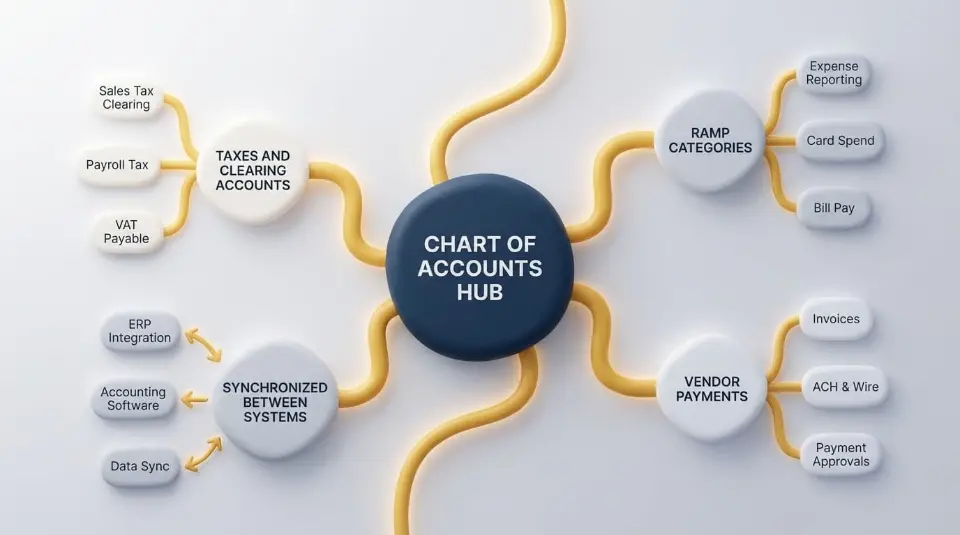
Accurate accounting depends on how transactions are recorded in the chart of accounts. Without proper alignment, even automated integrations can lead to misclassified expenses, inconsistent reporting, and month-end reconciliation issues.
Within the Ramp Odoo integration, the chart of accounts mapping defines how each transaction type posts into Odoo. Every card charge, bill payment, or reimbursement is matched to a predefined general ledger account before the record is created.
This mapping ensures:
- Ramp categories align with Odoo expense accounts
- Vendor payments post to the correct liability and cash accounts
- Taxes and clearing accounts remain consistent
- Financial statements reflect actual spending behavior
Because the chart of accounts is synchronized between systems, accounting rules remain centralized inside Odoo rather than managed separately in Ramp.
This prevents common breakdowns such as duplicate expense accounts, inconsistent naming, or transactions posting to suspense accounts due to missing mappings.
Cudio typically audits the chart of accounts structure before integration goes live. We identify overlapping accounts, outdated categories, and reporting gaps, then align Ramp mapping rules to match how finance teams actually report in Odoo. This prevents rework later when month-end numbers must tie out.
Book My FREE ERP Assessment Today
Analytic Accounts and Cost Center Tracking
While the chart of accounts defines what the money is, analytic accounts define where the money belongs.
The Ramp Odoo integration supports full synchronization of analytic accounts, analytic tags, and cost centers across systems. This allows each transaction to carry operational context alongside accounting classification.
Examples include:
- Departments such as Sales, Marketing, or Operations
- Projects and client engagements
- Cost centers tied to locations or subsidiaries
When spending occurs in Ramp, the selected department or project is automatically assigned to Odoo analytic accounts without manual classification.
This enables:
- Department-level profit and loss reporting
- Project margin tracking
- Cost center comparisons across time periods
- Clean segmentation without duplicate journals
Without analytic alignment, finance teams often rely on after-the-fact reclassifications, which introduce errors and delay reporting.
Cudio helps design analytic structures that scale. Instead of creating hundreds of static tags, our team maps analytical logic to business workflows. We help departments, projects, and reporting dimensions remain usable as transaction volume grows.
Book My FREE ERP Assessment Today
Real Time Visibility Across Ramp Integrations
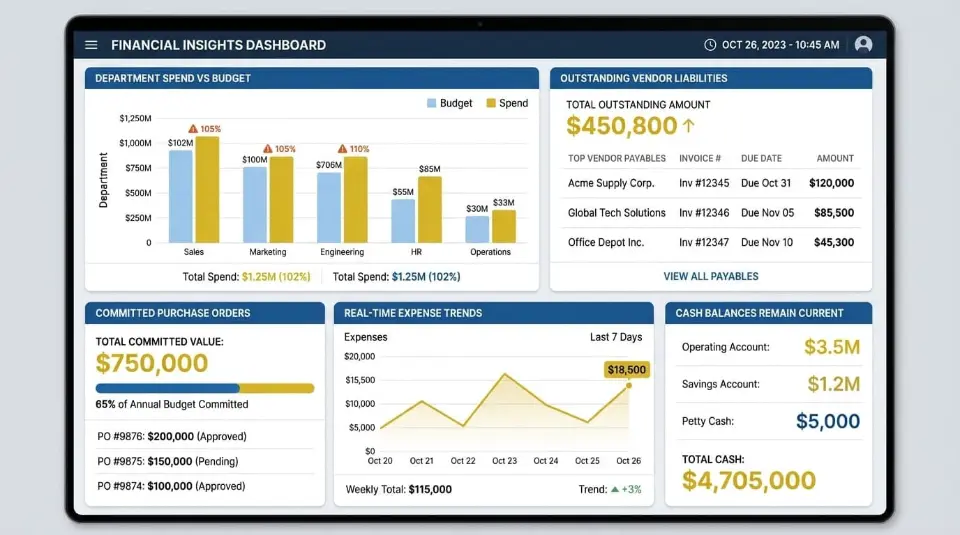
Once the chart of accounts and analytic structures are aligned, Ramp integrations unlock true real-time visibility across financial operations.
Because transactions sync continuously:
- Expenses appear in Odoo within minutes
- Bills update accounts payable immediately
- Purchase commitments reflect actual spend
- Cash balances remain current throughout the month
This eliminates blind spots between operational spend and accounting data.
Finance teams no longer wait for uploads or month-end imports to understand financial position. Instead, Odoo dashboards reflect live activity coming from Ramp, including:
- Department spends versus budget
- Outstanding vendor liabilities
- Committed purchase order value
- Real-time expense trends
Organizations using unified Ramp systems report significantly faster closes because reporting happens continuously, not retrospectively.
Cudio extends this visibility by validating reporting flows after deployment. We test whether analytic accounts roll correctly into financial reports and confirm that management dashboards reflect accurate data. We also ensure executives see consistent numbers across Odoo modules.
This step is critical. Automation alone does not guarantee clarity. Structured reporting does.
Book My FREE ERP Assessment Today
How Configuration Enables Automation Without Custom Code
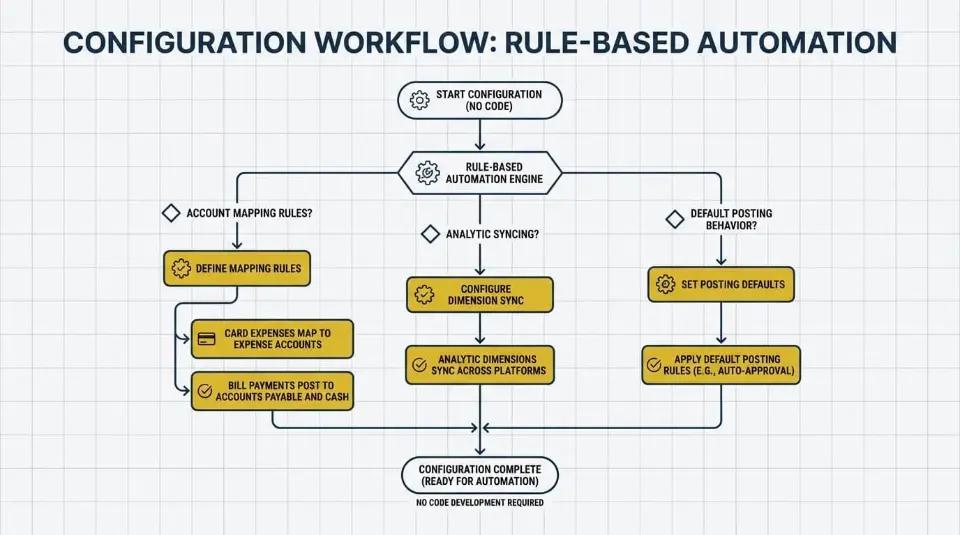
The Ramp Odoo integration automates tasks through configuration logic rather than development. Instead of writing custom scripts or maintaining middleware, the integration relies on structured accounting rules that determine how data behaves once it moves between systems.
This approach keeps the connection stable, upgrade safe, and scalable as both platforms evolve.
Account Mapping Rules
At the core of the integration are account-mapping rules that define how Ramp activity posts are displayed in Odoo.
Each transaction type is assigned predefined logic:
- Card expenses map to expense accounts
- Bill payments post to accounts payable and cash
- Reimbursements route through employee vendor records
- Fees and adjustments are posted to the designated clearing accounts
These rules ensure transactions arrive in Odoo fully classified without manual input. As long as the chart of accounts remains consistent, accounting behavior stays predictable regardless of transaction volume.
Analytic Dimension Syncing
Beyond general ledger accounts, the integration syncs analytic dimensions across platforms.
Departments, projects, and cost centers selected in Ramp become native analytic values inside Odoo. This allows classification to happen at the moment of spend rather than after reconciliation.
Because analytic dimensions sync automatically:
- Transactions do not require manual tagging
- Reporting stays consistent across modules
- Department budgets remain accurate in real time
The result is structured data that supports analysis without increasing manual work.
Default Posting Behavior
Default posting logic acts as a safety layer.
If a transaction enters Ramp without full classification, predefined defaults determine how it posts in Odoo. This prevents failed syncs, orphaned entries, or a buildup of suspense accounts.
Defaults can include:
- Fallback expense accounts
- Temporary clearing accounts
- Standard analytic values
This ensures continuous automation even when inputs are incomplete.
Cudio typically reviews default posting behavior early to prevent long-term cleanup. Proper defaults protect accounting integrity while allowing teams to refine rules gradually instead of blocking automation.
Book My FREE ERP Assessment Today
How Ramp Integrations Support Different Operating Models
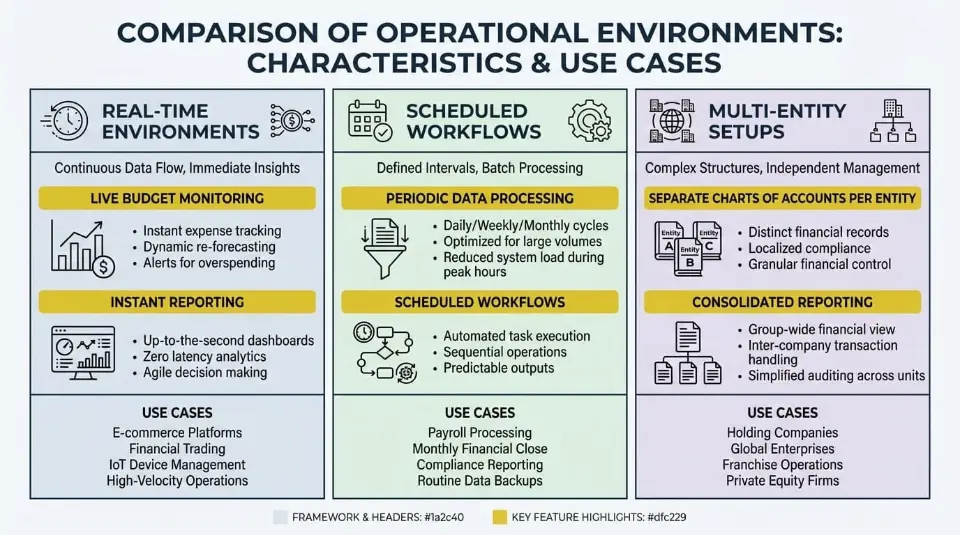
Not every finance organization operates the same way. The Ramp integrations framework is designed to adapt to different accounting environments without altering system architecture.
Instead of forcing one workflow, the integration adjusts how and when data moves.
Real Time Environments
In real-time accounting models, transactions sync as they occur.
This supports teams that require:
- Live budget monitoring
- Continuous cash flow tracking
- Immediate expense visibility
- Rolling close processes
As card spend, bills, or reimbursements happen in Ramp, records appear in Odoo within minutes. Financial reports remain current throughout the month rather than catching up at close.
This model works well for high-velocity businesses and teams managing frequent spend activity.
Scheduled Accounting Workflows
Some organizations prefer structured accounting windows.
In scheduled workflows, transactions sync in controlled intervals such as daily or weekly. This allows finance teams to review, approve, or validate data before it posts to the ledger.
System behavior remains automated, but timing is deliberate.
This approach is common for:
- Smaller accounting teams
- Regulated environments
- Businesses with strict approval hierarchies
The same integration supports both models without changing mapping logic or requiring custom code.
Multi-Entity and Multi-Company Setups
Ramp and Odoo both support multi-company environments, and the integration automatically preserves entity boundaries.
This includes:
- Separate charts of accounts per entity
- Entity-specific analytic dimensions
- Company-level vendors and users
- Distinct ledgers and reporting structures
Ramp card programs, departments, or locations can be mapped directly to corresponding Odoo companies.
This allows organizations to scale from a single entity to many without duplicating systems or compromising reporting accuracy.
What Changes for Finance Teams After Automation Goes Live
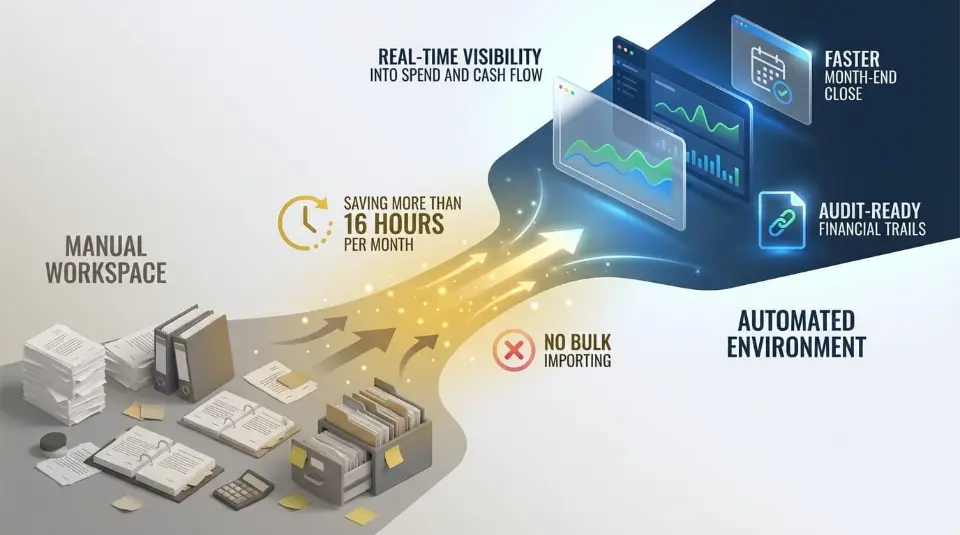
Once automation is active, the Ramp Odoo integration fundamentally changes how finance operations function day to day. Data no longer waits for reconciliation cycles. Instead, spend activity flows continuously between systems, reshaping visibility, closing timelines, and audit readiness.
Real Time Visibility Into Spend and Cash Flow
After the sync is enabled, financial data reflects real activity within minutes.
Every transaction created in Ramp moves automatically into the ERP, updating expense records, payments, and statements without exporting files or reentering data. This gives finance teams immediate visibility across departments, vendors, and accounts.
Key changes at the system level include:
- Live expense data appearing in reporting views as spend occurs
- Statement balances update automatically as payments post
- Cash positions reflecting cleared and pending transactions
- Department budgets are updated without manual refresh
Because users share synchronized access across systems, reporting no longer depends on delayed uploads or background batch jobs. Finance teams view the same numbers that leadership sees, with no timing gap between spend and record creation.
This real-time visibility improves control over company spending and allows procurement and finance leaders to respond before overruns occur.
Faster Month-End Close
Continuous sync removes the traditional month-end bottleneck.
Instead of reconciling hundreds of transactions at the end of the week or month, data is already validated and posted throughout the period. Expenses, reimbursements, and payments arrive pre-coded, with receipts attached and accounts aligned.
Operational improvements include:
- No bulk importing or exporting of CSV files
- Fewer journal corrections caused by manual input
- Reduced hours spent matching transactions to statements
- Minimal backlog at close
Teams report saving more than 16 hours per month previously lost to receipt matching and reconciliation. Because transactions are processed daily, the close process shifts from cleanup to review.
The result is a faster close cycle that can move from weeks to days without increasing staffing.
Audit-Ready Financial Trails
Automation also strengthens audit and compliance readiness.
Each record synced through the integration retains its full transaction history, including approvals, receipts, timestamps, and payment references. This metadata remains permanently linked across systems.
At the ERP level, auditors can trace:
- Expense records back to the original card transactions
- Vendor bills to approved reimbursements
- Payments to the corresponding bank and statement entries
- Purchase orders to receipts and final invoices
Because data flows through standardized workflows, records are consistent across systems. There is no need to reconstruct activity from emails, screenshots, or missing attachments.
Access controls further support compliance. User permissions determine who can approve, modify, or view transactions, while automated logs validate when changes occur.
This creates a single, verifiable source of truth that supports audits, internal reviews, and financial reporting without additional preparation.
Operational Impact Across the Organization
After automation goes live, finance operations become both faster and more stable.
- Systems stay aligned through continuous sync
- Workflows remain consistent across departments
- Errors caused by duplicate entry decline sharply
- Reporting becomes accurate during the month, not after
For growing companies, this shift allows finance teams to scale efficiently without adding headcount. Instead of spending time moving data, teams focus on oversight, analysis, and strategic control.
Automation does not replace judgment. It removes friction from the process, enabling financial decisions to be made with validated, up-to-date information.
That is the practical outcome of a fully synchronized Ramp and ERP environment.
Security, Controls, and Responsible Automation
Automation only works when data integrity is protected at every stage. The Ramp Odoo integration is designed with layered security controls that preserve accuracy while preventing unauthorized changes.
All data exchanged between systems moves through encrypted API connections. Each transaction request is authenticated before it is written into Odoo, ensuring only approved activity reaches the accounting ledger.
Key protection mechanisms include:
- Encrypted data transmission in transit
- Token-based authorization with controlled access
- System-level logging for every sync event
- Immutable transaction records once posted
Approval workflows remain enforced. Expenses, reimbursements, and bill payments must still pass policy checks before syncing, which means automation accelerates processing without weakening internal controls.
Every action leaves an auditable trail. Transaction creation, edits, approvals, and payment status updates are time-stamped and retained, preserving accountability even as volume increases.
This approach enables responsible automation where accuracy improves without sacrificing governance.
A Typical Ramp Odoo Integration Timeline
Most organizations experience automation as a gradual alignment of systems rather than a disruptive switch.
Initial connection establishes secure communication between Ramp and the Odoo ERP. During this phase, existing accounts, vendors, and users are synchronized to ensure clean data mapping.
Once live syncing begins, transaction flow stabilizes quickly:
- The early phase focuses on expenses and receipts
- Bill payments and statements follow once validation is complete
- Purchase orders and multi-entity flows mature last
In standard environments, organizations typically achieve functional automation within 1 to 2 weeks. More complex setups involving multiple companies, advanced procurement workflows, or custom accounting logic may take several weeks.
The key shift occurs once daily operations no longer rely on exporting or reconciliation cycles. From that point forward, automation compounds its value as transaction volume grows.
Who the Ramp Odoo Integration Is Built For
The integration is designed for organizations where manual accounting no longer scales.
- High-volume finance teams: Teams processing hundreds or thousands of transactions per month benefit from reduced errors, fewer adjustments, and lower reconciliation workload.
- Multi-department organizations: Departments generate spend independently, but centralized finance retains visibility and control through synchronized analytic tracking.
- Businesses running on Odoo ERP: Organizations using Odoo as their accounting core gain full automation without replacing existing financial structures.
- Companies scaling beyond manual accounting: As headcount, vendors, and payment volume increase, spreadsheet-based workflows break down. Automation replaces repetitive work with reliable system behavior.
For these businesses, the Ramp Odoo integration is not just a connector. It becomes foundational infrastructure that keeps finance operations accurate, visible, and scalable as growth accelerates.
Final Thoughts
The Ramp Odoo integration transforms how financial data moves across systems. Instead of manual uploads, delayed reporting, and reconciliation gaps, finance teams gain continuous sync between spend activity and the Odoo ERP. Transactions, bills, reimbursements, and purchase orders stay aligned automatically, reducing errors, improving visibility, and shortening the month-end close.
For organizations that want the integration done right, Cudio helps bridge strategy and execution. As an Odoo Gold Partner, Cudio supports end-to-end integration planning, data mapping, validation, and post-go-live optimization. Our team ensures workflows match real business operations, not generic templates.
Book My FREE ERP Assessment Today
FAQs
Quick answers to the questions finance teams ask before going all in on the Ramp Odoo integration.
How does the integration handle 2026 Odoo 19.0 bank reconciliation logic?
The integration uses Odoo 19.0's authenticated API layer to post transactions as expense records, which then auto-match against bank statements to ensure 100% reconciliation accuracy.
What is the typical ROI for teams with 500+ monthly transactions?
Teams report saving over 16 hours per month on receipt matching alone. At an average accountant salary, this represents a 400% ROI on the annual integration cost within the first six months.
Do I need a developer?
No. You do not need a developer for the Ramp Odoo integration. The connection is pre-built and configured by certified partners. Development is required only if your Odoo ERP has extensive custom logic.
What about multi-entity setups?
Multi-entity setups are fully supported. You can map Ramp cards, locations, and spend programs to specific Odoo companies. This keeps accounting, procurement, and reporting separate while keeping them synchronized.
Is it expensive?
The cost is typically around $5,000 per year for the standard integration. For most businesses, the time saved from manual reconciliation, fewer errors, and faster close cycles quickly offset the cost. Compared to ongoing manual work, it is usually more cost-efficient.
What happens if we disconnect the integration?
Disconnecting stops future syncing only. All historical data remains safely stored in both Ramp and Odoo. Your accounting records stay intact, and syncing can resume at any time.
How long does implementation really take?
Most standard Odoo environments go live within one to two weeks, including testing. Mid-sized businesses with additional workflows usually take eight to twelve weeks. Highly customized enterprise environments can extend to twelve to twenty weeks, depending on complexity.