
Most businesses don't delay ERP adoption because things are going well. They delay because no single problem feels bad enough to justify the disruption of changing everything.
That's the trap.
The real signal rarely arrives as one obvious breaking point. It shows up as several friction points compounding at the same time: a reporting lag here, a fulfillment error there, a finance close that takes longer every quarter.
At Cudio, we've seen this pattern across every industry we work in, from manufacturing and distribution to construction, retail, and healthcare. The businesses that act early do better. The ones that wait until the pain is undeniable spend twice as much fixing what broke while they waited.
This article helps you recognize where your operations actually stand, not just where you assume they do.
Key Takeaways
- Data silos and disconnected systems are the most common signs a business has outgrown its current tools
- Manual data entry doesn't just cost time. It introduces errors that compound downstream and get more expensive the longer they go undetected
- Real-time visibility across inventory, cash flow, and orders isn't a luxury. It's the baseline for any operation managing multiple channels or locations
- Growth reveals structural limits in legacy systems. Adding a new channel or location shouldn't require rebuilding your processes from scratch
- When employees build their own workarounds, that's a trust problem, not a training problem
- The decision threshold isn't perfection. It's whether the cost of staying disconnected is now exceeding the cost of fixing it
Sign 1: Your Data Lives in Too Many Places
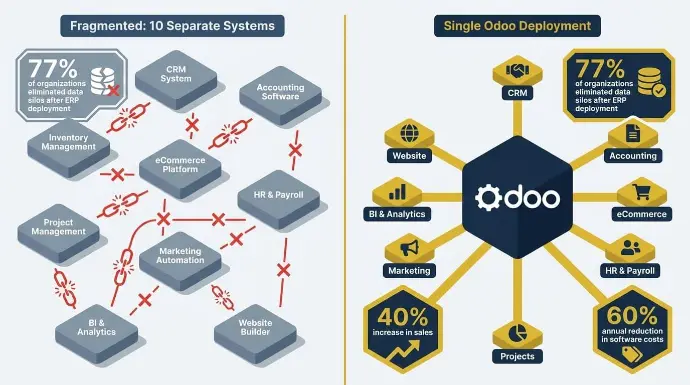
Most growing businesses don't set out to build a fragmented data environment. It happens gradually.
One team adopts a tool that works for them.
Another builds a spreadsheet to fill a gap. Before long, you've got five systems that don't talk to each other and a finance team spending half their week reconciling numbers that should already match.
That's a data silo problem, and it's one of the clearest signs your current setup has outgrown itself.
Spreadsheets Have Become Load-Bearing Infrastructure
Spreadsheets are useful tools. The problem starts when they stop being supplementary and become structural. When your team is using spreadsheets as manual processes to bridge gaps between disconnected systems, that's not a process issue.
That's a sign the underlying architecture can't support how the business actually operates.
Version conflicts become routine. Someone updates a file locally and forgets to share it.
Another team pulls numbers from last week's export without realizing it's stale. Financial reporting becomes a negotiation between competing versions of the same data rather than a read of one source of truth.
Consolidating data puts all your data into a single central system instead of scattered files and apps.
77% of organizations eliminated data silos after ERP deployment, enabling consistent, real-time collaboration across departments.
If you're already outgrowing spreadsheets but haven't replaced them yet, the operational drag compounds quietly until it's impossible to ignore.
Almac Imports came to us running 10 separate software platforms across a multi-lingual, multi-currency global distribution operation. No single system talked to another. Managing multiple systems created unnecessary complexity, when they needed one central system. Their team was spending significant time every week just reconciling data between platforms that should've been connected from the start.
We replaced all 10 with a single Odoo deployment, using an erp solution that supports each business function in one environment, configuring native multi-currency and multi-lingual modules and building automated distribution and replenishment logic on standard Odoo inventory and purchasing workflows.
Results:
- 40% increase in sales with no additional customer service headcount
- Estimated 60% annual reduction in software costs
- 24-hour delivery SLA achieved
- Dedicated on-site IT professional no longer required
See All Our Client Success Stories
Sign 2: Manual Data Entry Is Eating Hours and Creating Errors
Manual data entry doesn't just cost time. It is time-consuming, and when work stays manual, reducing errors becomes much harder because mistakes travel downstream and get more expensive the longer they go undetected.
An order was entered twice. A cost code was applied to the wrong department. A vendor payment was logged in one system but not reflected in another. Automating order processing makes this work more efficient.
Each mistake is small on its own. Together, they create reconciliation cycles that pull your team away from actual work. Disconnected entry across different processes also hurts overall business operations.
What the Research Actually Shows
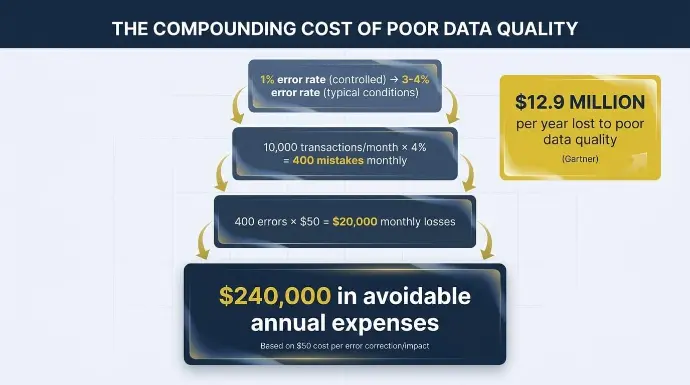
The average manual data entry error rate is 1% under controlled conditions and 3 to 4% under typical working conditions with time pressure and varied document quality. At the record level, error rates climb to 10 to 30% depending on how many fields each record contains.
Do the math on that. If your business processes 10,000 transactions per month at a 4% error rate, that's 400 mistakes monthly. At $50 per error to correct, that's $20,000 in monthly losses. Over a year, $240,000 in avoidable expenses, before you've counted the damage to customer trust.
And it's not just the cost of fixing errors. The average organization loses $12.9 million per year to poor data quality, according to Gartner, with over 25% of organizations estimating losses exceeding $5 million annually.
At Cudio, we see this play out in every environment we're brought into. The manual hours aren't the only problem. It's the compounding effect of decisions made on data that was wrong from the moment it was entered.
R&W Rope came to us, sending invoices, packing slips, and tracking numbers manually. Every week, 40 to 60 hours of administrative work were done by hand across three disconnected platforms. Their team wasn't inefficient. Their system was.
We rebuilt their e-commerce site on Odoo's native modules and implemented inventory, manufacturing, purchasing, sales, and accounting in a single environment.
Results:
- Over $35,000 in annual software cost savings
- 40 to 60 hours of weekly administrative work is fully automated
- Real-time data visibility across all sales channels
Sign 3: You Can't See What's Actually Happening in Your Business
When something goes wrong operationally, how quickly do you actually know about it? If the honest answer is "a few days later, when someone pulls a report," that's the visibility problem in plain terms, and one that enterprise resource planning addresses by giving leaders a holistic view of business operations.
A unified ERP also gives teams easy access to the information they need for better business decisions and more informed decisions.
Most Businesses Are Running on Stale Data Instead of Real Time Data
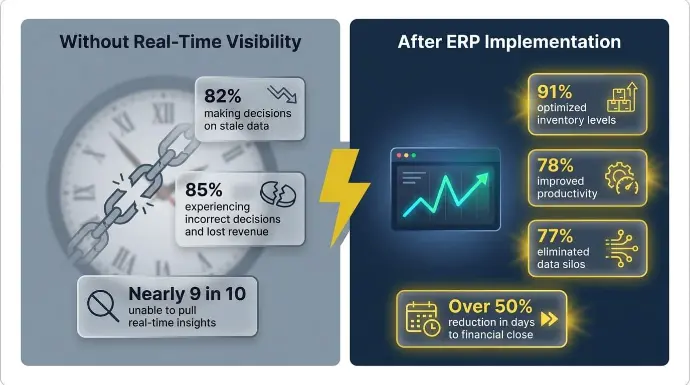
A global study by Dimensional Research found that 82% of companies are making decisions based on stale information, and 85% say this stale data is leading to incorrect decisions, lost revenue, and making it harder to stay competitive. Nearly 9 in 10 companies report they're unable to pull real-time insights from their legacy ERP systems.
Running a business on yesterday's numbers means you're always a step behind. When data is connected in one central system, leaders can make faster business decisions. Inventory decisions made on stale data lead to overstock in one location and stockouts in another. Cash flow calls get made without a current picture of what's in the pipeline.
Financial Reports That Take Too Long Signal a System Problem
A month-end close that drags into the third or fourth week signals that your financial reporting process depends too heavily on manual reconciliation across disconnected sources. When leadership can't trust the numbers without asking "which version is this?" or "has this been reconciled yet?", that's a system limitation, not a people problem.
91% of organizations reported optimized inventory levels and real-time data as a direct benefit after ERP implementation, with 78% reporting improved productivity and 77% achieving the elimination of data silos. A well-configured ERP keeps financial data connected to the operations generating it.
Find Out If Odoo Is Right for You
Lexington Medical, operating across 30 countries and five subsidiaries, was managing multilevel BOMs, lot tracking, expiration date management, sub-contracting workflows, and intercompany transactions on a system not built to handle them. Leadership couldn't trust the financial close numbers without manual verification.
After we rebuilt their environment with advanced custom financial reporting and automated intercompany transaction processing, they reduced days to financial close by over 50% and significantly cut their error rate across a 30-country operation.
As Rowan from Lexington Medical put it: "Through our partnership with Cudio, we have been able to improve existing workflows in Odoo and build out custom solutions that have reduced our days to close by over 50% while reducing our error rate."
Read the Lexington Medical Case Study
Sign 4: Growth Is Breaking Things Your Current System Can't Handle
Growth is supposed to be the goal. For a lot of operators, adding a new channel or location doesn't feel like progress. As companies grow, systems that once worked start showing growth pains, and expansion can feel like adding weight to a structure that was already showing cracks.
An ERP helps support continued growth and overall business growth.
Adding Channels, Locations, or SKUs Reveals Structural Limits
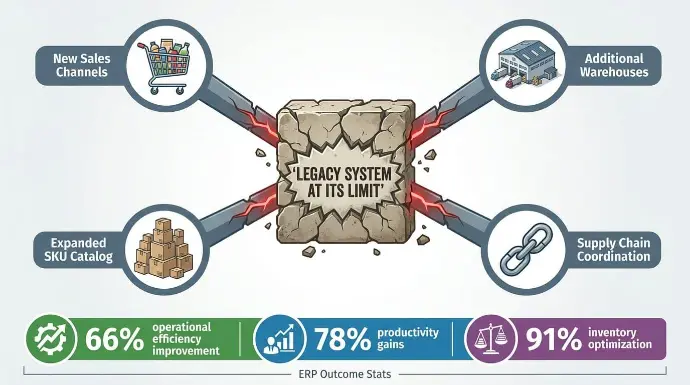
Most legacy systems were built for a smaller, simpler version of the business. When you add a new sales channel, open a second warehouse, or expand your product catalog, you need a scalable system as the company expands. They just create more manual work.
Omnichannel operations depend on synchronized data across every touchpoint.
As a business grows, disconnected tools stop running smoothly.
When systems are siloed, that synchronization doesn't exist. Orders placed on one channel don't automatically update inventory across others.
Fulfillment decisions get made on incomplete information. Customers feel the inconsistency before your team even realizes there's a problem. ERP supports expansion without sacrificing quality and helps protect customer satisfaction.
91% of companies with ERP systems live for more than a year report optimized inventory levels as a benefit, and 62% report reduced costs, specifically in purchasing and inventory control.
Project-Based and Construction Businesses Feel This Differently
For construction and project-based businesses, the scalability problem shows up in project management complexity rather than channel proliferation. BOMs tracked in spreadsheets, change orders managed through email threads, and resource allocation decisions made without a unified view of costs and timelines are the project-based equivalent of omnichannel data silos.
This is where our partnership with QBuild becomes directly relevant. QBuild's integration with Odoo connects project management, procurement, resource planning, and financial reporting in a single environment designed specifically for construction and project-based operations. Their guide to the 10 signs a business needs ERP maps directly to the operational visibility and scalability gaps we diagnose in every engagement.
Supply Chain Coordination Falls Apart at Scale
Supply chain visibility is one of the first things to break when a business is growing rapidly and outgrows its systems. When teams can't see real-time inventory positions across locations, coordination becomes reactive. You're chasing problems instead of preventing them. Cloud ERP delivers 66% improvement in operational efficiency, 78% productivity gains, and 91% inventory optimization for organizations that implement it, according to research aggregated across cloud ERP deployments.
Better coordination also supports cost reduction and lowers operational costs.
Aeromist came to us with disconnected systems, BOMs, and change orders tracked in spreadsheets, and no visibility into product cost or production forecasting. Adding new product lines was creating new operational gaps rather than new revenue.
What we implemented:
- Odoo ERP across inventory, sales, CRM, manufacturing, projects, and field service
- WooCommerce, Avalara Avatax for tax compliance, and ShipStation integrations
Results:
- Real-time inventory tracking across multiple warehouses
- Automated purchasing and demand forecasting
- Streamlined manufacturing and shipping workflows
Sign 5: Your People Are Working Around the System, Not With It
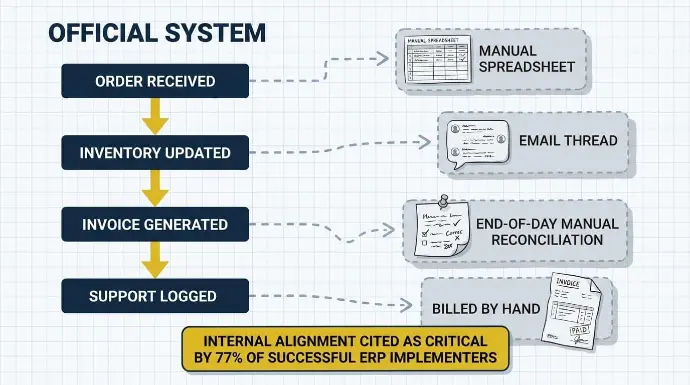
When employees stop using the official system and start building their own, that's not a training problem. That's a trust problem. And it's one of the most reliable signals that a platform has aged out.
Shadow Systems Are a Behavioral Signal
When your team maintains a separate spreadsheet to track what the ERP system should already know, or creates a messaging thread to coordinate what the software should handle automatically, they've made a quiet judgment: employees are creating workarounds because the current erp system no longer supports core workflows.
Shadow tools often appear when business software no longer aligns with how teams work.
Before long, this starts to compound.
Each workaround creates a new data source that isn't connected to anything else. 51% of businesses are challenged by implementation failure and operational disruptions during ERP transitions, and internal alignment is cited as critical by 77% of successful implementers.
Breaking down silos becomes harder when the silos aren't just between departments but between the official system and the informal ones people built around it.
Prizm came to us with helpdesk, accounting, and sales modules completely disconnected. Technicians were reconciling inventory manually at the end of each day. Subscription billing for printer meters was being invoiced by hand. Their team had built informal workarounds for nearly every core workflow because the official system couldn't handle them.
What we implemented:
- Odoo across helpdesk, field service, projects, inventory, sales, CRM, and accounting
- Custom smart buttons for field technician workflows
- Automated purchase orders using MTO and reordering rules
- Subscription billing automation for meter-based contracts
Results:
- Eliminated duplicate entry entirely
- Real-time field service inventory data
- Centralized billing, support, and CRM in a single Odoo environment
Sign 6: Your Vendor Has Stopped Keeping Up
Vendor support deterioration tends to happen gradually, which is why most businesses notice it too late. A weak erp vendor and an unresponsive support team are common signs the system is falling behind. Response times slow down.
Features get deprecated without replacement. The product roadmap stops addressing the regulatory requirements your industry actually faces. Poor vendor support can also undermine long-term business success.
When Maintenance Costs Exceed What the System Delivers
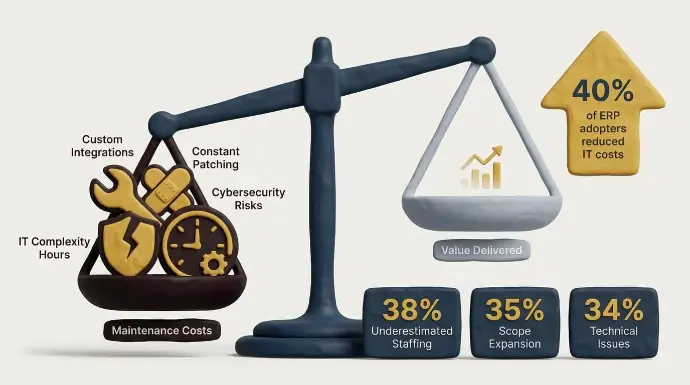
At some point, the math changes. When annual maintenance, custom integrations, and IT complexity cost more than the measurable value the system returns, you're paying to keep something running rather than paying for something that works.
The top causes of ERP project overruns are underestimated staffing (38%), scope expansion (35%), and technical issues (34%). These costs accelerate significantly when a platform stops receiving vendor updates, and your internal team is left patching functionality that should be maintained by the software provider. Legacy systems can also expose companies to increased cybersecurity risks.
40% of companies that implemented ERP saw a reduction in IT costs as a direct benefit, with the biggest ROI area being reduced IT maintenance overhead. If your current system requires constant patching just to stay functional, that cost is compounding invisibly every quarter. Modern ERP delivered through cloud computing can also reduce maintenance burden as needs evolve.
Get My Free ERP Readiness Check
Sign 7: Customers Are Feeling the Friction
Internal system problems don't stay internal for long. Eventually, they show up in the customer experience, and by the time they do, the damage is already happening.
Late Orders, Wrong Inventory, and Poor Communication Add Up
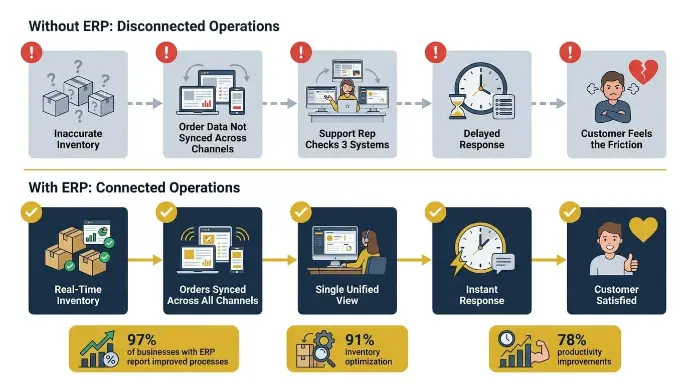
Most fulfillment complaints trace back to the same root causes: inventory management that isn't accurate, order data that isn't connected across channels, and support teams that need accurate data to resolve issues quickly but can't see what's actually happening in real time.
When a customer calls about a late order, and your support rep has to check three different places just to find a status update, that delay isn't a staffing issue. It's a system issue. ERP connects order details and customer records so teams can respond in ways that improve customer satisfaction.
A pattern of customer-facing errors that keeps repeating despite your team's best efforts is one of the clearest signs you need integrated ERP software. Shipping delays, wrong items sent, and orders that fall through the cracks between channels are symptoms of disconnected order management, not careless employees.
97% of businesses with ERP systems report improved processes, with the most common operational benefits being inventory optimization (91%), productivity improvements (78%), and removal of data silos (77%). When ERP connects inventory, orders, and customer records into a single view, support teams can actually answer questions instead of hunting for answers.
Refreshed Tech, an ITAD business in Indiana, came to us with inefficient inventory movement, no real-time visibility into unprocessed units, and broken integration with e-commerce aggregators. Customer-facing errors were a direct result of operational gaps that their system couldn't close.
What we implemented:
- Odoo across inventory, accounting, manufacturing, sales, CRM, and project modules
- Rithum Connector for marketplace management across 420+ channels
- Custom inventory processing for real-time unprocessed inventory visibility
Results:
- Automated billing and reconciliation for complex revenue share agreements
- Accurate device-level margin and revenue reports
- Marketplace infrastructure ready to scale to 15+ channels within a year
When Multiple Signs Point in the Same Direction
One sign in isolation rarely justifies an ERP decision. A slow month-end close is annoying. A few fulfillment errors are frustrating. A spreadsheet that's gotten too complex is a nuisance. Each one, on its own, has a workaround.
The pattern that actually matters is when operational pain, visibility gaps, and scalability friction all show up at the same time.
For many businesses, when your team can't see real-time data, your systems can't handle a new channel without breaking something, and your people have quietly built workarounds because the official tools don't work anymore, those aren't separate problems. They're the same problem showing up in different places.
83% of companies that performed an ROI analysis before ERP implementation met their ROI expectations, and 85% of organizations that hired ERP consultants reported successful project outcomes. The businesses that do this well treat it as an operational transformation, not a software swap. That distinction determines whether you end up in the 83% or the other group.
The decision becomes about a simpler question: Is the current state actively limiting growth or creating risk? When the cost of staying disconnected, measured in lost time, compounding errors, and decisions made on incomplete information, exceeds the cost of replacing those systems, that's when ERP stops being a future consideration and becomes a present one.
ERP also helps align systems so leaders can make faster, better business decisions. Odoo's modular ERP platform is built specifically to connect these functions in a single environment that scales with the business rather than against it.
Conclusion
The signs covered in this article rarely show up alone. They compound. A visibility gap here, a workaround there, a fulfillment error that keeps repeating. None of them feels catastrophic in isolation. Together, they're telling you something your current system can't keep up with.
The cost of staying disconnected is measured in lost hours, compounding errors, and decisions made on yesterday's numbers. If that amount has started exceeding the cost of fixing it, it’s time to make a change.
At Cudio, we've been in your seat. We scaled our own multi-channel operation on Odoo before we ever advised anyone else to do the same, consolidating 14 separate systems into one to support every major business function. If several of these signs sound familiar, the next step is understanding exactly where your operation stands.
Moving to one integrated ERP helps keep operations running smoothly as you grow.
Get My Free ERP Readiness Assessment
Frequently Asked Questions
The questions below reflect what growing businesses most commonly ask when they're evaluating whether ERP software is the right next step.
How do you know if you need an ERP?
The clearest warning signs are when multiple operational problems are compounding at the same time and the current setup is no longer enough. One slow report or one fulfillment error is a nuisance. When you're also dealing with data silos, manual reconciliation, and systems that can't support a new channel without breaking something, those aren't separate issues.
They're the same structural problem showing up in different places. ERP software becomes the right conversation when the cost of staying disconnected starts to outweigh the cost of fixing it. An erp solution replaces disconnected workarounds with one central source of operational data.
Do small businesses need an ERP?
Headcount matters less than complexity. A 20-person business managing multiple sales channels, warehouses, and product lines can outgrow its tools faster than a 200-person company running a single, simple operation.
The real question is whether your current tools can still support how the business actually runs. Odoo Community Edition is free to deploy, which makes it accessible for smaller businesses evaluating ERP for the first time. When operational complexity outpaces what spreadsheets can handle, ERP becomes relevant regardless of company size.
What's the difference between ERP software and accounting software?
Accounting software handles financials, while ERP stands for enterprise resource planning software. An ERP system connects accounting to each different process and each core business function in the company, including inventory management, order fulfillment, supply chain, customer data, and operations across the whole business.
The difference matters when a financial problem is actually an inventory problem, or when a cash flow issue traces back to disconnected order data. Accounting software gives you a view of the numbers. ERP software shows you why those numbers look the way they do.
What does an ERP implementation actually cost?
For SME businesses, implementations typically run between $40,000 and $150,000 USD, depending on scope, module selection, and integration requirements. That total should be weighed against savings in labor, errors, and ongoing operational costs.
For midsize companies, the cost of owning an ERP system typically amounts to around 3 to 5% of annual revenue. Odoo licensing is separate and based on user count and module selection. You can review Odoo's current pricing structure for licensing details, and contact our team for a scoping conversation on implementation costs specific to your operation.
How long does an ERP implementation take?
Small businesses with a focused scope typically go live in three to six months. Mid-sized businesses with multiple modules and moderate integrations run six to nine months. Complex operations with multiple entities and significant data migration typically run nine to eighteen months.
After go-live, cloud-based deployment and a scalable system can make future expansion easier. 63.4% of ERP implementation projects are completed on time when properly scoped and resourced, with the top causes of overruns being underestimated staffing, scope expansion, and technical issues. Review Odoo's official technical documentation for module and architecture details.