



ERP for professional services is a specialized software suite that unifies project management, financial accounting, and resource planning into a single platform.
Unlike manufacturing ERPs that track inventory, these systems optimize billable hours, utilization rates, and project profitability.
This guide compares top solutions like Odoo and NetSuite, and outlines critical implementation strategies
Key Takeaways
- ERP for professional services is designed for project-driven work, helping firms manage time tracking, project delivery, financial operations, and resource allocation within a single ERP system like Odoo.
- The right professional services ERP software improves project profitability, real-time visibility, and resource utilization by unifying project management, financial management, CRM, and reporting.
- Successful ERP adoption depends on proper implementation, including clean data migration, change management, phased rollouts, and aligning ERP functionality with real business objectives, where expert partners like Cudio add significant value.
How Does ERP for Professional Services Differ from Standard ERP?
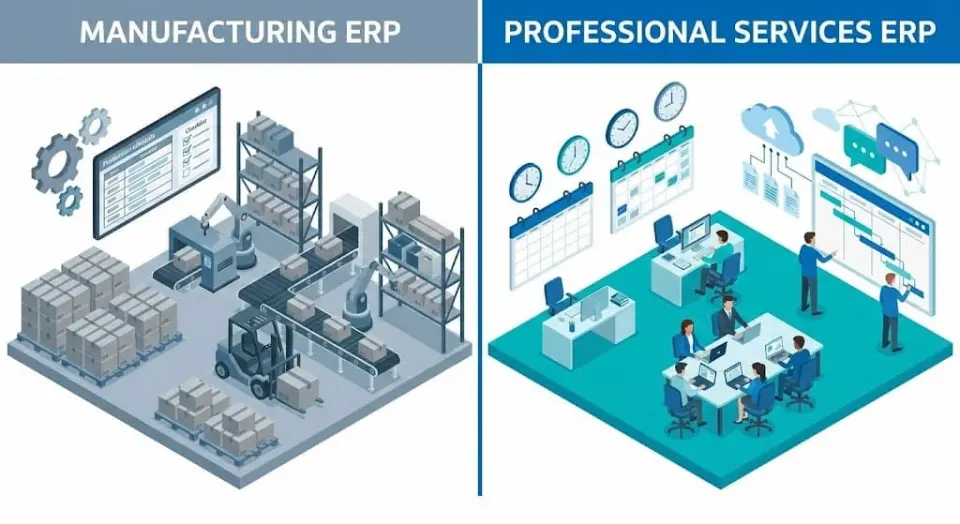
Professional Services ERP systems differ from standard ERPs by treating time and talent as the primary assets rather than physical inventory. While manufacturing systems focus on Bill of Materials (BOM) and supply chains, services ERPs prioritize project-based accounting, tracking milestones, billable hours, and resource utilization rates. This shift in focus allows firms to measure profitability at the project level rather than just the company level.
Choosing the right ERP for a services business depends heavily on your billing model, project structure, and team size — book an Odoo ERP consultation for professional services firms to get a recommendation tailored to your operations.
Professional services ERP software unifies business operations across project management, financial reporting, customer relationship management, and resource planning. These systems support real-time data visibility, allowing firms to make informed, data-driven decisions based on actual project progress and financial performance.
In our deployment of Odoo for 50+ service agencies, Cudio’s architects have found that mapping business processes before configuration reduces Odoo implementation time by an average of 30%.
What Are the Core Features of a Professional Services ERP?

Leading ERP architectures integrate four critical modules—Project Management, Financial Accounting, Resource Planning, and CRM—to resolve project-based friction.
- Comprehensive Project Management: Project planning, milestone tracking, and time tracking are core to professional services software. Odoo's Projects module allows for Kanban-based task organization, automatic timesheets, and real-time collaboration between project teams.
- Financial Management and Billing: Professional services ERP platforms like Odoo integrate accounting with project delivery. Users can manage budgets, invoices, and expense management in the same interface. Built-in tools support project accounting, enabling teams to tie revenue and costs to specific client projects.
- Resource Management Tools: Resource planning and capacity tracking ensure that staff are assigned based on skill sets, availability, and project demand. Odoo enables centralized resource allocation, with Gantt chart visualizations for workforce planning.
- Customer Relationship Management: CRM features in ERP software help track client interactions, proposals, feedback loops, and renewals. Odoo CRM links directly to project delivery pipelines, improving communication and overall client satisfaction.
Cudio enhances these features with advanced configurations and integrations. For example, Cudio develops Python-based automation scripts for project cost management or connects Odoo to third-party tools like Jira or HubSpot for deeper project analytics.
Why Do Service Firms Need Specialized ERP Software?
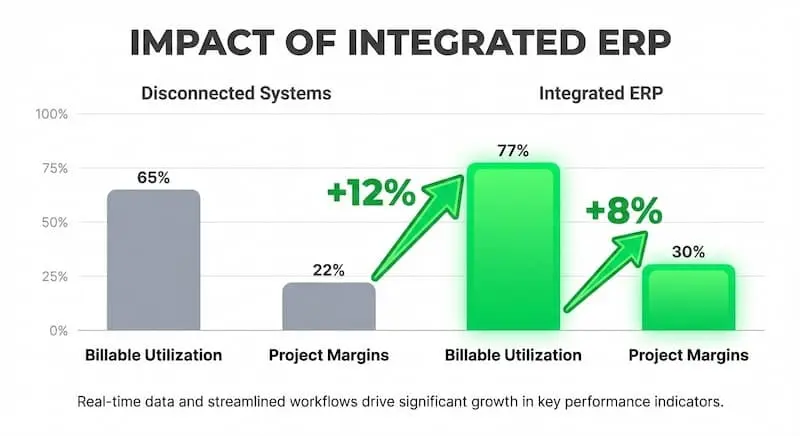
According to SPI Research’s 2024 Professional Services Maturity Benchmark, firms using integrated ERPs report 12% higher billable utilization and 8% higher project margins than those using disconnected systems.
- Improved Project Delivery: By using real-time dashboards and automated alerts, firms track project status, time utilization, and deadlines. This enables timely interventions, reduces delays, and optimizes project profitability.
- Streamlined Financial Management: Automated invoicing, budget control, and financial reporting reduce errors and accelerate month-end closings. Odoo's Finance module also supports multi-currency operations for global professional services organizations.
- Better Resource Utilization: Analytics on team availability and historical task performance support optimized staffing decisions. This improves margins without overloading employees.
- Enhanced Client Satisfaction: With centralized data and live project updates, account managers can provide accurate updates, transparent billing, and fast responses to inquiries.
Cudio configures these benefits within the Odoo platform by customizing financial management tools, building dashboards for utilization rates, and implementing cross-project analytics. These tailored solutions directly support key business objectives.
Consult Cudio for ROI Insights
Which ERP Systems Are Best for Professional Services?
Professional services firms need more than generic ERP systems. From consulting firms to creative agencies and engineering teams, the right ERP helps unify project management, financials, resource allocation, and CRM in one streamlined platform.
Here’s a comparison of the top ERP systems designed for project-driven work:
ERP System | Best For | Key Features | Deployment | Pricing (Est.) |
Odoo | Small to mid-size firms | Modular apps for projects, finance, CRM, HR; open source; highly flexible | Cloud / On-Prem | From $24/user/month |
NetSuite (Oracle) | Mid to large firms | Full-suite ERP + PSA; financials, billing, resource mgmt., multi-entity | Cloud | From $99/user/month + license |
Deltek Vantagepoint | Architecture & engineering | Project accounting, resource mgmt., time & expense, integrated CRM | Cloud | Custom pricing |
Scoro | Small consultancies | Quoting, billing, project timelines, task mgmt., dashboards | Cloud | From $28/user/month |
Microsoft Dynamics 365 PO | Firms using Microsoft tools | Native integration with Teams/Outlook; projects, finance, time tracking | Cloud | Varies by modules |
Accelo | Client-focused service teams | Workflow automation, sales to billing pipeline, client portals | Cloud | $24–$99/user/month |
SAP Business ByDesign | Mid-sized global firms | Multi-country financials, HR, project controls, real-time analytics | Cloud | Custom pricing |
Workday PSA | Enterprise HR + Services firms | Resource planning, billing, analytics; works well with Workday HCM | Cloud | Premium tier pricing |
1. Odoo
Odoo is a flexible, modular, open-source ERP system that offers apps for everything from project management and accounting to CRM and HR. Its architecture allows professional services firms to pick only the modules they need, keeping the system lightweight and cost-effective. Odoo’s open-source nature means it can be customized extensively for unique workflows. It's supported by a large global community and a robust partner network.
- Industry Fit: Consulting, IT services, marketing agencies, engineering, legal, architecture
- Price: Starts at $24/user/month (additional costs for hosting or advanced features)
Here’s what to consider when evaluating Odoo:
Pros
- Highly customizable and modular
- Affordable entry pricing
- Active developer ecosystem
Cons
- Requires technical expertise for advanced use cases
- May need add-ons for complex reporting or automation
Best For: Firms looking for a customizable, affordable ERP solution with the flexibility to scale. Especially valuable for teams that want to align their ERP to existing processes rather than change workflows to fit the software.
2. NetSuite (Oracle)
NetSuite is a leading cloud ERP platform designed for fast-growing and mid-to-large professional services firms. It includes robust modules for financials, project accounting, resource management, and client billing.
A 2024 Gartner Magic Quadrant report positions NetSuite as a leader for mid-market enterprises due to its native support for multi-subsidiary financial consolidation and global tax compliance.
- Industry Fit: Mid-sized to large professional services firms, global consultancies, legal/accounting
- Price: Starts at $99/user/month plus base licensing (custom quotes)
Before choosing NetSuite, keep the following in mind:
Pros
- End-to-end PSA and ERP features
- Excellent financial management tools
- Designed for multi-entity and global operations
Cons
- Higher implementation and licensing costs
- Requires certified developers for customization
Best For: Firms needing an enterprise-grade ERP with deep financial controls and international scalability. Ideal for organizations managing complex operations across countries or business units.
3. Deltek Vantagepoint
Deltek Vantagepoint is tailored for project-driven industries such as architecture, engineering, and consulting. It offers strong capabilities in project lifecycle management, resource planning, and financial visibility. Its industry focus makes it especially effective for firms with detailed time and expense tracking needs.
Industry Fit: Architecture, engineering, construction consulting, project-based services
Price: Custom pricing based on company size and selected features
Key strengths and weaknesses include:
Pros
- Deep project accounting and costing tools
- Built-in industry templates and workflows
- Reliable performance tracking
Cons
- Limited flexibility for non-core industries
- Implementation can be complex
Best For: Firms in architecture, engineering, or construction looking for an ERP system built for their industry. Deltek is best suited for companies that value standardized project workflows and financial rigor.
4. Scoro
Scoro is an all-in-one platform designed for small to mid-sized professional service firms. It combines quoting, time tracking, billing, and project management in one user-friendly interface. With a focus on usability and automation, it helps teams stay organized and efficient without the overhead of enterprise-level systems.
- Industry Fit: Marketing agencies, consulting firms, creative services
- Price: Starts at $28/user/month (pricing varies by plan)
Here’s what users typically love and what to watch for:
Pros
- Clean, intuitive user interface
- Strong quoting and invoicing tools
- Fast to implement and easy to use
Cons
- Limited scalability for larger teams or advanced operations
- Lacks deep financial modules
Best For: Small teams and agencies looking for a modern platform to manage client work, time, and billing in one place. A strong fit for firms that prioritize ease of use and fast deployment.
5. Microsoft Dynamics 365 Project Operations
Microsoft Dynamics 365 Project Operations connects sales, project planning, time tracking, and finance in one system. It’s particularly strong for teams already embedded in the Microsoft ecosystem, offering tight integration with Teams, Outlook, Excel, and Power BI. Its modular approach allows businesses to scale capabilities over time.
Industry Fit: IT consulting, managed services, business services, financial services
Price: Varies based on modules and licensing model
Take note of these pros and cons:
Pros
- Seamless integration with Microsoft 365 tools
- Modular, scalable system
- Strong project forecasting and reporting
Cons
- Pricing and licensing can be complex
- Requires experience with Microsoft architecture
Best For: Firms already using Microsoft platforms that want to centralize project and financial data. A logical fit for IT and consulting teams familiar with Microsoft 365.
6. Accelo
Accelo is a cloud-based client work management platform tailored for service businesses. It combines CRM, project delivery, support ticketing, time tracking, and billing into a single streamlined solution. Built with automation in mind, Accelo helps small teams reduce admin work and focus on billable services.
- Industry Fit: Agencies, IT services, consultants, MSPs
- Price: From $24 to $99/user/month depending on the plan
Let’s weigh the upsides and trade-offs:
Pros
- Built for service-based workflows
- Strong automation and workflow triggers
- Easy learning curve and user experience
Cons
- Not a full ERP (limited HR or complex financial tools)
- Customization is limited
Best For: Client-focused teams that need a platform to manage the full client lifecycle, from sales to delivery to billing, with minimal setup time. Particularly well-suited to smaller firms with repeatable processes.
7. SAP Business ByDesign
SAP Business ByDesign is a cloud-based ERP solution designed for mid-sized companies that want the power of SAP without the complexity of its enterprise platforms. It includes modules for finance, HR, project management, supply chain, and analytics, making it a comprehensive tool for growing firms.
- Industry Fit: Mid-sized professional services, finance, global service providers
- Price: Custom pricing; base typically starts at $1,500/month plus per-user fees
Consider the following advantages and limitations:
Pros
- Strong multi-country and multi-currency support
- Deep analytics and financial controls
- Full business suite with strong compliance features
Cons
- Higher pricing than many mid-market solutions
- Requires SAP expertise for setup and support
Best For: Professional services firms with international operations or complex financial structures. A good choice for those looking to grow into a more robust ERP while staying in the SAP ecosystem.
8. Workday Professional Services Automation (PSA)
Workday PSA is an enterprise-grade solution for services organizations that need to manage global teams, optimize project staffing, and integrate HR, finance, and operations. It provides advanced tools for forecasting, analytics, and workforce planning, and works well with the rest of the Workday platform.
- Industry Fit: Enterprise consulting, HR services, large-scale project firms
- Price: Premium enterprise pricing; available upon request
Evaluate these key factors when considering Workday:
Pros
- Strong integration with Workday HCM and Finance
- High-quality workforce analytics and forecasting
- Enterprise-level scalability and compliance
Cons
- Expensive for small or mid-sized firms
- Long implementation timelines
Best For: Large professional services organizations that already use Workday or require deep HR and finance integration. Best suited for enterprises managing complex teams across multiple regions and business units.
What Are the Common Implementation Risks?
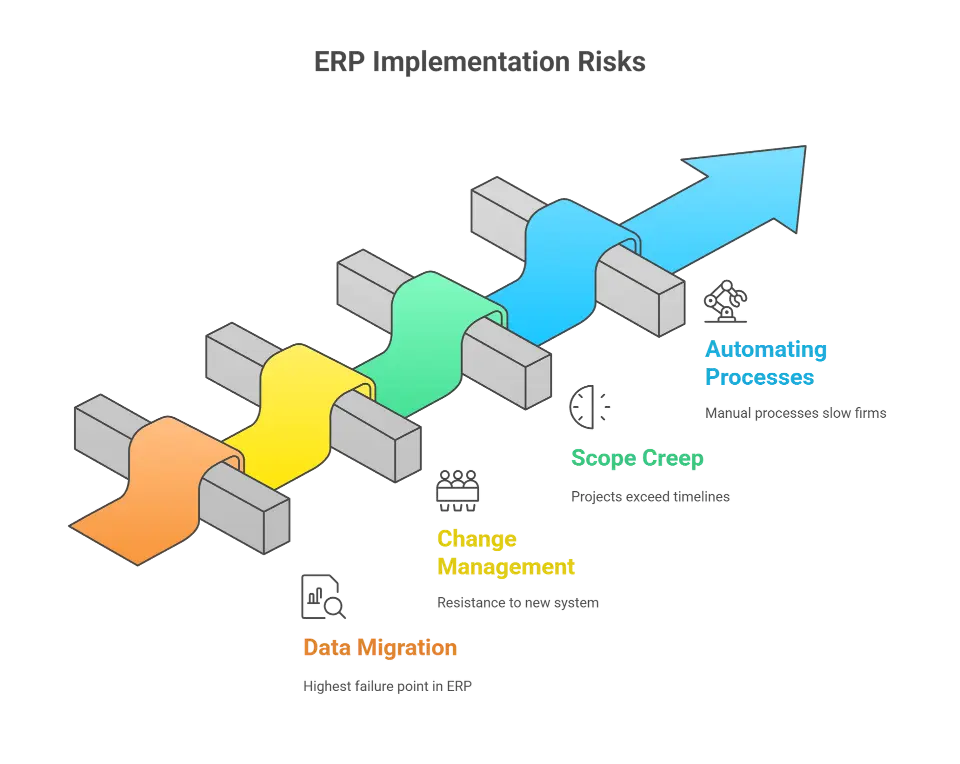
While ERP systems offer significant value, professional services organizations often face critical challenges during deployment, especially when transitioning from traditional ERP systems or disconnected tools.
1. Data Migration
Data migration is the single highest failure point in ERP implementation due to the complexity of mapping historical financial data. Moving from unstructured legacy tools (like Excel) to structured ERP databases requires strict ETL (Extract, Transform, Load) protocols to validate client records and billing histories. Without a 'clean data' mandate, firms risk generating inaccurate invoices immediately after go-live.
Odoo supports structured imports and model-based mapping to make this process smoother. Cudio improves reliability by creating custom ETL pipelines, staging data in controlled sandbox environments, and conducting real-time data validation before deployment.
This ensures accurate cash flow management, preserves historical billing data, and maintains continuity across resource availability.
Talk to Cudio About Data Migration
2. Change Management
Professional services teams often have entrenched habits and workflows. Introducing a new system can cause uncertainty or resistance if not handled well. Risks include underutilized modules, data inconsistency, and parallel use of old systems.
Early training and clear communication are essential. Firms must show how the system supports real-time visibility, improves collaboration, and strengthens project management. Odoo allows modular rollouts to ease user adoption. Cudio supports this transition with role-specific onboarding, user interface customization per department, and KPI-based tracking to monitor and improve engagement over time.
3. Scope Creep and Timeline Overruns
Without defined business objectives and a well-structured plan, ERP implementation can lose focus. Projects may exceed timelines and budgets, or result in features that do not meet real operational needs.
Cudio uses agile project tracking, milestone-based planning, and focused configuration sprints. Each sprint is aligned with the unique workflows of professional services teams, from financial reporting to resource management and human resources. Leveraging Odoo’s cloud-based solutions, Cudio sets up flexible testing and staging environments to ensure that go-live preparation does not interrupt daily business operations.
By breaking the implementation into clear workstreams, Cudio ensures ERP services align with actual priorities, such as improving cash flow management, streamlining operations, and achieving accurate real-time visibility across departments.
Get an Implementation Plan from Cudio
4. Automating Processes Across Departments
Manual processes often slow down service firms, particularly in the handoff between sales, project delivery, and finance. A modern ERP system like Odoo centralizes business functions and allows teams to automate processes across departments.
Cudio builds automation directly into the ERP workflow using Odoo server actions, logic conditions, and Python scripting. These automations reduce manual input across invoicing, project approvals, and human resources, helping professional services firms grow without increasing administrative burden.
Talk to Cudio About Process Automation
How Can You Ensure a Successful Rollout?
For professional services firms, this includes aligning ERP functionality with the firm’s revenue model, resource planning strategy, and project execution processes.
Here are the most effective best practices to follow:
1. Define Measurable Business Objectives
Start by identifying what success looks like for the organization. Objectives should be specific, measurable, and tied to current performance issues. For example, goals might include reducing invoice cycle time, improving resource utilization rates, or increasing on-time project delivery.
These objectives help define implementation priorities and determine which ERP modules to configure first. They also provide a framework for evaluating ROI post-launch.
2. Assemble a Cross-Functional Implementation Team
ERP systems impact all departments, so it is essential to include representatives from finance, operations, human resources, IT, and client services. A cross-functional team ensures that configuration decisions reflect the full range of business processes.
This team should be involved from the planning phase through go-live to provide feedback on workflows, identify risks, and validate that the system meets their operational requirements.
3. Develop a Realistic Timeline With Structured Phases
Attempting to roll out an entire ERP system at once often leads to confusion and user fatigue. A phased implementation strategy is more effective. This typically includes discovery, data migration, module configuration, testing, go-live, and post-launch stabilization.
Each phase should have clear deliverables, checkpoints, and timelines. Time must also be allocated for issue resolution, user feedback, and any required system adjustments.
4. Prioritize User Training and Ongoing Support
User adoption is one of the most critical success factors in ERP projects. Training should be tailored to each role, using real business scenarios such as timesheet approvals, project status tracking, or financial reporting tasks.
Training should begin before launch and continue afterward to reinforce usage patterns and introduce advanced features. Beyond initial training, a support plan must be in place to handle issues, answer user questions, and maintain system reliability.
How Is AI Reshaping Professional Services ERP?
The professional services sector is evolving, and so are ERP systems. Trends include:
- AI and Automation: Predictive resource allocation, AI-powered time tracking, and smart project alerts are reshaping how professional services ERP software operates.
- Cloud-Based Solutions: Cloud ERP reduces IT overhead, speeds up deployment, and improves collaboration across distributed teams.
- Advanced Analytics: ERP platforms are integrating BI tools for financial performance dashboards, expense management, and resource forecasting.
Cudio brings these innovations to life in Odoo through API integrations, machine learning connectors, and custom modules for advanced reporting. Their technical team also develops Python-based scripts to automate recurring business processes.
Talk to Cudio About Future-Proofing Your ERP
Conclusion
ERP for professional services offers project-centric organizations the ability to unify financial operations, manage resources efficiently, and deliver projects with greater transparency. Odoo stands out as a top ERP system for the professional services industry, offering modular flexibility, cost efficiency, and deep functionality.
Yet the value of even the best ERP software depends on precise implementation and customization. That’s why working with an experienced partner like Cudio makes a real difference. From defining detailed system requirements to deploying resource management tools and project dashboards, Cudio helps firms build a system that truly reflects their business goals.
Talk to a Cudio ERP Expert Today
FAQs
Here are a few frequently asked questions about ERP for professional services:
Is SAP a CRM or ERP?
SAP is primarily an ERP (Enterprise Resource Planning) system, but it also includes CRM (Customer Relationship Management) functionalities. It offers an integrated suite that manages core business functions like finance, HR, supply chain, and sales, alongside tools for managing customer relationships.
Who are the ERP service providers?
ERP service providers are companies that offer implementation, customization, training, and support for ERP systems. These include SAP, Oracle, Microsoft (Dynamics), NetSuite, Odoo, and Infor on the software side. On the services side, providers like Cudio, Accenture, Deloitte, and PwC specialize in deploying and managing ERP solutions tailored to specific business needs.
What does ERP mean in BPO?
In BPO (Business Process Outsourcing), ERP means Enterprise Resource Planning, which refers to systems that help manage internal operations such as finance, HR, procurement, and project management. ERP systems in BPOs are used to streamline back-office functions, improve workflow efficiency, and provide transparency across outsourced services.