



Odoo software, often searched as “what is Odoo software,” is an open source ERP solution designed to help businesses of all sizes manage everything from sales and accounting to human resources, project management, and inventory management in one fully integrated platform.
In this article, you’ll learn:
- What Odoo software is and how it works
- The key features and modules that make Odoo one of the most highly customizable ERP systems available
- How Odoo can streamline your business processes and improve ROI
- Real-world use cases and implementation best practices
Whether you’re exploring Odoo for the first time or considering an upgrade to Odoo Enterprise, this guide will help you understand its growth potential, benefits, and why it’s become a top choice among small businesses and global enterprises alike. Understanding the differences between Odoo Community and Enterprise is crucial for making the right choice.
Key Takeaways
- Odoo offers a comprehensive, modular ERP solution that integrates various business functions, allowing customization to meet specific company needs.
- The Odoo apps ecosystem includes over 43,000 applications, enabling businesses to tailor functionalities and streamline operations effectively.
- Flexible deployment options and cost efficiency make Odoo an attractive choice for businesses, with the potential to reduce operational costs and improve returns on investment.
Understanding Odoo Software
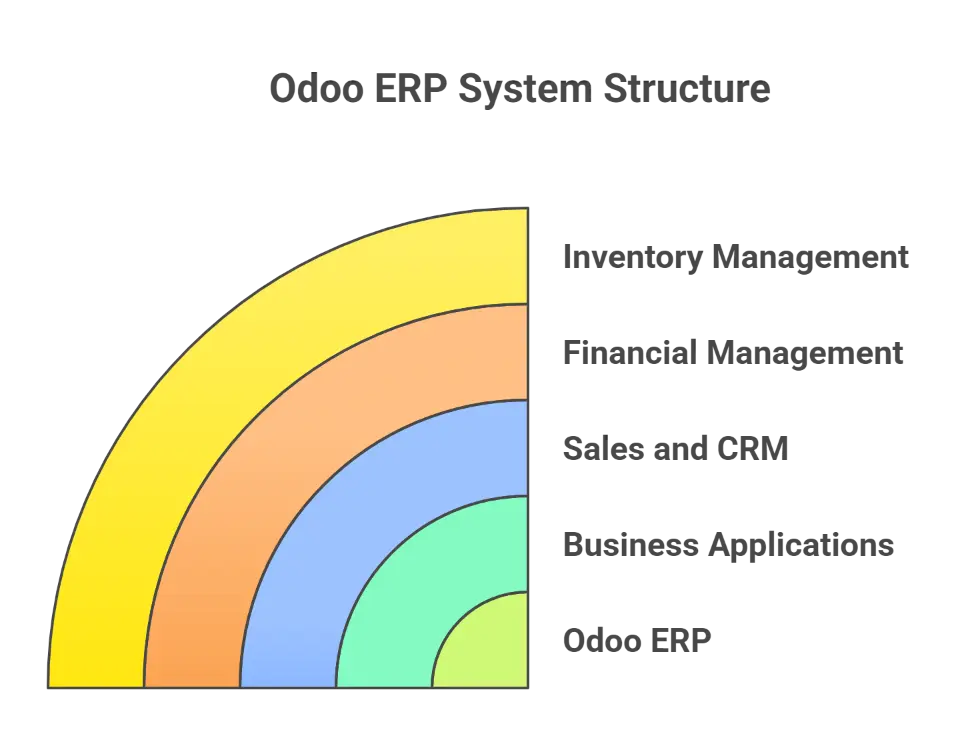
Odoo, previously known as OpenERP, rebranded in 2014 to reflect its growth beyond traditional enterprise resource planning. As an open source ERP software, it provides a complete suite of business applications that manage everything from sales and CRM to inventory, accounting, and eCommerce. Many businesses are migrating Magento to take advantage of these features.
The Odoo ERP system is built to address real-world business needs by integrating essential tools such as:
- Sales and customer relationship management
- Financial management and accounting apps
- Inventory management and warehouse tracking
- Project management and collaboration tools
To learn more about integrating Odoo with other platforms, explore Rithum Odoo integration.
With its modern user interface, businesses can manage operations intuitively while making informed decisions in real time. It is important to consider Odoo security measures to ensure data protection.
Modular Architecture of Odoo
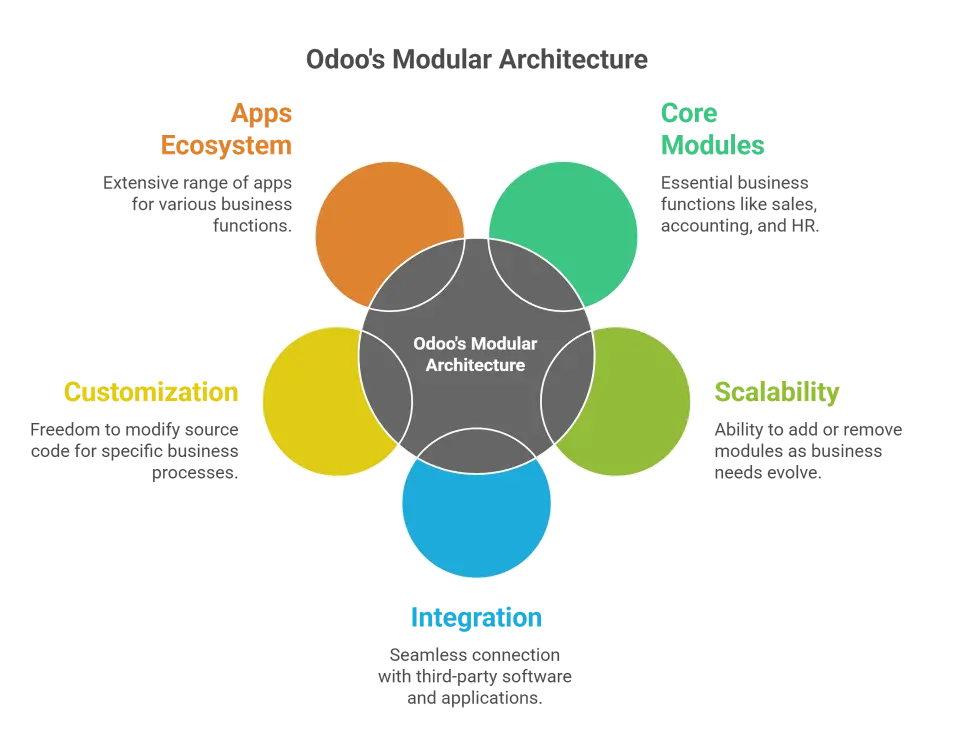
Odoo’s modular architecture is one of its most powerful and defining features. Instead of forcing businesses into a one-size-fits-all system, Odoo allows companies to implement only the specific modules they need, such as:
- Sales
- Accounting
- Inventory Management, or;
- Human Resources
To explore options for manufacturing ERP software, it's important to assess your specific production needs.
This approach keeps the ERP system streamlined, efficient, and perfectly aligned with each company’s operational goals. The flexibility to introduce new features or deactivate unused modules makes Odoo a highly customizable and To understand the differences between Acumatica and Odoo, it's important to consider your business's specific needs and complexity.
Odoo’s modular design also supports secure integration with third-party software like Microsoft Dynamics, eCommerce tools, and other business applications, ensuring all departments remain connected. Whether managing on site operations, opportunity management, or email marketing workflows, businesses can adapt Odoo to handle it all seamlessly.
Because Odoo is open source software, organizations can modify the source code and personalize it to their exact business processes. This freedom empowers companies to innovate, automate, and scale operations confidently while maintaining full control over their data and functionality.
Pro Tip: Start small. Implement the core Odoo apps that meet your immediate business needs, then scale gradually to create a fully integrated environment that enhances collaboration and operational efficiency.
Odoo Apps Ecosystem
The Odoo apps ecosystem is one of the most extensive and dynamic in the ERP industry, offering over 43,000 Odoo apps and modules that address a wide range of business needs. From finance and manufacturing to e-commerce, email marketing, and HR management, there’s an Odoo app for nearly every operational function.
Popular app categories include:
- E-commerce for managing your online store and sales channels
- Human Resources for payroll, attendance, and recruitment
- Accounting for financial reporting, automated billing, and tax compliance
- Manufacturing and inventory management for production and warehouse control
This vast ecosystem allows each company to build its own fully integrated ERP solution, selecting modules that best fit its goals. With both free and paid options available, businesses can customize their Odoo platform cost-effectively and expand functionality as they grow.
A standout feature of Odoo’s ecosystem is its collaborative development model. Thousands of Odoo community contributors and certified partners continuously develop and update apps, ensuring innovation and reliability across versions. The official modules provided by Odoo SA also guarantee performance, security, and compatibility.
Explore the full range of Odoo Apps at the Odoo App Store.
Financial Management with Odoo
Managing finances efficiently is essential for any business, and Odoo makes this easier with its all-in-one accounting apps and financial tools. The platform centralizes your financial accounting, invoices, and reporting in one place, helping teams save time and make more informed decisions.
Because Odoo integrates with sales orders, inventory management, and point of sale, your data always stays up to date across departments. This unified setup ensures accuracy and gives your team full visibility into cash flow, expenses, and performance.
For companies that need more depth, Odoo’s Enterprise Edition offers advanced analytics, consolidated reporting, and customizable dashboards that deliver valuable insights into profitability and growth trends. Whether you’re running on-premise or in the cloud, Odoo adapts to your business size and needs.
Pro Tip: Automate your billing and expense approvals in Odoo to reduce manual work and free up your team for higher-value tasks.
Explore the Odoo Accounting App to see how it can simplify your financial management and reporting.
Key Features of Odoo Accounting
The Odoo Accounting module brings automation and clarity to financial management. Its tools help businesses maintain accuracy, reduce manual work, and keep all financial data in sync. Below are the standout features that make it a powerful choice for modern organizations.
Feature | Description & Benefits |
Smart Reconciliation Tool | Automatically matches transactions and learns from manual entries, saving time and improving accuracy for every financial period. |
Advanced Tax Management | Supports multiple tax computation methods, generates detailed tax reports, and ensures compliance across regions and currencies. |
Instant Draft Invoices | Creates invoices automatically based on sales, timesheets, or recurring contracts—reducing manual entry and billing delays. |
Automated Payments | Handles wire transfers, batch payments, and recurring billing, keeping cash flow steady and predictable. |
Bank Synchronization | Connects directly with bank accounts to sync data in real time, eliminating discrepancies and improving financial visibility. |
Multi-Company & Multi-Currency Support | Ideal for growing companies operating in multiple regions, ensuring consistent financial reporting across entities. |
Integrated Financial Dashboards | Provides real-time views of cash flow, revenue, and outstanding payments for faster, more informed decisions. |
Together, these capabilities make Odoo Accounting a comprehensive and scalable solution for financial management, helping companies save time and maintain complete control over their financial data.
Operations and Inventory Management in Odoo
Managing daily operations efficiently is a major reason why companies choose Odoo software as their ERP solution. The platform provides a complete suite of tools for production, logistics, and inventory management, helping teams automate workflows, improve visibility, and streamline their business processes.
The Odoo ERP system connects warehouse operations, purchasing, sales, and production into a fully integrated environment. This means your financial management, human resources, and project management activities stay in sync across departments. Whether you’re using the Odoo Community edition or Odoo Enterprise, the system adapts to your business needs through customizable Odoo apps and Odoo modules.
Below is an overview of Odoo’s key operational capabilities and how they contribute to greater efficiency:
Feature / Module | Description & Benefits |
Inventory Management | Centralizes stock tracking across multiple warehouses. Automatically updates quantities after every sales or purchase order, reducing manual errors and improving accuracy. |
Warehouse Management | Supports FIFO and FEFO strategies, barcode scanning, and smart routes to optimize picking and storage. Real-time updates enhance control over inbound and outbound logistics. |
Manufacturing Operations | Integrates with Bills of Materials, routing, and quality checks to ensure smooth production processes. Syncs with Odoo ERP to plan resources and track performance. |
Product Lifecycle Management (PLM) | Helps engineering and production teams collaborate on design changes, manage versions, and reduce delays during new product launches. |
Procurement and Supply Chain | Automates supplier management, purchase orders, and restocking rules. Provides predictive insights to prevent stockouts and overstocking. |
Point of Sale (POS) | Connects retail and eCommerce operations in real time, allowing unified reporting, loyalty tracking, and customer insights directly from your ERP system. |
Project Management | Integrates with timesheets, budgets, and forecasting tools. Ideal for service-based industries that need detailed tracking of tasks and deadlines. |
Human Resources | Manages employee shifts, performance, and payroll within the same ERP platform, keeping all HR and operational data consistent. |
Document Management | Digitizes workflows by attaching invoices, receipts, and packing slips directly within relevant transactions. Improves compliance and data retrieval speed. |
Odoo Studio | Enables non-technical users to create new features, customize fields, or design dashboards without coding, supporting faster Odoo implementation and scaling. |
Each module is designed to integrate seamlessly with other business applications, creating a fully integrated ecosystem that supports data-driven decisions. This makes Odoo one of the most highly flexible ERP solutions available for both small businesses and large enterprises.
Pro Tip: Use the combination of Inventory Management, Project Management, and Financial Management modules to gain real-time control over costs, resources, and deliveries—all from one Odoo platform.
Learn more about Odoo Inventory Management and how it can help you streamline warehouse and supply chain operations while reducing Odoo cost and complexity.
Integration and Deployment Strategies
One of the biggest strengths of Odoo software is how easily it connects with the tools businesses already use. Its flexible integration capabilities make it simple to sync data and workflows across popular platforms like Shopify, Salesforce, and Microsoft Dynamics. This creates a fully integrated environment where every part of your ERP system works together, from sales and accounting to operations and customer service.
These integrations eliminate duplicate work, improve collaboration between teams, and help ensure all business processes stay aligned and up to date. Whether your company runs eCommerce stores, manages complex supply chains, or handles project management workflows, Odoo can connect it all.
In addition to its integration power, Odoo offers flexible deployment options that fit businesses of every size. You can host your system on premise, in the cloud, or through a hybrid setup, whichever best matches your technical needs and budget.
Flexible Deployment Options
Odoo provides multiple ways to deploy and manage your system:
- Community Edition: A free, open-source version perfect for small businesses just starting their digital transformation journey.
- Enterprise Edition: A premium version with advanced modules, extra features, and professional support for growing organizations.
- Odoo Online (SaaS): A fully managed cloud-hosted service that removes the need for in-house servers or maintenance, ideal for small to midsize businesses.
- Odoo.sh: A managed cloud environment tailored for developers, offering easy testing, staging, and deployment.
- On-Premise Installation: A self-hosted option for companies that prefer full control over their data, infrastructure, and document management policies.
This flexibility allows businesses to scale confidently as they grow. Whether you choose a cloud ERP setup or keep it in-house, Odoo makes it easy to switch or expand when your business needs evolve.
By combining strong integration capabilities with a range of deployment options, Odoo ERP gives companies a reliable foundation for automation, scalability, and long-term growth.
Pro Tip: If you’re unsure which hosting option is right for you, start with Odoo Online to experience the platform, then scale up to Enterprise or on-premise as your business matures.
Streamline Your Setup with Cudio. Whether you need a smooth Odoo implementation, integration with third-party tools, or migration to the cloud, Cudio’s experts can help you design a solution that fits your workflow perfectly.
Speak with Cudio’s ERP Experts
Best Practices for Odoo Implementation
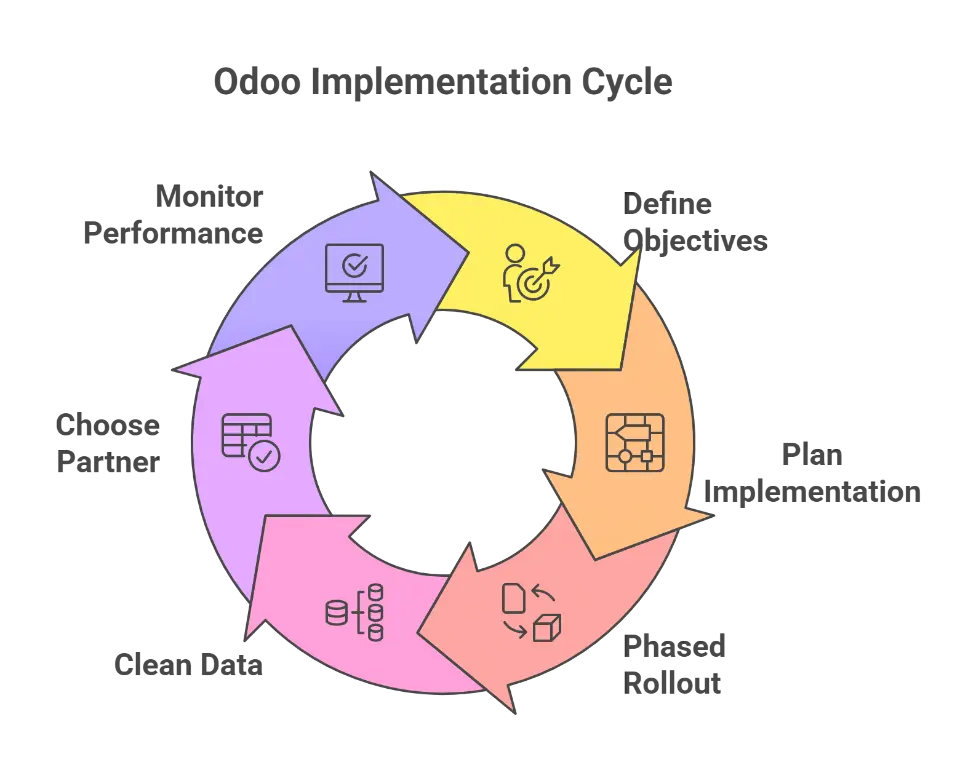
A successful Odoo implementation begins with clear planning and a solid strategy. Whether you are using the Odoo Community Edition or upgrading to Odoo Enterprise, following best practices ensures that your ERP system delivers long-term value.
Start by defining your business goals and identifying which areas Odoo will improve, such as accounting, customer management, or production processes. Clarity in these objectives helps your team stay aligned and measure success accurately.
1. Plan with Clear Objectives
Before starting your project, outline your business needs and the expected outcomes. Consider which Odoo apps best match your operations, from accounting to marketing and inventory. Having a clear roadmap creates a solid foundation for your deployment and supports better decision-making during configuration.
2. Use a Phased Implementation Approach
Instead of launching everything at once, adopt a phased rollout. This approach helps minimize risk, simplifies training, and allows teams to adapt gradually. You can start with core Odoo modules like Financial Accounting, Sales, and Inventory, then add advanced tools such as the social marketing app or CRM as your team grows more confident.
3. Clean and Organize Your Data
Before migrating, review your existing data to remove errors, duplicates, or outdated records. Clean and accurate data ensures smooth system performance after deployment. This is especially critical for companies handling sensitive financial transactions or automated invoices.
Pro Tip: Use Odoo’s built-in import tools to validate your data before going live. This step saves time and reduces the risk of inconsistencies.
4. Choose the Right Implementation Partner
Selecting the right Odoo partners can make all the difference. With more than 5,000 certified experts worldwide, Odoo’s network provides professional guidance, customization, and support. The best partners understand both your business processes and technical source code, ensuring your implementation aligns perfectly with your workflow.
Learn how to find the right Odoo Partner for your next project.
5. Monitor and Optimize After Go-Live
Once your system is live, continue monitoring its performance. Regularly review your processes, gather user feedback, and make improvements where needed. The modular and open source software design of Odoo makes optimization simple and cost-effective.
Regular updates introduce new features that can enhance productivity and user experience. Businesses that continuously refine their configurations unlock greater growth potential and maintain a competitive edge.
Pro Tip: Schedule quarterly reviews with your Odoo team to track KPIs, review reports, and evaluate where automation can further improve efficiency.
Industry-Specific Use Cases
Odoo stands out as a flexible solution that adapts to a wide variety of industries. From manufacturing and distribution to education, healthcare, and retail, it provides tailored tools that help companies streamline workflows and maintain compliance.
- Manufacturing: Companies use Odoo to optimize production processes, manage material planning, and reduce lead times.
- Retail: Businesses improve customer management and inventory accuracy through real-time stock tracking. For retailers transitioning from legacy systems, specialized Odoo migration services for retail ensure seamless data transfer and minimal operational disruption.
- Healthcare: Organizations benefit from better traceability and documentation while maintaining regulatory standards.
- Services: Businesses in consulting or technology enhance visibility and efficiency through automated scheduling and reporting.
For example, manufacturers like Amthor Glass and Sciencix have streamlined production and inventory workflows with Odoo, while Texas Controls USA improved coordination between project timelines and resource availability. These examples demonstrate how Odoo adapts to each sector’s operational model and drives measurable results.
Evaluating ROI and Risk-Free Trials
One of the biggest advantages of adopting Odoo software is its cost efficiency. Companies often see operational cost reductions of 25 to 35 percent compared to managing fragmented systems. The platform’s scalability and modular structure mean you only pay for the tools you need, avoiding unnecessary expenses tied to a paid version.
Because Odoo is an open source software, it provides flexibility for customizations, updates, and integrations without license limitations. Businesses can track ROI through detailed reports generated by built-in analytics, offering insight into performance and productivity.
Odoo also provides a 30-day free trial, allowing companies to explore its features risk-free. During this trial, users can test essential apps, assess usability, and ensure the system fits their workflows before investing in full deployment.
This hands-on evaluation helps businesses understand how Odoo improves financial accounting, reporting, and operational efficiency. It’s a smart way to experience the platform’s impact before committing.
External Link: Try the Odoo Free Trial and see how it can transform your operations.
Work with Cudio’s Certified Odoo Experts. Our team helps you plan, implement, and optimize Odoo for your industry.
Final Words
Odoo stands out as a powerful, fully integrated ERP solution that simplifies complex business processes and drives long-term efficiency. From accounting and inventory management to manufacturing and CRM, it offers the flexibility modern companies need to grow and adapt. With the right Odoo implementation partner, your ERP can deliver faster ROI and sustainable results.
Cudio’s certified Odoo experts help businesses plan, deploy, and optimize their Odoo systems for maximum impact. Whether you’re upgrading, migrating, or scaling, we make your ERP journey seamless and strategic.
Start your Odoo project with Cudio today
Frequently Asked Questions
Got questions about Odoo? Explore common topics like setup, pricing, and integrations in our FAQ section below.
What is the Community Edition of Odoo?
The Community Edition of Odoo is a free, open-source ERP software version that provides essential modules such as CRM, Sales, and Inventory, making it an excellent choice for small businesses. It allows users to access robust features without the financial burden of licensing fees.
How long does a typical Odoo implementation take?
A typical Odoo implementation takes 4 to 8 weeks for standard modules, but complex or customized implementations may extend to 3 to 6 months. It's important to consider the specific needs of your business when planning the timeline.
What industries can benefit from using Odoo ERP?
Odoo ERP is beneficial for a wide range of industries, including manufacturing, distribution, retail, field services, R&D, consulting, and IT. Its versatility makes it an excellent solution for various operational needs across these sectors.
What deployment options does Odoo offer?
Odoo provides various deployment options such as the Community Edition (free and open-source), Online Edition (SaaS cloud-hosted), Odoo.sh (managed cloud for developers), and On-Premises (self-hosted). You can choose the option that best fits your business needs.
What is the Odoo 16 Accounting module designed for?
The Odoo 16 Accounting module is designed to enhance accounting management efficiency through automated tools and comprehensive reporting systems. This enables businesses to streamline their financial processes effectively.