



Choosing between Odoo 19 and Odoo 20 isn't just a software question. It's a business timing decision, and getting it wrong costs more than a delayed go-live. It can cost tens of thousands of dollars in avoidable rework, as we'll show below.
Right now, we're seeing companies planning an ERP upgrade get stuck between two real options: move forward with Odoo 19, a stable release that's already three point releases deep, or hold out for Odoo 20, which Odoo previewed at Partner Days in April 2026 and won't officially unveil until Odoo Experience 2026 in Brussels this September. Neither answer is automatically right.
At Cudio, we've guided dozens of businesses through this exact decision. This guide breaks down what's actually shipped in Odoo 19, what's actually confirmed (versus speculative) for Odoo 20, and how to weigh your operational readiness, your risk tolerance, and your customization depth against both.
Key Takeaways
- Odoo 19 has been live since September 2025 and is currently at version 19.3, released in May 2026, with a documented AI infrastructure layer already in production use.
- Odoo 20 is not yet released. Its roadmap was shared at Partner Days in April 2026, with the official announcement expected at Odoo Experience 2026 (September 24 to 26, Brussels) and general availability likely in October or November.
- Two of Odoo 20's confirmed technical changes, the Owl 3 frontend framework and the full removal of XML-RPC on self-hosted and Odoo.sh instances, create real porting work for anyone with custom code or third-party integrations.
- Waiting too long on an old version has a quantifiable cost. We've measured over $110,000 in avoidable two-year expenses for a typical 40-user business still running Odoo 12 or 13.
- If your environment is heavily customized or touches multiple departments, the complexity of your migration will shape your timeline more than the version number will.
Why This Is a Business Decision, Not a Feature Comparison
Most version comparisons focus on features. That framing misses the real question.
Knowing which release has more capabilities doesn't tell you when your business should move. The right answer depends on where you are today: your current ERP version, how heavily customized your environment is, how much operational disruption you can absorb, and how much risk you're willing to carry.
Odoo 19 is confirmed, stable, and production-ready, and it's been in the field for close to a year. Odoo 20 is still on the roadmap. Odoo's own Partner Days materials describe it, with characteristic candor, as "a list of things we will maybe do." Features can still shift, get renamed, or get cut before September.
"Odoo 17 is not just a version upgrade. It's a rearchitecting of how multi-entity businesses can operate from a single environment." — Gordon Cummins, CEO of Cudio
The same logic applies to every major Odoo release, including this one. The smarter question isn't which version wins. It's what your business actually needs right now.
Upgrade Now, Wait, or Plan First? A Quick-Reference Guide
Before diving into the details, this table gives you a direct answer based on where your business stands today.
Scenario | Recommended Path | Why It Makes Sense |
Your current setup is slowing operations or blocking growth | Upgrade to Odoo 19 now | A stable, production-ready release solves real problems today without waiting |
Your system is working, and you want the latest release | Wait for Odoo 20 | If nothing is broken, holding for the next version carries low risk |
You have heavy customizations, integrations, or multi-department dependencies | Start planning your migration now | Complex environments need lead time, and Owl 3 and JSON-2 both require code changes |
The decision touches business-critical workflow automation across multiple teams | Speak with us first | The cost of a misstep here is too high to navigate without experienced guidance |
Each of these scenarios plays out differently depending on your ERP history, your team's capacity, and your operational risk tolerance.
The sections below break down what's actually in Odoo 19 today and what's actually planned for Odoo 20.
What's Actually in Odoo 19 Today
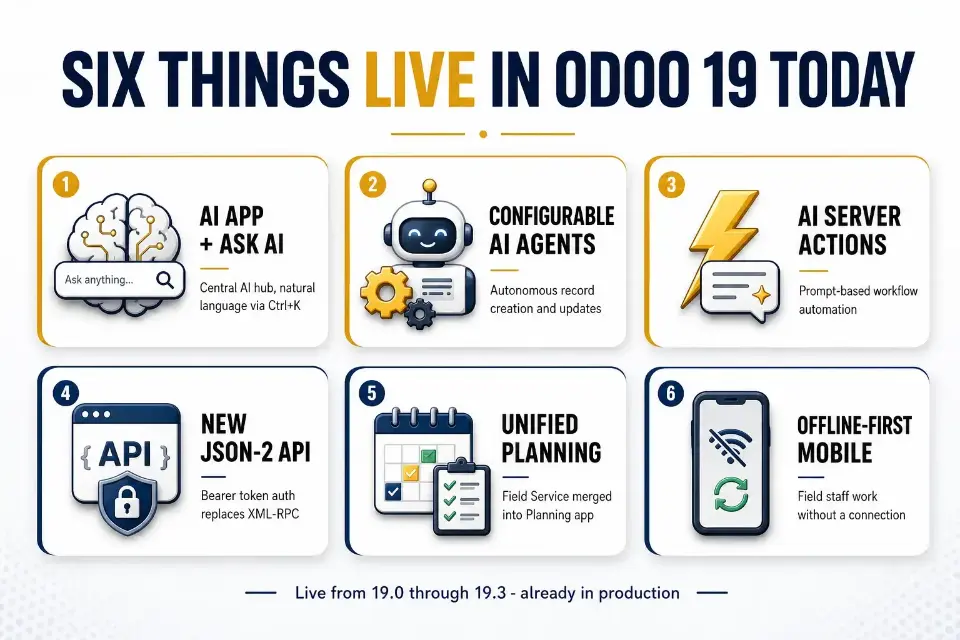
Odoo 19 launched at Odoo Experience 2025 in September of that year, and it's had three minor releases since: 19.1 in January 2026, 19.2 in the spring, and 19.3 in mid-May 2026. That release cadence matters, because it means Odoo 19 isn't a single static snapshot. It's a maturing platform with a growing AI layer.
The AI infrastructure Odoo 19 introduced
Version 19.0 shipped a dedicated AI app as a central hub, configurable AI agents, and an "Ask AI" natural language interface accessible via Ctrl+K, along with prompt-based Server Actions. Under the hood, it connects to OpenAI and Google Gemini as model providers. Version 19.1 built on that with file-specific AI analysis, context-aware filtering, and early multi-step task chaining.
What changed with Field Service
If you're comparing older release notes to what's live today, note that Odoo's standalone Field Service app was retired in 19.2. Its core features, mobile task management, customer signature capture, and material logging, were merged directly into the Planning app to unify scheduling. If you're still budgeting for a separate Field Service rollout, that line item no longer applies.
The integration change that affects every custom build
Also in 19.2, Odoo deprecated the long-standing XML-RPC and JSON-RPC endpoints in favor of a new JSON-2 API: a simpler, method-driven HTTP interface with bearer token authentication, proper 4xx and 5xx error codes, and support for big integers and batch operations.
XML-RPC still works in legacy mode through Odoo 19, but if you have external integrations built on it, this is the version where you should start migrating them, not the version where you're forced to.
What 19.3 added in May 2026
The most recent point release delivered over 35 module-level improvements.
AI agents that can create and update records autonomously, including by reading an uploaded PDF file and generating images for websites or email campaigns; a new AI Website Assistant that lets you edit a site conversationally, pulling or generating images through a chat interface directly in the builder; an offline-first mobile mode that lets field staff create, edit, archive, and delete records without a connection, syncing automatically once they're back online; and a completely redesigned Manufacturing Kanban view, with cards now showing scheduled week, component availability, active work center, and remaining time at a glance.
None of this is speculative. It's already running in production databases.
If your business needs cross-module workflow automation, better CRM pipeline visibility, or accounting reconciliation improvements today, Odoo 19's release notes document exactly what you'd be adopting, including advanced multi-ledger consolidation for SMEs and stronger payment status tracking for small businesses.
In CRM, Odoo 19 also reduced the manual workload compared with older rule based workflows, though its rules-based automation still relies primarily on manual rule definitions rather than fully autonomous behavior and can still depend on manual triggers and some manual work. Our Odoo upgrade service handles the custom code and third-party module compatibility work that comes with it.
What's Actually Planned for Odoo 20
Odoo 20's roadmap was presented at Odoo Partner Days in April 2026 by Luc Nailis, Odoo's Product Owner. The official unveiling is expected at Odoo Experience 2026 in Brussels, September 24 to 26, with general availability typically following a few weeks after the keynote.
The modularity of Odoo has always been both a strength and a risk.
"The modularity of Odoo is both its greatest strength and its most common source of failure. Teams turn on everything at once and then wonder why adoption collapses." — Gordon Cummins, CEO of Cudio
That risk is worth keeping in mind with a new release this early in its lifecycle. Here's what's actually confirmed so far, separated from what's still directional.
Many Odoo 19 automations still rely on rule-based workflows and manual rule definitions, so while they reduce manual workload in some flows, they still depend on manual triggers in others. That also matters when planning around the accounting improvements already available today, including advanced multi-ledger consolidation for SMEs.
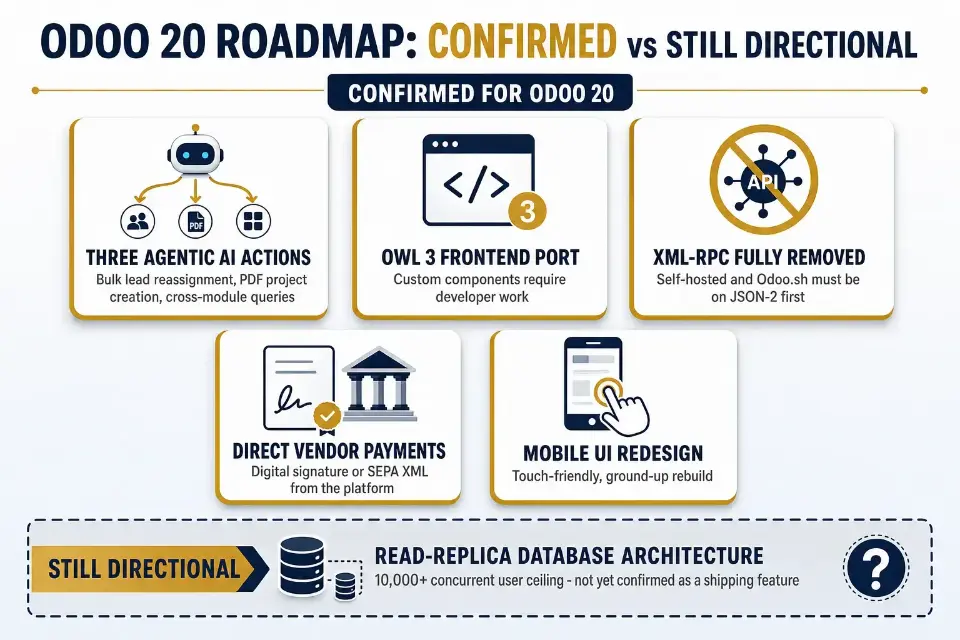
Confirmed: Three specific agentic AI capabilities.
Where Odoo 19's AI responds to prompts, Odoo 20 is built around AI that acts with less prompting, pushing further into AI-driven automation and intelligent automation rather than simple assistance.
Odoo's own Partner Days materials confirmed three concrete agentic actions: bulk lead reassignment, project creation directly from an uploaded PDF document, and live operational queries across modules. In practice, that means AI agents can execute tasks with less manual intervention, surface AI-driven insights and predictive insights, and support smarter decisions through predictive analytics across daily workflows.
A demonstrated example: An accounting agent that runs through an entire quarterly treasury and finance audit checklist on its own, reviewing bank statements, flagging anomalies, and checking reconciliation without a series of manual prompts. The same direction also matters for CRM and sales, where AI can help a sales team prioritize high value opportunities and improve conversion rates. Taken together, this points to Odoo 20 as a more autonomous, data-aware new release, not a finished specification.
Confirmed: Two technical changes with real migration cost.
Odoo 20 requires porting every custom frontend component to Owl 3, the next major version of Odoo's JavaScript framework.
This is genuine developer work, not an automatic conversion. Alongside that, XML-RPC and JSON-RPC, already deprecated in Odoo 19, are fully removed on self-hosted and Odoo.sh instances in Odoo 20 (removal on Odoo Online happened earlier, in 19.1).
If you're running integrations built on those older endpoints, you'll need to be on JSON-2 before you upgrade, not after. For ERP systems with custom integrations, preserving historical data, including sales orders, is part of maintaining business continuity during the transition.
Confirmed: Direct payments and interface changes.
Odoo 20 is expected to let users send vendor payment batches straight to their bank with a single digital signature, or generate a SEPA XML file without leaving the platform. That points to seamless integration across finance workflows and better support for local payment gateways in cross-border setups.
A tax-inclusive or tax-exclusive toggle will let businesses switch pricing display per document. The mobile user interface is getting a ground-up redesign focused on touch-friendly layouts rather than a shrunk-down desktop view, with improved usability that should make day-to-day work more user friendly.
Still directional, not guaranteed: the read-replica database architecture Odoo has discussed, aimed at supporting well beyond the roughly 10,000 concurrent user ceiling of current versions, has not been confirmed as a shipping feature. That matters most to large enterprises managing higher transaction volumes and connecting multiple tools, including ecommerce platforms and e invoicing flows. If your growth plan depends on that specific capability, treat it as unconfirmed until Odoo's official release notes are published in the fall.
Given how much of this is still in motion, our advice is to treat the roadmap as a strong signal of direction, not a specification you can build a migration plan around today. If you're moving an ERP with custom integrations and need to stay ahead, migration planning should protect business continuity and preserve historical data such as sales orders.
When Upgrading to Odoo 19 Right Now Makes Sense
Not every business is in a position to wait. If your current setup is actively slowing operations, the calculus shifts quickly. These are the scenarios where moving to Odoo 19 now is the right call:
- Workflow drag is real: Your team on Odoo 17 or Odoo 18 is building manual workarounds because the system can't keep up with how the business actually runs.
- Functional gaps can't wait: Improvements to the accounting module, CRM, or inventory are operationally necessary, not just nice to have, and a several-month delay has a measurable cost.
- Compliance or reporting gaps exist: Your current version can't meet reporting requirements, and that exposure is growing; for highly regulated businesses, those accounting and reporting improvements can be a game changer.
- You need a proven migration path: You want a validated upgrade behind you before taking on larger transformation work, not an unvalidated release with unknown compatibility gaps.
- Internal capacity exists now: Your team has the bandwidth to execute today, and waiting risks losing that implementation window entirely, while early adopters may prefer to bank the gains from upgrading sooner.
Lexington Medical, one of our clients operating across 30 countries, is a good illustration of what "workflow drag" actually looks like at scale.
Complex bills of materials and intercompany transactions across that many entities had outgrown their legacy system, and moving to a current, stable Odoo release cut their financial close time by 50% and meaningfully reduced their error rate, without needing to wait for a future release cycle to solve problems they had today.
That same urgency is why some businesses are waiting for Odoo 20, where broader seamless integration with multiple tools, including ecommerce platforms and payment gateways, is expected to improve how connected operations run.
See How Cudio Helped Lexington Medical
If any of these describe your situation, a well-planned migration built around Odoo 19 is a lower-risk, higher-certainty path than holding out for a release that hasn't shipped yet. Odoo 20 is expected to enhance performance and scalability, which matters most for higher transaction volumes and some large enterprises that want to stay ahead. Odoo 20 is also expected to automate operational alerts, including drafting delayed-shipment notifications.
When Waiting for Odoo 20 Is the Smarter Move
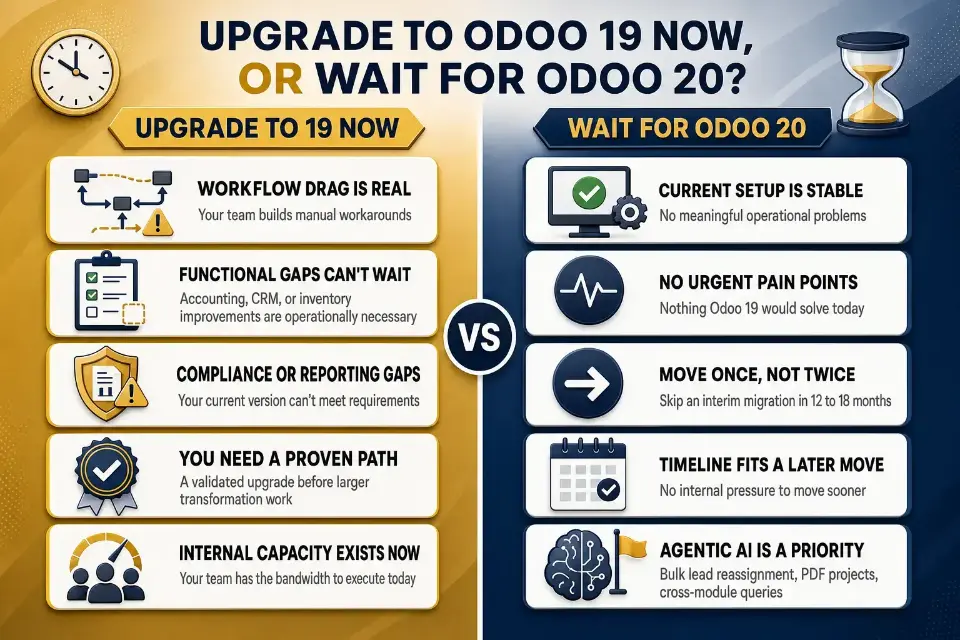
Waiting isn't hesitation. In the right circumstances, it's the more disciplined call. These are the scenarios where holding for Odoo 20 makes genuine business sense:
- Your current Odoo setup is stable, with no meaningful operational problems across accounting, CRM, or core workflows.
- Your team has no urgent pain points that Odoo 19 would solve today, making an immediate upgrade harder to justify internally.
- You want to move once, not twice, and upgrading to Odoo 19 now would mean another migration within 12 to 18 months.
- Your implementation window aligns better with a later timeline, with no internal pressure to move sooner.
- Agentic AI capabilities, specifically the confirmed bulk lead reassignment, PDF-based project creation, and cross-module querying, are a defined strategic priority for your team.
- Compliance or reporting gaps exist, but not in a way that makes Odoo 19's compliance improvements a game changer for your regulated environment.
- Your broader digital transformation plan depends more on the next wave of automation and AI than on fixing immediate process issues today.
If you fall into one of these categories, waiting isn't a risk. Upgrading prematurely onto an unreleased version is, though companies with a clear business case can still move sooner and benefit as early adopters.
Before you commit to either path, it's worth mapping your current customization depth against what Owl 3 and JSON-2 will actually require you to touch.
The Real Cost of Getting the Timing Wrong
Timing an ERP upgrade isn't just about picking the right version. It's about understanding what the wrong timing actually costs, in both directions, and we've quantified this precisely for clients on the older end of the spectrum.
Waiting too long has a real, calculable price tag

In our own cost analysis of businesses still running Odoo 12 or 13, we found a typical 40-user company loses an average of $110,000 in avoidable expenses over two years.
That figure breaks down into a 25% Enterprise renewal surcharge that Odoo now applies to contracts more than three major versions behind (in effect since March or April 2026), roughly $2,000 to $5,000 a month in specialist DevOps labor to keep unsupported infrastructure running, and reactive custom code fixes that cost far more than planned ones: about $2,000 per module when refactored in a structured process, versus a much higher bill when it's done under pressure after something breaks.
The underlying mechanism, a widening version gap compounding both surcharge exposure and unsupported infrastructure risk, applies proportionally the longer any version sits unpatched, not just to the oldest releases.
Upgrading too early carries a different kind of risk.
Moving to Odoo 20 before the partner ecosystem has validated it in live environments means absorbing undocumented bugs, compressed testing timelines, and, in this specific release, mandatory Owl 3 porting work for every custom frontend component before you can even begin functional testing.
Early agentic AI features that look compelling in a roadmap preview can behave unpredictably in a database with years of inconsistent product or customer records; agentic actions are only as reliable as the data they're acting on.
Neither the fastest path nor the most cautious one is automatically right for you. What matters is picking the one that's actually informed by your environment.
Odoo 17 and Odoo 18 Users: Should You Skip Odoo 19?
The answer depends on where you're starting from, not a blanket rule.
Skipping directly from Odoo 17 or Odoo 18 to Odoo 20 is technically possible in some cases, but the gap introduces real risk.
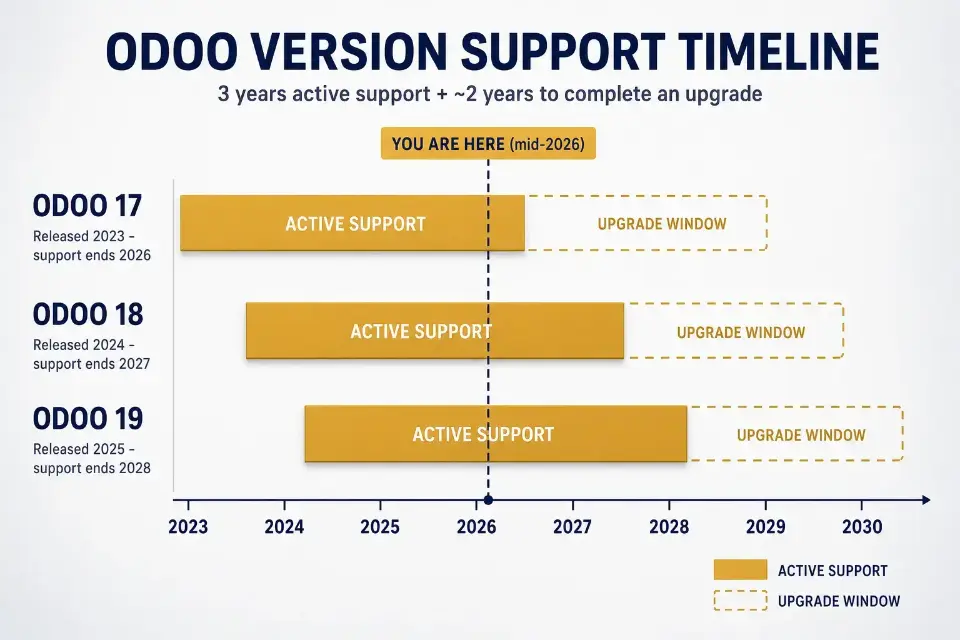
Odoo maintains each major version for three years of active support, plus roughly two additional years to complete an upgrade before losing access to security patches entirely.
Odoo 17 (released 2023) is supported through 2026; Odoo 18 (2024) through 2027; Odoo 19 (2025) through 2028.
The wider the gap you jump, the more your custom code has to cross at once, including the Owl 2-to-Owl 3 frontend rewrite and the JSON-2 migration if you haven't already made it.
R&W Rope came to us running QuickBooks, Fishbowl, and Shopify as three disconnected systems rather than a legacy Odoo version, but the underlying lesson is the same: the longer disconnected or outdated tooling stays in place, the more manual workaround labor accumulates before anyone measures it. Consolidating onto a current, single Odoo instance saved them $35,000 annually and cut administrative workload by 40 to 60 hours a week.
Odoo 17 users should weigh the following:
- Whether custom modules have accumulated across two version gaps
- Whether an interim Odoo 19 migration reduces overall migration risk
- How urgently the business needs improvements that can't wait
Odoo 18 users should weigh: Integration dependencies that may shift between versions, whether standardizing before upgrading changes the calculus, and whether waiting 12 to 18 months for Odoo 20 is operationally viable.
An Odoo partner assessment, run against your actual codebase rather than a generic checklist, is the most reliable way to determine whether skipping a version is viable for your specific environment.
Start Upgrade Planning Before You Pick a Version
One of the most consistent mistakes we see is businesses treating upgrade planning as something that happens after the version decision. It doesn't have to work that way, and waiting creates real problems.
Odoo's own official upgrade platform makes the standard-module conversion straightforward: request a test database, thoroughly test it including every custom module, freeze further development on the codebase, then request the production upgrade once you're confident.
For Enterprise customers, that standard-module conversion is free.
Community edition users typically rely on the community-maintained OpenUpgrade scripts instead, which is fully self-managed and doesn't carry the same support guarantee.
Odoo's production-ready upgrade scripts for a new major version typically take three to four months to stabilize after release, even though test-database scripts are usually ready almost immediately. That's a real scheduling constraint if you're hoping to move onto Odoo 20 the moment it ships in the fall.
Workflow audits, data cleanup, and customization reviews are version-agnostic. They need to happen whether you land on Odoo 19 or hold for Odoo 20. Refreshed Tech, an electronics refurbishing company, is a good example of what that preparation looks like in practice: Replacing Wholecell.io and QuickBooks with a single Odoo instance and our Rithum connector let them automate inventory tracking and expand cleanly across multiple marketplaces, work that had nothing to do with which Odoo version they landed on and everything to do with getting their data and workflows mapped first.
See How Cudio Helped Refreshed Tech
The same applies to integration mapping. If your migration touches multiple departments or third-party systems, the complexity of that work shapes your timeline more than the version itself does.
How We Help You Choose and Plan the Right Upgrade Path
Before we recommend any version, we audit your current Odoo setup.
Workflow reviews, customization assessments, and integration mapping all happen before we confirm a direction. That work shapes whether Odoo 19 or Odoo 20 is the right target for your environment.
Our advisory process covers:
- Workflow and cross-module dependency review
- Customization and integration assessment, including Owl 3 and JSON-2 exposure
- Version recommendation based on your actual environment
- Zero-downtime migration plan development
- Data migration planning and testing
- Staff training and rollout scheduling
We've rescued more than 35 failed or underperforming Odoo and ERP implementations and completed over 62 successful projects. That experience means we understand what happens when migration decisions get made without enough preparation behind them. We also recommend waiting when waiting is the honest answer; our goal is the right path for your business, not the fastest route to a signed project.
A Practical Odoo Upgrade Roadmap for the Next 6 to 12 Months
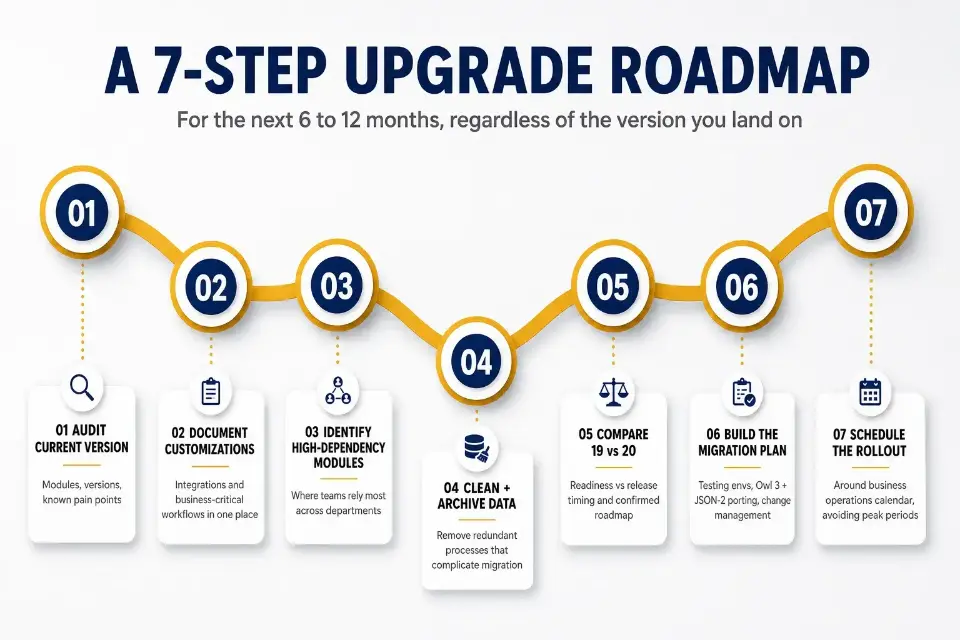
Regardless of which version you land on, the preparation work is the same. Here's a concrete action plan you can start today:
- Audit your current Odoo version, active modules, and known operational pain points before anything else.
- Document all customizations, third-party integrations, and business-critical workflows in one place.
- Identify the modules with the highest operational dependency across your teams.
- Clean your data, archive outdated records, and remove redundant processes that will complicate migration.
- Compare Odoo 19 readiness against Odoo 20's release timing and confirmed roadmap items, weighing your workflow automation needs against your actual timeline.
- Build a migration plan that covers testing environments, custom module porting for Owl 3 and JSON-2, and change management.
- Schedule the rollout around your business operations calendar to minimize disruption during peak periods.
This sequence works whether you're moving to Odoo 19 now or planning ahead for Odoo 20. The businesses that execute cleanly are the ones that started this work before the version decision was final.
Choosing the Path Between Odoo 19 vs Odoo 20 That Fits Your Business
The right choice between Odoo 19 vs Odoo 20 depends on urgency, customization complexity, and how much operational risk your business can absorb right now.
If your current ERP is slowing teams down, creating reporting gaps, or forcing manual workarounds, waiting for an unreleased version may create more problems than it solves. If your system is stable, planning now and upgrading once Odoo 20 is validated in live environments may be the better long-term move.
At Cudio, we help businesses make that decision with a clear view of your workflows, integrations, data, and upgrade risks. Sometimes the right answer is to move now. Sometimes it’s to wait. What matters is choosing the path that fits your business instead of chasing the newest release.
Plan Your Odoo Upgrade With Cudio
FAQs About Odoo 19 vs Odoo 20
Trying to decide whether to upgrade now or wait for Odoo 20? Here are quick answers to the most common questions about features, compatibility, and upgrade planning.
What's the actual difference between Odoo 19 and Odoo 20's AI features?
Odoo 20 builds on the AI foundation introduced in Odoo 19. While Odoo 19 added AI agents, natural language assistance, and AI-powered server actions, Odoo 20 expands these capabilities with more autonomous workflows and cross-module automation. The result is less manual input and more AI-driven task execution.
Do I need to migrate off XML-RPC before I upgrade to Odoo 20?
Yes. Odoo 20 fully removes XML-RPC for self-hosted and Odoo.sh environments. If your integrations still rely on XML-RPC, you should migrate to the JSON-2 API before upgrading. Doing so helps avoid compatibility issues during the upgrade process.
How long does an Odoo version upgrade typically take from audit to go-live?
Most Odoo version upgrades take between three and six months from the initial audit to go-live. The timeline depends on your customizations, integrations, data migration requirements, and testing process. More complex or multi-company environments usually require additional time. Proper planning helps reduce delays and implementation risks.
Can I upgrade from Odoo 17 directly to Odoo 20 without going through Odoo 19?
Yes, a direct upgrade is possible in some cases. However, skipping versions increases the risk of compatibility issues, especially if your system includes custom modules or third-party integrations. A technical assessment is the best way to determine whether a direct upgrade is appropriate. Many businesses benefit from reviewing their environment before making the jump.
What should I check before committing to any Odoo upgrade?
Before upgrading, review your custom modules, third-party apps, and external integrations for compatibility with the new version. You should also assess your database and historical data, test critical workflows, validate migrated records such as sales orders during migration testing, and identify unsupported or outdated customizations. Addressing these issues before upgrading helps reduce downtime and unexpected problems after go-live.