



Upgrading to a new ERP version feels like progress. But a migration only moves your database to a new version number. It doesn't touch your data quality, your undocumented customizations, or your brittle integrations. Whatever's broken today gets carried into Odoo 20 exactly as it is, just running on newer code.
Version compatibility and business readiness are two different things, and the gap between them is where most complex migrations go wrong. This checklist is built for operations and IT leaders who need to audit their current Odoo setup honestly before committing to migration. We're not here to sell you on new features. We want to help you find what needs fixing first.
In this article, we walk through the 10 checklists every complex or omnichannel business should run before migrating to Odoo 20. We close with a readiness scorecard and an eight-step roadmap you can act on right away.
Key Takeaways
- Odoo 20 readiness comes down to six dimensions, not a version number: data quality, customization health, integration stability, workflow documentation, user adoption, and testing infrastructure. How close you are to Odoo 20 today matters far less than how clean your instance is.
- Complex and omnichannel businesses carry disproportionate migration risk, since every custom module, integration, and sales channel multiplies the surface area for something to break.
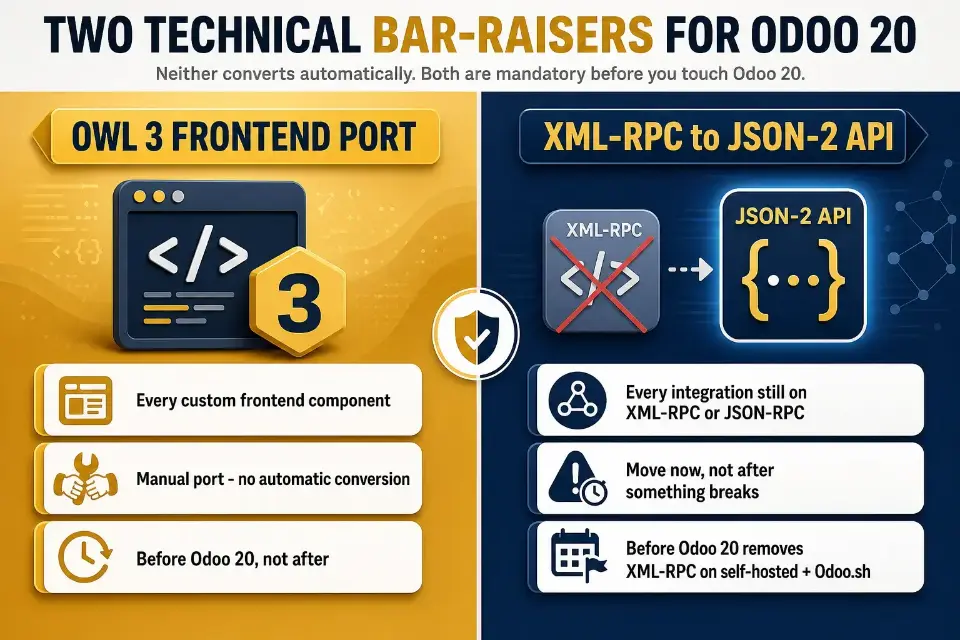
- Odoo 20 raises the technical bar in two specific ways: every custom frontend component needs manual porting to the Owl 3 framework, and any integration still running on XML-RPC needs to move to Odoo 19's JSON-2 API. The exact version where XML-RPC gets fully removed on self-hosted and Odoo.sh instances is still unsettled, but waiting to find out isn't a strategy.
- Most instances land somewhere between "Not Ready Yet" and "Rescue-Ready." That's a normal starting point, as long as you deal with it before you commit to a migration date.
- Dirty data and undocumented custom code don't get fixed by upgrading; they get carried forward. With Odoo 20's agentic AI features acting on that same data with less human oversight, the cost of skipping cleanup only goes up.
What Odoo 20 Readiness Actually Means
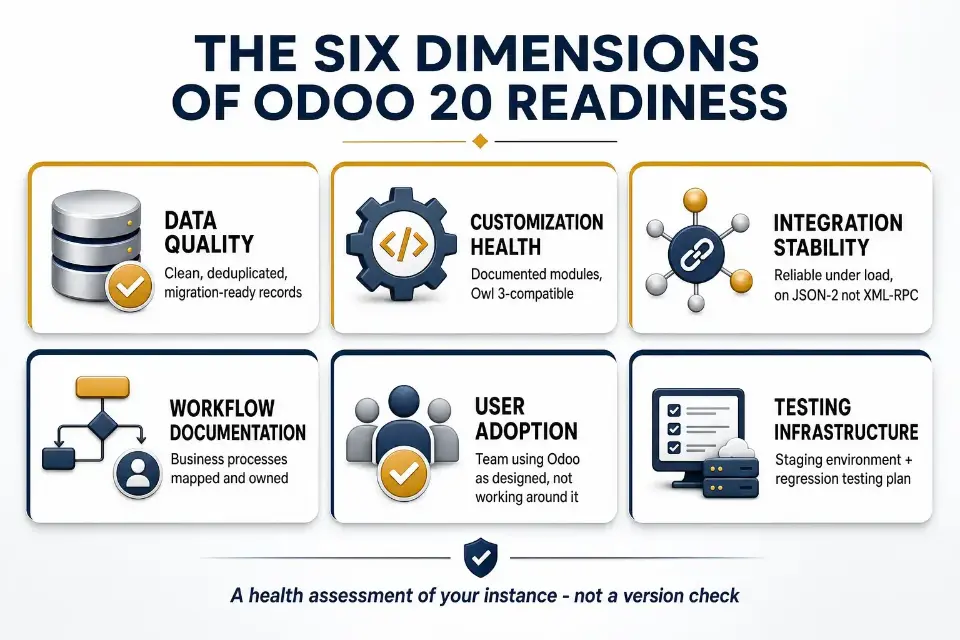
Odoo 20 readiness is a health assessment of your entire instance, not a version check.
Modern ERP systems demand more than traditional ERP thinking about version numbers alone.
A business running Odoo 17 with clean data, documented workflows, and stable integrations can be far more prepared than one on Odoo 19 with broken third-party connectors and manual workarounds patching over process gaps. A newer version number just means more recent code sitting underneath whatever operational debt you already have.
Real readiness spans six dimensions:
- Data quality: Are your records clean, deduplicated, and migration-ready?
- Customization health: Are your custom modules documented, maintained, and upgrade-compatible, specifically with Odoo 20's Owl 3 frontend framework?
- Integration stability: Do your third-party connections behave reliably under load? Are they already running on Odoo 19's JSON-2 API rather than the older XML-RPC endpoints Odoo is phasing out?
- Workflow documentation: Are your business processes mapped and owned?
- User adoption: Is your team actually using Odoo as designed, or working around it?
- Testing infrastructure: Do you have a staging environment and a regression testing plan?
The expected features in Odoo 20 center on stronger AI capabilities, AI embedded workflows, and smarter automation through tighter cross-app integration rather than isolated module changes.
Odoo's own release notes point to a September 2026 launch for the new Odoo version, with the odoo 20 release date likely announced at odoo experience and general availability typically following 2-4 weeks after that release date. Odoo 20 focuses on AI integration and user interface enhancements, with improved functionality across modules and stronger cross-app integration for better workflow automation. Many organizations still wait several months after launch for stability patches before planning upgrades, so the businesses that arrive prepared will be the ones who started this audit early.
Why Complex and Omnichannel Businesses Face Higher Upgrade Risk
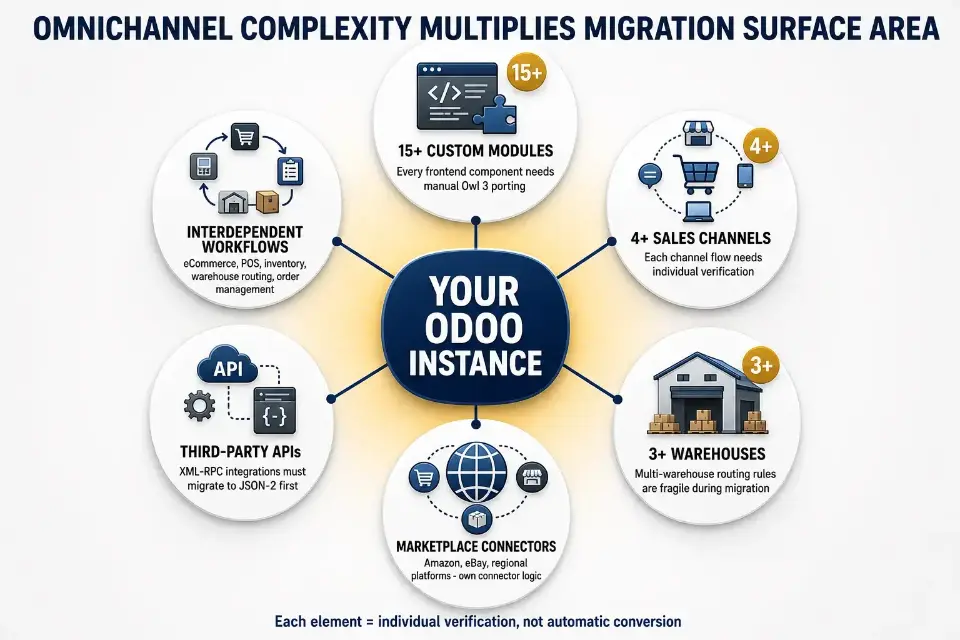
Not every Odoo instance carries the same migration risk.
A simple instance with standard modules and a single warehouse upgrades relatively cleanly through Odoo's official Upgrade Service, which handles standard-module conversion automatically once you request a test database.
A business running 15 custom modules, three warehouses, four sales channels, and a mix of third-party connectors is a different story, because Odoo ERP can scale well beyond SMEs through its modular structure, and every one of those pieces still needs individual verification against the new version rather than an automatic conversion.
Omnichannel businesses carry interdependencies across eCommerce, POS, inventory, warehouse routing, and order management that all have to move together. A stock sync that silently fails, or a marketplace connector still calling a deprecated endpoint, can stall the entire migration mid-cutover, with production down.
Larger or more complex ERP projects should also review infrastructure capacity before upgrade planning, including whether Odoo 20's support for read-replica database scaling is relevant to their environment.
Third-party modules and custom APIs are the most fragile piece across any version change, and Odoo 20 raises that bar specifically.
Every custom frontend component has to be ported to Owl 3 by hand; there's no automatic conversion path.
Odoo's guidance on when XML-RPC and JSON-RPC actually disappear from self-hosted and Odoo.sh instances has varied, but the direction is clear: these endpoints are on their way out, and integrations still built on them should move to the newer JSON-2 API well before you touch Odoo 20, not after something breaks.
Quick Readiness Snapshot: Ready, Not Ready, or Rescue-Ready?
Before working through the full checklist, it helps to know which path applies to your situation. Most Odoo instances fall into one of three tiers.
Tier | What It Looks Like | Recommended Next Step |
Ready | Clean data, documented workflows, stable integrations, minimal technical debt | Begin upgrade planning and testing |
Not Ready Yet | Some messy data, unclear processes, outdated customizations needing cleanup | Run a structured pre-upgrade audit first |
Rescue-Ready | Broken workflows, a failed implementation, heavy undocumented custom modules, users working around Odoo, leadership that doesn't trust the data | Stabilize the instance before any migration planning |
Most complex and omnichannel businesses land somewhere between Not Ready Yet and Rescue-Ready. That's a normal, honest starting point. The rest of this checklist walks through exactly what to resolve before production readiness becomes realistic.
Checklist 1: Audit Your Current Odoo Version and Modules
A realistic upgrade planning roadmap starts with an honest inventory of your existing system and what you're actually running, since most businesses underestimate how much has accumulated in their instance over time.
- Confirm your current Odoo version and verify it still sits on a supported release path. Odoo maintains each major version for three years of active support, plus roughly two additional years to complete an upgrade, per Odoo's own upgrade documentation. Odoo 17 (2023) is supported through 2026, and Odoo 18 (2024) through 2027, so businesses should plan upgrades around support windows and the expected timing of the new Odoo version.
- List every installed app, not just the ones your team actively uses.
- Flag installed but unused modules, since they add upgrade surface area with zero operational return.
- Identify all custom modules and document who built them, when, and whether they're maintained.
- Catalog third-party modules from the Odoo marketplace or external vendors, and check whether each vendor has already confirmed an Odoo 20-compatible release.
- Review custom modules for module compatibility with Odoo 20, especially anything inherited from previous versions; customizations may need an audit now, and companies may need to test them after release.
- Note any deprecated features your workflows depend on, starting with XML-RPC and JSON-RPC integrations.
- Flag the modules generating the most friction, including support tickets, workarounds, or user complaints.
- Review server configuration for cloud or on-premise deployments as part of your upgrade plan, and assess technical readiness and infrastructure capacity before moving forward.
Checklist 2: Review Your Customizations Before Migration
Customizations are where migrations quietly break, especially when custom development has accumulated around old assumptions, and Odoo 20's Owl 3 requirement makes this checklist more consequential than usual.
- Identify all custom modules and confirm whether they were built for your current Odoo version.
- Review all Odoo Studio configurations for compatibility with the target version; Odoo Studio is part of Enterprise Edition, while Odoo Community Edition is free and open-source but does not include the same tooling or official support.
- Flag custom fields that duplicate native Odoo functionality and evaluate whether they can be retired instead of ported, after validating whether standard Odoo options already cover the need.
- Mark any customization with no documentation as an immediate liability. If your team can't explain what a piece of code does, nobody can verify it's safe to move.
- Identify workaround customizations built to patch gaps Odoo has since addressed natively. Odoo's own 19.3 release notes list more than 35 module-level improvements shipped in that point release alone, so it's worth checking whether some of your custom code has already been made redundant.
- Flag all undocumented code from previous developers as a migration blocker until it's reviewed.
- Confirm third-party modules have confirmed upgrade paths and active vendor support.
- For larger, complex organizations, Enterprise Edition is usually the better fit because of its advanced features and support model.
- Schedule compatibility testing for every custom module before migration begins, following Odoo's own guidance on upgrading a customized database, with frontend components tested specifically against Owl 3.
Checklist 3: Clean Your Data Before Odoo 20
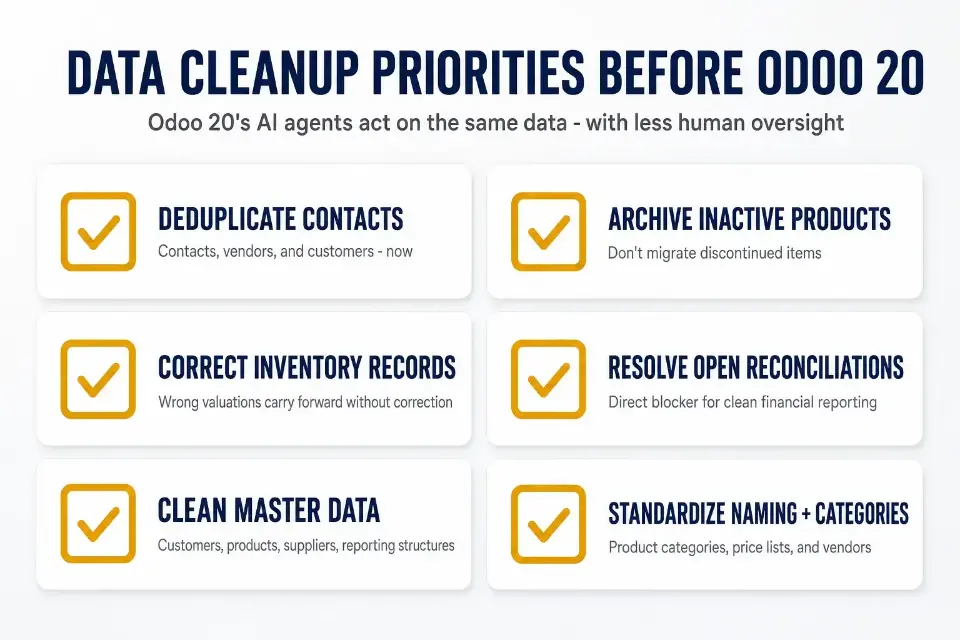
Dirty data doesn't get fixed by a version upgrade, and Odoo 20's agentic AI features raise the stakes here. Planning for data integrity and data migration is essential before upgrading to Odoo 20, because an AI agent making autonomous decisions off duplicate vendor records or unreconciled inventory is acting on bad information with less human oversight in the loop than you have today.
- Deduplicate contacts, vendors, and customers now. Duplicate records compound in a new version and corrupt sales, purchasing, and reporting downstream.
- Archive inactive or discontinued products rather than migrating them, and review which historical data still has reporting or compliance value before moving it. Records with no operational purpose just add noise.
- Correct incorrect inventory records before migration, since wrong valuations carry forward without correction.
- Resolve unreconciled accounting data. It's a direct blocker for clean financial reporting post-upgrade.
- Clean master data across customers, products, suppliers, and reporting structures before migration.
- Standardize naming conventions in product categories, price lists, and vendors to cut down on noise in every report you run.
- Fix broken product categories and outdated price lists before migration, not after.
Checklist 4: Map Your Omnichannel Workflows Before Migration
Omnichannel businesses carry the most complex interdependencies of any Odoo configuration. Every channel flow and other core workflows should be documented, standardized, and validated before migration, not assumed to still work.
That process review is also foundational to a successful odoo rollout and broader odoo erp implementation.
Work through each channel systematically:
- eCommerce order flow needs documentation end-to-end, from checkout through fulfillment and shipping confirmation.
- POS-to-inventory sync is one of the most common failure points during upgrades. Validate how stock movement and stock updates move correctly across retail and online channels before touching production.
- Marketplace integrations (Amazon, eBay, and regional platforms) run on their own connector logic, which frequently breaks across Odoo versions and needs individual testing in staging, particularly for any connector still built on XML-RPC.
- Warehouse routing rules, including multi-step routes, putaway rules, and cross-warehouse transfers, are fragile during migration and need a full review.
- Returns, refunds, and exchange workflows across channels are typically the least documented and most manually handled, so map them now.
- Payment and shipping workflow dependencies need documentation before any testing begins.
- Order status visibility across all channels is a critical post-upgrade validation point.
Odoo 20's roadmap includes expanded multi-channel capabilities, including automatic point-of-sale hardware detection over the local network and combo-deal promotions surfaced automatically at checkout. It also aims to strengthen cross-app integration for improved workflow automation and lets businesses streamline operations with enhanced inventory and logistics features. Even so, those gains only create business value if the channel workflows are already stable, and the third-party modules connecting your channels still need individual compatibility confirmation before migration proceeds.
Checklist 5: Test Every Integration Before You Migrate
Broken integrations are one of the most common reasons migrations fail in production, and they're also the most under-tested, because they only get exercised at real transaction volume. Prioritize integration work by impact on core workflows and expected business outcomes, not just by technical complexity.
- Payment gateways need confirmed compatibility with the target Odoo version before migration begins. A broken checkout is an immediate revenue event, not something you patch after launch.
- Shipping tool integrations, including carrier APIs and label printing, need testing in a staging environment under realistic order volumes.
- Marketplace connectors often rely on third-party modules that may not have Odoo 20-compatible versions available at launch, so check vendor roadmaps now, not after go-live.
- Custom APIs should be audited for dependencies on Odoo internals that change between versions. Any of them still calling XML-RPC or JSON-RPC need to move to Odoo's JSON-2 API well ahead of an Odoo 20 migration; the exact removal timeline for self-hosted and Odoo.sh instances has shifted in Odoo's own communications, so treat the migration as due now rather than waiting for a firm deadline.
- BI dashboards and marketing platform integrations need validation for data continuity, not just connectivity.
- Document every integration and assign a named business owner or system owner responsible for validation.
- Any integration with known issues needs fixing before migration. Compatibility testing in staging isn't optional, especially when fragmented systems leave connector behavior and dependencies poorly documented.
The platform changes most likely to affect your existing connector logic are documented in Odoo's own release notes, and on Odoo.sh, staging branches make this testing accessible without touching production.
Checklist 6: Validate Inventory, Warehouse, and Fulfillment Logic
For omnichannel businesses, inventory and warehouse configuration carries the highest density of custom logic in any Odoo instance. Errors here don't surface until after go-live, which makes pre-migration validation non-negotiable.
- Stock locations need mapping and verification. Phantom locations and unmapped stock create inventory discrepancies that are hard to unwind post-upgrade.
- Route configurations, including multi-step receiving, cross-docking, and dropship flows, need documentation and validation against your actual operations, especially when the same stock also supports field service parts.
- Reordering rules need review for accuracy, since incorrect minimum and maximum values migrate forward without correction.
- Barcode and scanning flows need testing in a staging environment before any go-live commitment.
- Picking, packing, and shipping sequences need end-to-end validation, not spot checks.
- Multi-warehouse transfer logic is a consistent failure point, so confirm routing rules are correct before data cleanup begins.
- Inventory valuation method (FIFO, average cost, or standard price) needs confirmation and reconciliation before migration.
- Inventory management logic must be validated before migration.
Odoo 20 is expected to streamline inventory management further, but only if warehouse logic is already accurate.
Version-specific changes that affect warehouse and fulfillment configuration are exactly what an Odoo upgrade engagement should walk through before touching production.
Checklist 7: Confirm Accounting and Reporting Readiness
Unreconciled accounts and misconfigured taxes don't become more manageable after migration; they get harder to fix. In modern ERP environments, accounting systems work inside the wider operating model rather than as a separate silo, so treat this checklist as a hard gate before any data cleanup or staging work begins.
Odoo 20 is expected to add accounting tools such as predictive budgeting, scenario modeling, predictive cash-flow forecasting, tax toggles, and support for multiple tax IDs.
- Your chart of accounts needs to be clean, current, and mapped to your actual financial structure. Inherited accounts from old configurations create reporting noise immediately post-upgrade.
- All tax configurations need testing against current transaction types before migration.
- Resolve all open reconciliations before moving forward. Carrying unreconciled entries into Odoo 20 is a real liability, and one you can't defer.
- Analytic accounting configurations need review for relevance and accuracy.
- Revenue reporting by sales channel needs validation, which is non-negotiable for omnichannel businesses.
- Management dashboards need testing against real data in your staging environment before go-live.
- Inventory valuation reports need to align with physical counts before migration begins, because these gains matter most when the business operates with clean, trusted finance data.
The accounting and compliance side of this has a real number attached. Staying on an older Odoo version costs a typical 40-user business over $110,000 across two years, driven partly by the 25% Enterprise renewal surcharge Odoo now applies to contracts more than three major versions behind.
Checklist 8: Surface Workarounds and Broken Processes
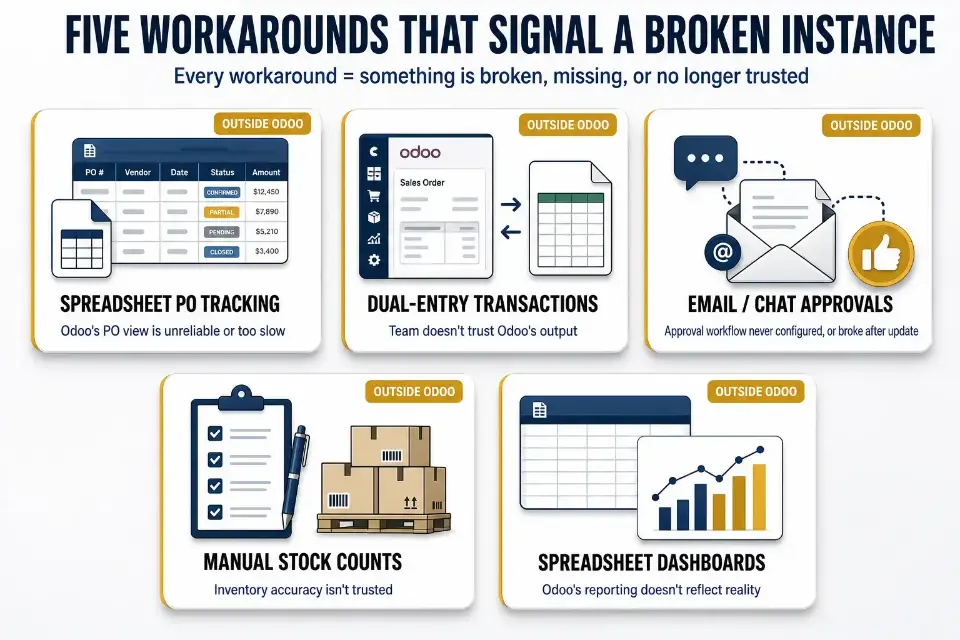
Every workaround your team runs outside Odoo is a signal. It means something in your instance is broken, missing, or no longer trusted, not just a minor inconvenience. Most of these workarounds reveal pain points in how the system supports day-to-day work.
- Tracking open purchase orders in a shared spreadsheet because Odoo's PO view is unreliable or too slow.
- Entering the same transaction in Odoo and a separate spreadsheet because the team doesn't trust Odoo's output.
- Running approvals through email or chat because Odoo's approval workflow was never configured, or broke after an update.
- Doing manual stock counts outside Odoo because inventory accuracy isn't trusted.
- Building management reports in a spreadsheet because Odoo's reporting doesn't reflect how the business actually operates.
Well defined processes are required before AI-driven automation can reduce manual intervention safely.
Categorize each workaround you identify before migration: Fix it now, rebuild it in Odoo 20 using standard functionality, or retire it entirely. Carrying a workaround forward doesn't resolve it. It just embeds it one version deeper. Odoo 20 is expected to automate various administrative tasks across business modules, and its AI features may support that through AI Record Creation, Bulk Updates, and natural-language workflow support, but they will not fix broken processes on their own.
Checklist 9: Assess User Adoption and Training Gaps
Low user adoption and user training gaps are readiness blockers, not something to clean up after migration. If teams are avoiding Odoo today, that behavior carries forward into Odoo 20 regardless of what new features ship.
- Identify which teams use Odoo daily and which have built parallel processes outside it.
- Treat warehouse managers, finance teams, or customer service staff avoiding Odoo as a blocking readiness risk, not a training footnote; use role based training tailored to each function using Odoo every day.
- Recognize that teams working around Odoo usually signal unresolved workflow or usability problems, not just skill gaps.
- Audit permission and role-based access configurations and clean them up before migration begins.
- Identify every process that lacks user documentation, since these are the most likely to fail post-upgrade.
- Address training gaps now, in the pre-migration phase, not after go-live.
- Ensure key users and power users in each department receive deeper training and support thorough testing of user acceptance before go-live to help drive adoption.
Checklist 10: Build Your Testing and Staging Plan
No production upgrade should move forward without a validated staging environment that mirrors your actual production database, not a demo instance or sample dataset. The checklists above tell you what to fix. This one confirms whether those fixes actually hold under real conditions, and successful upgrade projects need a realistic staging and cutover window, not just a test database.
- Use a production-copy database in staging, not synthetic test data.
- On Odoo.sh, use built-in staging branch support for all pre-migration testing.
- Thorough user acceptance testing needs real users from each business function, not just IT, before the go-live phase.
- Integration testing needs to cover every third-party connection, including low-frequency ones that only run at month-end or during peak season.
- Workflow validation in staging should reflect real transaction volumes.
- If your business can't afford operational disruption, build a zero-downtime migration plan during the staging phase, before go-live is scheduled.
- Document rollback planning fully before production cutover, so your team knows exactly what happens if the upgrade fails.
Odoo's own upgrade platform is built around exactly this test-then-production sequence. Request a test database, work through every item above against it, and only request the production upgrade once you're confident nothing broke. Single-version moves to Odoo 20 commonly take 4 to 8 weeks, excluding longer remediation work.
One scheduling detail worth building into this plan: production-ready upgrade scripts for a brand-new major version typically take three to four months to stabilize after release, even though test-database scripts are usually ready almost immediately.
If you're hoping to move onto Odoo 20 the moment it ships this fall, plan around that lag now. Many teams also budget for post launch support and ongoing support once production cutover is complete.
Signs Your Odoo Instance Needs Fixing Before Any Upgrade
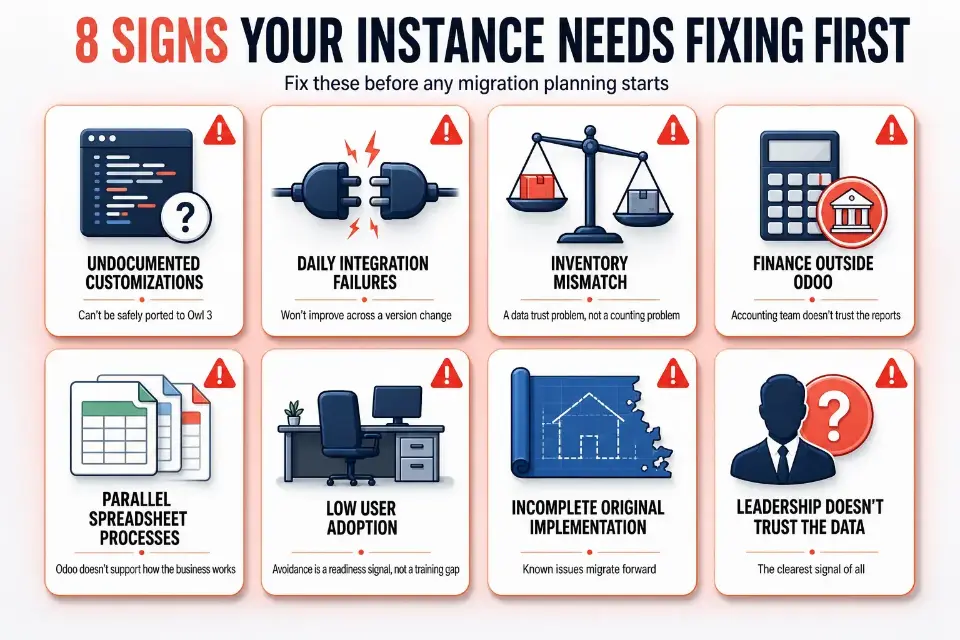
Some businesses shouldn't be planning an Odoo 20 migration right now. They should be stabilizing what they already have first. Here are the clearest signals:
- Heavy customization with no documentation. If your team can't explain what a custom module does, it can't be safely ported to Owl 3.
- Broken integrations causing daily issues. Connectors that already fail in production won't improve across a version change. They'll just fail differently.
- Inventory records that don't match physical stock. That's a data trust problem, not a counting problem.
- Finance reconciling outside Odoo. If your accounting team doesn't trust the reports, the data cleanup problem is already serious.
- Teams running parallel spreadsheet processes. This signals Odoo doesn't support how the business actually works.
- Low user adoption across key operational teams. Avoidance is a readiness signal, not a training gap.
- The original implementation was never fully completed. Known unresolved issues migrate forward. They don't disappear.
- Leadership doesn't trust the data in Odoo. This is the clearest signal of all.
If several of these apply, what unresolved technical debt actually costs over time is worth understanding before any upgrade path planning begins.
How Cudio Helps You Get Ready for Odoo 20
Our founders scaled their own omnichannel business on Odoo before building a consulting practice around it. This checklist comes out of that operational experience, not theory.
"The modularity of Odoo is both its greatest strength and its most common source of failure. Teams turn on everything at once and then wonder why adoption collapses." — Gordon Cummins, CEO of Cudio
For businesses in the Rescue-Ready tier, the path forward doesn't have to be a full restart. Auditing the current instance, identifying root issues, removing unnecessary custom modules, cleaning up workflows, and building a safer upgrade path toward Odoo 20 is exactly what an Odoo rescue engagement is built to do.
Refreshed Tech is a good example of what that looks like in practice. Replacing two disconnected legacy systems with a single, properly scoped Odoo instance let them automate inventory tracking and expand cleanly across new marketplaces, work that had to happen before any future version upgrade would make sense.
For businesses in the Not Ready Yet tier, we also support pre-migration audits, data cleanup, and integration reviews to close the gap before any production readiness commitment is made.
Run an Odoo 20 Readiness Check
Odoo 20 Readiness Scorecard
Before running through the full details again, use this scorecard to rate your current position across ten dimensions and support data readiness and erp strategy discussions.
Any dimension marked Blocked is a reason to pause upgrade planning until that issue is resolved. Print this out and work through it with your team, whether you are coordinating a complex rollout or planning for small teams.
Readiness Dimension | What to Check | Status |
Data Quality | Are contacts, products, and inventory records clean and deduplicated? | Clean / Needs Work / Blocked |
Customization Health | Are all custom modules documented, maintained, and compatibility-tested against Owl 3? | Clean / Needs Work / Blocked |
Integration Stability | Do all third-party connectors perform reliably under normal load, and are they on JSON-2? | Clean / Needs Work / Blocked |
Workflow Clarity | Are your core business processes mapped and owned by a named team member, with clear reporting structures? | Clean / Needs Work / Blocked |
Omnichannel Readiness | Are all channel flows documented and validated end-to-end? | Clean / Needs Work / Blocked |
Inventory Accuracy | Do Odoo stock records match physical counts? | Clean / Needs Work / Blocked |
Reporting Reliability | Does leadership trust the data coming out of Odoo today? | Clean / Needs Work / Blocked |
User Adoption | Are all key teams using Odoo as designed, without parallel workarounds? | Clean / Needs Work / Blocked |
Testing Capacity | Do you have a staging environment and a compatibility testing plan ready? | Clean / Needs Work / Blocked |
Upgrade Timeline | Is your migration timeline realistic given current instance health? | Clean / Needs Work / Blocked |
Your Odoo 20 Readiness Roadmap: From Audit to Go-Live Decision
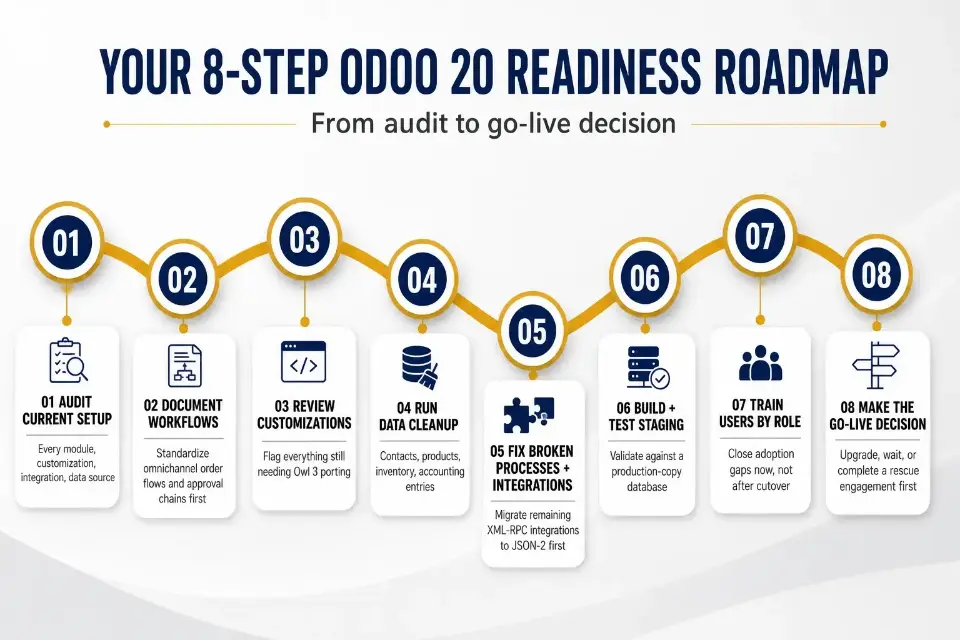
Use this sequence to translate the checklist above into a structured action plan before any migration commitment is made.
- Audit your current Odoo setup as part of Odoo ERP implementation planning. Inventory every module, customization, system, integration, and data source currently running in production.
- Document and standardize all critical workflows before making migration decisions. Prioritize omnichannel order flows and approval chains first.
- Review customizations. Remove anything that duplicates native Odoo functionality and document everything that stays, flagging what still needs Owl 3 porting.
- Run data cleanup. Contacts, products, inventory records, and accounting entries all need resolution before migration begins.
- Fix broken processes and integrations. Don't carry known failures into Odoo 20, and migrate any remaining XML-RPC integrations to JSON-2 first.
- Build and test a staging environment. Validate every workflow and integration against a production-copy database.
- Train users before go-live by role and tie the training to adoption in each department. Close adoption gaps now, not after cutover.
- Make the go-live decision. Based on your audit results, the path forward is either upgrade, wait, or complete a rescue engagement first, and the choice should reflect ERP value and business value, ideally checked against Odoo's own confirmed release planning rather than roadmap speculation.
Final Thoughts
Preparing for Odoo 20 is about more than installing the latest version. A successful upgrade starts with understanding the health of your current environment, resolving technical debt, and confirming that your customizations, integrations, and data are ready for migration.
Work through the readiness checklist before committing to an upgrade. If your assessment uncovers issues, address them first rather than rushing into migration. Investing time in preparation now can help reduce downtime, avoid costly rework, and make the transition to Odoo 20 much smoother.
If you're unsure where your Odoo instance stands, Cudio can help. Our team performs comprehensive readiness assessments, identifies upgrade risks, and builds practical migration plans tailored to your business, so you can upgrade with confidence.
Book Your Odoo 20 Readiness Assessment
FAQs About Preparing for Odoo 20
Preparing for Odoo 20 involves more than upgrading your software. Here are quick answers to the most common questions about migration planning, compatibility, and technical readiness.
Does Odoo 20 support migration directly from Odoo 16, or do businesses need to upgrade incrementally through intermediate versions?
It depends. Odoo supports direct upgrades from older versions in many cases, but custom modules and third-party integrations can affect compatibility. Businesses with heavily customized environments may require additional planning before upgrading. A technical assessment is the best way to determine the safest upgrade path.
How long does a full Odoo 20 readiness audit typically take for a mid-market business with heavy customization?
A readiness audit typically takes several weeks for businesses with extensive customizations. The timeline depends on the number of custom modules, integrations, and the quality of existing documentation. More complex environments require additional analysis before migration planning can begin. A thorough audit helps identify risks early and reduce upgrade issues.
Will third-party Odoo apps from the Odoo App Store be automatically compatible with Odoo 20 at launch?
No. Third-party apps are not automatically compatible with new Odoo versions. Each app developer must release an updated version that supports Odoo 20. Before upgrading, confirm compatibility with every critical app your business relies on. This helps prevent unexpected issues after go-live.
What happens to Odoo.sh hosting configurations and branch environments when a production instance is upgraded to Odoo 20?
Odoo.sh environments may require updates after a major version upgrade. Branch configurations, build settings, and staging environments should all be reviewed before moving to production. Testing these environments helps ensure a smoother deployment. Always validate your hosting configuration before the final cutover.
How does Odoo 20's agentic AI functionality affect existing automated workflows and scheduled actions in customized instances?
Odoo 20's agentic AI features may affect existing automation in customized systems. Businesses using custom workflows, scheduled actions, or server actions should test everything in a staging environment before upgrading. Compatibility depends on how your current automations are built. Thorough testing helps avoid unexpected behavior after deployment.