
If you're reading this, the implementation's already gone wrong. Maybe go-live happened, and the system isn't working the way it was supposed to. Maybe the project stalled mid-build, and the partner's gone quiet. Maybe it's been live for six months, and your team is still running the business on spreadsheets.
Whatever the specific situation, one thing holds: Most stalled Odoo implementations aren't dead. They're disorganized, under-scoped, or carrying unresolved technical debt from decisions made under pressure. The root causes, whether scope creep, partner misconfiguration, or data migration failure, are consistent across almost every engagement we've taken on.
According to Panorama Consulting's 2025 ERP Report, 47% of implementations exceeded budget, with the top causes being underestimated project staffing (38%), scope expansion (35%), and technical or data issues (34%). These aren't edge cases; they're the norm, and they're almost entirely recoverable when addressed with the right sequence.
This article includes everything you need to know about that sequence. At Cudio, we've followed it across 35 rescue engagements. It works the same way every time.
Key Takeaways
- Odoo implementation failure recovery isn't about starting over. It's about cutting what isn't working, stabilizing what is, and expanding only once the foundation holds.
- The first step is always an independent audit against 120+ health metrics. Any recovery that skips this is guesswork.
- 93% of ERP implementations require customization, per Panorama Consulting. The issue isn't that customization exists. It's when it's built outside Odoo's ORM framework and becomes unmaintainable.
- Data integrity issues don't stay contained. Corrupt master data in the PostgreSQL database spreads across modules, corrupts reporting, and destroys user trust.
- Projects with structured change management are 6x more likely to meet their objectives, per Prosci research. Recovery without change management produces a technically correct system nobody uses.
- Post-launch stabilization adds four to six weeks beyond re-launch and is where most recoveries either hold or slip back.
Step 1: Stop Adding and Start Auditing
The most damaging response to a failing implementation is to keep building.
New features get added to fix adoption problems that are actually configuration problems. Custom Python modules get layered onto a broken data foundation. The system becomes more complex and less trustworthy at the same time.
The first decision in any recovery is to stop. No new development, no new modules, no new integrations until a comprehensive audit applies a structured approach to failed implementations in Odoo, because recovering a failed ERP implementation requires a systematic method that identifies the key inefficiencies before any fixes begin.
What Our Technical Audit Covers
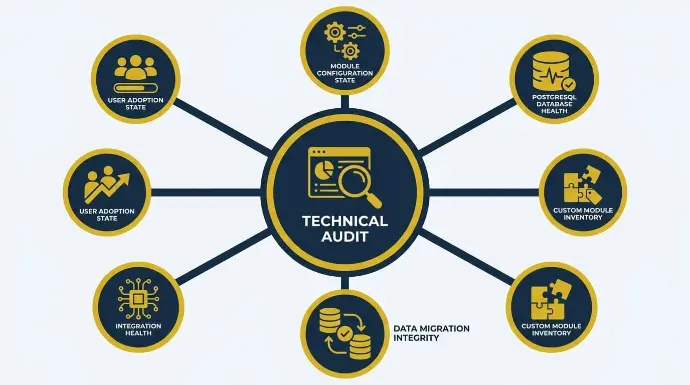
We plug every rescue client's existing Odoo database into our proprietary Accounting and Health Dashboard, which monitors system logs, API interactions, transaction integrity, and journal health across 120 key metrics. This gives us an objective baseline before we change anything, and a thorough audit before recovery starts.
The audit covers six specific areas:
1. Module configuration state: Which modules are fully configured, which are partially built, and which were abandoned mid-project? We check for orphaned module dependencies, deactivated menus pointing to unconfigured workflows, and demo data left in production environments.
2. PostgreSQL database health: Missing indexes on frequently queried fields like product.product, account.move, and stock.quant that cause dashboard timeouts. Corrupted Many2many relationship tables. Mismatched field types between custom module definitions and the actual PostgreSQL schema. pg_stat_statements analysis to identify long-running queries degrading system performance.
3. Custom module inventory: Every modification made outside Odoo's standard ORM framework gets catalogued: whether each custom module uses Odoo's official module manifest structure (manifest.py), whether it follows the ORM's models.Model inheritance pattern, whether XML-RPC endpoints are properly secured, and whether the module has been tested against the current Odoo version. As confirmed in Odoo's official upgrade documentation, Odoo's upgrade service covers standard modules only. Custom modules require source code compatibility with the target version before any upgrade can proceed.
4. Data migration integrity: Duplicate records in res.partner, product.template, and product.product tables. Mismatched Many2one field references pointing to deleted records. Poor data migration often leads to corrupted or missing data, including missing stock valuations in stock.valuation.layer. Incomplete accounting entries where journal items in account.move.line don't balance. Open transactions at the original cutover date that were never properly handled, so we run data integrity checks to prevent further corruption before recovery proceeds.
5. Integration health: API connector logs for failed authentication, rate limit errors, and timeout patterns. Webhook configurations pointing to decommissioned endpoints. Broken EDI mapping files between Odoo and third-party platforms.
6. User adoption state: Login frequency by user role. Which workflows are being completed inside Odoo versus tracked externally? Which modules have zero activity since go-live?
What the Audit Produces
Within the first week, we deliver a findings meeting that turns the audit into a clear recovery plan, covering every identified issue ranked by urgency and business impact, five to seven quick wins we can address immediately to start rebuilding team confidence, a proposed recovery timeline, and a list of future risks to address in later phases. It also sets a clear path by assigning recovery steps to the right internal team and a qualified implementation partner.
That findings meeting is where the recovery actually starts. Not in the configuration, not in the code. In the honest conversation about what exists and what it will take to fix it.
Start With a Free Odoo Rescue Assessment
Step 2: Make the Rescue vs Re-implement Decision
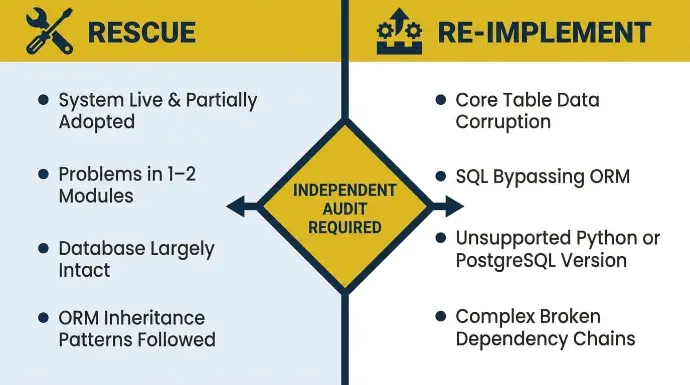
The audit produces one critical decision: rescue what exists, or re-implement from scratch. Most operators assume re-implementation is necessary. In most cases, it isn't.
When Rescue Is the Right Call
Targeted rescue is appropriate when the foundation is structurally sound, but specific areas have gone wrong in isolation. The indicators that point toward rescue include:
- The system is live and at least partially adopted by some teams
- Problems are contained to one or two modules rather than the entire environment
- The PostgreSQL database is largely intact, with correctable field mapping issues and no corruption across core accounting or inventory tables
- Custom modules exist but follow Odoo's ORM inheritance patterns and can be retested without a full rebuild
- The original project scope was reasonable for the business size and operational complexity
When Re-implementation Is the Better Option
Re-implementation becomes the right call in a failed ERP environment when problems are foundational. The specific technical indicators we look for include:
- Core account.move, stock.quant, or res.partner tables have data corruption that can't be practically repaired without a full migration
- Custom modules were built using direct SQL queries, bypassing the ORM, creating security vulnerabilities and upgrade incompatibility
- The Python version or PostgreSQL version underlying the installation is no longer supported (Python 3.7 and PostgreSQL versions below 12 are end-of-life)
- Module dependency chains have grown so complex that disabling any single module breaks core functionality
- This is common when the current system was never genuinely adopted and the odoo system no longer supports the actual workflows of the business
The only reliable way to make this call is through an independent root cause analysis.
As confirmed by Odoo's official upgrade documentation, upgrade services don't include data cleaning or the upgrade of custom modules not covered by a maintenance contract. That means a re-implementation decision also requires a clean data migration strategy, not just a fresh Odoo install.
Step 3: Re-scope Before You Rebuild
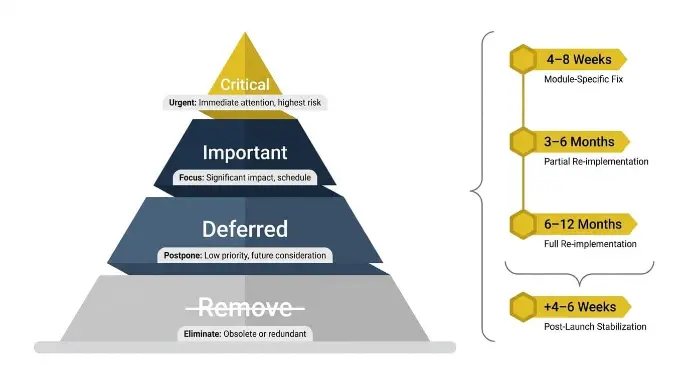
Re-scoping isn't starting over; it's cutting what isn't delivering value and stabilizing what is. Many businesses skip re-scoping after a troubled ERP project because it feels like admitting failure. It's actually the step that makes recovery possible.
According to Panorama Consulting's 2025 ERP Report, scope expansion is responsible for 35% of ERP budget overruns. The recovery plan can't repeat that mistake, and this is one of the warning signs when an ERP project is drifting again during recovery.
Every feature added to the recovery scope must go through a formal change request with a documented timeline and budget impact before any work begins.
The Re-scope Framework
The following structure reflects how we prioritize every re-scope conversation, and recovery works best when deployment is broken into smaller stages so critical operations stabilize first across key business operations.
Priority | What Belongs Here | Decision |
Critical | Core accounting (account.move, account.payment), plus the first areas to stabilize: sales (sale.order), purchasing (purchase.order), inventory (stock.quant, stock.picking), and invoicing | Stabilize first. Nothing else gets added until these work reliably |
Important | Modules that add significant operational value but aren't blocking daily operations: manufacturing, CRM, project | Phase 2 after critical modules are stable and UAT-signed |
Deferred | Reporting enhancements, integrations with secondary systems, and advanced analytics | Phase 3 with full scoping and dedicated change control |
Remove | Custom code that was never adopted, modules duplicating native Odoo functionality, and integrations that never worked in production | Cut entirely. Document the decision in the project log |
Realistic Recovery Timelines
Recovery timelines are driven by three factors: the condition of the PostgreSQL database, the depth and quality of existing custom Python code, and how ready the organization is to commit to changed workflows.
Scenario | Realistic Timeline |
Module-specific fix: broken inventory valuation method (standard_price vs average_cost), misconfigured accounting journal, failed API connector auth | 4 to 8 weeks |
Partial re-implementation: core modules rebuilt, data re-migrated from specific tables, integrations re-established with proper API versioning | 3 to 6 months |
Full re-implementation with complete data migration from legacy systems | 6 to 12 months |
Post-launch stabilization and adoption reinforcement (all scenarios) | An additional 4 to 6 weeks |
Most ERP projects exceed initial budgets by three to four times, and timeline extensions of 30% beyond the original schedule are common. A missed launch date is usually a symptom of uncontrolled scope rather than just estimation error, and most failed projects become more expensive when teams keep expanding scope without a clear path to release. These numbers improve significantly when recovery projects are scoped conservatively, which helps avoid the pattern seen in many failed projects, and milestones are defined before work begins.
Step 4: Clean the Data Before Anything Goes Live Again
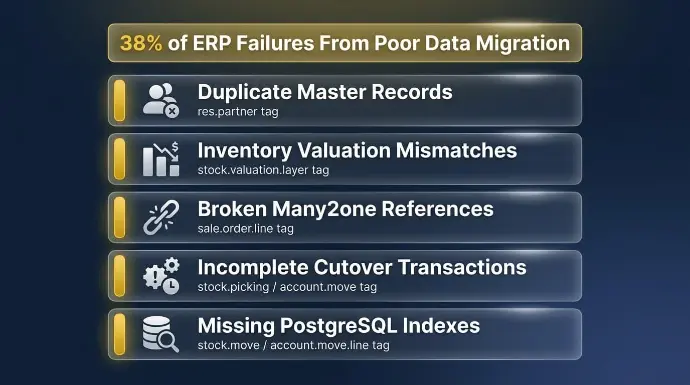
Data discipline has to be enforced through strict data quality management before a new system goes live again.
Corrupt or incomplete master data prevents a working system, regardless of how clean the configuration is.
38% of ERP failures result from poor data migration, making it the second most common cause of implementation failure after change management.
Bad data in legacy systems will reproduce the same problems in the new system if it is migrated unchanged.
What Data Cleanup Actually Involves Technically
The specific issues we encounter in recovery data audits, in order of frequency:
- Duplicate master records: Duplicate res.partner records for the same customer or vendor cause split transaction histories, broken receivables, and incorrect aged debt reports. Deduplication requires merging partner records using Odoo's built-in merge utility while preserving all related account.move.line, sale.order, and purchase.order references.
- Inventory valuation mismatches: When the inventory valuation method (standard_price, average_cost, or fifo) was changed after transactions were recorded, stock.valuation.layer entries no longer reconciled with the accounting journal. Correcting this requires reversing and reposting valuation entries in the correct sequence.
- Broken Many2one references: Orphaned foreign key references in tables like sale.order.line pointing to deleted product.product records cause views to fail and reports to crash. These require direct PostgreSQL queries to identify and correct before the module can be reliably tested.
- Incomplete cutover transactions: Open stock.picking records from the original go-live that were never validated, account.move entries in draft state that were never posted, and purchase.order records in a partially received state all need a defined handling strategy before re-launch. Poor migration planning also commonly leaves corrupted records or missing data, and opening balances must be verified before relaunch to restore accurate financial reporting.
- Missing PostgreSQL indexes: Unindexed foreign key columns on high-volume tables like stock.move, account.move.line, and mrp.production cause full table scans that produce timeout errors on dashboards and reports. For Odoo 18, PostgreSQL 14 or 15 with shared_buffers set to 25% of available RAM and work_mem scaled per worker process is the recommended configuration for production environments.
Our ETL Approach to Data Migration and Re-migration
For recovery engagements that require partial or full data re-migration, we use a proprietary ETL engine built on Python and PostgreSQL, powered by machine learning, and hosted on Google Cloud to enable a safe migration of data, users, processes, and required modules to the newer Odoo version rather than a bulk import.
It handles the transformation layer between legacy system data structures and Odoo's PostgreSQL schema, including field mapping validation, referential integrity checks, and batch processing with validation checkpoints between stages to prevent cascading failures. Choosing the right implementation partner matters here, because ongoing support depends on a team that can maintain the migrated environment over time. Multiple rehearsal migrations run before the final cutover.
Nothing goes live until reconciliation reports confirm data integrity across every module.
Recovery in Practice: R&W Rope
R&W Rope came to us running QuickBooks for accounting, Fishbowl for inventory, and Shopify for e-commerce. That’s three disconnected platforms with no unified reporting, no reconciled data across channels, and 40 to 60 hours of administrative overhead every week. Data migration required mapping QuickBooks' chart of accounts to Odoo's account.account structure, migrating Fishbowl's inventory records to stock.quant and product.product, and rebuilding their Shopify product catalog in Odoo's native e-commerce module.
Results:
- Over $35,000 in annual software cost savings
- 40 to 60 hours of weekly administrative work is fully automated
- Real-time data visibility across all sales channels, replacing manual reporting
See How We've Done This Before
Step 5: Address Technical Debt Before Expanding
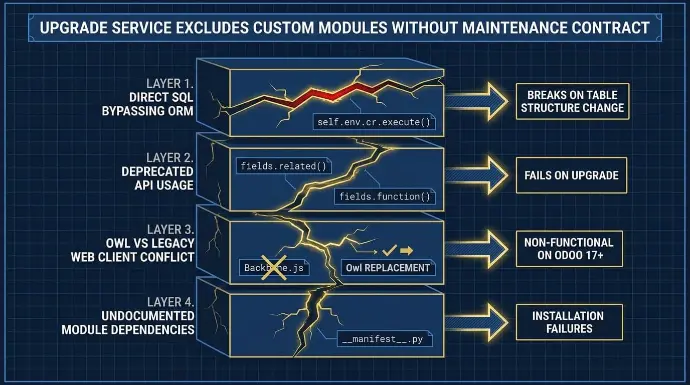
Technical debt accumulated during a failed build is a common root problem in any failed Odoo project and doesn't disappear on its own.
Every modification made outside Odoo's standard ORM framework must be reviewed and either properly rebuilt within Odoo's module API architecture or removed entirely before new functionality is added on top, which is one reason Odoo implementations fail when teams keep layering fixes onto unstable custom code.
Why This Step Can't Be Skipped
Odoo's upgrade service explicitly excludes custom modules not covered by a maintenance contract. That means every non-standard module is a manual upgrade obligation.
The specific technical patterns that create upgrade-blocking debt include:
- Direct SQL queries bypassing the ORM: Custom code using self.env.cr.execute() with raw SQL rather than Odoo's ORM search(), read(), and write() methods breaks when table structures change between versions. Odoo 18's redesigned ORM uses different SQL generation and caching patterns than earlier versions, meaning raw SQL that worked on Odoo 16 may produce incorrect results on Odoo 18.
- Deprecated API usage: Methods like fields.related() and fields.function() were removed in Odoo 14 and 16 respectively. Custom modules still using these in environments running older versions will break on upgrade.
- Owl vs legacy web client conflicts: Odoo 18's web client uses the Owl component framework, replacing the legacy Backbone.js architecture. Custom JavaScript that was written for the legacy client needs to be rewritten in Owl syntax before it'll function on Odoo 17 and above.
- Undocumented module dependencies: manifest.py files that don't accurately declare all module dependencies cause installation failures and unpredictable behavior when modules are upgraded individually.
How We Approach Technical Debt Cleanup
Our developers have over 14 years of experience in Odoo customization and development using Python, PostgreSQL, Odoo ORM, and RESTful APIs. Our approach to every technical debt audit follows the same sequence: begin with an honest evaluation of what was built and what still supports business requirements, assess it against Odoo's official module API standards, remove what's redundant or unmaintainable, and rebuild necessary customizations properly within the ORM framework. We simplify first and expand second, every time, because successful recovery depends on keeping only customizations that support real business requirements.
Recovery in Practice: Refreshed Tech
Refreshed Tech came to us as an ITAD business with a customization layer that had grown beyond what their team could maintain, broken integration with Rithum, and no real-time inventory visibility across their receiving and fulfillment workflow.
What we rebuilt:
- Odoo across inventory, accounting, manufacturing, sales, CRM, and project modules
- Rithum Connector for automated marketplace management was rebuilt within Odoo's standard module API framework across 420+ channels
- Custom inventory processing logic rebuilt using Odoo ORM patterns for real-time unprocessed inventory visibility
Results:
- Automated billing and reconciliation for complex revenue share agreements
- Accurate device-level margin and revenue reports
- Marketplace infrastructure ready to scale to 15 or more channels within a year
Step 6: Phased Go-Live with Validation at Every Stage
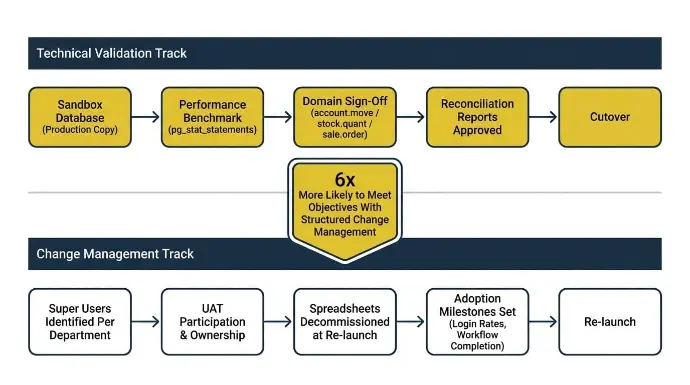
A phased rollout after a recovery is always safer than attempting another full go-live simultaneously across all modules.
Controlled re-deployment, module by module, reduces blast radius and gives real users time to validate that each layer is working under live conditions before the next stage begins.
Validation Requirements Before Each Phase
Nothing gets marked complete in our recovery engagements until it has passed all of the following:
- Validated in a sandbox database that is a copy of the production environment, not a clean install
- Benchmarked for performance under realistic concurrent user load using pg_stat_statements to confirm no full table scans on core transactional tables
- Domain-specific sign-off: accounting team validates that account.move trial balance matches source records, the inventory team confirms stock.quant on-hand quantities match physical count, operations team validates sale.order to stock.picking to account.move flow end-to-end, and sales teams validate pricing exceptions and order scenarios as part of user acceptance testing
- Reconciliation reports run across all affected modules against live data before cutover is approved
Change Management Runs Alongside Technical Recovery
Projects with structured change management programs are six times more likely to meet or exceed their objectives, according to Prosci research.
Technical recovery without parallel change management produces a technically correct system that nobody uses.
The practical requirements for change management in a recovery engagement include:
- Identifying internal super users per department who receive deep role-specific training before the broader team rollout, then form a dedicated internal support system after relaunch rather than helping only during rollout
- Involving key users in UAT so their sign-off creates ownership rather than passive acceptance, while establishing feedback loops between end-users and the technical team during recovery
- Decommissioning the spreadsheets and legacy workarounds simultaneously with the re-launch, not after; shadow spreadsheets are often a sign of user resistance, not just a process issue
- Building adoption milestones into the project plan: login rates, workflow completion rates, approval workflows usage, and support ticket volume targets by week four
- Making user training continuous rather than a one-time handoff, with proper training delivered through role-specific training sessions instead of rushed generic overviews, because rushed training sessions drive poor adoption
Recovery in Practice: Lexington Medical
Lexington Medical came to us, operating across 30 countries and five subsidiaries. Financial close was unreliable, the account.move intercompany entries weren't reconciling across entities, and users across multiple countries had built manual workarounds for BOM traceability and lot tracking that were producing inconsistent data.
What we rebuilt:
- Advanced custom financial reporting across five entities using Odoo's multi-company account.account and res.company structures
- Automated intercompany transaction processing eliminating manual journal entries
- Full traceability across mrp.production, stock.lot, and account.move in a single environment
- Role-based training for finance, operations, and compliance stakeholders across multiple countries before re-launch approval
Results:
- Days to financial close reduced by over 50%
- Error rate was significantly cut across a 30-country operation
- The system has scaled with rapid global growth without requiring additional software
As Rowan from Lexington Medical put it: "Through our partnership with Cudio, we have been able to improve existing workflows in Odoo and build out custom solutions that have reduced our days to close by over 50% while reducing our error rate."
Step 7: Post-Launch Stabilization Is Part of the Recovery
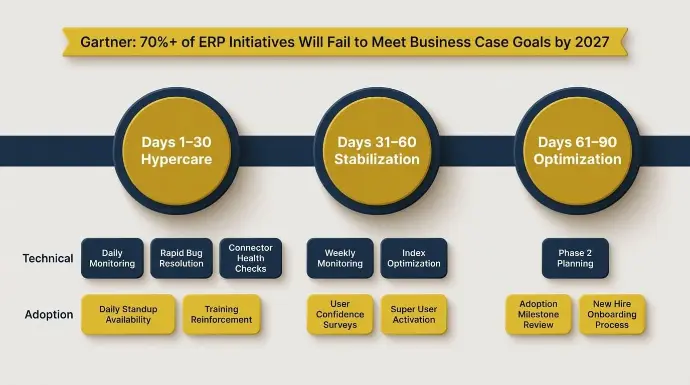
Most recovery plans end at go-live. Ours don't. The four to six weeks after re-launch are where recoveries either hold or slip back. Gartner research predicts that by 2027, more than 70% of recently implemented ERP initiatives will fail to fully meet their original business case goals. That failure doesn't happen at go-live. It happens in the weeks and months after, when adoption stalls and workarounds creep back in.
Our Post-Launch Monitoring
Our Accounting and Health Dashboard continues monitoring system logs, API interaction health, transaction integrity, and journal accuracy after every re-launch, and unreliable odoo reports are often the first signal that trust in the system is slipping. Specifically, we monitor:
- account.move journal balance integrity daily for the first 30 days
- stock.quant versus physical inventory reconciliation weekly
- API connector response times and error rates for every active integration, with regular checks on overall erp system performance
- User session activity by role to identify adoption gaps before they become permanent workarounds
The 30/60/90 Day Stabilization Model
Period | Technical Focus | Adoption Focus |
Days 1 to 30 (Hypercare) | Daily monitoring, rapid bug resolution, performance tuning, and connector health checks | Daily standup availability, training reinforcement, and open-door issue escalation |
Days 31 to 60 (Stabilization) | Weekly monitoring, process gap identification, reporting refinement, index optimization | Weekly cadence, user confidence surveys, super user activation |
Days 61 to 90 (Optimization) | Phase 2 planning, additional modules scoped with proper change control | Adoption milestone review, new hire onboarding process established |
Recovery in Practice: Prizm Document Solutions
Prizm came to us with helpdesk, accounting, and sales completely disconnected. Field technicians were reconciling stock.quant records manually at the end of each day. Subscription billing for printer meters was invoiced by hand because the account.analytic.account meter tracking had never been properly configured. The post-launch stabilization period was where their workflows were finally locked in.
What we implemented:
- Odoo across helpdesk, field service, projects, inventory, sales, CRM, and accounting
- Custom smart buttons linking helpdesk.ticket to field.service.order and stock.picking for field technician workflows
- Automated purchase orders using MTO routes and product.orderpoint reordering rules
- Subscription billing automation using Odoo's sale.subscription module for meter-based contracts
Results:
- Eliminated duplicate entry entirely across all five disconnected workflows
- Real-time field service inventory data through unified stock.quant tracking
- Centralized billing, support, and CRM in a single Odoo environment
Defining Success Before Recovery Begins
Before any recovery work starts, we define what “done” looks like in measurable, agreed-upon terms. Without it, the recovery has no finish line, and teams can't objectively assess whether the system's working.
Metric | Technical Definition | Target |
Month-end close time | Days from period end to all account.move entries in "posted" state with zero draft entries in prior period | Specific reduction agreed before work starts |
Order processing error rate | Percentage of sale.order to stock.picking to account.move sequences completing without manual intervention | Agreed threshold by module |
User active usage rate | Percentage of licensed users with active sessions completing core workflow steps per week by day 28 post re-launch | Minimum 80% across critical modules |
Inventory reconciliation accuracy | Match rate between stock.quant on-hand quantities and physical count records | Within 1% variance |
Support ticket volume | Week-over-week decline in tickets categorized as configuration or workflow errors | Declining trend through week 6 |
We require an internal executive sponsor to be named before work begins. Without one, UAT gets de-prioritized, adoption slips, and decisions stall regardless of how well the technical remediation goes. The executive sponsor must own the recovery as a business transformation effort, not treat it like an it project, so decision-making stays aligned with business operations during recovery.
Conclusion
A failed Odoo implementation isn't a verdict on the platform or on your organization. 42% of ERP failures result from inadequate change management, 38% from poor data migration, and 35% from inexperienced teams. Those are execution gaps, and execution gaps are fixable.
The recovery sequence in this guide is the same one we've followed across 35 rescue engagements. The result is always the same: a system the team trusts, processes that run through Odoo rather than around it, and an operation that's positioned to grow.
At Cudio, we've been on the operator side of a broken rollout. We built our practice after scaling our own multi-channel business on Odoo, consolidating 14 separate systems into one, and hitting every wall our clients now describe to us. That experience is why our approach stays specific and technical rather than reassuring and vague.
If your implementation has stalled or broken down, the first step is understanding exactly where things stand before committing to any path forward.
Get My Free Implementation Recovery Assessment
Frequently Asked Questions
The questions below reflect what businesses most commonly ask once they've decided to pursue recovery.
How long does Odoo implementation failure recovery take?
It depends on three factors: PostgreSQL database condition, the depth of custom Python code, and organizational readiness to change workflows. A module-specific fix, for example, correcting a broken inventory valuation method or fixing a connector authentication failure, typically takes four to eight weeks. A partial re-implementation runs three to six months. A full re-implementation with clean data migration runs six to twelve months. Post-launch stabilization adds four to six weeks to every scenario.
Should we rescue the current implementation or start over?
The answer comes from a root cause analysis, not instinct. If the system's live and partially adopted with isolated problems and largely intact core tables (account.move, stock.quant, res.partner), rescue is almost always faster and cheaper. If business processes were never properly mapped, the database has corruption across multiple tables, or custom modules are built outside the ORM using raw SQL, re-implementation on a clean foundation is often faster in the long run. Only an independent audit of the actual environment produces a defensible answer.
Can we recover without replacing our current partner?
In some cases, yes. Recovery can continue with the same implementation partner if the relationship is functional and the original team has the diagnostic objectivity to assess what went wrong in their own build, but the wrong partner is also a common reason a failed Odoo project stays stuck. The practical problem is that choosing the wrong implementation partner often means weak accountability, poor fit with the business, and repeated delays, so most partners who caused the failure also lack the technical distance to accurately identify root causes in the code they wrote. If you're continuing with the original team, an independent technical audit of what was built should precede any continuation of work.
What are the most common technical causes of Odoo implementation failure?
The three biggest causes are inadequate change management (42%), poor data migration (38%), and inexperienced implementation teams (35%). At the code level, the failures we see most consistently are custom modules built outside Odoo's ORM framework using raw SQL or deprecated API methods, missing PostgreSQL indexes on high-volume transactional tables, data migration that was done without rehearsal runs and reconciliation validation, and integrations tested in isolation rather than as end-to-end workflows under production load.
What does Cudio's recovery process actually cost?
Every recovery starts with an assessment of the existing environment. Cost depends on what the audit reveals: the extent of data corruption across PostgreSQL tables, the volume of custom Python code that needs review or rebuilding, and the scope of re-implementation or remediation required. We use fixed-fee pricing, so there are no surprise invoices after the scope is agreed. Contact our team to start with a scoping conversation. You can also review Odoo's current pricing for licensing context, separate from implementation costs.
How do we know when recovery is genuinely complete?
Recovery's complete when the team is working through Odoo, not around it. The specific technical indicators: account.move the month-end close completes without manual intervention, stock.quant reconciles against physical inventory within the agreed variance threshold, user adoption is at or above the target rate by week four post-re-launch, and support ticket volume is declining week over week. Go-live is a milestone. Recovery is complete when the business doesn't need active partner support to keep the system running.