A successful Odoo implementation comes down to a few things done consistently well: Clean data before migration, phased rollout planning, minimal customization, strong user adoption, and clear ownership after go-live.
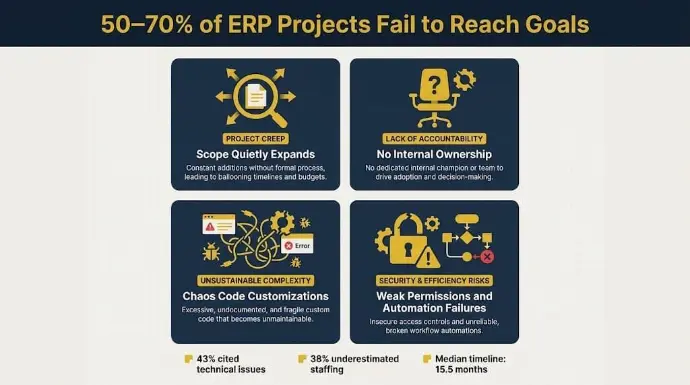
Most ERP projects fail when teams rush configuration, skip process mapping, or assume the system will fix broken workflows on its own. Industry research estimates that 50% to 70% of ERP projects fail to fully reach their goals, and in most cases, the software isn’t the real problem.
At Cudio, we have completed 62+ successful Odoo projects and rescued 32+ broken ones. We have seen what separates implementations that stabilize long-term from those that slowly fall apart after launch.
This guide breaks down the implementation phases, technical decisions, and operational mistakes that matter most.
I Want Odoo Connected Properly Across My Operations
Key Takeaways
- Standard-first configuration keeps your Odoo environment easier to upgrade, maintain, and scale over time.
- Clean data migration directly affects inventory accuracy, financial reporting, and operational stability after launch.
- User adoption matters more than feature count because unused workflows quickly turn into spreadsheets and manual workarounds.
- Phased rollouts reduce operational risk and give teams time to validate workflows before expanding into additional modules.
- Post-go-live governance determines long-term ROI, especially once workflows, integrations, and reporting requirements start evolving.
Why Most Odoo Implementations Fail Before Go-Live
Before getting into how to run a successful Odoo implementation, it’s worth understanding why so many ERP projects start struggling before the system is even fully live.
In most cases, the problem isn’t Odoo; it’s the way the implementation is handled internally.
Projects get overloaded halfway through. Teams underestimate how much operational involvement is actually required. Customizations are approved too quickly. Nobody owns the rollout from the business side. Then suddenly, timelines stretch, testing gets rushed, and go-live starts feeling more like damage control than a planned deployment.
That pattern is extremely common. Panorama Consulting’s 2023 ERP Report found that only around 50% of ERP projects stay within budget, while the median implementation timeline reaches 15.5 months. Among delayed projects, 43% cited technical issues as the primary cause, while 38% underestimated staffing and internal resource requirements.
We see these same problems constantly in rescue projects.
The Project Quietly Expands Beyond the Original Scope
This usually starts innocently.
A business plans to implement Sales, Inventory, and Accounting first. Then someone requests custom warehouse routing. Another team wants advanced reporting dashboards. E-commerce integrations get added halfway through. Suddenly, the project becomes far more complex than the original timeline or staffing plan was built for.
Without strong governance, scope creep starts affecting testing, documentation, training, and deployment quality very quickly.
Nobody Truly Owns the Implementation Internally
A lot of businesses assume the implementation partner will carry the entire rollout. That almost never works well long-term.
The technical team can configure workflows, but they cannot make operational decisions for your warehouse, accounting team, or purchasing department. Without internal ownership, approval chains stall, testing gets delayed, and critical decisions stay unresolved until the pressure of go-live forces rushed fixes.
The best implementations happen when leadership stays actively involved from planning through stabilization.
Customizations Create Problems Earlier Than Most Teams Expect
One of the biggest mistakes we see is businesses customizing too much too early.
A workflow feels slightly different from the old system, so custom development gets approved immediately instead of testing whether Odoo’s native logic already handles it well enough. Over time, those small customization requests pile up into heavily modified environments that become difficult to upgrade, troubleshoot, or even fully understand internally.
We call this “chaos code.”
We have inherited environments where poorly documented custom modules broke approval workflows, inventory routing, and accounting automations because nobody fully understood the dependency chain behind them anymore.
Weak Permissions and Automation Failures Slowly Break Operations
Some implementation problems don’t show up immediately. They build quietly in the background.
We’ve seen permission structures configured so poorly that users bypassed workflows entirely because they could not complete tasks inside the system. We’ve also seen failed cron jobs stop inventory syncs and automated invoicing processes without anyone noticing for weeks.
By the time leadership catches the issue, inventory valuation no longer reconciles correctly, reports stop matching operational reality, and finance teams lose trust in the data altogether.
Pre-Implementation Planning Determines Everything That Follows
Most Odoo implementation problems start long before go-live.
They usually begin during planning, when teams rush discovery, skip process mapping, or fail to define business requirements and operational requirements clearly. Mapping current workflows helps document existing data flows and business processes while clarifying how core business workflows connect.
A successful rollout depends on understanding how inventory, accounting, purchasing, approvals, reporting, and integrations affect each other before configuration even begins. Early planning should also include choosing the right hosting model. An experienced implementation partner can use gap analysis to recommend the right odoo apps based on your needs.
Requirements Gathering Is Not a Feature Wishlist
A lot of businesses approach requirements gathering like a list of features they want inside Odoo. That usually creates problems later.
Requirements gathering is about identifying explicit business requirements and what the company needs operationally. Business process mapping is about understanding how work actually moves through the company today, including the manual workarounds teams already rely on.
For example:
- Warehouse routing affects inventory reservations, fulfillment timing, and purchasing forecasts
- Approval chains affect vendor payments and financial close workflows
- Marketplace sync dependencies affect inventory accuracy across Shopify, Amazon, Walmart, and 3PL systems
- Multi-warehouse setups affect replenishment rules and transfer logic
An odoo erp system connects sales, inventory management, accounting, and CRM in one platform, which helps streamline decisions across teams. These workflows are all connected inside Odoo.
This is also the stage where businesses should decide between Odoo Community and Enterprise, since odoo erp is modular, scalable, and cost-effective for businesses of different sizes and industries. Enterprise is usually the better fit for businesses needing:
- Advanced accounting
- Multi-company management
- Complex automations
- Marketplace integrations
- Role-based access controls
- Multi-warehouse operations
Trying to switch editions halfway through implementation often creates unnecessary rework in an ERP system.
Why Most Businesses Should Avoid a Big-Bang Go-Live
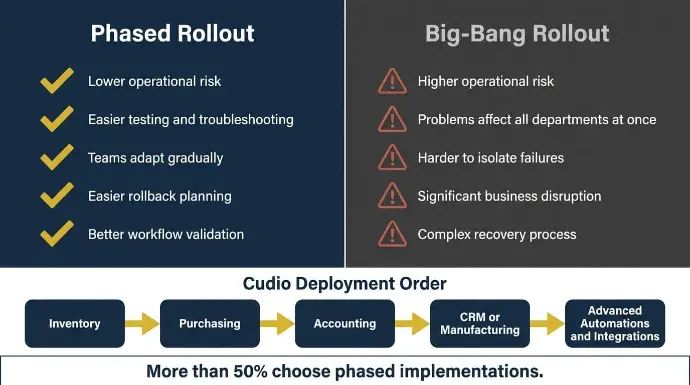
Many businesses think launching every module at once will speed things up. In reality, it usually increases operational risk, while phased deployment helps create a smooth transition and avoids overwhelming users with too many changes at once.
Research shows that less than 21–23% of organizations use a full big-bang rollout, while more than 50% choose phased implementations instead.
Here is why phased rollouts are usually safer:
A phased approach minimizes disruption and makes issues easier to isolate and resolve.
At Cudio, we usually deploy operational layers in sequence:
- Inventory
- Purchasing
- Accounting
- CRM or Manufacturing
- Advanced automations and integrations
That approach gives teams time to stabilize workflows before expanding further.
Before deployment starts, we map roughly 150–200 business use cases, run sandbox validation, perform parallel testing, and require super-user sign-offs before production rollout. The goal isn’t just getting Odoo live. The goal is to get it stable long-term by setting clear timelines, budgets, and success criteria as key implementation metrics.
See How Cudio Implements Odoo Systems
Standard-First Configuration Prevents Long-Term Upgrade Problems
One of the biggest mistakes businesses make during an Odoo implementation is customizing too much too early.
A workflow feels slightly different from the old system, so custom code gets approved immediately instead of checking whether Odoo already handles it natively through configuration, automation rules, or server actions. Over time, those quick decisions create environments that become harder to upgrade, troubleshoot, and maintain.
That’s why we strongly recommend a standard-first approach.
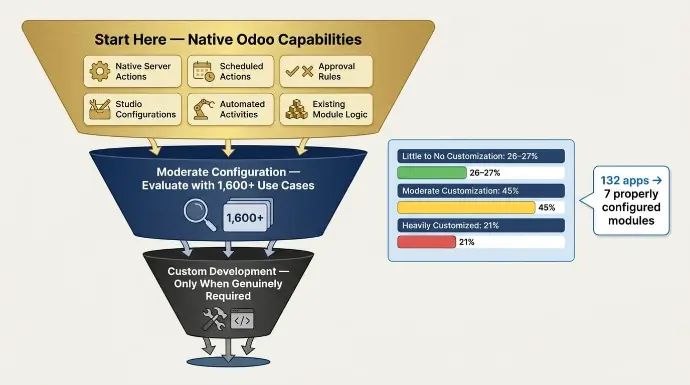
In practice, this means exhausting Odoo’s native capabilities before writing custom code. A lot of workflows can already be handled using:
- Native server actions
- Scheduled actions
- Approval rules
- Studio configurations
- Automated activities
- Existing module logic
Custom development should only happen when the business requirement genuinely can’t be solved through standard configuration.
This matters because every customization adds another dependency layer to the environment. Poorly structured module dependency chains, direct core file modifications, and undocumented Python customizations are some of the biggest reasons upgrades fail later.
We regularly inherit systems where one outdated module breaks purchasing workflows, accounting automations, or inventory routing during version upgrades because the original architecture was never built to be upgrade-safe.
Industry data reflects this balance as well:
- Around 26–27% of ERP projects are implemented with little to no customization
- Roughly 45% use moderate customization
- Around 21% become heavily customized
The problem isn’t customization itself; it’s unnecessary customization without governance.
At Cudio, we maintain a catalog of more than 1,600 business use cases, which allows us to evaluate whether a workflow truly requires custom development or if Odoo already supports it natively. In rescue environments, we’ve taken systems running 132 different apps and simplified them down to just seven properly configured modules with better operational stability afterward.
Aeromist is a good example of this approach working correctly. After replacing disconnected systems across WooCommerce, Fishbowl, and QuickBooks, their Odoo environment was built around operational simplicity first. The result was real-time inventory tracking, automated forecasting, and streamlined production workflows without creating unnecessary long-term maintenance complexity.
Read Aeromist’s Odoo Transformation with Cudio
When customization is genuinely necessary, architecture matters. We build using Odoo’s ORM inheritance model, isolated module structures, and upgrade-safe development practices instead of modifying core source files directly. That keeps future upgrades far more manageable and reduces long-term technical debt.
See How Cudio Approaches Odoo Customization
Data Migration Is Where Most ERP Damage Starts
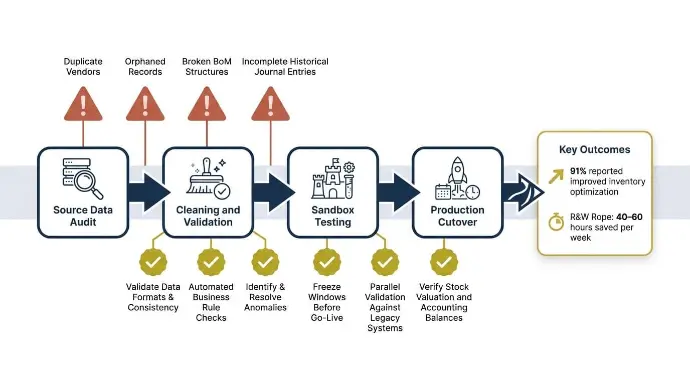
A lot of businesses think data migration is just importing records from one system into another. In reality, it’s one of the highest-risk parts of any Odoo implementation, because migrating data and cleaning it are critical steps, and bad data quality leads to inefficient operations and incorrect calculations.
Most migration problems are not caused by the import itself. They started with bad source data that nobody cleaned before the project began. Duplicate vendors, orphaned records, inconsistent product naming, broken BoM structures, and incomplete historical journal entries create problems that follow the business long after go-live.
Inventory is usually where the damage becomes visible first.
If stock valuation layers, warehouse quantities, or multi-currency mappings are inaccurate during migration, purchasing, fulfillment, accounting, and reporting all start drifting out of sync.
Poor formats, missing records, or low-quality relevant data can also compromise reports and business insights after go-live. Once that happens, teams stop trusting the system and fall back into spreadsheets and manual reconciliation workarounds.
That’s why migration planning needs operational validation, not just technical imports.
Some of the most important migration controls include:
- Cleaning duplicate vendors and customer records before import
- Validating BoM structures and inventory relationships
- Reconciling historical journal entries before cutover
- Running parallel validation against legacy systems
- Using freeze windows before go-live to reduce transaction conflicts
- Verifying essential data such as stock valuation and accounting balances before production deployment
Research consistently shows how important this stage is. Panorama Consulting’s ERP data found that 91% of businesses with mature ERP deployments reported improved inventory optimization after implementation. That kind of improvement only happens when migration data is accurate from day one.
At Cudio, we validate migrations inside sandbox environments before production rollout and build Python migration scripts for more complex environments involving intercompany accounting, multi-currency structures, and large inventory datasets. We also stay involved after go-live through stabilization monitoring because some migration discrepancies only appear once real operational volume starts flowing through the system.
R&W Rope is a strong example of what a clean migration process can accomplish. After replacing disconnected systems across QuickBooks, Fishbowl, and Shopify, they reduced administrative workload by 40–60 hours per week and saved roughly $35,000 annually by consolidating operations into one properly configured Odoo environment.
Explore How Cudio Handles Odoo Migrations
User Adoption Determines Whether ROI Ever Happens
A successful Odoo implementation isn’t just about getting the system live, but about getting people to actually use it correctly every day.
This is where many ERP projects struggle. The workflows technically work, but teams keep using spreadsheets, manual approvals, or side processes because they were never trained properly on how Odoo fits into their daily operations.
Resistance to change is also common here, especially when employees are reluctant to leave familiar systems or manual processes, which can delay adoption and reduce productivity.
That directly affects ROI.
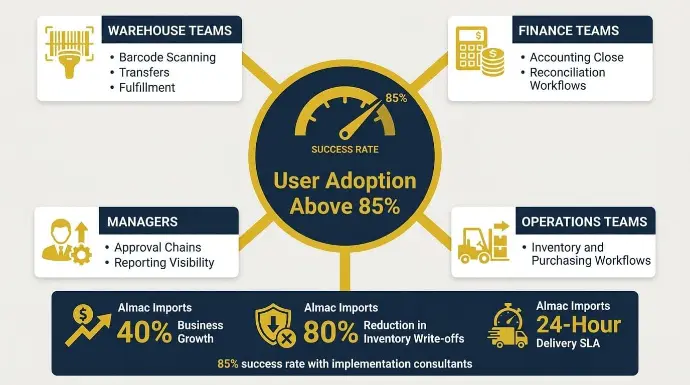
Businesses working with implementation consultants achieved an 85% success rate. Strong ERP environments also tend to maintain user adoption rates above 85%. Once adoption drops below that level, reporting accuracy, workflow consistency, and operational visibility usually start breaking down.
One of the biggest reasons adoption fails is generic ERP training.
Different teams need different workflows:
- Warehouse teams need training on barcode scanning, transfers, and fulfillment
- Finance teams need accounting close and reconciliation workflows
- Managers need approval chains and reporting visibility
- Operations teams need inventory and purchasing workflows
That user training should be hands-on during implementation.
This is why sandbox training and department-specific UAT matter so much. Teams should test real operational scenarios before go-live, not generic demos, and internal documentation should also be established so users can adapt after go-live.
At Cudio, roughly three-quarters of our team come from functional, finance, and project leadership backgrounds. We also use a super-user ownership model where department leaders help validate workflows, test approvals, and support adoption internally after rollout.
Almac Imports is a good example of this working well. After implementing Odoo with structured operational alignment, they achieved:
- 40% business growth
- 80% reduction in inventory write-offs
- 24-hour delivery SLA without adding headcount
Those results only happen when teams consistently use the system properly.
I Want Odoo Connected Properly Across My Operations
Post-Go-Live Governance Is What Prevents the “Year-2 Collapse”
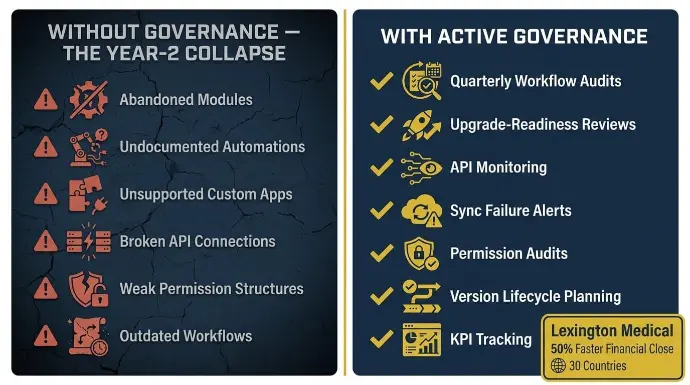
A lot of ERP projects look successful during the first few months after go-live, but without post implementation support, small issues can turn into major disruptions when teams treat launch as the finish line. Problems usually appear later when nobody actively owns the system anymore.
This is what causes the “Year-2 collapse.”
Workflows stop getting updated. Automations break quietly. Integrations fail without alerts. Departments slowly return to spreadsheets and manual workarounds because the system no longer reflects real operations.
Over time, configuration drift starts building across the environment.
We commonly see:
- Abandoned Odoo modules
- Undocumented automations
- Unsupported custom apps
- Broken API connections
- Weak permission structures
- Outdated workflows after operational changes
Good governance prevents those problems before they spread.
That usually includes:
- Quarterly workflow audits
- Upgrade-readiness reviews
- API monitoring
- Sync failure alerts
- Permission audits
- Version lifecycle planning
- KPI tracking and regular reports to measure effectiveness and identify improvement areas
Ongoing support and maintenance are needed to troubleshoot issues, optimize workflows, and adjust system settings after launch.
Lexington Medical is a strong example of long-term Odoo governance done correctly. Their environment scaled across operations in 30 countries while reducing financial close time by 50% and significantly lowering reporting errors, all without adding extra software layers.
At Cudio, we stay involved long after go-live through ongoing support, upgrade planning, and operational support in the post implementation phase.
That includes continuous support for troubleshooting and performance optimization, with ongoing assessment that supports continuous improvement as business needs change. Clients also get real-time visibility into project tracking and timesheets, so issues are addressed early instead of turning into larger operational problems later.
I Want Odoo Connected Properly Across My Operations
What a Realistic Odoo ROI Timeline Actually Looks Like
One of the biggest misconceptions around ERP projects is expecting ROI immediately after go-live.
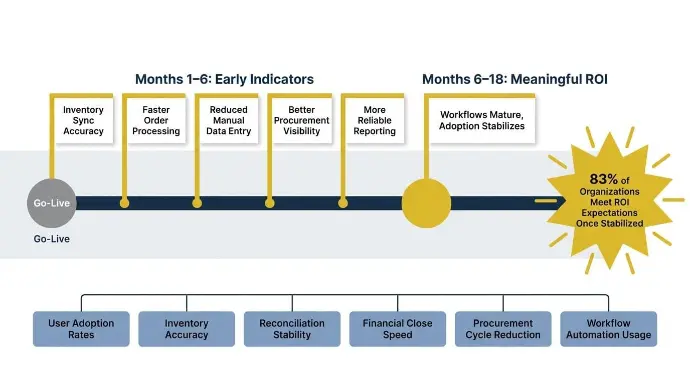
In reality, most businesses start seeing meaningful ROI between 6 to 18 months after implementation, depending on data quality, rollout complexity, user adoption, and operational discipline after launch.
Research from Panorama Consulting found that 83% of organizations that performed ROI analysis before implementation said their projects eventually met ROI expectations once the system stabilized. The keyword there is stabilized.
ERP ROI usually appears in stages, not all at once.
Early improvements typically show up in:
- Inventory sync accuracy
- Faster order processing
- Reduced manual data entry
- Better procurement visibility
- More reliable reporting
Larger operational gains usually come later once workflows mature and adoption stabilizes across departments.
Some of the most important leading indicators to track early include:
- User adoption rates
- Inventory accuracy
- Reconciliation stability
- Financial close speed
- Procurement cycle reduction
- Workflow automation usage
These indicators usually tell you much earlier whether the implementation is moving in the right direction before major cost savings become visible on paper.
For example, if inventory syncs are still failing, reconciliation issues continue appearing, or departments are bypassing workflows manually, the environment is not fully stabilized yet, regardless of what the dashboard says.
Common Odoo Implementation Mistakes That Quietly Destroy Projects
Most ERP failures do not happen because of one massive technical issue. They usually happen through smaller operational mistakes that slowly compound over time.
Here are some of the most common ones we see.
Mistake | What Happens Later |
Departments bypassing workflows | Teams return to spreadsheets and manual approvals, which damages reporting accuracy and operational visibility |
Undocumented customizations | Upgrades become risky because nobody fully understands the dependency chains or module behavior |
Weak internal ownership | Workflow issues stay unresolved and configuration drift builds over time |
Overreliance on spreadsheets after go-live | Usually signals low system trust, poor training, or broken operational workflows |
No rollback planning during deployment | Small deployment failures can create major operational downtime |
Choosing a partner based only on price | Weak architecture, rushed testing, and unsupported customizations often create expensive rescue work later |
Conclusion
A successful Odoo implementation isn’t just about getting the system live. Long-term success comes from clean migration planning, stable architecture, strong user adoption, and operational governance after go-live. Businesses that treat ERP as an operational system instead of a one-time software deployment usually see the strongest long-term ROI.
At Cudio, we’ve completed 62+ successful implementations and rescued 32+ broken Odoo environments. That experience shapes how we approach every rollout, upgrade, and stabilization project we take on.
I Want an Odoo Implementation Built for Long-Term Stability
Frequently Asked Questions
Still weighing your Odoo rollout strategy? These are the questions we hear most before implementation starts.
How long does an Odoo implementation usually take?
Most small to mid-sized Odoo implementations take around 3–6 months. More complex environments involving manufacturing, integrations, or multi-company accounting usually take longer, depending on rollout scope and operational complexity.
Should businesses choose Odoo Community or Enterprise?
Odoo Enterprise is usually the better fit for growing businesses needing advanced accounting, automations, integrations, and multi-company functionality. Community can still work well for simpler operational environments.
How many modules should go live first?
Most businesses should start with core operational modules first, usually Inventory, Purchasing, Sales, and Accounting. Rolling out too many modules simultaneously increases operational risk significantly.
What causes most Odoo implementations to fail?
Most failures come from rushed planning, poor migration quality, excessive customization, weak ownership, and low user adoption after go-live.
Can Odoo be implemented without a partner?
Technically yes, but implementation risk becomes much higher without ERP deployment experience. A certified Odoo partner has received Odoo training and approval, which helps them follow implementation best practices and reduce risk.
How much customization is too much in Odoo?
Customization becomes risky once businesses start heavily modifying workflows before fully evaluating Odoo’s native capabilities, especially when teams skip thorough testing and user acceptance testing before launch. It helps confirm configured workflows operate without errors and catch system errors or inefficiencies prior to go-live. Excessive undocumented customizations are one of the biggest causes of upgrade and maintenance problems later.