


If you're running Odoo 16, Odoo 17, or Odoo 18 in 2026, an Odoo 19 upgrade means moving your existing Odoo system to version 19 while keeping your data, users, workflows, and installed modules intact as part of a controlled transition. For businesses managing ERP operations with customizations, integrations, and data concerns, the real question is not just whether to upgrade, but whether your setup is ready for it.
The honest answer is that there's no single right move for every business. Whether upgrading to Odoo 19 makes sense right now depends on your current version, the complexity of your setup, the state of your data, your integrations, your budget, and your operational calendar. That decision matters because older versions eventually lose support and compatibility, while Odoo 19 brings major performance gains, AI-assisted workflow improvements, and feature updates that can reduce manual work and improve day-to-day efficiency. Upgrading without a proper audit, compatibility review, and testing plan tends to create more problems than it solves.
That’s why we put this guide together. It covers Odoo 19’s key features, upgrade timing and readiness, the pros and cons, common risks, who should upgrade now or wait, the main cost and timeline factors, and the preparation checklist to use if you decide to move forward.
Key Takeaways
Odoo 19 has been live since September 2025 and is now three point releases deep (19.1, 19.2, 19.3), each adding real functionality rather than just bug fixes.
The upgrade is built around three themes: AI-first workflows across accounting, CRM, and inventory; roughly 40% faster performance; and deeper industry-specific packages.
Whether to upgrade now depends more on your data quality, customization load, and integration health than on how many new features Odoo 19 has.
Custom modules built for older versions don't automatically work in Odoo 19; each one needs review, testing, and often a rewrite before migration.
A structured audit before you touch production is the single biggest factor separating a clean upgrade from a costly one.
What Is an Odoo Upgrade?
An Odoo upgrade means moving your existing system from one version to a newer one while preserving your data, workflows, users, installed modules, and business continuity.
It's not a fresh installation. The goal is to carry everything that matters in your current setup into a more current, capable version of the platform.
In practice, that process involves more than flipping a switch.
A proper upgrade includes auditing your current environment, migrating your database, reviewing custom modules for compatibility, testing workflows in a staging environment, and training users before go-live.
The complexity of that process scales directly with:
How customized your system is
How many third-party integrations you rely on
How clean your data is going into the migration
Done well, an upgrade strengthens your ERP foundation. Done without preparation, it can disrupt operations, break integrations, and create data problems that take months to untangle.
"ERP transformations are difficult. We move entire operating systems into a single source of truth. There will be surprises, but those surprises shouldn't be your financial burden." — Gordon Cummins, CEO of Cudio
Why Odoo 19 Matters in 2026
Odoo 19 is the current stable release for businesses evaluating their ERP setup in 2026.
For companies still running older versions, the gap between their current environment and what Odoo 19 offers is widening in ways that have real operational consequences.
Older versions eventually lose official support, meaning security patches, bug fixes, and compatibility updates stop arriving.
Odoo's own upgrade documentation confirms that each major version gets three years of active support, plus roughly two additional years to complete an upgrade before that window closes for good.
As third-party apps and integrations move forward, older Odoo versions become harder to maintain without accumulating technical debt, and the longer a business waits, the more complex and costly the eventual upgrade becomes.
Beyond risk management, Odoo 19 brings meaningful improvements across usability, finance, sales, inventory, and automation that translate into tangible workflow gains for most businesses. The case for upgrading isn't just about staying current.
It's about getting more out of the platform you've already invested in.
Key Odoo 19 Features Businesses Should Know
Odoo 19 delivers improvements across several core business areas, and Odoo itself frames the release around three themes: AI-first workflows, faster performance, and deeper industry packages.
Rather than treating this as a feature checklist, it's worth understanding which improvements are most likely to affect your day-to-day operations.
Usability and Interface
The Odoo 19 interface brings a cleaner, more responsive navigation experience, a stable dark mode, and mobile workflows optimized for tasks like approving purchase orders, logging timesheets, and updating CRM opportunities from a phone. Users who've been working around interface friction in older versions will notice the difference quickly.
Accounting and Finance
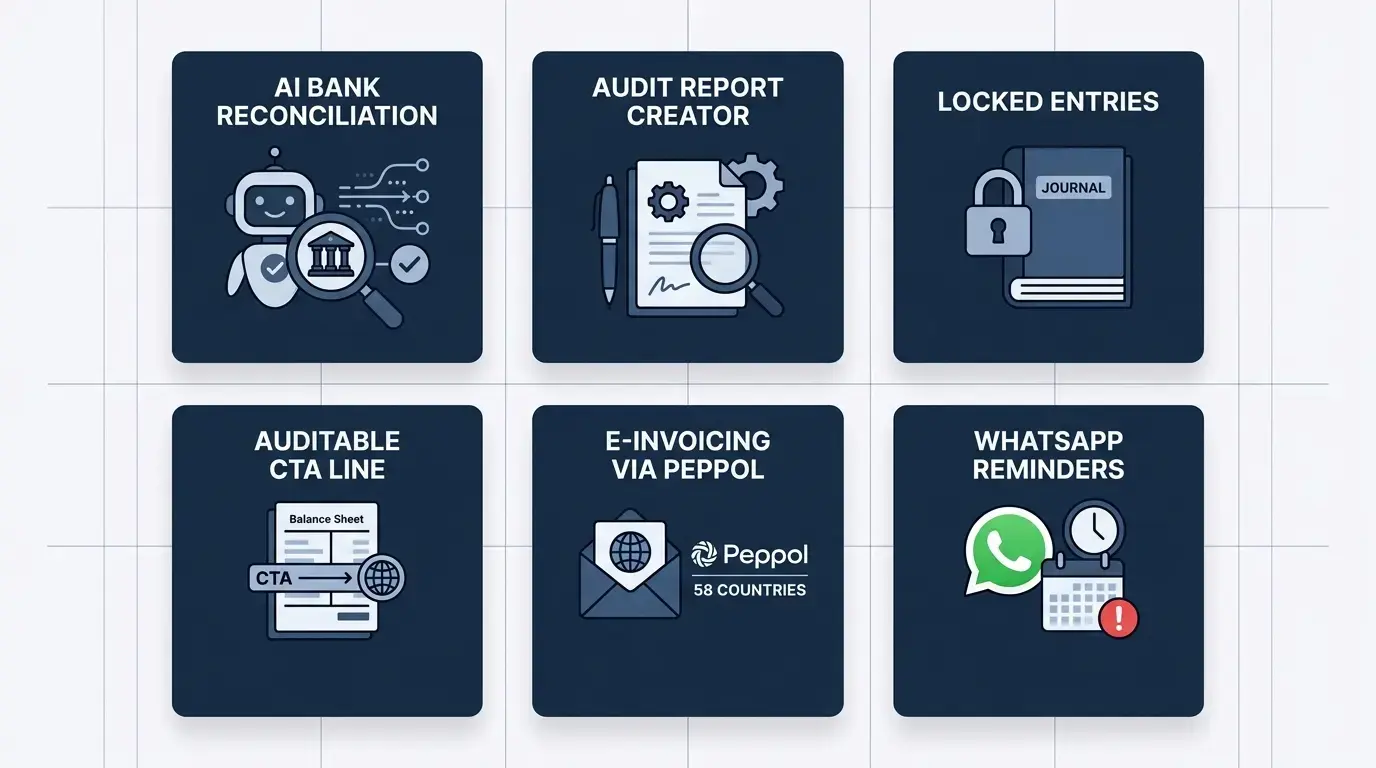
This is where Odoo 19 invests the most. Bank reconciliation has been rebuilt around AI: The system reads bank statements, proposes matching entries, and lets accountants correct discrepancies manually rather than building every match by hand.
An audit report creator compiles accounting reports, legal texts, and signatures into a single downloadable PDF, pulling directly from the Documents app.
Locked accounting entries are new too: once an accountant reviews and approves an entry, non-accountants can no longer change it, which matters if you've ever had a closed period quietly re-opened by someone outside finance.
The 19.3 release added another layer on top of this, including an auditable cumulative translation adjustment line on the balance sheet to automatically reconcile discrepancies from different exchange rate types.
Odoo 19 also extends compliant e-invoicing to 58 countries through Peppol, and adds WhatsApp-based reminders for overdue invoices alongside a country-by-country tax calendar.
Sales and CRM
CRM lead assignment is now rules-based and AI-supported, with probability scoring on each lead and explanations for why a deal is likely (or unlikely) to close.
Business card scanning generates new leads directly, and AI drafts reply suggestions and chatter summaries to speed up handoffs between reps.
On the sales side, quoting supports sections and subsections for cleaner proposals, and online down payment links let a client confirm an order the moment they pay through the portal.
eCommerce and Website
Odoo 19 brings SEO-optimized product pages built for rich search snippets, Google Merchant Center integration, and improved Click & Collect flows. For businesses running Odoo-powered storefronts, these changes have direct customer-facing impact rather than sitting purely in the back office.
Inventory and Operations
Inventory forecasting is now truly predictive. The engine uses historical consumption patterns, seasonal trends, and supplier lead times to recommend reorder points automatically instead of relying on a planner's gut feel.
The barcode app has been reworked with batch transfers and cycle counts that run during normal operations rather than requiring a full stoppage, and a new graphical traceability view follows a lot or serial number from receipt through production to delivery.
Manufacturing gets its own headline change with a redesigned Kanban view where each card shows scheduled week, component availability, active work center, and remaining time at a glance. This is alongside a cost nature breakdown that shows the share of costs on a quotation or across all sales orders on a project.
Documents, Sign, and Productivity
The Documents and Sign modules are more tightly integrated with the rest of the platform.
Files can be inserted anywhere in Odoo using a slash command, multi-document envelopes let you upload several PDFs and bundle them into a single signing request, and sign requests can go out over WhatsApp where that's the more natural channel for a client.
AI and Automation
AI shows up as connective tissue across nearly every module above rather than as a single standalone feature, tying together lead scoring in CRM, reconciliation suggestions in accounting, demand forecasting in inventory, and AI-generated pivot tables and charts in the spreadsheet and reporting tools. Typing a plain-language request produces a working chart instead of building one field by field.
When Is the Right Time for an Odoo Upgrade in 2026?
Timing an Odoo upgrade well is just as important as deciding to upgrade at all. Moving too early, before a release has stabilized, or at the wrong point in your business calendar, can turn a manageable project into a costly disruption.
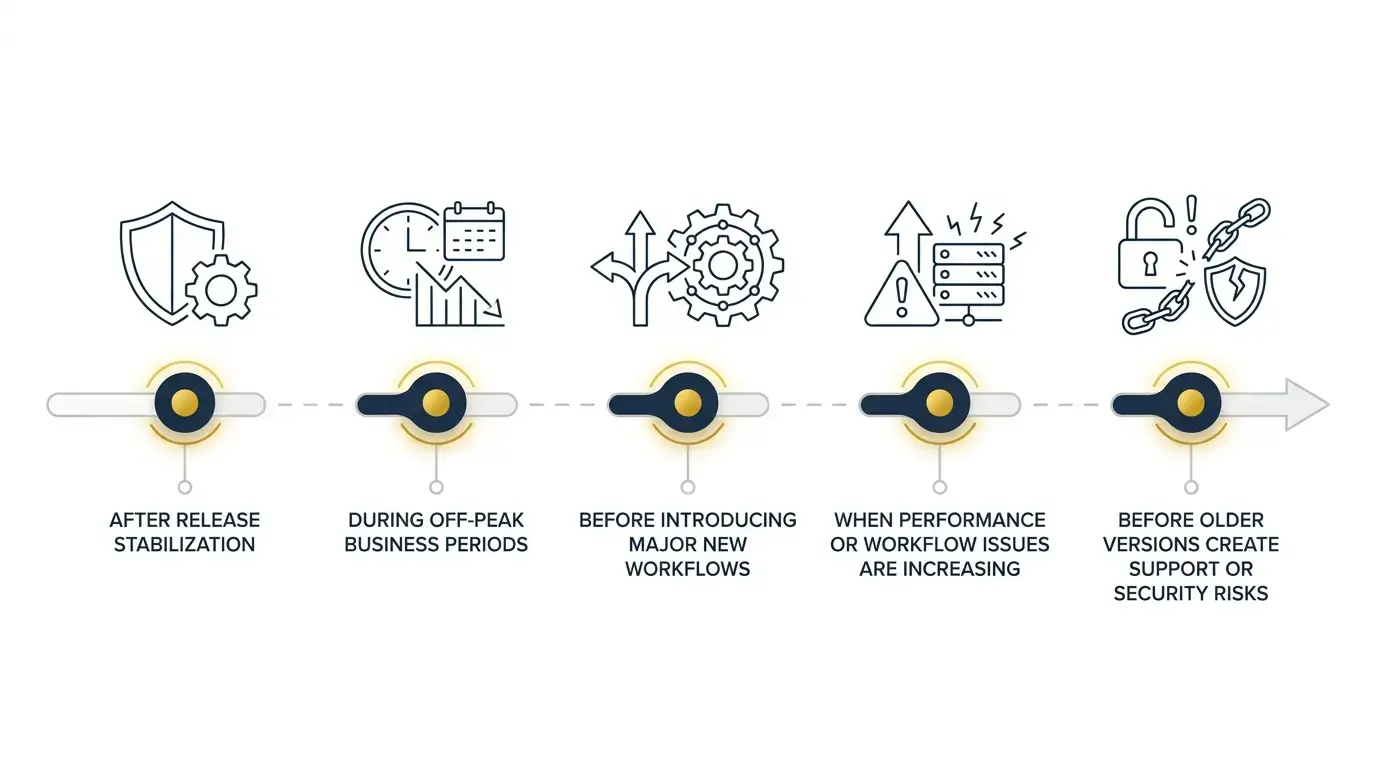
Here are the conditions that typically signal good timing:
After release stabilization: New Odoo versions benefit from a settling-in period; early adopters sometimes hit bugs that get resolved in the following point releases. With 19.1, 19.2, and 19.3 already shipped, Odoo 19 has had more than half a year to stabilize, which is a meaningfully different risk profile than upgrading the week a major version launches.
During off-peak business periods: Avoid upgrading during your busiest seasons. For eCommerce or inventory-heavy businesses, upgrading during a peak sales period is a real operational risk. Schedule upgrades during slower months when your team has capacity to test, train, and absorb disruption.
Before introducing major new workflows: If you're planning to add new modules, expand to new markets, or restructure operations, upgrading first gives you a cleaner foundation to build on.
When performance or workflow issues are increasing: If your current version is creating bottlenecks or reliability problems, those issues won't resolve themselves. A properly executed upgrade is often the most efficient fix.
Before older versions create support or security risks: As versions age out of official support, the risk profile of staying on them increases. Proactive upgrades are almost always less disruptive than reactive ones.
Who Should Upgrade to Odoo 19?
Not every business is in the same position, but some situations make upgrading a clear priority. You're a strong candidate if:
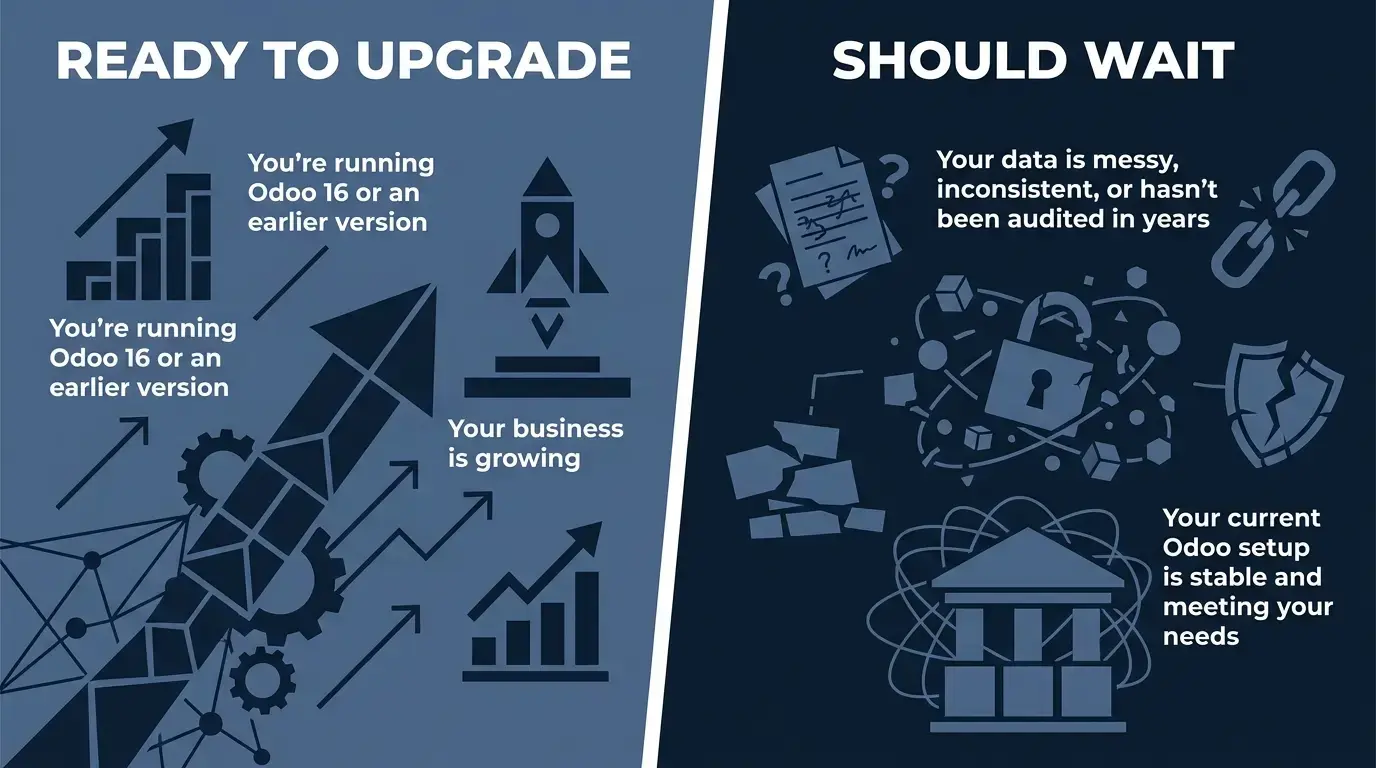
You're running Odoo 16 or an earlier version, and your current setup is increasingly difficult to maintain
Your team relies on manual workarounds because your current version lacks features Odoo 19 now handles natively, particularly around AI-assisted reconciliation and forecasting
Your reporting is unreliable or requires significant manual effort to produce accurate outputs
You have modules or integrations that are no longer supported on your current version
Your business is growing, and your current setup is struggling to scale with it
You're planning a significant operational change, such as adding a new business unit, expanding eCommerce, or restructuring finance workflows, and want a modern foundation before you build
Who Should Wait or Plan First?
Upgrading isn't always the right immediate move. Some businesses are better served by pausing, planning, or cleaning up their current environment first. Consider waiting if:
Your data is messy, inconsistent, or hasn't been audited in years. Migrating bad data into a new version doesn't fix the underlying problem; it carries it forward, and it does so into a system where AI features are now acting on that same data with less manual double-checking than before.
You have heavy customizations that haven't been reviewed for compatibility with Odoo 19. Untested custom modules are one of the most common causes of upgrade failures.
You have broken or poorly documented integrations with third-party systems. These need resolving before migration, not after.
Your current Odoo setup is stable and meeting your needs. If it's working well and your version isn't yet approaching end-of-support, waiting for the next release cycle can be a reasonable choice.
Your team doesn't have the capacity to absorb an upgrade right now. User adoption is a real factor, and an upgrade that goes live without adequate training tends to underperform.
If any of these apply, the right first step is an honest audit of your current system, not an upgrade timeline.
Pros of an Odoo 19 Upgrade
When the timing and preparation are right, upgrading delivers real business value. Benefits of upgrading to Odoo 19include:
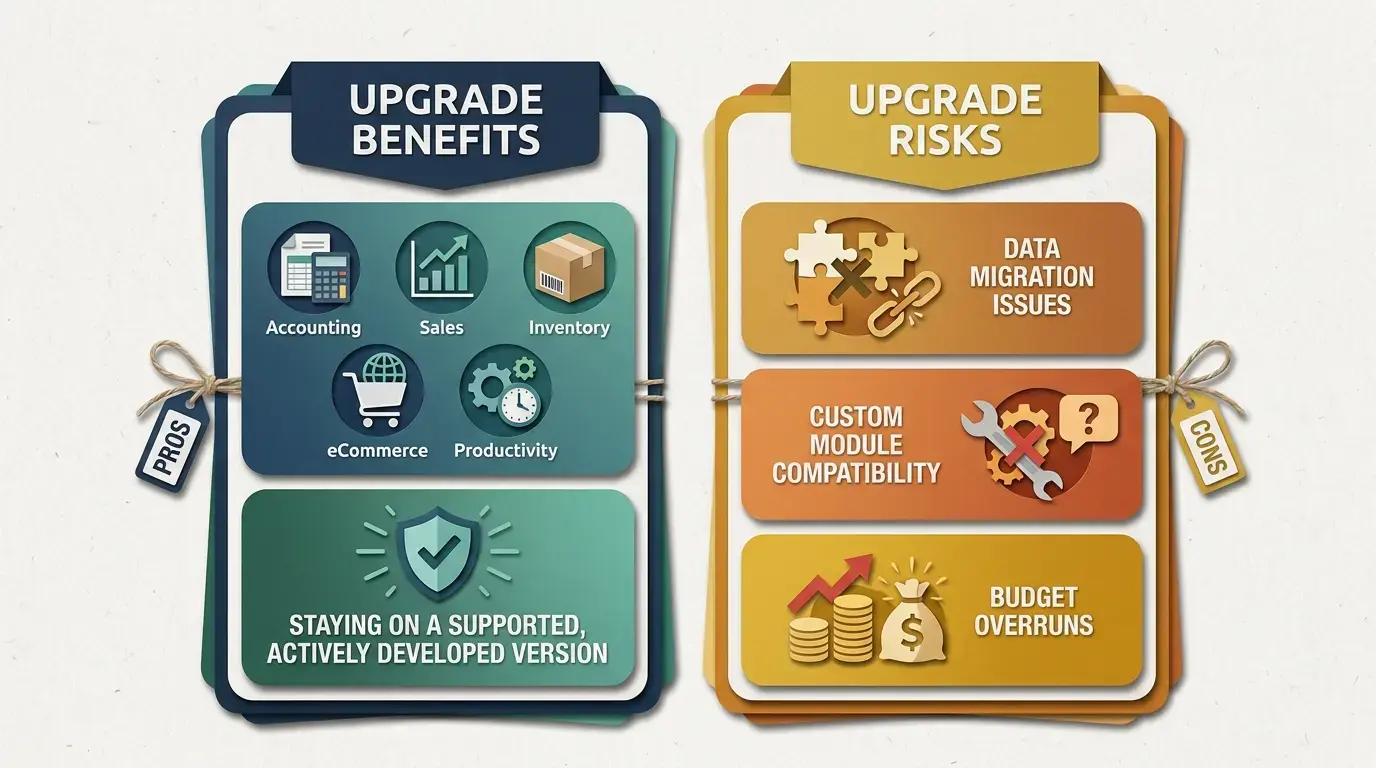
Access to current features across accounting, sales, inventory, eCommerce, and productivity that older versions simply don't have
A better user experience that reduces friction and speeds up common tasks
Improved workflow efficiency through tighter module integration and less manual work
Better compatibility with newer Odoo apps and third-party tools that have moved forward with the platform
A natural opportunity to clean up outdated processes and accumulated technical debt as part of the upgrade itself
Staying on a supported, actively developed version rather than one counting down toward end-of-life
Avoiding the compounding cost of falling further behind, since every skipped version makes the eventual jump larger
Cons and Risks of an Odoo Upgrade
A well-planned upgrade significantly reduces risk, but it doesn't eliminate it. These are the challenges businesses run into most often.
Data migration issues: Moving a large or complex database between versions introduces risk. Upgrading to Odoo 19 requires comprehensive system backups before any migration starts to reduce the risk of data loss. Incomplete records, inconsistent formats, and legacy entries that were never cleaned up can cause migration errors that take real time to resolve.
Custom module compatibility: Custom modules built for older Odoo versions don't automatically work in Odoo 19. Each one needs review, testing, and often a rewrite. Skipping this step is one of the most reliable ways to break an upgrade.
Broken integrations: Third-party integrations with accounting software, logistics platforms, or payment gateways may not be compatible with Odoo 19 out of the box. These need identifying and testing before go-live.
Downtime: Even a well-managed upgrade involves some downtime. For businesses that rely on Odoo daily, that window needs careful planning to minimize impact.
Testing gaps: Insufficient staging-environment testing before go-live is a common cause of post-upgrade problems. Every critical workflow needs validation before the new version goes live.
User adoption challenges: Interface changes and new workflows require training. Teams that aren't prepared for the new environment tend to revert to workarounds or make errors that create downstream problems.
Budget overruns: Upgrades scoped without a full audit of customizations, integrations, and data complexity frequently run over budget. Realistic scoping upfront prevents surprises later.
Odoo 19 Upgrade Checklist
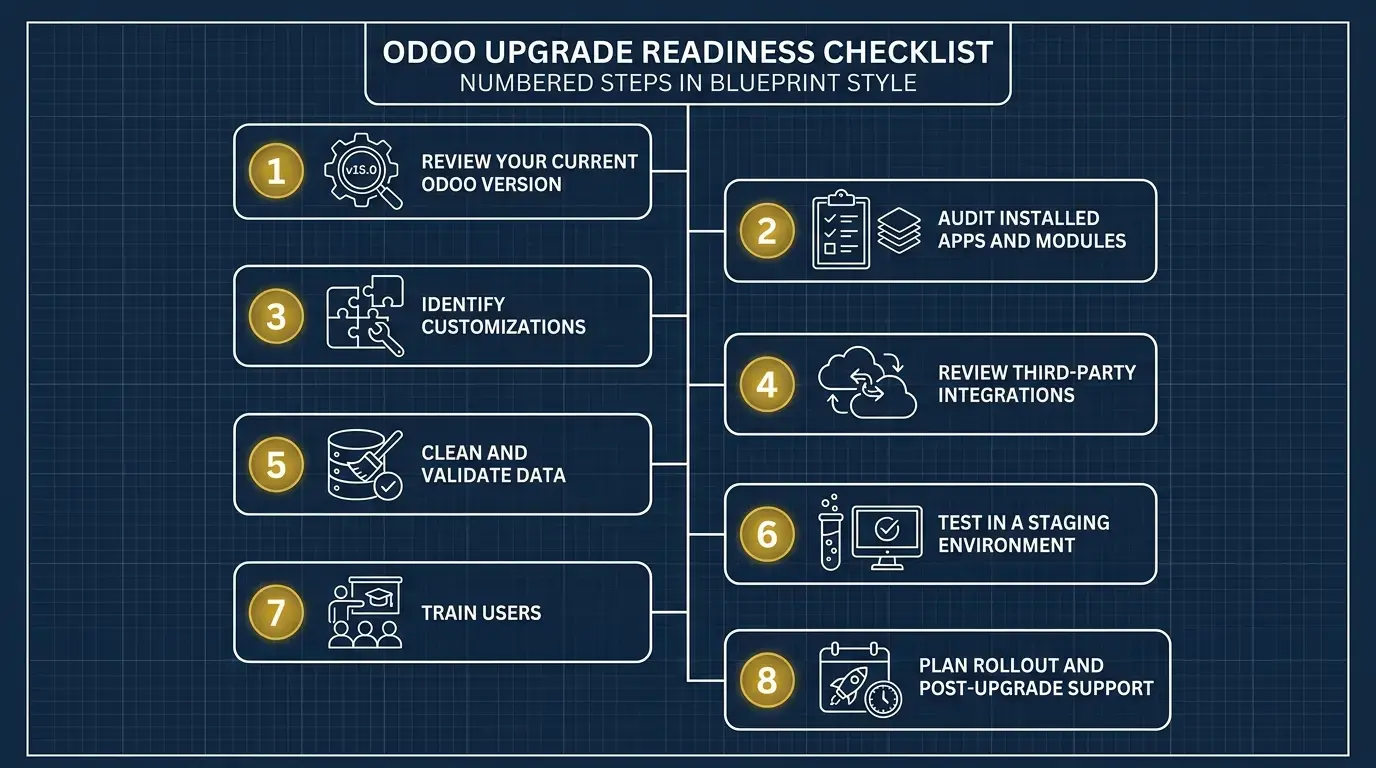
Work through each item before committing to a go-live date:
Review your current Odoo version. Confirm which version you're on and understand the upgrade path to Odoo 19.
Audit installed apps and modules. Document every module currently in use, including any that are inactive but still installed.
Identify customizations. List all custom modules, modified views, and bespoke workflows. Each one needs compatibility review.
Review third-party integrations. Map every external system connected to your instance and confirm Odoo 19 compatibility.
Clean and validate data. Audit your database for duplicate records, incomplete entries, and legacy data that should be archived or removed.
Document key workflows. Write down how critical processes currently work so they can be validated after the upgrade.
Check reporting requirements. Confirm every report your team relies on will function correctly in Odoo 19.
Test in a staging environment. Run a full migration in staging before touching production, and test every critical workflow.
Train users. Prepare your team for interface changes and new features before go-live, not after.
Plan rollout and post-upgrade support. Define who's responsible for monitoring the system after launch and how issues get escalated.
Before locking in a go-live date, every team should walk through the implementation and upgrade checklist so they can catch gaps in their own audit, the kind that don't show up until production, well before they become a problem.
Odoo 16, 17, and 18 Users: What Should You Do?
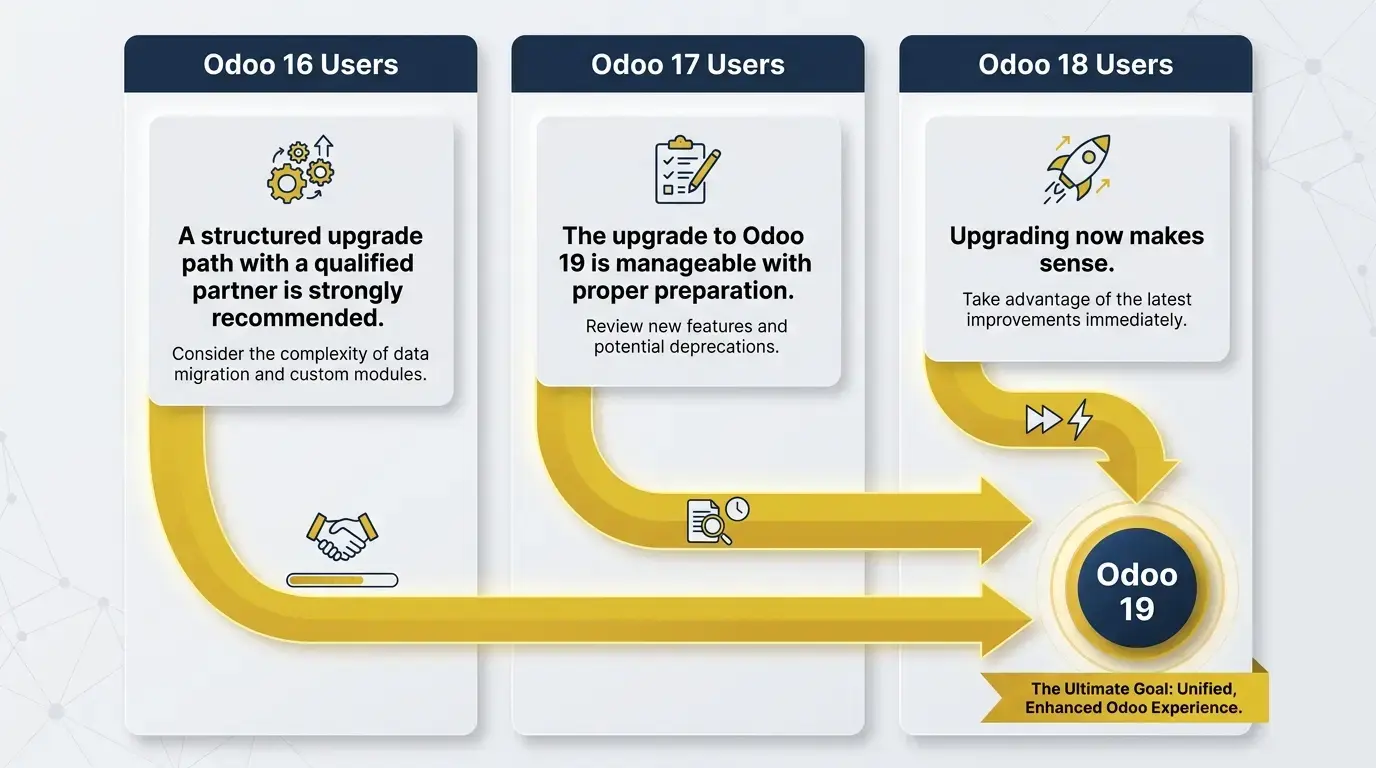
Your current version shapes how you should approach an Odoo 19 upgrade.
Odoo 16 Users
Odoo 16 is now several versions behind the current release, and every passing month adds more technical debt. The upgrade path to Odoo 19 is longer and needs more careful planning, particularly around custom modules and integrations that have had more time to diverge from current standards. A structured upgrade path with a qualified partner is strongly recommended here.
Odoo 17 Users
One version closer to current, but the same principles apply. If your setup is stable and your customizations are well-documented, the upgrade to Odoo 19 is manageable with proper preparation. If complexity has accumulated or your data hasn't been audited recently, address those issues before scheduling the upgrade.
Odoo 18 Users
You're in the most recent position before Odoo 19, which makes the decision more nuanced. If Odoo 19's features address specific pain points in your current workflows, particularly the AI-driven reconciliation and forecasting tools, upgrading now makes sense. If your setup is stable and meeting your needs, it may be worth planning a more deliberate move instead. Either way, the checklist above applies.
How Much Does an Odoo Upgrade Cost?
There's no single answer to what an Odoo upgrade costs, and any source that gives you a flat number without understanding your setup isn't giving you useful information.
The actual cost depends on several factors:
Cost Factor | What Drives the Variation |
|---|---|
Database size and complexity | Larger, more complex databases require more migration time and testing |
Hosting and edition | Community vs. Enterprise, cloud vs. on-premise, each carries different cost structures |
Number of customizations | Each custom module requires review, testing, and often rewriting |
Third-party integrations | Each integration needs compatibility verification and potentially reconfiguration |
Data cleanup requirements | Messy data requires pre-migration work that adds time and cost |
Testing scope | Thorough staging and UAT testing takes time but reduces post-launch risk |
User training | Training scope depends on team size and how much the interface has changed |
Post-upgrade support | Ongoing support after go-live is a separate cost that should be planned for |
Businesses with simple, lightly customized setups spend significantly less than those with complex integrations, heavy customizations, and large databases. Getting an accurate estimate starts with an honest audit of your current environment.
The cost of delaying too long has a real number attached to it. Staying on an outdated Odoo version costs a typical 40-user business over $110,000 across two years, once the legacy Enterprise surcharge, unsupported-infrastructure labor, and reactive fixes are all counted.
How Long Does an Odoo Upgrade Take?
Like cost, upgrade timelines vary based on the complexity of your setup. A straightforward instance with minimal customizations and clean data moves through the process relatively quickly. A heavily customized system with multiple integrations and years of accumulated data requires considerably more time.
The typical phases of an Odoo upgrade include:
Discovery and audit of the current environment
Staging environment setup and initial migration
Custom module review and rewriting where needed
Integration testing with third-party systems
User acceptance testing across critical workflows
User training before go-live
Production migration and go-live
Post-launch monitoring and support
Rushing any of these phases increases the risk of problems after go-live.
A realistic timeline built around your actual setup is worth more than an optimistic one built around a best-case scenario.
A silent test upgrade typically lasts less than 20 minutes, but a proper test upgrade does not shorten the overall project much because validation and remediation still take time.
One scheduling detail worth knowing: Odoo's own upgrade platform typically has test-database scripts ready almost immediately after a major release, but the production-ready scripts for that same version usually take three to four months to stabilize, so a realistic go-live date needs to account for that lag rather than assume day-one availability.
Why Work With an Odoo Upgrade Partner?
An experienced Odoo upgrade partner reduces risk at every stage of the process, and the value isn't just technical. It's strategic, because an experienced partner helps create a more efficient transition.
A qualified partner helps you assess your current environment honestly before committing to a timeline, identify customizations and integrations that need attention before migration, build and test a staging environment that mirrors production, catch workflow issues before they reach your live system through strict checks on workflows, integrations, and migration results, train your team on the new version before go-live, and provide support after launch when questions inevitably arise.
"I've watched brilliant CEOs tolerate a failing ERP implementation for over a year because the 'lift' to start over feels more painful than continuing to suffer." — Gordon Cummins, CEO of Cudio
Businesses that attempt Odoo upgrades without experienced support tend to underestimate the complexity of their own setups. The problems that surface after a poorly managed upgrade are almost always more expensive to fix than the cost of doing it properly the first time.
The Bottom Line
An Odoo upgrade in 2026 can meaningfully improve how your business operates, but only if the timing, preparation, and execution are right. Upgrading to Odoo 19 without a clear picture of your current environment, your customizations, your data quality, and your operational calendar is how upgrades go wrong.
The businesses that get the most out of an Odoo upgrade treat it as a planned transition rather than a rushed project. They audit before they migrate, test before they go live, and train their teams before the new version lands in front of them.
Plan Your Odoo Upgrade with Cudio
FAQs About Odoo Upgrade
Planning an Odoo upgrade? Here are quick answers to the most common questions about upgrading to Odoo 19, timelines, costs, and what to expect during the process.
What is an Odoo upgrade?
An Odoo upgrade is the process of moving your existing Odoo system to a newer version while preserving your data, users, configurations, and business workflows. Unlike a new implementation, an upgrade builds on your existing environment. It typically includes database migration, compatibility checks, testing, and user validation. The goal is to improve functionality without disrupting business operations.
Should I upgrade to Odoo 19 in 2026?
It depends. If you're running an older version and the timing and readiness factors are favorable, upgrading to Odoo 19—the latest version most businesses would typically consider in 2026—is generally a good decision, especially if you're experiencing performance, security, or feature limitations. However, businesses with extensive customizations or data quality issues should resolve those first. A readiness assessment can help determine the best timing.
Is Odoo 19 the latest stable Odoo version?
Yes. As of 2026, Odoo 19 is the latest stable release for production environments. It has received multiple point releases that improve stability, security, and functionality. While Odoo 20 is approaching, Odoo 19 remains the recommended version for businesses planning an upgrade today.
How long does an Odoo upgrade take?
An Odoo upgrade typically takes anywhere from several weeks to a few months. The timeline depends on your database size, customizations, integrations, and testing requirements. More complex environments require additional planning and validation before go-live. A thorough audit helps establish a realistic schedule.
How much does an Odoo upgrade cost?
The cost of an Odoo upgrade depends on your specific environment. Factors such as custom modules, third-party integrations, database complexity, data cleanup, whether you use Odoo Enterprise, training, and post-launch support all influence the final cost. Because every implementation is different, an accurate estimate requires a technical assessment.
Can I upgrade from Odoo 16 or Odoo 17 to Odoo 19?
Yes. You can upgrade from Odoo 16 or Odoo 17 to Odoo 19 with proper planning. Multi-version upgrades often require additional compatibility reviews, testing, and updates to custom modules. Working with an experienced Odoo partner can help reduce upgrade risks and downtime.
Can custom modules affect an Odoo upgrade?
Yes. Custom modules are one of the most common reasons Odoo upgrades become more complex. Modules built for older versions often require updates to their source code or redevelopment before they work correctly in Odoo 19. Reviewing customizations early helps avoid unexpected delays during migration.
How can Cudio help with an Odoo upgrade?
Cudio provides an Odoo upgrade service that supports every stage of the upgrade process. Our team performs readiness assessments, migration planning, custom module reviews, data migration, testing, user training, and post-launch support, with the upgrade service structured to support a successful upgrade. If your system needs stabilization before upgrading, we can also help through our Odoo Rescue services.