
Odoo vs Zoho: Best ERP Software for Your Business in 2025
Last Updated: Nov 3, 2025



Choosing the right ERP platform can feel overwhelming, mainly when your business depends on it.
A poor fit leads to clunky workflows, missed growth opportunities, and siloed data. Zoho serves over 300,000 businesses in 180 countries, offering ease and speed, while Odoo CRM delivers deep integration across operations for growing teams.
In this guide, we break down pricing, features, project management, and integration capabilities so you can confidently choose the best ERP for long-term business growth.
Key Takeaways
- Odoo offers a comprehensive ERP solution with extensive functionalities and customization, making it ideal for complex business needs. Zoho, on the other hand, serves simpler operational requirements with a strong focus on CRM.
- Pricing analysis indicates that Zoho is a more cost-effective option for smaller businesses, with a total cost of ownership ranging from $15,000 to $30,000, compared to Odoo’s $20,000 to $60,000.
- When choosing between the two, businesses should consider their operational complexity and growth potential: Odoo is tailored for scalability and customization, while Zoho is suited for straightforward implementations.
Quick Comparison: Odoo vs Zoho at a Glance
Here’s a snapshot of how Odoo and Zoho stack up. Both offer powerful ERP solutions, but their strengths suit different business needs. Use this quick overview to spot which platform aligns best with your goals.
Category | Odoo ERP | Zoho ERP Suite |
Best For | Full-scale ERP across departments and industries | Simple CRM-first operations and basic ERP needs |
Business Size | Medium to large businesses with complex workflows | Startups and small to mid-sized teams |
Customization | High customization through open-source architecture | Limited customization depending on plan |
Ease of Use | Powerful but requires training and onboarding | Intuitive and easy to set up |
Pricing Range | $20,000 to $60,000+ over five years | $15,000 to $30,000+ over five years |
Deployment Options | Available on cloud and on-premise | Cloud-based only |
Use this snapshot to quickly assess which platform may fit your business before diving deeper.
Overview of Odoo and Zoho
Zoho is a cloud-based business software suite that offers over 50 integrated applications across sales, marketing, finance, HR, operations, and support. It is designed for ease of use, fast setup, and affordability. This makes it a strong choice for small to mid-sized businesses looking to streamline operations without heavy IT involvement.
At its core is Zoho One, a bundled solution that serves as a complete operating system for business. It combines tools like Zoho CRM, Books, Inventory, Projects, Recruit, and Marketing Automation.
Zoho prioritizes:
- Ease of use and fast onboarding
- Modular access to tools within a cohesive interface
- Seamless native integrations between apps
- A growing marketplace for extensions and add-ons
- Cloud-first flexibility, especially for remote teams
Businesses that need essential ERP functions like CRM, accounting, HR, and inventory in one place often choose Zoho for its simplicity and unified experience.
Odoo is a customizable, open-source ERP platform with more than 40 business applications. These span sales, finance, manufacturing, HR, supply chain, marketing, and productivity. With both a free Community version and a paid Enterprise version, Odoo can scale with your business.
Its modular architecture lets companies choose only the apps they need. Popular modules include Odoo CRM, Accounting, Manufacturing, Inventory, Website Builder, and Marketing Automation.
Odoo stands out for:
- High levels of customization through its open-source structure
- Strong integration between modules, especially in operations and finance
- Support for multi-company, multi-location, and multi-currency setups
- Flexible deployment options, including both cloud and on-premise
- An active developer ecosystem and app store
For companies with complex workflows, compliance needs, or long-term growth plans, Odoo offers the flexibility to build a fully tailored ERP system.
Can Odoo work for your specific setup? Take a look at Cudio’s Odoo ERP Services to see how we help businesses build custom solutions that scale with them.
Learn More About Our Odoo Migration Services Today!
Pricing Comparison
Zoho pricing follows a tiered, per-user pricing model. A free edition is available for up to 3 users with basic CRM features. Paid plans scale with features:
Plan | Monthly Price per User | Includes |
Free | $0 | CRM basics, 3 users |
Standard | $14 | Custom modules, workflows, sales forecasting |
Professional | $23 | Blueprint, inventory, Google Ads integration |
Enterprise | $40 | AI assistant, sandbox, multi-user portals |
Ultimate | $52 | Advanced analytics, unified business insights |
Zoho One, the all-in-one suite, starts at $37/user/month and includes over 50 business apps.
Odoo uses modular pricing. Businesses pay for users and the apps they use. There’s a free Community edition, and paid tiers include:
Plan | Monthly Price per User | Includes |
One App Free | $0 | One app, unlimited users |
Standard | $7.25 | All apps, cloud hosting, support |
Custom | $10.90 | All apps, multi-company, APIs, Odoo Studio |
Over five years, Zoho’s total cost of ownership ranges from $15,000 to $30,000. Odoo typically ranges from $20,000 to $60,000 depending on user count, customization, and hosting.
Core Features
Below, we break down their capabilities in key areas to help you better understand which solution aligns with your needs.
CRM and Sales Tools
Zoho CRM is built with usability in mind. It offers an open source platform, multichannel communication (email, chat, social), sales automation, forecasting, and AI-powered insights through its assistant, Zia. For most SMBs, it delivers enough functionality to manage pipelines, engage leads, and drive revenue.
Odoo includes CRM as one of its many apps, tightly integrated with sales, inventory, and accounting. It supports lead scoring, activity tracking, and reporting, and is especially useful when sales data needs to flow into other systems, such as invoicing or order fulfillment.
For teams that need a lightweight CRM with fast onboarding, Zoho is often a better fit. If your sales process is tightly tied to other operations, such as stock or billing, Odoo offers better cross-module integration.
Marketing Automation and Workflows
Zoho provides a suite of marketing tools designed for ease and integration across channels. Its apps include email campaigns (Zoho Campaigns), marketing automation, webinars, social media management, surveys, landing page builders, and website optimization. These tools work together to support multichannel lead generation with simple automation flows. Teams can build campaigns, segment contacts, track engagement, and score leads, all within a user-friendly interface.
Odoo, while also offering email marketing and automation, extends marketing deeper into operational workflows. Its tools allow businesses to create campaigns that are dynamically triggered by sales activity, inventory levels, customer status, or behavioral data. Marketing activities can be linked directly to backend modules like POS, eCommerce, or accounting. Odoo also includes SMS marketing, event management, and detailed performance tracking, making it easier to run campaigns that reflect real-time business context.
While Zoho excels at front-end marketing execution and is ideal for companies focused on customer acquisition, Odoo stands out for businesses that want their marketing closely aligned with supply chain, sales operations, or product availability. It supports a more holistic, operations-driven marketing strategy.
Inventory, E-commerce, and Manufacturing
Zoho Inventory is ideal for small to mid-sized businesses with basic stock needs. It supports order tracking, shipping, and simple warehouse management. It integrates with other Zoho apps and popular eCommerce platforms like Shopify and Amazon.
Odoo Inventory is more advanced. It handles multi-warehouse setups, barcoding, reordering rules, drop shipping, serial numbers, and batch tracking. It’s built for businesses with complex supply chains or high-volume operations.
If your business relies heavily on inventory or logistics, Odoo offers greater depth and control. Zoho suits simpler workflows where speed and ease matter more than depth.
Companies operating across multiple industries often choose Odoo to support both operational depth and future scale. A knowledgeable Odoo partner, such as Cudio, can help you tailor modules to match specific logistics or production demands.
Accounting and Finance
Zoho Books is a robust cloud-based accounting system covering invoicing, payments, bank reconciliation, and tax compliance. It's well-suited for small businesses that need accurate, compliant bookkeeping.
Odoo Accounting includes double-entry accounting, real-time bank syncing, automated reconciliation, and multi-company support. It integrates seamlessly with sales, purchase, and inventory modules for complete financial visibility.
Zoho Books is ideal for teams with basic to moderate finance needs. Odoo offers better scalability for growing companies or those managing complex financial workflows across multiple entities.
Project and Task Management
Zoho Projects is a full-featured project management tool offering Gantt charts, time tracking, task dependencies, and integrations with other Zoho apps.
Odoo’s project app is tightly connected to timesheets, helpdesk, and invoicing. It's beneficial for service-based businesses that bill by the hour or by task completion.
Zoho Projects is best for general-purpose task management. Odoo is better suited for businesses that need projects tied directly to billing, HR, or client-delivery workflows.
If you’re unsure which direction to take or need a roadmap to scale your systems with confidence, the team at Cudio is happy to help.
Integration Capabilities
Odoo and Zoho both offer strong integration options, but they serve different needs.
Zoho is designed for seamless internal integration across its 50+ apps. Tools like CRM, Books, Projects, and Campaigns work together automatically, making it easy to stay within one ecosystem.
For third-party tools, Zoho uses Zoho Flow, a no-code automation builder that connects with over 200 apps, including Slack, Shopify, and Google Workspace. While this works well for standard tools, Zoho can be limited when connecting with more advanced or niche platforms.
Odoo takes a more open approach. Its platform supports deep customization through a powerful API and a large App Store with thousands of modules. Businesses can also build their own connectors on different apps, giving them full control over how systems integrate.
If you want quick, no-code integrations within a single suite, Zoho is a strong option. If your business requires flexible, complex connections or custom workflows, Odoo is the better fit.
Customization Options

Customization is one of the most significant differences between Odoo and Zoho.
Zoho offers moderate flexibility through settings, custom fields, and automation tools like Blueprint and CommandCenter. In higher-tier plans, users can also create custom functions and use APIs to extend workflows. For many small businesses, these tools are more than enough to tailor Zoho to their needs.
However, Zoho is still a closed-source platform, which means you're limited to what the platform allows. It works best for teams that want standard features with a few light modifications.
Odoo, on the other hand, is built for customization. Its open-source structure allows businesses to modify existing apps or make new ones from scratch. With tools like Odoo Studio and full developer access, companies can create workflows that mirror their exact processes.
This makes Odoo a better fit for businesses with unique operations, industry-specific needs, or long-term scaling plans. Whether it's adjusting data models, redesigning workflows, or building custom dashboards, Odoo gives you complete control.
Scalability and Growth
Odoo’s modular design enables businesses to add or remove applications as their needs evolve. Its high scalability makes it suitable for a diverse range of organizations, from small startups to large corporations. Odoo supports complex workflows across industries, providing a robust solution as businesses expand.
Zoho’s suite of applications adjusts to increased demands as businesses expand. However, its scalability is more limited than Odoo’s, which supports businesses of all sizes and complex workflows. Evaluating the scalability options of each platform is crucial for long-term success.
Implementation Time and Complexity
Zoho offers several advantages that contribute to a more straightforward and quicker implementation:
- Straightforward features and intuitive design result in lower implementation times.
- Its SaaS model presents lower implementation risk, making it attractive for quick deployment.
- Simplicity and ease of use further simplify the implementation process.
In contrast, Odoo’s implementation can take longer due to its extensive customization options, which add complexity and the potential for delays, thereby steepening the learning curve. Successful Odoo implementations need investment in user training and adoption programs to mitigate high ERP failure rates.
While this adds to the initial implementation time, the long-term benefits of a highly customized and flexible ERP system can outweigh the initial investment.
User Experience and Interface
Both Odoo and Zoho offer intuitive user experiences that enhance usability for diverse employee and customer needs. Users appreciate Odoo’s interface for its intuitive navigation and ease of customization, though it can be overwhelming for some due to its extensive feature set.
Zoho’s user interface is considered user-friendly, enabling users to set up and automate workflows quickly. However, some users note inconsistency across different applications.
Overall, Zoho often appeals to small to mid-sized organizations for its quick implementation and ease of use.
Customer Support and Community
Odoo provides community support through forums and user and developer contributions, offering free access to help. Commercial support is available to users with paid plans, ensuring enhanced assistance and ongoing support. This combination of community and commercial support provides a robust support system for Odoo users.
Zoho’s commercial support includes premium options with dedicated onboarding specialists and a Technical Account Manager for enterprise support. Like Odoo, Zoho also offers community support options for users seeking assistance. However, Zoho’s premium support options can add value for businesses that require dedicated support.
Industry Use Cases
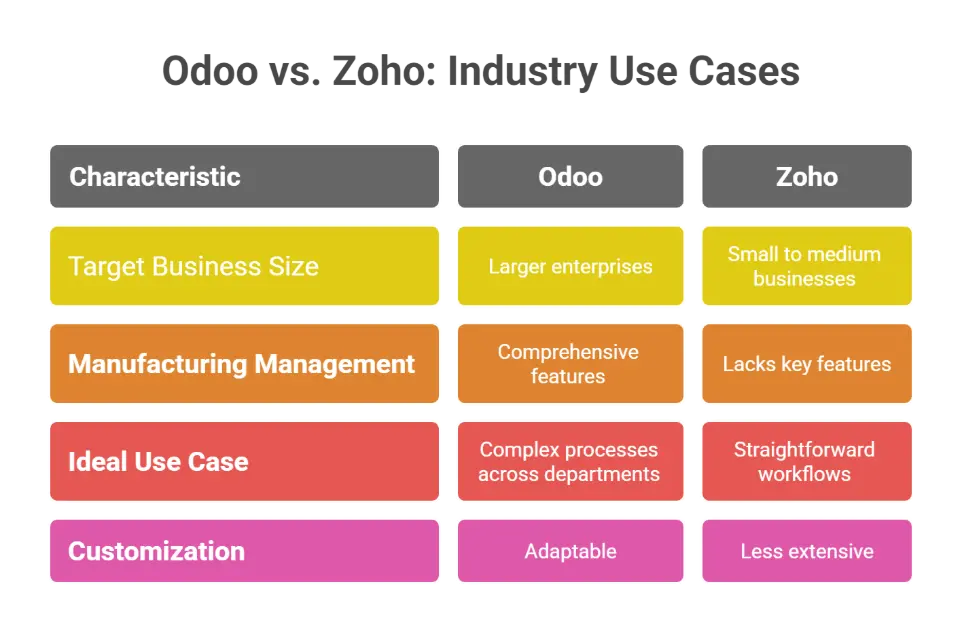
Odoo is frequently used in:
- Retail
- E-commerce
- Manufacturing
- Inventory management
- Production scheduling
Its specialized modules are designed for end-to-end automation in sectors like manufacturing and e-commerce. Larger enterprises benefit from Odoo’s ability to manage complex processes across departments.
Zoho is primarily tailored for small to medium-sized businesses with simpler processes. It lacks key features for comprehensive manufacturing management, such as master production scheduling and repair management.
Odoo’s adaptability and comprehensive features make it suitable for a wide range of industries. Zoho’s simplicity and focus on CRM make it a better fit for businesses with less complex operational needs.
Strategic Considerations for Business Leaders
Organizations should assess their long-term growth potential and how each platform can adapt to future business needs when evaluating Odoo and Zoho. Many brands struggle with the efficiency of their accounting software, especially its ability to scale as transaction volumes increase with company growth.
Odoo’s modular architecture allows it to scale and accommodate increasing accounting needs without a complete system overhaul.
Organizations should consider the technical expertise within their teams when choosing between Odoo and Zoho.
Odoo’s extensive customization capabilities may require more technical resources than Zoho’s simpler setup. Specific requirements and resources play a key role in determining whether organizations should choose Zoho or Odoo.
When to Choose Zoho Over Odoo
Zoho is best suited for businesses that want simplicity, speed, and predictable costs. It fits teams that need reliable ERP functionality without heavy customization or IT maintenance.
You should consider Zoho if your business:
- Has up to 50 users or a smaller operational structure
- Manages straightforward bookkeeping and basic CRM needs
- Handles limited or no inventory
- Does not require manufacturing or multi-company management
- Prefers a ready-to-use cloud solution with minimal setup
When to Choose Odoo Over Zoho
Odoo is the right choice for businesses that need flexibility, depth, and control. Its open-source architecture and modular structure allow you to build an ERP system that grows with your organization.
You should consider Odoo if your business:
- Requires customized workflows or department-specific automation
- Manages multiple locations, warehouses, or business entities
- Needs full integration between finance, inventory, HR, and sales
- Operates in industries with complex compliance or production needs
- Plans for long-term scaling and process optimization
Final Words
Choosing between Odoo and Zoho comes down to your business’s complexity, growth vision, and internal capabilities. If your operations involve multiple departments, require deep customization, or demand an ERP system that can evolve with your business, Odoo is a powerful fit. On the other hand, Zoho offers a simpler, user-friendly experience ideal for small to medium-sized companies seeking core CRM and automation features without the weight of advanced ERP software.
For growing businesses ready to scale or streamline operations, investing in the right platform is just the beginning. Partnering with an expert makes all the difference.
Cudio helps businesses implement Odoo with confidence, bringing real-world operations experience and technical mastery to every project.
Ready to see what Odoo can do for your business?
Frequently Asked Questions
Get quick answers to the most common questions about Odoo, Zoho, and choosing the right ERP solution for your business.
What are the core differences between Odoo and Zoho?
The core difference between Odoo and Zoho lies in their functionality: Odoo offers extensive customization and a wide range of departmental tools suitable for businesses of all sizes, while Zoho emphasizes straightforward CRM solutions, making it ideal for small to medium-sized companies. Thus, your choice should depend on your specific business needs and the complexity of your business.
How do Odoo and Zoho compare in terms of pricing?
Odoo's pricing varies significantly due to its modular structure, with a 5-Year Total Cost of Ownership ranging from $20,000 to $60,000. In contrast, Zoho offers more straightforward pricing and a lower total cost, ranging from $15,000 to $30,000. Overall, Zoho is a more economical option for small teams than Odoo.
Which platform offers better customization options?
Odoo offers better customization options thanks to its open-source architecture, enabling extensive tailoring to meet specific business needs. At the same time, Zoho provides more limited customization with a focus on ease of use.
How do Odoo and Zoho support business scalability?
Both Odoo and Zoho effectively support business scalability; Odoo's modular design caters to diverse operational needs, while Zoho's applications adapt seamlessly to the evolving demands of growing small to medium-sized businesses. This versatility enables organizations to scale efficiently and manage complex workflows as they expand.
What are the primary industry use cases for Odoo and Zoho?
Odoo excels in retail, e-commerce, manufacturing, and inventory management, providing extensive automation through its specialized modules. In contrast, Zoho is more suited for small to medium businesses with simpler needs, lacking the advanced features for comprehensive manufacturing management.