You already know QuickBooks isn’t keeping up with your needs. The inventory doesn't sync, multi-entity reporting means a weekend in spreadsheets, and every new workflow gets a workaround instead of a solution.
You've been patching the gaps for a while now, and you're at the point where you're either adding headcount to manage the manual load or starting to ask whether there's a better way.
At Cudio, we talk to businesses at exactly this inflection point every week.
The calls usually start the same way: something broke, something was missed, or something just isn't scaling the way it should. We've guided businesses through every stage of this migration, from the initial data audit to post-go-live support.
This guide walks you through the full process so you know what to expect before ever taking the first step.
Key Takeaways
- Migrating from QuickBooks to Odoo isn’t a software swap. It’s a structural shift in how your business operates, and every phase from data cleanup to cutover sequencing affects whether accounting continuity holds.
- The most common migration triggers are inventory complexity, multi-entity operations, recurring revenue models, and reporting gaps that QuickBooks was never designed to close.
- Data mapping, staging validation, and a structured parallel run are the three phases that most teams underestimate, and most migrations get wrong.
- Go-live is not the finish line. User adoption and post-migration monitoring are where the real work happens.
- A clean migration is possible. We've done it for businesses running 14 separate systems that now run one.
Why Growing Businesses Outgrow QuickBooks
QuickBooks earns its place in the early stages of a business. As accounting software, quickbooks accounting software handles invoicing, payroll, and basic reporting well enough when operations are straightforward and the business is small.
At a certain point, though, growing companies need Odoo ERP, an all in one solution that moves them from basic accounting software into a broader ERP ecosystem built to support wider business operations, and the gaps stop being inconveniences and start being operational risk.
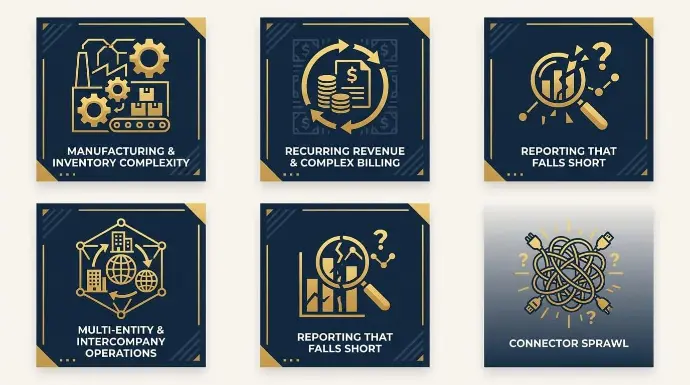
We hear five recurring patterns in almost every discovery call we take.
1. Manufacturing and Inventory Complexity QuickBooks Cannot Handle
This is the most common migration trigger we see. Businesses start on QuickBooks, add Fishbowl or a similar inventory layer, then hit a wall when production complexity, unit of measure variation, or multi-channel sales grow beyond what either system can handle, especially compared with Odoo’s inventory management for real-time stock control and tighter operational coordination.
One multi-brand manufacturer we worked with described constant production orders and moving parts as the specific driver. Their pre-Odoo stack was QuickBooks plus a sprawl of spreadsheets and point applications across multiple businesses. The explicit goal was to get off spreadsheets entirely.
A separate light manufacturing and distribution client hit the same wall earlier. QuickBooks gave them order entry and purchase order entry tied to accounting, but no real inventory tracking, no manufacturing tracking, and no margin or cost visibility.
Odoo also connects accounting to stock with real-time inventory management, automated updates, multi-warehouse tracking, and automated inventory refills.
They tried Fishbowl as the inventory layer on top of QuickBooks before abandoning it entirely, citing its rigidity and inability to handle complex units of measure across multiple sales channels. When the patch on top of the patch no longer works, that's the signal.
2. Recurring Revenue and Complex Billing
Any business running subscriptions, deferred revenue, partner commissions, or royalty payouts will run into the same wall. QuickBooks has no native handling for annual-terms-paid-monthly structures, deferred revenue waterfalls, MRR or LTV reporting, or referral partner commissions. Businesses end up bolting on Chargebee for subscriptions, a separate CRM, separate document storage, and custom connectors to stitch it all together.
One founder we spoke with stayed on QuickBooks for years because the surrounding ecosystem assumed it. Over six years, they cycled through Zoho, then Pipedrive plus QuickBooks, plus Dropbox, then added Chargebee, then moved to HubSpot, then eventually brought everything back together.
That tool churn was driven by one root cause: QuickBooks can’t anchor a recurring revenue business, while Odoo helps streamline operations by replacing disconnected subscription, CRM, and finance tools with seamless integration.
It supports customer relationship management and related accounting activities in one system, connecting accounting directly to native CRM and inventory management and reducing data lag between separate apps, with HR included alongside the same core workflows.
3. Multi-Entity and Intercompany Operations
QuickBooks Online requires a separate file per legal entity with no native consolidation, while Odoo enterprise supports unlimited users and multi-company management in one environment. Intercompany flows turn into spreadsheet exercises every time a shared bill comes in or a purchasing transaction crosses entity lines.
One multi-brand client we worked with needed automated multi-company expense allocation, automated splits across related entities, multi-company reporting at invoice line level, and consolidated forecasting.
None of that is achievable in QuickBooks without manual journals or external spreadsheets.
Their observation was sharper than most: the limits of their multi-company setup didn't become visible until they tried to integrate operational systems like payment platforms and e-commerce on top of it. Multi-entity QuickBooks pain hides until you try to operationalize.
Reporting That Falls Short
QuickBooks reporting doesn’t reach the granularity or metric set that growing leadership teams expect, particularly around recurring revenue metrics, invoice-level profitability, and multi-entity consolidated views.
Odoo’s customizable dashboards and financial reporting are structured differently from QuickBooks and support more tailored analysis.
One founder preparing for a Series A round described his quarterly OKRs as built almost entirely around financial dashboards covering customer acquisition cost, lifetime value, MRR, deferred revenue waterfalls, and expense recognition.
He was building all of it as custom work because QuickBooks delivered none of it out of the box. Founders preparing for fundraising find out late that QuickBooks reports cannot do the job, and the cost of catching up is high.
Connector Sprawl When QuickBooks Stays as the Accounting Layer
When operations move to a more capable system, but QuickBooks stays for accounting, the connector layer becomes the single biggest maintenance burden. Off-the-shelf connectors are rarely production-ready without customization, and data integrity at the boundary between systems is fragile.
One client evaluated the available QuickBooks connectors for his Odoo instance and concluded the reviews were poor enough that any of them would need customization, so he built his own. Two issues he flagged: A refresh token that has to be re-authenticated daily or the sync silently breaks, and a sales tax timing problem where credit card transactions capture before the tax line gets applied. Both issues are invisible in connector marketing and painfully visible at the month-end close.
"ERP is the central nervous system of a business. When it fails, orders stop shipping, invoices go unpaid, and customer trust evaporates."
Gordon Cummins, CEO of Cudio (source)
Keeping QuickBooks as the general ledger while operations grow elsewhere is not a stable end state. It’s a transitional architecture, and the longer it persists, the more maintenance accumulates.
Full History or Opening Balances? Making the Right Call First
This decision shapes everything that follows, and it needs to be resolved before any data moves.
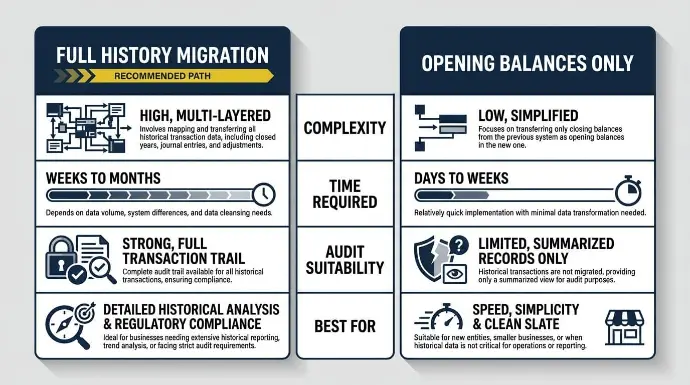
Full history migration brings every transaction record from QuickBooks into the Odoo Accounting module. It’s more complete, but it’s also more complex and time-intensive.
Moving transaction data and cleaning and mapping historical data into Odoo is labor-intensive and tedious, especially when older books need transformation before import.
Opening balances only migration starts fresh from a defined cutover date, using summarized balances to establish your financial baseline. It is faster and cleaner, but it trades historical depth for simplicity.
The right choice depends on your regulatory requirements, audit obligations, and reporting expectations. The table below breaks down the key differences.
Factor | Full History Migration | Opening Balances Only |
Complexity | High | Low to moderate |
Time Required | Weeks to months | Days to weeks |
Audit Suitability | Strong, full transaction trail | Limited, summarized records only |
Best For | Businesses under 3 years old or with active audit exposure | Older or complex books with a clean cutover date |
Most businesses with fewer than three years of QuickBooks history can migrate full data without significant risk. Older or more complex books, particularly those with layered transactions or multi-entity structures, typically opt for opening balances to avoid carrying legacy errors forward.
Many organizations prefer importing master data and starting with opening balances, transferring only the data needed instead of every historical transaction.
Trial balance reconciliation is the checkpoint that validates whichever path you choose. Do not finalize your approach until that reconciliation is clean.
Pre-Migration Checklist: Audit, Reconcile, and Prepare Your Data
Most migration problems don't start during the import. They start weeks earlier, when someone assumes the data in QuickBooks is cleaner than it actually is. Pre-migration planning should also identify third-party apps connected to QuickBooks that must connect to Odoo and set controls to prevent data loss.
A structured pre-migration audit catches those problems before they become expensive, and it sets the foundation for the data mapping work that follows.
"Your ERP is currently embezzling from your profit margins. You won't find this theft on your P&L, but it's happening every single time a team member 'just handles' a manual workaround because the system is too clunky to do it right."
Gordon Cummins, CEO of Cudio (source)
Data Audit and Reconciliation
Before exporting anything, run these steps in sequence:
- Run a trial balance report in QuickBooks and confirm it balances to your intended cutover date.
- Review the QuickBooks company file for app connections, export scope, and any records that must be retained for audit or compliance.
- Reconcile all bank accounts, credit cards, and payables against statements up to that same date.
- Confirm your chart of accounts structure can be mapped to Odoo's default account types, and flag any accounts that require custom mapping.
- Document outstanding transactions that must carry over versus those that can be closed cleanly in QuickBooks before migration.
- Establish a data freeze date and enforce it. No new entries in QuickBooks after that point.
- If you're planning a phased or opening-balance migration, export data only for the specific period you intend to bring over.
Data Cleanup and Deduplication
Clean data migrates cleanly. Dirty data multiplies problems inside a staging environment, and those problems are far more expensive to fix after the fact than before the export runs.
- Identify and merge duplicate customers, vendors, and products before any export runs.
- Archive inactive accounts rather than migrating them, keeping the new system lean from day one.
- Flag incomplete records with missing tax IDs, addresses, or payment terms, and resolve them in QuickBooks first.
- Review open purchase orders and invoices to confirm each one is valid and should carry forward.
The staging environment will surface errors, but it shouldn’t be the first place where problems are discovered. The cleaner the source data, the faster validation moves, and the lower the risk of reconciliation failures after go-live.
Important: If your books haven’t been fully reconciled before migration begins, the errors you carry over will compound inside Odoo. A messy migration doesn’t become a clean one just because the platform changed. Reconcile in QuickBooks first, migrate second.
Data Mapping: Chart of Accounts, Customers, Vendors, and Products
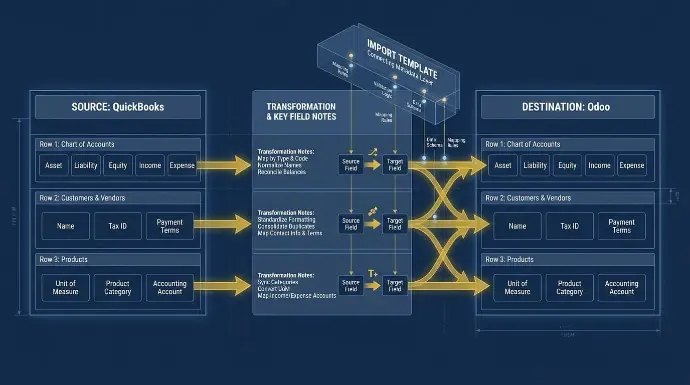
Data mapping is where migrations succeed or fail quietly.
The records look fine in QuickBooks, but the underlying structure doesn't translate directly into Odoo, and those gaps create reconciliation problems that surface weeks after go-live. Cleaning and mapping historical data into Odoo is often complex, especially when source fields do not align cleanly and require data transformation before validation.
Getting this step right is what makes the validation phase far less painful. Because Odoo’s open-source nature allows extensive customization, both Odoo Community and the enterprise edition can be tailored heavily, which makes disciplined mapping documentation even more important.
Mapping the Chart of Accounts
QuickBooks account types don’t map one-to-one to Odoo's account types. Manual review is required for every account before import begins, because key accounting features like account grouping and reporting behavior differ from QuickBooks.
Work through each QuickBooks account and assign it to the correct Odoo account type: asset, liability, equity, income, or expense. The Odoo Accounting module uses a structured account hierarchy that differs from QuickBooks in meaningful ways, particularly around sub-accounts and account groupings.
After account mapping, check the balance sheet in staging, because incorrect account types will distort the final statements.
Forcing a direct import without this review produces a chart of accounts that looks populated but behaves incorrectly during reporting.
Flag any QuickBooks accounts that have no direct Odoo equivalent. Some fields will need a workaround. Others can be dropped entirely if they no longer reflect how the business operates. Document both decisions.
Mapping Customers, Vendors, and Products
Customer and vendor records require field-by-field mapping. For each record, confirm that the name, contact details, tax ID, and payment terms are present, correctly formatted, and assigned to the right field in Odoo. Missing tax IDs or mismatched payment terms create downstream errors in invoicing and tax reporting that are tedious to correct after import.
Product records carry additional complexity. Each product needs a unit of measure, product category, and the correct accounting account mapped before the import runs. Products without these fields assigned will either fail validation or land in the wrong place inside the Odoo Accounting module.
Use an import template to track the source field, target field, and any transformation notes for every record type. A metadata import template helps track source fields, Odoo targets, and validation notes before load. This metadata import template becomes the audit trail if something breaks during validation and supports import metadata review before import. View Odoo's full documentation for field mapping references before finalizing your approach.
Migration Methods: CSV Import, Connectors, and ETL Pipelines
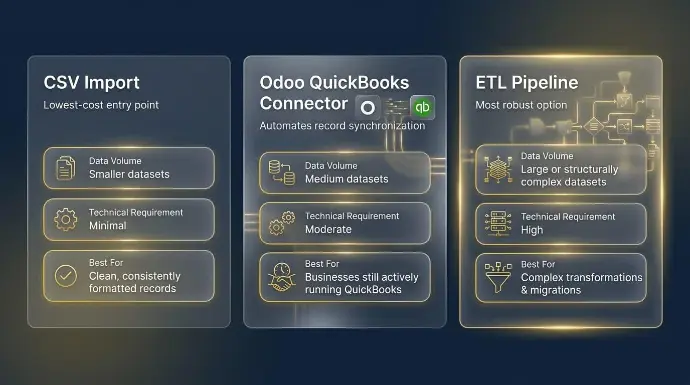
Three primary methods exist for moving data into Odoo. Each one suits a different combination of data volume, technical capability, and timeline. Choosing the wrong method adds weeks to a migration that should take days.
Here’s how each approach works in practice:
- CSV import is Odoo's native migration tool. It works well for smaller datasets with clean, consistently formatted records. The process is manual, which means someone on your team owns every mapping decision and every file preparation step. Files are often first prepared in excel format and then converted to csv format for loading into Odoo. It is the lowest-cost entry point, but it scales poorly when record counts climb or data complexity increases.
- Odoo QuickBooks Connector automates record synchronization between QuickBooks Online and Odoo, reducing the manual mapping burden significantly. For businesses that are still actively running QuickBooks at the time of migration, this method supports quickbooks odoo synchronization during the transition window and lowers the risk of data gaps at cutover.
- ETL pipeline is the most robust option for large or structurally complex datasets. An ETL process extracts data from QuickBooks, transforms it to match Odoo's data model, and loads it in a controlled sequence. It supports more reliable data transformation and can automate complex quickbooks migration work with less manual handling. It handles transformation logic that CSV imports cannot, but it requires a technical resource or an experienced implementation partner to build and manage it correctly.
No single method fits every migration. The right choice depends on data volume, internal technical capacity, and how much runway exists before go-live. At Cudio, we assess all three factors before recommending a method. If you are ready to have that conversation,
How Cudio’s Migration Process Works
Regardless of which method you use, always run a pilot migration in a staging environment first. Validate the output before touching production.
Staged Data Loading and Pilot Imports
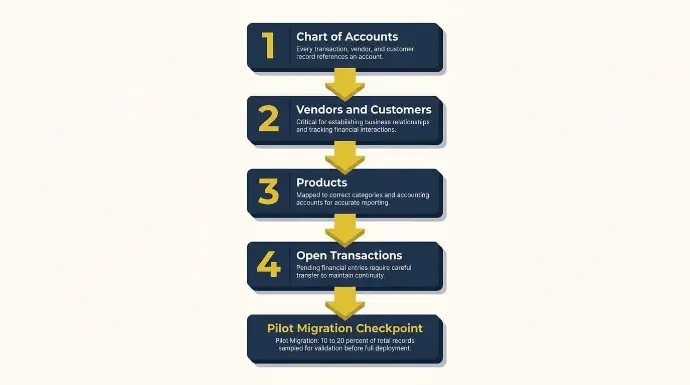
Data loaded in the wrong order breaks relationships that are difficult to untangle after the fact. Dependencies exist between every record type, and the import sequence must respect them.
Load records in this order.
- Chart of accounts first, since every transaction, vendor, and customer record references an account.
- Vendors and customers second, once the account structure is in place, to receive them.
- Products third, mapped to the correct categories and accounting accounts established in step one.
- Open transactions last, including invoices, purchase orders, and outstanding balances. Open transaction types such as sales orders should be loaded from their respective screens only after master data is validated.
Before running a full import, execute a pilot migration using a representative sample of roughly 10 to 20 percent of your total records.
Teams often import transaction data only after validating master-data templates and sample loads first. Validate every result against the source records in QuickBooks before proceeding, and reconcile trial balances and invoices to confirm accuracy. If the pilot output doesn't reconcile cleanly, the full import won't either.
The staging environment must mirror production settings exactly. A staging setup that differs from production produces test results that don't hold when the real import runs.
Document every error the pilot surfaces. Categorize each one as either a data issue or a mapping issue before rerunning, since these are solved differently and conflating them wastes time.
Data Validation, Trial Balance Reconciliation, and Parallel Run
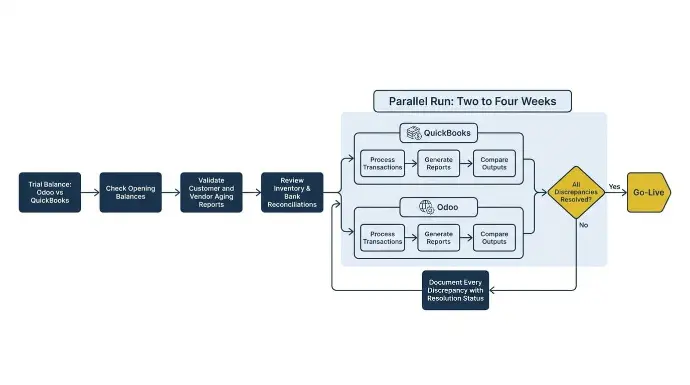
Once the staged import completes, validation begins. This is not a formality. It is the last checkpoint before the business commits to go-live, and every discrepancy found here is cheaper to fix than one discovered after QuickBooks is retired.
Work through these steps in order:
- Run a trial balance in Odoo and compare it line-by-line against the QuickBooks export. On the QuickBooks side, export from the relevant transaction screens using the export icon so reconciliation uses the exact same source population. Every account must match before anything else moves forward.
- Check opening balances for every account individually. A discrepancy at this level must be traced to its source and corrected, not estimated or carried forward.
- Validate customer and vendor balances by comparing aging reports between both systems, including invoices as part of customer balance validation. Mismatches here create invoicing and payment errors that compound quickly.
- Run a parallel period where both Odoo and QuickBooks operate simultaneously for two to four weeks. This surfaces workflow gaps and user errors that staging environments rarely catch.
- Document every discrepancy with a resolution status. Nothing advances to go-live with an open item.
A parallel run feels redundant when confidence is high, but it rarely is. The two to four weeks of overlap consistently catch the edge cases that structured testing misses, and it gives the team time to correct them without pressure.
At Cudio, we’ve seen migrations go sideways in the 30 days after go-live, when discrepancies surface in reconciliation and reporting that no one caught in staging. R&W Rope came to us after exactly this kind of experience. After migrating to Odoo with our team, they replaced QuickBooks, Fishbowl, and Shopify with a single Odoo environment, saved $35,000 annually, and cut 40 to 60 hours of administrative work per week. That outcome was built on getting the validation phase right, not just the import.
Cutover Planning: Locking QuickBooks and Setting Your Go-Live Date
Timing the cutover correctly is one of the most underestimated decisions in the entire migration process. Set a formal cutover date aligned with a natural period close, ideally month-end or quarter-end, so opening balances in Odoo reflect a clean financial boundary with no ambiguity about which system owns which period.
Once that date is confirmed, lock QuickBooks from further entries and communicate that hard stop to every user who touches the books. Any transaction entered after the cutover date creates a reconciliation problem that has to be unwound manually.
Before go-live is declared, every validation step from the previous phase must be signed off in writing. No open items carry forward. Assign a go-live owner who holds accountability for system access, user permissions, and support escalation in the first days after switchover. This role is not ceremonial. It is the single point of coordination when something unexpected surfaces.
Document a rollback plan before go-live, not after. If a critical issue surfaces in the first 48 hours, the team needs a clear, pre-approved path back to QuickBooks without a scramble.
After Go-Live: Timelines, Training, and Keeping Teams Aligned
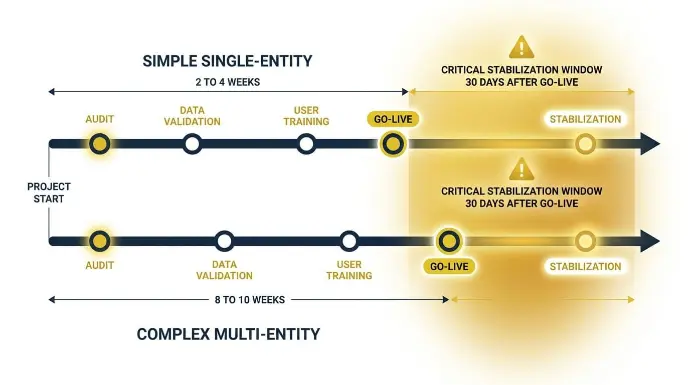
Migration timelines vary more than most teams expect. A simple single-entity move with clean data typically takes two to four weeks from audit to go-live. Complex multi-entity or multi-currency migrations run closer to eight to 10 weeks.
Lock in your project schedule before committing to a go-live date, and budget for migration consulting, implementation consultants, and post-launch technical oversight—not just software licensing.
The go-live date is not the finish line. User adoption is where migrations quietly stall.
Odoo's interface is less intuitive for many quickbooks users, so it requires structured employee training, not just a walkthrough.
Finance, operations, and inventory teams each interact with the Odoo Accounting module differently, and each group needs onboarding that reflects their actual day-to-day tasks. User training is essential for successful adoption after migration.
Identify department leads early. They drive internal change management at the team level and absorb questions that would otherwise bottleneck the project.
Cross-departmental buy-in is a real success factor, not a soft one. When one team is undertrained, errors surface in shared data that affect everyone downstream.
During stabilization, support services and, when needed, external help are often necessary for updates, bug fixes, and system monitoring. Workflow automation setup, including approvals, recurring journal entries, and automated reporting, is best configured after data validation is complete, not during the migration itself. Layering automation on top of unvalidated data creates compounding errors that are difficult to trace.
"Even the best ERP system cannot fix a breakdown in training or a departure from professional workflows."
Gordon Cummin, Ceo of Cudio (source)
Our team handles post-go-live support, training coordination, and workflow configuration as part of a structured handoff. We stay involved through the stabilization period because we know that the most dangerous moment in any migration is the 30 days after go-live, not the go-live day itself. That’s where we plan to be.
How Cudio’s Migration Process Works
Conclusion
Migrating from QuickBooks to Odoo is a structural decision, not a software swap. The businesses we work with have tried every workaround: extra headcount, bolt-on tools, custom connectors. Eventually, they all hit the same wall. The data is siloed, the reporting is behind, and the team is drowning in manual work that should not exist.
At Cudio, we’ve guided businesses through every phase of this migration, from the initial data audit to post-go-live stabilization. We’ve done it for businesses running 14 separate systems that now run one. We don’t flip a switch and walk away. We stay through stabilization because we know the 30 days after go-live are where migrations quietly break down.
Get My Free Migration Assessment
Frequently Asked Questions
Here are the questions we hear most from businesses at this stage of the process:
Can I run QuickBooks and Odoo simultaneously after the migration is complete?
Yes, and we recommend it. A parallel run of two to four weeks is standard practice. Both systems operate simultaneously, so you can surface workflow gaps, validate reporting, and catch user errors before QuickBooks is fully retired. The parallel period isn’t optional for complex migrations.
Does Odoo support the same payroll integrations that QuickBooks uses?
Odoo has native payroll functionality that covers payroll rules, payslips, and employee contracts, but payroll is just one part of a broader ERP platform that combines accounting with CRM, inventory, and human resources. It includes 73+ core modules, and businesses can activate only the features they need based on their business needs. For businesses that rely on third-party payroll processors, Odoo supports API integrations that can connect to external platforms. The specific configuration depends on your current payroll setup and jurisdiction. We map this during the discovery phase so there are no surprises at go-live.
How do I handle migrating QuickBooks classes and locations into Odoo's analytic accounts?
QuickBooks classes and locations map to Odoo's analytic accounting structure. Each class or location becomes an analytic account or analytic tag in Odoo, and those tags can be applied across journal entries, invoices, and expenses to maintain the same departmental or location-level reporting you had in QuickBooks. The mapping requires manual review to make sure the analytic structure reflects how your business actually reports.
What happens to my QuickBooks file after the data migration is complete?
Keep it. QuickBooks should remain accessible as a read-only historical reference for at least 12 months after go-live, longer if your business has audit obligations or open regulatory periods. You do not need an active paid subscription to retain access to historical data in most QuickBooks versions, but confirm this with Intuit for your specific plan.
Can I migrate QuickBooks data if my books have not been reconciled in over a year?
You can migrate, but you should not. Unreconciled books carry errors that multiply inside Odoo and are significantly harder to trace after the migration than before it. The correct sequence is to reconcile in QuickBooks first, then migrate. If the reconciliation backlog is too large to clear before migration, an opening balances approach with a clean cutover date is the safer path. In that case, many organizations choose to import metadata and master data, then start with opening balances rather than bringing over full transaction history. We assess this during discovery and recommend the right approach for your situation.
How long does a QuickBooks to Odoo migration typically take?
A single-entity migration with clean, reconciled data typically takes 2 to 4 weeks from audit to go-live. Multi-entity or multi-currency migrations with complex intercompany flows run closer to 8 to 10 weeks. Timeline is driven by data quality, migration method, and how many modules are being stood up alongside accounting, including advanced features beyond finance such as expense management, bank synchronization, project management, or broader accounting operations. Longer timelines are also common when businesses need multi-currency, complex cost allocation for landed costs, or structured EDI invoice workflows configured in Odoo’s 73+ core modules. We provide a project timeline estimate after the initial data assessment.