



Most businesses don’t leave QuickBooks because accounting stopped working.
They leave because everything around them has become harder to manage. Inventory grows more complex, recurring billing starts relying on separate tools, multi-entity reporting turns into spreadsheet work, and connectors between systems become fragile enough to disrupt operations.
At Cudio, we see this pattern constantly across rescue and migration projects.
In this article, we break down where QuickBooks fits well, where Odoo becomes justified, and what businesses should realistically evaluate before making the switch.
Key Takeaways
- QuickBooks is built primarily for accounting and financial management, while Odoo is designed to manage broader operational workflows across one system.
- Most businesses outgrow QuickBooks when inventory, manufacturing, recurring billing, or multi-entity operations become more complex.
- Connector sprawl becomes expensive over time, especially when multiple third-party apps are syncing critical operational and financial data.
- Odoo offers deeper operational control, but implementation quality heavily impacts whether the system scales cleanly or becomes difficult to maintain.
- The real cost difference isn’t monthly software pricing. It’s the long-term operational overhead created by disconnected systems, manual processes, and migration risk.
Comprehensive Comparison Table At a Glance: QuickBooks vs Odoo
Before comparing pricing, implementation, or operational tradeoffs, it helps to look at the core differences between these platforms side by side in a quick but detailed comparison.
Capability | QuickBooks Online | Odoo |
Accounting | Strong accounting, bookkeeping, payroll, and tax workflows | Full accounting with advanced accounting features integrated into broader ERP operations |
Inventory | Basic inventory tracking for lower-complexity operations | Advanced inventory management with warehouse routing, replenishment, lot/serial tracking, and valuation workflows |
Manufacturing | Limited native manufacturing functionality | Native MRP, BoMs, manufacturing orders, and production workflows |
CRM | Typically requires external CRM software | Native CRM integrated with sales, inventory, and accounting workflows |
Recurring Billing | Usually supported through external subscription platforms | Native subscription and recurring billing modules available |
Multi-Company | Separate company instances required for each entity | Native multi-company management and consolidated reporting |
Integrations | 750+ integrations available across third party tools | Native business modules plus API and integration support |
Deployment | SaaS-only | Cloud-hosted, on-premise, and hybrid deployment options |
Reporting | Strong accounting and financial reporting | Broader operational, inventory, manufacturing, and cross-functional reporting |
Implementation Complexity | Faster onboarding with lighter setup requirements | Higher implementation, governance, and training requirements |
Scalability | Well-suited for accounting-first businesses | Better suited for growing operational complexity across departments and entities |
QuickBooks and Odoo Were Built for Different Stages of Complexity
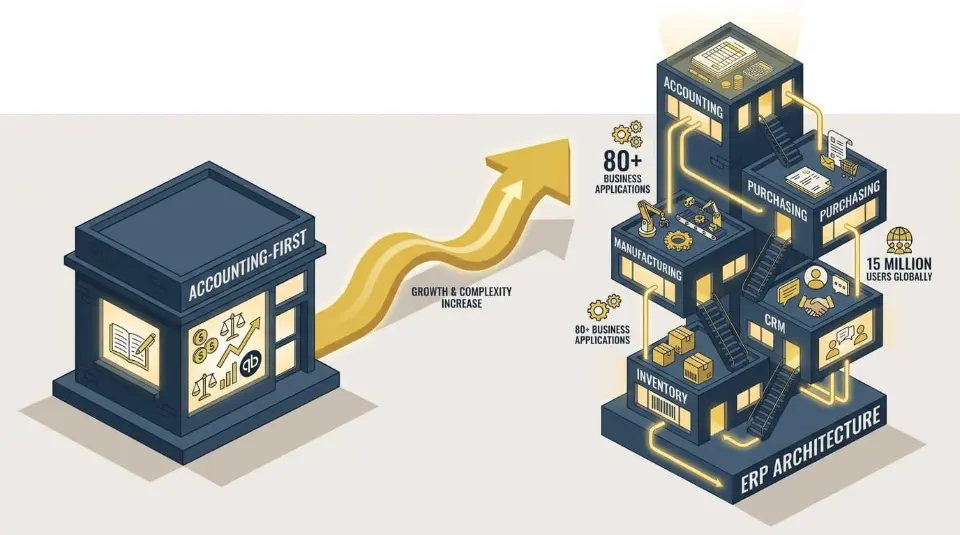
Before comparing features, pricing, or deployment models, it’s important to understand that QuickBooks and Odoo were designed for very different operational environments.
Most businesses start with QuickBooks because their immediate problem is accounting. Odoo usually enters the conversation later, once operational complexity starts spreading beyond finance.
Why So Many Businesses Start With QuickBooks
There’s a reason QuickBooks dominates small-business accounting in the United States. Around two-thirds of U.S. small businesses use it in some form because it solves a very specific problem well: Getting financial operations running quickly with a straightforward setup, especially for companies that need specialized accounting software built for small businesses rather than a full ERP or internal technical team.
For accounting-first businesses, the onboarding is simple and familiar, with a gentler learning curve that makes it easier for small teams to get comfortable in hours, not weeks. Core financial workflows are relatively easy to configure, including:
- Bank reconciliation
- Accounts payable and receivable
- Payroll processing
- Tax preparation workflows
- Basic inventory ledgering
- expense tracking
That simplicity matters early on. QuickBooks is well suited to small and medium businesses with straightforward accounting needs, because most growing businesses aren’t thinking about warehouse routing rules, manufacturing orders, or intercompany allocations when they first launch. They need clean books, stable reporting, and software their accountant already understands, especially since most certified public accountants prefer QuickBooks Online, which can make filing smoother during tax season.
At this stage, QuickBooks fits naturally. It’s designed to help businesses manage financial operations without introducing the complexity that comes with a broader ERP environment.
As operations grow, though, the conversation starts changing. The challenge usually stops being accounting itself and starts becoming everything surrounding it, which is why QuickBooks is strongest when a business needs just accounting rather than broader operational software.
Odoo Was Built as an ERP, Not Just an Accounting Tool
Odoo approaches the business from a very different architectural perspective. Instead of centering the platform around accounting, Odoo ERP treats accounting as one operational layer inside a broader enterprise resource planning system, and it can handle accounting functions well beyond just basic accounting. Odoo now reports over 15 million users globally and offers over 80 business applications spanning inventory, CRM, manufacturing, purchasing, human resources, and project management.
The biggest difference is how those modules interact. Odoo runs on a shared PostgreSQL relational database, which means operational data flows across modules natively, supporting workflow automation and keeping business processes connected through shared data instead of relying heavily on third-party synchronization between disconnected systems.
For example, a sales order can:
- Reserve inventory
- Trigger a purchase workflow
- Create a manufacturing order
- Generate invoicing
- Update accounting entries
Odoo’s modular structure lets companies start with essential applications and expand as needs grow.
All inside the same operational environment.
That architecture becomes important once businesses start managing more operational moving pieces across departments, entities, warehouses, sales channels, or global markets where multi currency support starts to matter.
“Odoo, done right, is a bit of a Swiss Army knife for PE. It can support multiple sectors and business models on one platform, even when the portfolio companies are of completely different shapes and sizes.”
Gordon Cummins, Ceo of Cudio (source)
At Cudio, we maintain a catalog of more than 1,600 business use cases because implementation success depends less on installing software and more on understanding how operations actually function across finance, inventory, sales, purchasing, and fulfillment. Most businesses do not need every Odoo module, and users who only need basic bookkeeping may find the system overwhelming at first. The real work is identifying which operational workflows belong inside the ERP and configuring them correctly from the beginning, often with help from a technical partner who understands workflows and integration capabilities.
Explore Cudio’s Odoo Implementation Process
The Real Operational Breaking Points
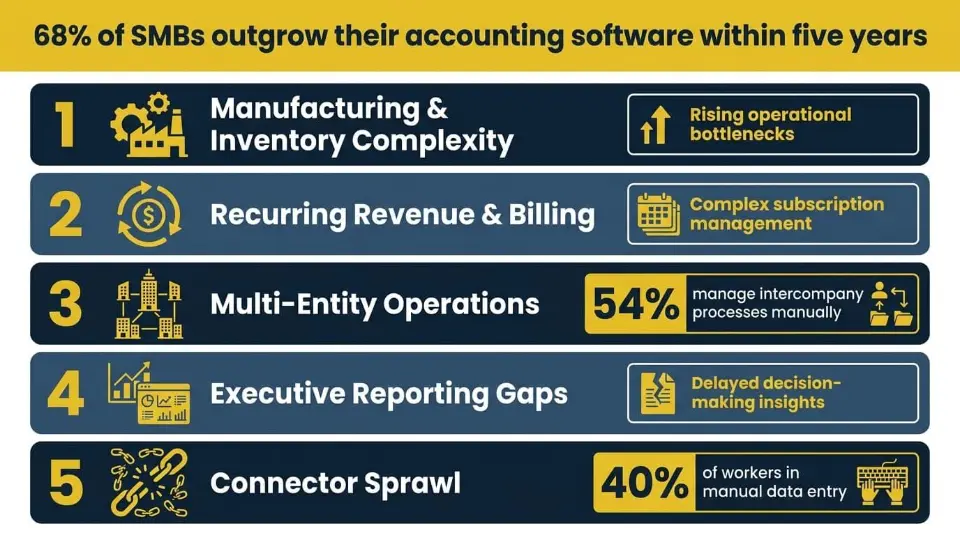
At Cudio, we keep seeing the same pattern across discovery calls and rescue projects. Businesses start layering inventory systems, spreadsheets, connectors, and operational workarounds around QuickBooks until the architecture becomes difficult to maintain long-term. 68% of SMBs outgrow their accounting software within five years, and the friction rarely arrives as a single dramatic moment.
Below are the five recurring themes that emerged clearly:
1. QuickBooks Does Not Handle Manufacturing or Inventory Management Complexity
This is the most common migration trigger we see.
A business starts with QuickBooks for accounting, then adds Fishbowl or a similar inventory layer once operations become more inventory-heavy; stronger inventory management is usually the first missing layer. For a while, the layered setup remains manageable. Then production complexity increases, more sales channels are introduced, and the gaps between systems start becoming operational problems instead of minor inconveniences.
This is usually the point where businesses realize accounting software alone is no longer enough to manage operations cleanly, although quickbooks enterprise can extend capabilities somewhat without reaching the level of a full ERP for complex operations. The requirements start expanding into workflows such as:
- Bills of materials (BoMs)
- Manufacturing orders
- Warehouse routing logic
- Barcode scanning
- Lot and serial tracking
- Automated replenishment rules
- Inventory valuation tied to accounting
None of these operational requirements automatically justifies an ERP on its own.
The breaking point usually happens when multiple complexity layers begin overlapping at the same time.
At Cudio, we see this particularly often in businesses managing inventory across manufacturing, distribution, and e-commerce simultaneously, where Odoo ties inventory management to wider business operations.
Aeromist, for example, replaced WooCommerce, Fishbowl, and QuickBooks with a unified Odoo environment that gave them real-time inventory tracking and automated production forecasting workflows. Reporting and auditability are the two most common failure points for businesses that have outgrown their accounting system, and they compound quickly once inventory and manufacturing complexity enter the picture.
It’s also worth noting that ERP implementations in discrete manufacturing fail at 73% rates when implementation quality is poor, which is precisely why getting configuration right from the start matters so much.
Explore Cudio’s Odoo Migration Services
2. QuickBooks Struggles With Recurring Revenue and Complex Billing Models
Any business with subscriptions, recurring invoices, deferred revenue, partner commissions, or royalty payouts runs into the same wall.
QuickBooks has no native handling for annual-terms-paid-monthly structures, deferred revenue waterfalls, monthly recurring revenue or lifetime value reporting, referral partner commissions, royalties, or ways to create recurring invoices.
Deferred revenue recognition under ASC 606 is complex enough on its own; managing it across separate systems without native automation compounds the compliance and accuracy risk significantly.
Businesses end up bolting on Chargebee or similar platforms for subscriptions, a separate CRM, separate document storage, custom modules for tax logic, and custom connectors to handle online payments and payment gateways and stitch it all together.
One founder told us they stayed on QuickBooks for years simply because everyone else does, and that moving off it has been hard precisely because so much of the surrounding ecosystem assumes it. Over 6 years, they cycled through Zoho, then Pipedrive, plus QuickBooks, plus Dropbox, then added Chargebee for subscriptions, then moved to HubSpot, then eventually brought everything back together into a unified environment. The tool churn was driven directly by QuickBooks being unable to anchor a recurring revenue business on its own.
Businesses with subscription or recurring revenue models often need operational handling for:
- Deferred revenue schedules
- Annual-term-paid-monthly billing structures
- Monthly recurring revenue (MRR) reporting
- Referral partner commissions
- Royalty calculations
- Revenue recognition timing
At the ERP level, the complexity usually shifts toward coordinating revenue recognition schedules, deferred revenue waterfalls, recurring invoice automation, subscription billing workflows, CRM and finance synchronization, and reporting consistency across operational systems.
That’s where implementation quality becomes critical. Even the right ERP architecture becomes difficult to manage if billing logic, accounting treatment, permissions, and operational workflows are not configured correctly from the beginning.
3. Multi-Entity and Intercompany Operations Require Constant Manual Work
QuickBooks Online requires a separate file per legal entity with no native consolidation or multi company support, and intercompany flows turn into spreadsheet exercises. This pattern came up consistently across multiple clients with holding company structures.
54% of companies still manage intercompany processes manually according to Deloitte, which increases the likelihood of reconciliation errors, reporting delays, and compliance risk. That baseline friction is what QuickBooks leaves growing multi-entity businesses to manage entirely on their own.
One multi-brand client running a parent entity plus several operating companies described needing automated allocation logic whenever shared operational expenses entered the system. A single bill needed to split automatically across multiple related entities while still maintaining clean reporting at both the individual company and consolidated levels. Multi-company reporting at the invoice line level, consolidated forecasting, and multi currency support were all requirements that QuickBooks simply could not support without manual journals or external spreadsheets.
They also noted something important: The limits of their multi-company setup did not become fully visible until they tried to integrate operational systems, payment platforms, e-commerce workflows, and bank accounts on top of it. Multi-entity QuickBooks pain hides until you try to operationalize it.
A separate client running multiple legal entities under a management company structure described a similar problem. Shared services run out of one entity while purchasing and revenue flow through the others, and the intercompany purchasing and manufacturing flows simply do not have a clean home in QuickBooks.
At the ERP level, this introduces more advanced governance and accounting requirements, including:
- Intercompany journal handling
- Consolidated reporting
- Multi-company user permissions
- multi currency
- Entity-level data segregation
- Shared chart-of-account structures
Deployment flexibility also starts to matter more at this stage.
QuickBooks Online operates as a SaaS-only platform. Odoo offers cloud-hosted, on-premise, and hybrid deployment options depending on operational, infrastructure, or compliance requirements. None of those models is universally better.
The right fit depends heavily on how the business operates internally. It’s also worth noting that QuickBooks lacks a full multi-entity ledger with native consolidated reporting; combined reports must be exported to Excel rather than generated natively, which is precisely where the manual overhead compounds for holding company structures.
At Cudio, roughly three-quarters of our team come from functional, finance, and operational leadership backgrounds rather than purely development roles. That becomes particularly important in multi-company environments where reporting logic, permissions, accounting treatment, and operational governance all intersect.
Plan Your Odoo Upgrade Strategy With Cudio
4. Reporting Falls Short for Executive, Board, or Investor Needs
QuickBooks reporting doesn’t reach the granularity or metric set that growing leadership teams expect, particularly when they need executive reporting and accounting reports that go beyond standard bookkeeping outputs around recurring revenue metrics, invoice-level profitability, and multi-entity consolidated views.
Many businesses do not realize their reporting limitations until leadership expectations change, commonly during expansion, investor preparation, or fundraising.
One client preparing for a Series A round described building large portions of his reporting environment almost entirely as custom work because his existing systems could not consistently produce the operational metrics leadership needed.
His quarterly OKRs revolved around financial reporting and executive dashboards covering customer acquisition cost, lifetime value, monthly recurring revenue, deferred revenue waterfalls, expense recognition, cash flow, and overall financial status.
The challenge was not creating a report once. The challenge was maintaining reporting accuracy across constantly changing operational data. Founders preparing for fundraising find out late that QuickBooks reports cannot do the job, and the cost of catching up is high.
A separate multi-brand client described needing sales pipelines for tracking and forecasting, invoice-level profitability dashboards, performance reporting, multi-company financial dashboards, cost of goods recognition aligned with inventory valuation, and commissions reporting. None of these are native QuickBooks capabilities, and as soon as the business needs more than one entity’s worth of any of them, the problem compounds.
The reporting requirements extended beyond standard financial statements into areas such as:
- Customer acquisition cost (CAC)
- Lifetime value (LTV)
- Margin visibility
- Forecasting
- Board reporting
- Invoice-level profitability
- Deferred revenue recognition
- Expense recognition timing
- Advanced reporting
The reporting strain usually appears once recurring revenue metrics, operational forecasting, inventory valuation, commissions, and multi-entity reporting all need to pull from separate systems simultaneously. At that point, reporting becomes heavily dependent on spreadsheet consolidation, manual exports, custom dashboards, reconciliation layers, and financial modeling adjustments.
The issue is rarely that QuickBooks reporting is inherently weak. The issue is that executive-level operational reporting often requires deeper coordination across operational systems than accounting-first platforms were originally designed to manage on their own, including the cross-system financial tracking leadership teams expect.
5. Connector Sprawl Becomes the Hidden Operational Tax
When operations move to a more capable system, but QuickBooks stays as the accounting layer, the connector layer becomes the single biggest maintenance burden. Integrations are not inherently a problem. In many businesses, they are necessary. QuickBooks connects with more than 750 third-party applications, which is part of why it remains flexible for growing companies.
The operational strain usually appears later, once the number of connectors and sync dependencies starts compounding.
Software sprawl forces roughly 40% of workers into manual data entry and duplication, with a similar share reporting workflow and approval delays, a pattern that maps directly onto what we see in businesses maintaining QuickBooks as an accounting core while operations expand elsewhere.
At Cudio, we run rescue diagnostics across approximately 140 operational and technical metrics because connector failures rarely happen in isolation. Most issues emerge through accumulated dependencies, undocumented workflows, and operational assumptions spread across multiple systems.
Strengthen Your Odoo Integration Architecture Today
Pricing Is Less Important Than Operational Total Cost
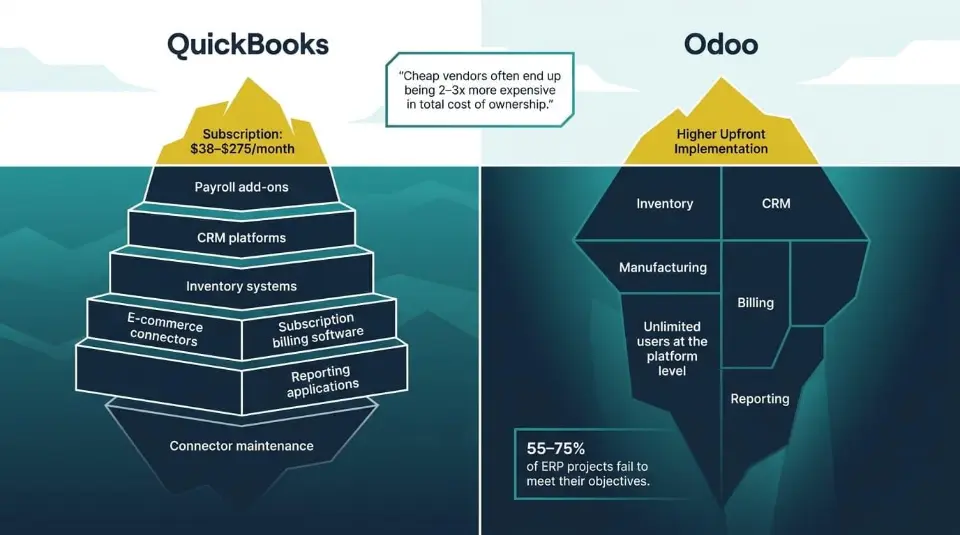
Software pricing discussions often focus too heavily on subscription numbers while ignoring the operational overhead surrounding the platform.
In practice, businesses rarely feel the strain from one monthly software bill alone.
The higher cost usually comes from the systems, workflows, maintenance, and operational workarounds layered around the software over time.
QuickBooks Looks Affordable Until the Ecosystem Expands
QuickBooks pricing is one of the reasons many businesses adopt it early. The onboarding cost is relatively accessible, the subscription model is familiar through tiered, flat-rate pricing plans that rise based on users and features, and businesses can start with only the financial functionality they immediately need, which works well for companies with simpler accounting processes.
QuickBooks Online plans currently range from $38 to $275 per month, though Intuit raised prices 15–25% in mid-2025, and businesses that bundle Payroll alongside their plan saw combined monthly costs jump by $80 or more.
As operations grow, though, the surrounding ecosystem often expands alongside it. Businesses may gradually add:
- Payroll add-ons
- Time tracking tools
- Inventory systems
- E-commerce connectors
- CRM platforms
- Subscription billing software
- Reporting applications
QuickBooks itself supports this flexibility well, which is part of its appeal. The challenge is that each additional operational layer usually introduces its own licensing, maintenance, and workflow dependencies.
For growing teams and medium businesses using higher QuickBooks tiers alongside payroll, tracking tools, and operational integrations, costs can quickly climb into several hundred dollars monthly before implementation support, customizations, or operational maintenance are even factored in.
The more important consideration usually isn’t the subscription total itself. It’s how much operational complexity the business is managing outside the accounting platform over time.
Odoo Requires Higher Upfront Investment but Consolidates More Systems
Odoo approaches pricing differently because the platform is structured more like operational infrastructure than a standalone accounting software solution.
Odoo Community is the free community version and is open-source, but businesses are responsible for hosting, maintenance, updates, and technical management themselves.
Odoo Enterprise is the enterprise version and adds licensing costs in exchange for hosted infrastructure, enterprise features, and broader operational functionality across the ERP environment.
The larger investment usually comes from implementation itself, as businesses moving into ERP environments often need:
- Process discovery
- Data migration
- Sandbox testing
- User training
- Permission structures
- Workflow configuration
- Operational testing before go-live
At Cudio, implementation projects typically involve staging environments, migration scripts, role-based permission mapping, and structured testing workflows before production deployment happens. The goal is not simply moving data into a new system, but validating that operational processes behave correctly under real business conditions before teams rely on them daily. That’s also why implementation quality matters so much.
Between 55% and 75% of ERP projects fail to meet their objectives, with poor configuration and governance among the leading causes. Poorly configured ERP environments can create long-term maintenance and upgrade problems that cost significantly more than the original software licensing itself.
“The hourly rate is a decoy. ‘Cheap’ vendors often end up being 2–3x more expensive in total cost of ownership.”
Gordon Cummins, Ceo of Cudio (source)
Odoo isn’t automatically the cheaper option for every business. For smaller accounting-first organizations, QuickBooks may remain the more practical fit operationally and financially, since it is primarily designed for small to medium-sized businesses and can be less effective for large enterprises with complex processes.
Odoo is often a better fit for businesses aiming to scale beyond what suits small businesses, medium sized businesses, or larger enterprises managing broader operational complexity across multiple systems.
Talk Through Your ERP Requirements With Our Team
The Structural Pricing Difference: Odoo vs. QuickBooks
The structural pricing difference is also worth noting directly. Odoo Community starts at no licensing cost, with Odoo Enterprise priced per user on a monthly or annual contract.
QuickBooks Online Essentials starts at $27/month but caps at three users, with higher-tier plans required for larger teams. The user model alone creates a meaningful cost gap at scale: Odoo Enterprise carries unlimited users at the platform level, while QuickBooks pricing escalates with headcount.
On user satisfaction, third-party review platforms show the two products rated closely overall.
According to Odoo’s own comparison page, Odoo holds a 4.3/5 on G2Crowd and 4.1/5 on Capterra, while QuickBooks Online holds 4.0/5 on G2Crowd and 4.3/5 on Capterra.
QuickBooks scores higher on brand exposure and familiarity, which reflects its dominant market position. Odoo scores higher on reconciliation tool usability and data entry. Neither platform wins the satisfaction comparison cleanly - the right fit depends on what the business is actually trying to do with the software.
Odoo is not automatically the cheaper option for every business. For smaller accounting-first organizations, QuickBooks may remain the more practical fit operationally and financially. The decision usually comes down to whether the business is primarily managing accounting workflows or broader operational complexity across multiple systems.
Talk Through Your ERP Requirements With Our Team
Ease of Use vs Operational Depth
The difference between QuickBooks and Odoo is as much about feature depth as it is how much operational structure the business is prepared to manage internally.
Area | QuickBooks Online | Odoo |
Onboarding | Faster setup with minimal implementation requirements | Longer onboarding with more structured implementation |
User Training | Easier for non-technical teams to learn quickly | Requires more deliberate training across departments |
Governance Requirements | Lighter workflow governance | Stronger governance and operational discipline required |
Workflow Enforcement | More flexible and accounting-focused | More structured workflow and approval management |
Role Permissions | Simpler permission structures | Granular role-based access and operational permissions |
Implementation Discipline | Lower setup complexity | Higher dependency on implementation quality |
Operational Depth | Built for accounting-first workflows | Built for broader operational coordination |
QuickBooks prioritizes accessibility and speed around key features for basic accounting, handling core accounting tasks such as invoicing, payroll, and tax preparation for small to medium-sized businesses with straightforward financial needs, while Odoo offers more advanced features for teams prepared to support deeper operational coordination and workflow control. Simplicity has a ceiling.
Which Platform Fits Your Business Right Now?
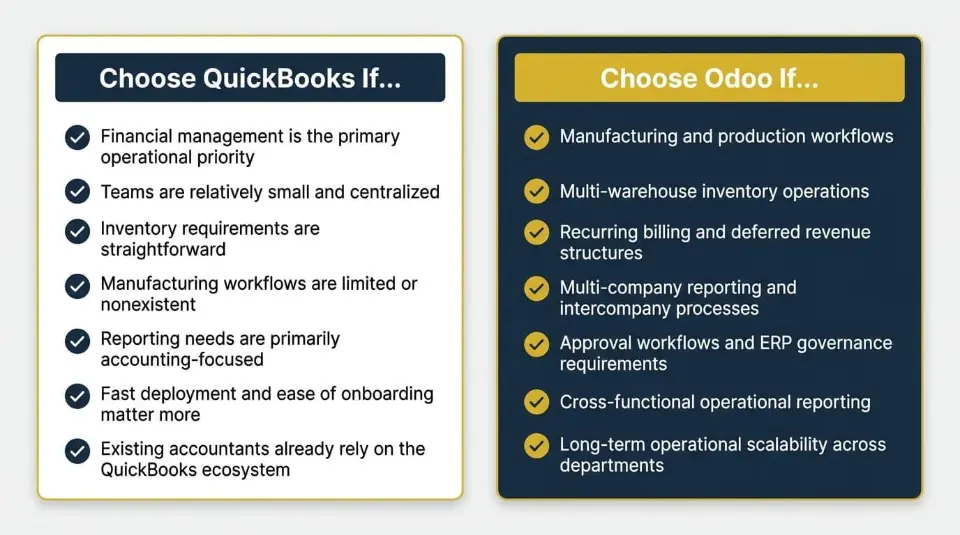
At this stage, the decision usually becomes less about software features and more about operational fit. Both platforms solve real business problems well, but they are designed for very different levels of operational complexity.
Choose QuickBooks If...
QuickBooks is often the stronger fit for businesses where accounting remains the center of operations and the surrounding workflows are still relatively manageable, especially for an accounting team or owner-led finance function that wants speed and familiarity.
It usually makes sense when:
- Financial management is the primary operational priority
- Teams are relatively small and centralized
- Inventory requirements are straightforward
- Manufacturing workflows are limited or nonexistent
- Reporting needs are primarily accounting-focused
- Fast deployment and ease of onboarding matter more than deep operational customization
- Existing accountants or bookkeepers already rely heavily on the QuickBooks ecosystem for just accounting
For businesses operating with lower operational complexity, QuickBooks remains practical, familiar, and efficient, helped by its long-standing familiarity through the financial software company Intuit.
Choose Odoo If...
Odoo shines once operational complexity starts extending beyond accounting itself.
That often includes businesses managing:
- Manufacturing and production workflows
- Multi-warehouse inventory operations
- Recurring billing and deferred revenue structures
- Multi-company reporting and intercompany processes
- Approval workflows and ERP governance requirements
- Cross-functional operational reporting
- Tax management needs tied to broader cross-functional control
- Long-term operational scalability across departments and systems
The shift usually happens when disconnected operational workflows begin creating enough friction that the business needs tighter coordination between inventory, purchasing, finance, fulfillment, forecasting, and reporting.
Odoo doesn’t eliminate operational complexity automatically. What it provides is a more cohesive operational framework for managing that complexity as the business grows. It can also support broader workflows than accounting alone when a business needs one system for finance and surrounding operations.
Plan Your Odoo Migration With Cudio
Conclusion
QuickBooks and Odoo solve very different operational problems, so the choice in odoo accounting vs quickbooks depends on the business context.
QuickBooks works well for businesses that primarily need accessible accounting with lower operational complexity, and the right platform depends on the company’s specific accounting needs and long-term operational complexity.
Odoo becomes more relevant once inventory, manufacturing, recurring billing, multi-company workflows, and operational reporting start stretching beyond what accounting-first systems were designed to manage comfortably.
Neither platform is universally better. The real question is how much operational complexity the business is managing today and how that complexity will evolve over time.
Architecture decisions compound. The longer disconnected systems, spreadsheets, and workflow workarounds remain in place, the harder they become to untangle later.
Talk With Cudio About Your ERP Transition Strategy
FAQs
Before making a platform decision, these are some of the most common questions businesses ask us during discovery calls.
Is QuickBooks enough for inventory-heavy businesses?
It depends on the level of operational complexity involved. QuickBooks can work well for businesses with relatively straightforward inventory requirements, especially when accounting is still the operational priority. The strain usually appears once businesses introduce multi-warehouse operations, manufacturing workflows, unit-of-measure complexity, barcode processes, or multi-channel inventory coordination.
When should a business move from QuickBooks to Odoo?
Most businesses begin evaluating Odoo once operational workflows start becoming harder to manage across disconnected systems, and many move forward once they have implemented Odoo to replace a patchwork of separate tools.
Common triggers include manufacturing complexity, recurring revenue operations, multi-company reporting, fragmented reporting pipelines, and growing dependency on spreadsheets or middleware between platforms.
Can Odoo fully replace QuickBooks?
Yes, Odoo can fully replace QuickBooks for businesses that need more than accounting, including integrated ERP capabilities for inventory, CRM, purchasing, manufacturing, and operational workflows rather than just accounting.
Whether it should replace QuickBooks often comes down to comparing Odoo accounting with broader operational requirements and whether the organization is prepared for ERP implementation and governance.
Is Odoo better for multi-company operations?
Odoo is generally better suited for businesses managing multiple legal entities, intercompany workflows, and consolidated operational reporting. QuickBooks Online requires separate company instances for each entity, while Odoo supports native multi-company structures with shared operational workflows, consolidated visibility, and multi currency support.
Is Odoo harder to implement?
Yes. Odoo requires significantly more implementation planning, workflow configuration, governance, and user training than QuickBooks. The tradeoff is deeper operational flexibility and broader process coordination across departments. Implementation quality heavily impacts whether the environment remains maintainable long term.
Can QuickBooks and Odoo work together temporarily?
Yes, many businesses temporarily operate QuickBooks as the accounting layer while moving inventory, CRM, manufacturing, or operational workflows into Odoo. At Cudio, we often see this as a transitional architecture during migration phases. The important consideration is managing connector reliability, reconciliation consistency, and operational governance while both systems remain active.